이번 블로그에서는 [KodeKloud] 에서 제공하는 실습 환경을 이용하여 vLLM을 서빙하는 실습을 진행합니다.
1. kodekloud 에 가입/로그인 하시고
2. https://uklabs.kodekloud.com/learn/courses/youtube-labs-vllm 로 접속
3. "Enroll for free" 클릭 (우상단 파란 버튼)
4. "Start Lab" 클릭 하고 실습 진행
이 실습에서는 vLLM 을 이용하여 실제 운영 가능한 추론 서버로 만드는 방법을 배우게 됩니다. 대부분의 튜토리얼은 vLLM에 대한 고수준 설명을 제공하지만, 이 실습에서는 Hugging Face와 vLLM을 함께 사용하여 동일한 모델을 실행하고 속도를 비교함으로써 직접적인 차이를 확인할 수 있습니다.
당신은 InferenceIO라는 스타트업에서 ML 엔지니어 역할을 수행하고 있습니다. 이 회사는 동시에 여러 사용자를 위한 LLM 서비스를 제공하는 계약을 체결했습니다. 현재 사용 중인 HuggingFace 설정은 한 번에 하나의 요청만 처리합니다. 8단계의 점진적인 작업들을 통해, 실시간 모니터링을 포함한 프로덕션 서버로의 최적화된 방법을 실습하게 됩니다.
- Hugging Face transformers를 사용하여 기본 추론 속도 측정
- vLLM을 사용하여 동일 모델을 실행하고, 초당 토큰 수를 비교
- KV 캐시 프레그멘테이션 문제로 인해 60~80%의 메모리 낭비를 초래하는 상황을 시각적으로 보여주기
- PagedAttention 이 OS의 Virutal Memory 관리에서 영감을 받은 페이징 방식을 사용하여 메모리 낭비를 해결하는 방법 학습
- vLLM을 OpenAI 호환 API 서버로 제공
- vLLM 서버에 동시사용자 수로 부하를 발생시켜, 테스트하고, 처리량 확장 정도를 측정
- 운영 환경에 맞게 max_model_len 및 max_num_seqs 와 같은 vLLM 파라미터 조정
- 실시간 Gradio 모니터링 대시보드 구축
추론 엔진의 중요성, PagedAttention의 작동 방식, 그리고 효율적인 다중 사용자 지원을 위한 운영환경에 vLLM 서버의 배포 및 모니터링 방법에 대해 학습하게 됩니다.
Question 1 of 15
vLLM 랩 - 개인 사용에서 프로덕션 서비스까지
The Scenario
- 당신은 InferenceIO라는 스타트업에서 ML 엔지니어이며, LLM-as-a-Service 플랫폼을 개발하고 있습니다. 당신의 CEO는 여러 동시 사용자에게 SmolLM을 제공하는 계약을 체결했습니다. 현재 사용 중인 HuggingFace 설정은 한 번의 요청만 처리할 수 있습니다. 당신의 임무는 vLLM을 사용하여 프로덕션 환경에서 작동하는 추론 서버를 구축하는 것입니다.
Your Mission
- 단순한 단일 사용자 추론에서 실시간 모니터링 기능이 포함된, 실제 운영 가능한 vLLM 서버 구축
What You Will Do
- 간단한 Hugging Face 추론을 실행하고, 초당 처리되는 토큰 수를 측정
- vLLM을 사용하여 동일한 모델을 실행하고 차이점을 비교
- LLM 서비스에 제한을 두는 KV 캐시 파편화 문제 시각화
- PagedAttention 기법이 메모리 문제를 어떻게 해결하는지 확인 (운영체제 페이징 방식과 유사)
- OpenAI 호환 API 서버로 vLLM 배포
- 서버에 동시 사용자 수를 적용하여 스트레스 테스트를 수행하고 처리량을 측정
- 운영 환경에 적합하도록 vLLM 파라미터 조정
- 실시간 Gradio 모니터링 대시보드 구축 (최종 프로젝트)
Question 2 of 15
Setup: Verify Environment
사전 설정 환경
- vLLM, transformers, 및 Gradio를 포함하는 파이썬 가상 환경
- SmolLM-135M 모델 (이 단계에서 다운로드)
- /root/code/에서 사용되는 모든 작업 스크립트
Your First Action
- 환경을 활성화하고, 검증 스크립트를 실행
verify_environment.py
#!/usr/bin/env python3
"""
Setup: Verify Environment
Checks the lab environment and downloads the SmolLM-135M model.
"""

import os
import sys
import time


def verify_environment():
    """Verify all lab prerequisites are met."""
    print("=" * 65)
    print("vLLM Explained Lab - Environment Verification")
    print("=" * 65)

    checks_passed = 0
    checks_total = 5

    # Check 1: Virtual environment
    print("\n[1/5] Checking Python virtual environment...")
    if os.path.exists("/root/venv"):
        print("  PASS - Virtual environment found at /root/venv")
        checks_passed += 1
    else:
        print("  FAIL - Virtual environment not found")
        print("  Fix: Run 'python3 -m venv /root/venv && source /root/venv/bin/activate'")
        return False

    # Check 2: Required packages
    print("\n[2/5] Checking required packages...")
    try:
        import torch
        import transformers
        print(f"  PASS - torch {torch.__version__}")
        print(f"  PASS - transformers {transformers.__version__}")
        checks_passed += 1
    except ImportError as e:
        print(f"  FAIL - Missing package: {e}")
        print("  Fix: Run 'pip install torch transformers'")
        return False

    # Check 3: vLLM (must be the CPU build)
    print("\n[3/5] Checking vLLM installation...")
    try:
        import vllm
        # Check the package metadata version, not vllm.__version__ -
        # the runtime __version__ strips the +cpu suffix ("0.24.0"),
        # while the metadata keeps it ("0.24.0+cpu"). vLLM's platform
        # detection reads the metadata version too.
        from importlib.metadata import version as pkg_version
        vllm_version = pkg_version("vllm")
        if "cpu" in vllm_version:
            print(f"  PASS - vllm {vllm_version} (CPU build)")
            checks_passed += 1
        else:
            print(f"  FAIL - vllm {vllm_version} is not the CPU build")
            print("  The generic PyPI wheel is a CUDA build and cannot run")
            print("  on this GPU-less machine (fails with 'Device string must")
            print("  not be empty' at engine init).")
            print("  Fix: Reinstall the CPU wheel:")
            print("    pip uninstall -y vllm")
            print("    pip install 'https://github.com/vllm-project/vllm/releases/download/v0.24.0/vllm-0.24.0+cpu-cp38-abi3-manylinux_2_34_x86_64.whl' --extra-index-url https://download.pytorch.org/whl/cpu")
            return False
    except ImportError as e:
        print(f"  FAIL - vLLM not installed: {e}")
        print("  Fix: Re-run the lab startup script or contact support")
        return False

    # Check 4: Additional packages
    print("\n[4/5] Checking additional packages...")
    try:
        import gradio
        import aiohttp
        import requests
        print(f"  PASS - gradio {gradio.__version__}")
        print(f"  PASS - aiohttp {aiohttp.__version__}")
        print(f"  PASS - requests {requests.__version__}")
        checks_passed += 1
    except ImportError as e:
        print(f"  FAIL - Missing package: {e}")
        print("  Fix: Run 'pip install gradio aiohttp requests'")
        return False

    # Check 5: Download SmolLM-135M model
    print("\n[5/5] Downloading SmolLM-135M model...")
    print("  This may take a minute on first run...")
    try:
        from transformers import AutoModelForCausalLM, AutoTokenizer

        model_name = "HuggingFaceTB/SmolLM-135M"
        start_time = time.time()

        print(f"  Downloading tokenizer for {model_name}...")
        tokenizer = AutoTokenizer.from_pretrained(model_name)

        print(f"  Downloading model for {model_name}...")
        model = AutoModelForCausalLM.from_pretrained(model_name)

        elapsed = time.time() - start_time
        param_count = sum(p.numel() for p in model.parameters()) / 1e6

        print(f"  PASS - Model downloaded in {elapsed:.1f}s")
        print(f"  Model size: {param_count:.0f}M parameters")

        # Quick test generation
        print("\n  Running quick test generation...")
        inputs = tokenizer("Hello, world!", return_tensors="pt")
        outputs = model.generate(**inputs, max_new_tokens=10)
        test_output = tokenizer.decode(outputs[0], skip_special_tokens=True)
        print(f"  Test output: {test_output[:80]}...")
        print("  PASS - Model generates text successfully")

        # Clean up memory
        del model
        del tokenizer

        checks_passed += 1
    except Exception as e:
        print(f"  FAIL - Model download failed: {e}")
        return False

    # Summary
    print("\n" + "=" * 65)
    print(f"ENVIRONMENT CHECK: {checks_passed}/{checks_total} passed")
    print("=" * 65)

    if checks_passed == checks_total:
        print("\nAll checks passed! Your environment is ready.")
        print("\nLab Scenario:")
        print("  You are an ML engineer at InferenceIO.")
        print("  Mission: Use vLLM to serve SmolLM to concurrent users.")
        print("\nNext step: Run Task 1")
        print("  python /root/code/task_1_hf_baseline.py")

        # Create marker
        os.makedirs("/root/markers", exist_ok=True)
        with open("/root/markers/environment_verified.txt", "w") as f:
            f.write("ENVIRONMENT_VERIFIED\n")

        print("\nEnvironment verification complete!")
        return True
    else:
        print(f"\n{checks_total - checks_passed} check(s) failed. Fix the issues above and retry.")
        return False


if __name__ == "__main__":
    success = verify_environment()
sys.exit(0 if success else 1)| root@controlplane ~/code via 🐍 v3.12.3 (venv) ➜ source /root/venv/bin/activate # 모든 필수 패키지가 설치되었는지 확인 # SmolLM-135M 모델 (135M 파라미터) 다운로드 # 테스트 생성 # 모든 것이 준비되었는지 확인 root@controlplane ~/code via 🐍 v3.12.3 (venv) ➜ python /root/code/verify_environment.py ================================================================= vLLM Explained Lab - Environment Verification ================================================================= [1/5] Checking Python virtual environment... PASS - Virtual environment found at /root/venv [2/5] Checking required packages... PASS - torch 2.11.0+cpu PASS - transformers 5.15.1 [3/5] Checking vLLM installation... PASS - vllm 0.24.0+cpu (CPU build) [4/5] Checking additional packages... PASS - gradio 5.50.0 PASS - aiohttp 3.14.3 PASS - requests 2.34.2 [5/5] Downloading SmolLM-135M model... This may take a minute on first run... Downloading tokenizer for HuggingFaceTB/SmolLM-135M... Warning: You are sending unauthenticated requests to the HF Hub. Please set a HF_TOKEN to enable higher rate limits and faster downloads. config.json: 100%|████████████████████████████████████████████| 724/724 [00:00<00:00, 6.57MB/s] tokenizer_config.json: 100%|██████████████████████████████| 3.69k/3.69k [00:00<00:00, 27.8MB/s] vocab.json: 100%|███████████████████████████████████████████| 801k/801k [00:00<00:00, 85.1MB/s] merges.txt: 100%|████████████████████████████████████████████| 466k/466k [00:00<00:00, 216MB/s] special_tokens_map.json: 100%|████████████████████████████████| 831/831 [00:00<00:00, 10.7MB/s] tokenizer.json: 100%|██████████████████████████████████████| 2.10M/2.10M [00:00<00:00, 183MB/s] Downloading model for HuggingFaceTB/SmolLM-135M... model.safetensors: downloading bytes: █████████████████████████████████████| 238MB, 19.4MB/s model.safetensors: reconstructing file: 100%|█████████████████████| 538MB / 538MB, 46.9MB/s Loading weights: 100%|█████████████████████████████████████| 272/272 [00:00<00:00, 1307.67it/s] generation_config.json: 100%|█████████████████████████████████| 111/111 [00:00<00:00, 1.28MB/s] PASS - Model downloaded in 7.0s Model size: 135M parameters Running quick test generation... Test output: Hello, world! **Step 1: Understanding What a... PASS - Model generates text successfully ================================================================= ENVIRONMENT CHECK: 5/5 passed ================================================================= All checks passed! Your environment is ready. Lab Scenario: You are an ML engineer at InferenceIO. Mission: Use vLLM to serve SmolLM to concurrent users. Next step: Run Task 1 python /root/code/task_1_hf_baseline.py Environment verification complete! |
Question 3 of 15
Naive HuggingFace Inference - The Baseline
- 이 작업에서는 Hugging Face transformers를 사용하여 SmolLM-135M을 실행하고, 토큰 생성 속도를 측정합니다. 이를 통해 vLLM이 이 속도를 능가한다는 기준을 마련합니다.
CONCEPT: LLM Inference Speed
LLM을 사용할 때, 주요 지표는 초당 토큰(tok/s)입니다. 이는 디코딩 단계에서 모델이 출력을 생성하는 속도를 측정합니다.
- 동일한 모델에 대해 서로 다른 추론 엔진은 다른 속도를 제공합니다.
- Hugging Face Transformers는 모델을 실행하는 가장 간단한 방법입니다.
- 하지만, 한 번에 하나의 요청만 처리하며 최적화는 수행하지 않습니다.
REAL-WORLD USE CASE:
ChatGPT와 Gemini를 비교할 때, 성능 차이를 확인하는 이유는 두 모델이 서로 다른 추론 엔진을 사용하기 때문입니다.
task_1_hf_baseline.py
#!/usr/bin/env python3
"""
Task 1: Naive HuggingFace Inference - The Baseline
Measure baseline inference speed using raw HuggingFace transformers.
"""

import os
import time


def main():
    print("=" * 65)
    print("Task 1: Naive HuggingFace Inference - The Baseline")
    print("=" * 65)

    from transformers import AutoModelForCausalLM, AutoTokenizer

    model_name = "HuggingFaceTB/SmolLM-135M"
    prompt = "Explain what a large language model is in simple terms."

    print(f"\nModel: {model_name}")
    print(f"Prompt: \"{prompt}\"")
    print("-" * 65)

    # --- LOAD MODEL ---
    print("\nLoading model with HuggingFace transformers...")

    # TODO 1: Load the model
    # Hint: Use the model_name variable ("HuggingFaceTB/SmolLM-135M")
    model = AutoModelForCausalLM.from_pretrained("HuggingFaceTB/SmolLM-135M")  # TODO: Set to model_name

    tokenizer = AutoTokenizer.from_pretrained(model_name)

    # Set pad token if not set
    if tokenizer.pad_token is None:
        tokenizer.pad_token = tokenizer.eos_token

    print("Model loaded successfully.")

    # --- GENERATE ---
    print("\nGenerating with HuggingFace transformers...")
    inputs = tokenizer(prompt, return_tensors="pt")

    # TODO 2: Set the max_new_tokens for generation
    # Hint: Controls how many tokens the model generates
    start_time = time.time()
    outputs = model.generate(
        **inputs,
        max_new_tokens=50,  # TODO: Set to 50
        do_sample=True,
        temperature=0.7,
    )
    end_time = time.time()

    # Calculate metrics
    input_tokens = inputs["input_ids"].shape[1]
    total_tokens = outputs.shape[1]
    generated_tokens = total_tokens - input_tokens
    total_time = end_time - start_time
    tokens_per_second = generated_tokens / total_time

    # Decode output
    output_text = tokenizer.decode(outputs[0], skip_special_tokens=True)

    # --- RESULTS ---
    print("\n--- RESULTS ---")
    print(f"Generated text: {output_text[:200]}...")
    print(f"\nGenerated tokens: {generated_tokens}")
    print(f"Total time: {total_time:.2f} seconds")
    print(f"Tokens per second: {tokens_per_second:.1f} tok/s")

    # Save baseline for later comparison
    baseline_file = "/root/markers/hf_baseline.txt"
    os.makedirs("/root/markers", exist_ok=True)
    with open(baseline_file, "w") as f:
        f.write(f"tokens_per_second={tokens_per_second:.2f}\n")
        f.write(f"total_time={total_time:.4f}\n")
        f.write(f"generated_tokens={generated_tokens}\n")

    # --- KEY INSIGHT ---
    print("\n" + "=" * 65)
    print("KEY INSIGHT:")
    print("- This is SINGLE-REQUEST performance")
    print("- There is no batching - one request at a time")
    print("- Under load with multiple users, requests would queue up")
    print("- Next: See how vLLM improves this (Task 2)")
    print("=" * 65)

    # Create marker file
    with open("/root/markers/task1_complete.txt", "w") as f:
        f.write("TASK_1_COMPLETE\n")

    print("\nTask 1 Complete!")
    print("Next: python /root/code/task_2_vllm_inference.py")

    # Clean up
    del model
    del tokenizer


if __name__ == "__main__":
    main()
task_1_hf_baseline.py 스크립트 실행
| root@controlplane ~/code via 🐍 v3.12.3 (venv) ➜ python /root/code/verify_environment.py ================================================================= Task 1: Naive HuggingFace Inference - The Baseline ================================================================= Model: HuggingFaceTB/SmolLM-135M Prompt: "Explain what a large language model is in simple terms." ----------------------------------------------------------------- Loading model with HuggingFace transformers... Warning: You are sending unauthenticated requests to the HF Hub. Please set a HF_TOKEN to enable higher rate limits and faster downloads. Loading weights: 100%|█████████████████████████████████████| 272/272 [00:00<00:00, 2600.59it/s] Model loaded successfully. Generating with HuggingFace transformers... --- RESULTS --- Generated text: Explain what a large language model is in simple terms. A large language model (LLM) is a type of artificial intelligence (AI) that learns from data to generate human-like text. LLMs are trained on la... Generated tokens: 50 Total time: 4.72 seconds Tokens per second: 10.6 tok/s ================================================================= KEY INSIGHT: - This is SINGLE-REQUEST performance - There is no batching - one request at a time - Under load with multiple users, requests would queue up - Next: See how vLLM improves this (Task 2) ================================================================= Task 1 Complete! Next: python /root/code/task_2_vllm_inference.py |
WHAT YOU WILL LEARN
- 초당 토큰 수를 측정하고, 비교를 위한 기준치를 설정
Question 4 of 15
Task 2: vLLM 오프라인 추론 - 차이점을 확인
- 이 작업에서는 Hugging Face 대신 vLLM을 사용하여 동일한 모델과 프롬프트를 실행합니다. 토큰 처리 속도에 대한 직접적인 비교를 확인할 수 있습니다.
CONCEPT: What is an Inference Engine?
vLLM는 추론 엔진입니다. 이는 LLM을 효율적으로 실행하도록 특별히 설계된 시스템입니다. 다양한 추론 엔진들이 존재합니다.
주요 추론 엔진 간략 비교 --> 동일 모델이지만, 사용되는 엔진에 따라 매우 다른 속도로 운행할 수 있습니다.
- vLLM - 높은 처리량, 여러 사용자를 위한 최적의 솔루션
- llama.cpp - CPU/RAM 최적화, 로컬 환경에 적합
- TensorRT-LLM - NVIDIA GPU에 최적화
- SGLang - 빠른 구조 생성
- Hugging Face TGI - 간단한 배포
REAL-WORLD USE CASE
기존의 기본적인 Hugging Face 추론 방식에서 vLLM으로 전환하는 기업은 동일한 하드웨어 자원을 사용하여 더 많은 사용자에게 동일한 모델을 제공할 수 있습니다.
task_2_vllm_inference.py
#!/usr/bin/env python3
"""
Task 2: vLLM Offline Inference - See the Difference
Compare vLLM inference speed against the HuggingFace baseline.
"""

import os
import time

# Configure vLLM for CPU-only execution.
# The lab VM has a 4GB memory limit, so run the engine in-process
# (VLLM_ENABLE_V1_MULTIPROCESSING=0): the default multi-process mode
# spawns 2 extra Python processes that each cost over 1GB.
# VLLM_CPU_KVCACHE_SPACE is deliberately unset - it would override the
# kv_cache_memory_bytes argument and only accepts whole GiB values.
os.environ["VLLM_TARGET_DEVICE"] = "cpu"
os.environ["VLLM_ENABLE_V1_MULTIPROCESSING"] = "0"
os.environ.pop("VLLM_CPU_KVCACHE_SPACE", None)
os.environ["TORCHDYNAMO_DISABLE"] = "1"

# 128MB KV cache - holds ~43 full-length sequences for SmolLM-135M at
# max_model_len=128 (~22.5KB KV per token). Kept small because vLLM's
# startup check counts the pod's page cache (model downloads) as used
# memory, leaving only a few hundred MB "available" on the 4GB VM.
KV_CACHE_BYTES = 128 * 1024 * 1024


def main():
    print("=" * 65)
    print("Task 2: vLLM Offline Inference - See the Difference")
    print("=" * 65)

    from vllm import LLM, SamplingParams

    model_name = "HuggingFaceTB/SmolLM-135M"
    prompt = "Explain what a large language model is in simple terms."

    print(f"\nModel: {model_name}")
    print(f"Prompt: \"{prompt}\"")
    print("-" * 65)

    # --- INITIALIZE vLLM ---
    print("\nInitializing vLLM engine...")

    # TODO 1: Initialize the vLLM engine
    # Hint: Pass the model_name variable to the LLM constructor
    # Note: enforce_eager=True skips torch.compile to save memory on CPU
    llm = LLM(model="HuggingFaceTB/SmolLM-135M", max_model_len=128, enforce_eager=True,
              kv_cache_memory_bytes=KV_CACHE_BYTES)  # TODO: Set to model_name

    # TODO 2: Create SamplingParams for generation
    # Hint: Set temperature and max_tokens for text generation
    sampling_params = SamplingParams(temperature=0.7, max_tokens=50)  # TODO: Set to 0.7 and 50

    print("vLLM engine ready.")

    # --- GENERATE ---
    print("\nGenerating with vLLM...")
    start_time = time.time()
    outputs = llm.generate([prompt], sampling_params)
    end_time = time.time()

    # Extract results
    generated_text = outputs[0].outputs[0].text
    generated_tokens = len(outputs[0].outputs[0].token_ids)
    total_time = end_time - start_time
    tokens_per_second = generated_tokens / total_time

    # --- vLLM RESULTS ---
    print("\n--- vLLM RESULTS ---")
    print(f"Generated text: {generated_text[:200]}...")
    print(f"\nGenerated tokens: {generated_tokens}")
    print(f"Total time: {total_time:.2f} seconds")
    print(f"Tokens per second: {tokens_per_second:.1f} tok/s")

    # --- COMPARISON ---
    print("\n--- COMPARISON: HuggingFace vs vLLM ---")
    hf_tps = None
    hf_time = None
    baseline_file = "/root/markers/hf_baseline.txt"
    if os.path.exists(baseline_file):
        with open(baseline_file, "r") as f:
            for line in f:
                key, value = line.strip().split("=")
                if key == "tokens_per_second":
                    hf_tps = float(value)
                elif key == "total_time":
                    hf_time = float(value)

    if hf_tps:
        print(f"{'Metric':<20} {'HuggingFace':>12} {'vLLM':>12}")
        print("-" * 46)
        print(f"{'Tokens/sec':<20} {hf_tps:>12.1f} {tokens_per_second:>12.1f}")
        print(f"{'Total time':<20} {hf_time:>11.2f}s {total_time:>11.2f}s")
        if tokens_per_second > hf_tps:
            speedup = tokens_per_second / hf_tps
            print(f"\nvLLM is {speedup:.1f}x faster in tokens/sec")
        else:
            print("\nNote: For single requests, results may be similar.")
            print("The real advantage shows under concurrent load (Task 6).")
    else:
        print("(HuggingFace baseline not found - run Task 1 first)")

    # Save vLLM metrics for later comparison
    os.makedirs("/root/markers", exist_ok=True)
    with open("/root/markers/vllm_baseline.txt", "w") as f:
        f.write(f"tokens_per_second={tokens_per_second:.2f}\n")
        f.write(f"total_time={total_time:.4f}\n")
        f.write(f"generated_tokens={generated_tokens}\n")

    # --- KEY INSIGHT ---
    print("\n" + "=" * 65)
    print("KEY INSIGHT:")
    print("- vLLM optimizes inference even for single requests")
    print("- The REAL advantage is under concurrent load (Task 6)")
    print("- vLLM handles batching natively - no manual queue management")
    print("- Before that, let's understand WHY vLLM is faster (Tasks 3-4)")
    print("=" * 65)

    # Create marker
    with open("/root/markers/task2_complete.txt", "w") as f:
        f.write("TASK_2_COMPLETE\n")

    print("\nTask 2 Complete!")
    print("Next: python /root/code/task_3_kv_cache_problem.py")

    # Clean up
    del llm


if __name__ == "__main__":
    main()
task_2_vllm_inference.py 스크립트 실행
| root@controlplane ~/code via 🐍 v3.12.3 (venv) ➜ python /root/code/task_2_vllm_inference.py ================================================================= Task 2: vLLM Offline Inference - See the Difference ================================================================= INFO 08-22 08:05:23 [importing.py:46] Triton is installed but 0 active driver(s) found (expected 1). Disabling Triton to prevent runtime errors. WARNING 08-22 08:05:23 [importing.py:58] Triton is installed, but doesn't include CPU backend. Disabling Triton. INFO 08-22 08:05:23 [importing.py:81] Triton not installed or not compatible; certain GPU-related functions will not be available. Model: HuggingFaceTB/SmolLM-135M Prompt: "Explain what a large language model is in simple terms." ----------------------------------------------------------------- Initializing vLLM engine... INFO 08-22 08:05:24 [api_utils.py:273] non-default args: {'max_model_len': 128, 'kv_cache_memory_bytes': 134217728, 'disable_log_stats': True, 'enforce_eager': True, 'model': 'HuggingFaceTB/SmolLM-135M'} Warning: You are sending unauthenticated requests to the HF Hub. Please set a HF_TOKEN to enable higher rate limits and faster downloads. WARNING 08-22 08:05:24 [arg_utils.py:1590] The global random seed is set to 0. Since VLLM_ENABLE_V1_MULTIPROCESSING is set to False, this may affect the random state of the Python process that launched vLLM. INFO 08-22 08:05:30 [model.py:598] Resolved architecture: LlamaForCausalLM INFO 08-22 08:05:30 [model.py:1725] Using max model len 128 INFO 08-22 08:05:30 [scheduler.py:252] Chunked prefill is enabled with max_num_batched_tokens=4096. INFO 08-22 08:05:30 [vllm.py:1006] Asynchronous scheduling is enabled. WARNING 08-22 08:05:30 [vllm.py:1062] Enforce eager set, disabling torch.compile and CUDAGraphs. This is equivalent to setting -cc.mode=none -cc.cudagraph_mode=none WARNING 08-22 08:05:30 [vllm.py:1110] Inductor compilation was disabled by user settings, optimizations settings that are only active during inductor compilation will be ignored. INFO 08-22 08:05:30 [kernel.py:276] Final IR op priority after setting platform defaults: IrOpPriorityConfig(rms_norm=['native'], fused_add_rms_norm=['native']) WARNING 08-22 08:05:30 [vllm.py:534] Model Runner V2 requires Triton; using the V1 model runner instead. INFO 08-22 08:05:30 [compilation.py:310] Enabled custom fusions: norm_quant, act_quant INFO 08-22 08:05:32 [core.py:114] Initializing a V1 LLM engine (v0.24.0) with config: model='HuggingFaceTB/SmolLM-135M', speculative_config=None, tokenizer='HuggingFaceTB/SmolLM-135M', skip_tokenizer_init=False, tokenizer_mode=auto, revision=None, tokenizer_revision=None, trust_remote_code=False, dtype=torch.bfloat16, max_seq_len=128, download_dir=None, load_format=auto, tensor_parallel_size=1, pipeline_parallel_size=1, data_parallel_size=1, decode_context_parallel_size=1, dcp_comm_backend=ag_rs, disable_custom_all_reduce=True, quantization=None, quantization_config=None, enforce_eager=True, enable_return_routed_experts=False, kv_cache_dtype=auto, device_config=cpu, structured_outputs_config=StructuredOutputsConfig(backend='auto', disable_any_whitespace=False, disable_additional_properties=False, reasoning_parser='', reasoning_parser_plugin='', enable_in_reasoning=False), observability_config=ObservabilityConfig(show_hidden_metrics_for_version=None, otlp_traces_endpoint=None, collect_detailed_traces=None, kv_cache_metrics=False, kv_cache_metrics_sample=0.01, cudagraph_metrics=False, enable_layerwise_nvtx_tracing=False, enable_mfu_metrics=False, enable_mm_processor_stats=False, enable_logging_iteration_details=False, jit_monitor_verbose=False), seed=0, served_model_name=HuggingFaceTB/SmolLM-135M, enable_prefix_caching=True, enable_chunked_prefill=True, pooler_config=None, compilation_config={'mode': <CompilationMode.NONE: 0>, 'debug_dump_path': None, 'cache_dir': '', 'compile_cache_save_format': 'binary', 'backend': 'inductor', 'custom_ops': ['all'], 'ir_enable_torch_wrap': False, 'splitting_ops': [], 'compile_mm_encoder': False, 'cudagraph_mm_encoder': False, 'encoder_cudagraph_token_budgets': [], 'encoder_cudagraph_max_vision_items_per_batch': 0, 'encoder_cudagraph_max_frames_per_batch': None, 'compile_sizes': None, 'compile_ranges_endpoints': [4096], 'inductor_compile_config': {'enable_auto_functionalized_v2': False, 'size_asserts': False, 'alignment_asserts': False, 'scalar_asserts': False}, 'inductor_passes': {}, 'cudagraph_mode': <CUDAGraphMode.NONE: 0>, 'cudagraph_num_of_warmups': 0, 'cudagraph_capture_sizes': [], 'cudagraph_copy_inputs': False, 'cudagraph_specialize_lora': True, 'use_inductor_graph_partition': False, 'pass_config': {'fuse_norm_quant': True, 'fuse_act_quant': True, 'fuse_attn_quant': False, 'enable_sp': False, 'fuse_gemm_comms': False, 'fuse_allreduce_rms': False, 'fuse_rope_kvcache_cat_mla': False, 'fuse_act_padding': False}, 'max_cudagraph_capture_size': None, 'dynamic_shapes_config': {'type': <DynamicShapesType.BACKED: 'backed'>, 'evaluate_guards': False, 'assume_32_bit_indexing': False}, 'local_cache_dir': None, 'fast_moe_cold_start': False, 'static_all_moe_layers': []}, kernel_config=KernelConfig(ir_op_priority=IrOpPriorityConfig(rms_norm=['native'], fused_add_rms_norm=['native']), enable_flashinfer_autotune=True, moe_backend='auto', linear_backend='auto') [W822 08:05:32.413024877 utils.cpp:68] Warning: NUMA binding: Using MEMBIND policy for memory allocation on the NUMA nodes (0). Memory allocations will be strictly bound to these NUMA nodes. (function init_cpu_memory_env) WARNING 08-22 08:05:32 [cpu_worker.py:114] libiomp is not found in LD_PRELOAD. For best performance, please follow the section `set LD_PRELOAD` in https://docs.vllm.ai/en/latest/getting_started/installation/cpu/ to setup required pre-loaded libraries. INFO 08-22 08:05:32 [parallel_state.py:1588] world_size=1 rank=0 local_rank=0 distributed_init_method=tcp://10.244.77.169:58795 backend=gloo INFO 08-22 08:05:32 [parallel_state.py:1923] rank 0 in world size 1 is assigned as DP rank 0, PP rank 0, PCP rank 0, TP rank 0, EP rank N/A, EPLB rank N/A INFO 08-22 08:05:32 [cpu_model_runner.py:113] Starting to load model HuggingFaceTB/SmolLM-135M... INFO 08-22 08:05:32 [selector.py:138] Using HND KV cache layout for CPU_ATTN backend. INFO 08-22 08:05:33 [weight_utils.py:574] No model.safetensors.index.json found in remote. INFO 08-22 08:05:33 [weight_utils.py:849] Filesystem type for checkpoints: OVERLAY. Checkpoint size: 0.50 GiB. Available RAM: 47.72 GiB. INFO 08-22 08:05:33 [weight_utils.py:872] Auto-prefetch is disabled because the filesystem (OVERLAY) is not a recognized network FS (NFS/Lustre). If you want to force prefetching, start vLLM with --safetensors-load-strategy=prefetch. Loading safetensors checkpoint shards: 0% Completed | 0/1 [00:00<?, ?it/s] Loading safetensors checkpoint shards: 100% Completed | 1/1 [00:00<00:00, 5.32it/s] Loading safetensors checkpoint shards: 100% Completed | 1/1 [00:00<00:00, 5.32it/s] INFO 08-22 08:05:33 [default_loader.py:430] Loading weights took 0.21 seconds INFO 08-22 08:05:33 [cpu_model_runner.py:130] Warming up model for the compilation... INFO 08-22 08:05:38 [cpu_model_runner.py:134] Warming up done. INFO 08-22 08:05:38 [cpu_worker.py:235] Explicitly set (0.12/3.73) GiB for KV cache on node 0. INFO 08-22 08:05:38 [kv_cache_utils.py:2146] GPU KV cache size: 5,760 tokens INFO 08-22 08:05:38 [kv_cache_utils.py:2147] Maximum concurrency for 128 tokens per request: 45.00x INFO 08-22 08:05:38 [core.py:344] init engine (profile, create kv cache, warmup model) took 5.03 s vLLM engine ready. Generating with vLLM... Rendering prompts: 100%|█████████████████████████████████████████| 1/1 [00:00<00:00, 42.47it/s] Processed prompts: 100%|█| 1/1 [00:03<00:00, 3.27s/it, est. speed input: 3.36 toks/s, output: --- vLLM RESULTS --- Generated text: An LLM is a computer program that can process large amounts of data in a short period of time. It can be used to generate text, analyze data, and even predict future events. Let's take a look at a s... Generated tokens: 50 Total time: 3.30 seconds Tokens per second: 15.2 tok/s --- COMPARISON: HuggingFace vs vLLM --- Metric HuggingFace vLLM ---------------------------------------------- Tokens/sec 10.6 15.2 Total time 4.72s 3.30s vLLM is 1.4x faster in tokens/sec ================================================================= KEY INSIGHT: - vLLM optimizes inference even for single requests - The REAL advantage is under concurrent load (Task 6) - vLLM handles batching natively - no manual queue management - Before that, let's understand WHY vLLM is faster (Tasks 3-4) ================================================================= Task 2 Complete! Next: python /root/code/task_3_kv_cache_problem.py |
WHAT YOU WILL LEARN
vLLM과 Hugging Face를 동일한 모델에 비교하고, 추론 엔진이 중요한 이유에 대해 설명
Question 5 of 15
Knowledge Check: Inference Basics
- 당신은 동일한 모델(SmolLM-135M)에 대해 HuggingFace와 vLLM 추론을 비교했습니다.
Key Observation:
- 두 엔진은 정확히 동일한 모델과 동일한 프롬프트를 사용했습니다.
- 그러나 실제 성능은 달랐습니다.
- 이는 모델 자체뿐만 아니라 추론 엔진의 중요성을 보여주는 것입니다.
Question 6 of 15
Task 3: The KV Cache Problem - Why Memory Matters
TASK OVERVIEW
vLLM을 더 자세히 알아보기 전에, 이 시스템이 해결하는 핵심 문제를 이해하는 것이 중요합니다. 여러 요청을 처리할 때, 어텐션 레이어의 KV(Key-Value) 캐시는 메모리를 사용합니다. 기존 시스템은 메모리 60~80%를 불필요하게 낭비합니다.
CONCEPT: The KV Cache Bottleneck
LLM 추론 과정 중에
- 사용자가 입력한 프롬프트는 메모리에 키-값 캐시(Key-Value cache) 형태로 저장됩니다.
- 생성되는 각 토큰은 이 캐시에 추가됩니다 (autoregressive decoding)
- 기존 시스템에서는 각 요청에 대해 최악의 경우 메모리 용량을 미리 할당합니다
- 짧은 프롬프트는 대량의 미리 할당된 공간을 낭비합니다.
이는 다음과 같은 의미를 가집니다:
- 메모리의 60~80%는 불필요한 공간으로 낭비되고 있습니다.
- 하드웨어 사양보다 훨씬 적은 동시 사용자 수를 처리할 수 밖에 없습니다.
REAL-WORLD USE CASE
예를 들어, 극장의 50석 중 한 줄 전체를 5명 그룹에 예약하는 경우, 나머지 45석은 다른 사람에게 사용될 수 없습니다.
task_3_kv_cache_problem.py
#!/usr/bin/env python3
"""
Task 3: The KV Cache Problem - Why Memory Matters
Simulate KV cache fragmentation with contiguous memory allocation.
"""

import os


def main():
    print("=" * 65)
    print("Task 3: The KV Cache Problem - Why Memory Matters")
    print("=" * 65)

    # Simulated requests with different prompt lengths
    requests = [
        {"id": 1, "prompt_tokens": 45,  "description": "Short question"},
        {"id": 2, "prompt_tokens": 128, "description": "Medium paragraph"},
        {"id": 3, "prompt_tokens": 23,  "description": "Quick greeting"},
        {"id": 4, "prompt_tokens": 256, "description": "Long document"},
        {"id": 5, "prompt_tokens": 67,  "description": "Code snippet"},
    ]

    # TODO 1: Set the maximum sequence length for worst-case allocation
    # Hint: Traditional systems use values like 512, 2048, or 4096
    max_seq_len = 512  # TODO: Set to 512

    print(f"\nMax sequence length (pre-allocated per request): {max_seq_len}")
    print(f"Number of concurrent requests: {len(requests)}")

    # --- SIMULATE CONTIGUOUS ALLOCATION ---
    print("\n--- SIMULATING CONTIGUOUS ALLOCATION ---")
    print(f"(Each request gets {max_seq_len} token slots, regardless of actual usage)\n")

    total_allocated = 0
    total_used = 0

    for req in requests:
        actual = req["prompt_tokens"]
        allocated = max_seq_len
        total_allocated += allocated
        total_used += actual

        # Create visual bar
        bar_width = 50
        used_chars = int((actual / allocated) * bar_width)
        wasted_chars = bar_width - used_chars
        bar = "#" * used_chars + "." * wasted_chars

        # TODO 2: Calculate the wasted memory percentage
        # Hint: Subtract actual from allocated, then divide by allocated
        wasted_pct = (allocated - actual) / allocated * 100  # TODO: Set to (allocated - actual) / allocated * 100

        print(f"  Request {req['id']} ({req['description']}):")
        print(f"    [{bar}] {actual}/{allocated} used ({wasted_pct:.1f}% wasted)")

    # --- SUMMARY ---
    overall_utilization = total_used / total_allocated * 100
    overall_waste = 100 - overall_utilization

    print(f"\n--- SUMMARY ---")
    print(f"Total allocated: {total_allocated} token slots")
    print(f"Total actually used: {total_used} token slots")
    print(f"Memory utilization: {overall_utilization:.1f}%")
    print(f"Overall waste: {overall_waste:.1f}%")

    # Visual comparison
    print(f"\n--- WHY THIS IS A PROBLEM ---")
    print(f"  With {max_seq_len}-token pre-allocation:")
    print(f"  - You allocated {total_allocated} slots but only used {total_used}")
    print(f"  - {overall_waste:.1f}% of your memory is WASTED")
    print(f"  - That wasted memory could serve MORE users")
    if overall_waste > 60:
        print(f"  - This matches vLLM's finding: 60-80% memory waste in traditional systems")

    # Max users comparison
    hypothetical_memory = 10000  # Assume 10000 token slots of total memory
    max_users_contiguous = hypothetical_memory // max_seq_len
    avg_actual = total_used // len(requests)
    max_users_ideal = hypothetical_memory // avg_actual

    print(f"\n--- CONCURRENT USER IMPACT ---")
    print(f"  With {hypothetical_memory} total memory slots:")
    print(f"  - Contiguous allocation: {max_users_contiguous} concurrent users max")
    print(f"  - Ideal (no waste): {max_users_ideal} concurrent users max")
    print(f"  - You are serving {max_users_contiguous}x fewer users than possible!")

    # --- KEY INSIGHT ---
    print("\n" + "=" * 65)
    print("KEY INSIGHT:")
    print("- Traditional systems pre-allocate WORST-CASE memory per request")
    print("- Short prompts waste massive amounts of memory")
    print("- This limits how many concurrent requests you can serve")
    print("- This is the EXACT problem vLLM's PagedAttention solves (Task 4)")
    print("=" * 65)

    # Create marker
    os.makedirs("/root/markers", exist_ok=True)
    with open("/root/markers/task3_complete.txt", "w") as f:
        f.write("TASK_3_COMPLETE\n")

    print("\nTask 3 Complete!")
    print("Next: python /root/code/task_4_paged_attention.py")


if __name__ == "__main__":
    main()
task_3_kv_cache_problem.py 실행
| root@controlplane ~/code via 🐍 v3.12.3 (venv) ➜ python /root/code/task_3_kv_cache_problem.py ================================================================= Task 3: The KV Cache Problem - Why Memory Matters ================================================================= Max sequence length (pre-allocated per request): 512 Number of concurrent requests: 5 --- SIMULATING CONTIGUOUS ALLOCATION --- (Each request gets 512 token slots, regardless of actual usage) Request 1 (Short question): [####..............................................] 45/512 used (91.2% wasted) Request 2 (Medium paragraph): [############......................................] 128/512 used (75.0% wasted) Request 3 (Quick greeting): [##................................................] 23/512 used (95.5% wasted) Request 4 (Long document): [#########################.........................] 256/512 used (50.0% wasted) Request 5 (Code snippet): [######............................................] 67/512 used (86.9% wasted) --- SUMMARY --- Total allocated: 2560 token slots Total actually used: 519 token slots Memory utilization: 20.3% Overall waste: 79.7% --- WHY THIS IS A PROBLEM --- With 512-token pre-allocation: - You allocated 2560 slots but only used 519 - 79.7% of your memory is WASTED - That wasted memory could serve MORE users - This matches vLLM's finding: 60-80% memory waste in traditional systems --- CONCURRENT USER IMPACT --- With 10000 total memory slots: - Contiguous allocation: 19 concurrent users max - Ideal (no waste): 97 concurrent users max - You are serving 19x fewer users than possible! ================================================================= KEY INSIGHT: - Traditional systems pre-allocate WORST-CASE memory per request - Short prompts waste massive amounts of memory - This limits how many concurrent requests you can serve - This is the EXACT problem vLLM's PagedAttention solves (Task 4) ================================================================= Task 3 Complete! Next: python /root/code/task_4_paged_attention.py |
WHAT YOU WILL LEARN
KV 캐시 관리의 한계와 메모리 프레그멘테이션이 동시 사용자 수에 미치는 영향
Question 7 of 15
Task 4: PagedAttention - vLLM's Solution
- 이제 vLLM이 KV 캐시 문제를 어떻게 해결하는지 살펴보겠습니다. vLLM는 운영체제가 페이징 방식을 사용하여 가상 메모리를 관리하는 방식에서 영감을 받아 PagedAttention이라는 기능을 도입했습니다.
CONCEPT: PagedAttention (OS Paging Analogy)
요청 시 미리 큰 연속적인 블록을 할당하는 대신:
- vLLM은 작은 크기의 고정된 크기의 페이지(운영체제 메모리 페이지와 유사)를 사용합니다.
- 페이지는 모델이 토큰을 생성할 때마다 필요에 따라 할당됩니다.
- 최악의 경우에 대한 추가 공간 필요 없음 - 메모리 용량이 동적으로 증가
- 활용량은 ~20%에서 ~95%로 증가
- 이는 운영체제 가상 메모리와 동일한 개념입니다.
- 운영체제는 RAM을 4KB 페이지 단위로 나누어, 필요할 때마다 할당합니다.
- vLLM 은 KV 캐시를 토큰 크기의 페이지로 나누어, 필요할 때마다 할당합니다.
REAL-WORLD USE CASE
그룹당 50석을 미리 예약하는 대신, 사람들이 도착하는 순서대로 좌석을 할당합니다. 이렇게 하면 동일한 극장에는 훨씬 더 많은 그룹을 수용할 수 있습니다.
task_4_paged_attention.py
#!/usr/bin/env python3
"""
Task 4: PagedAttention - vLLM's Solution
Compare paged allocation vs contiguous allocation for KV cache.
"""

import os
import math


def main():
    print("=" * 65)
    print("Task 4: PagedAttention - vLLM's Solution")
    print("=" * 65)

    # Same requests from Task 3
    requests = [
        {"id": 1, "prompt_tokens": 45,  "description": "Short question"},
        {"id": 2, "prompt_tokens": 128, "description": "Medium paragraph"},
        {"id": 3, "prompt_tokens": 23,  "description": "Quick greeting"},
        {"id": 4, "prompt_tokens": 256, "description": "Long document"},
        {"id": 5, "prompt_tokens": 67,  "description": "Code snippet"},
    ]

    max_seq_len = 512  # From Task 3

    # TODO 1: Set the page size for paged allocation
    # Hint: A typical page holds 16 tokens (like OS 4KB pages)
    page_size = 16  # TODO: Set to 16

    print(f"\nPage size: {page_size} tokens per page")
    print(f"Contiguous allocation: {max_seq_len} tokens per request (worst-case)")

    # --- PAGED ALLOCATION ---
    print("\n--- PAGED ALLOCATION (like vLLM's PagedAttention) ---\n")

    total_paged_allocated = 0
    total_contiguous_allocated = 0
    total_used = 0

    for req in requests:
        actual = req["prompt_tokens"]
        total_used += actual

        # Contiguous: worst-case allocation
        contiguous_alloc = max_seq_len
        total_contiguous_allocated += contiguous_alloc

        # TODO 2: Calculate how many pages are needed
        # Hint: Round up to nearest page using math.ceil
        pages_needed = math.ceil(actual / page_size)  # TODO: Set to page_size

        paged_alloc = pages_needed * page_size
        total_paged_allocated += paged_alloc

        paged_waste = (paged_alloc - actual) / paged_alloc * 100 if paged_alloc > 0 else 0

        # Visual: show pages
        page_blocks = "|".join(["##" if i < pages_needed else ".." for i in range(pages_needed)])

        print(f"  Request {req['id']}: {actual} tokens -> {pages_needed} pages ({paged_alloc} slots)")
        print(f"    Pages: [{page_blocks}]  waste: {paged_waste:.1f}%")

    # TODO 3: Calculate paged memory utilization
    # Hint: Divide total used by total paged allocated
    paged_utilization = total_used / total_paged_allocated * 100  # TODO: Set to total_paged_allocated
    contiguous_utilization = total_used / total_contiguous_allocated * 100

    # --- SIDE-BY-SIDE COMPARISON ---
    print(f"\n--- SIDE-BY-SIDE COMPARISON ---")
    print(f"{'Method':<14} {'Total Allocated':>16} {'Total Used':>12} {'Utilization':>13}")
    print("-" * 57)
    print(f"{'Contiguous':<14} {total_contiguous_allocated:>12} slots {total_used:>8} slots {contiguous_utilization:>12.1f}%")
    print(f"{'Paged':<14} {total_paged_allocated:>12} slots {total_used:>8} slots {paged_utilization:>12.1f}%")

    memory_saved = total_contiguous_allocated - total_paged_allocated
    savings_ratio = total_contiguous_allocated / total_paged_allocated if total_paged_allocated > 0 else 0

    print(f"\nMemory saved: {memory_saved} slots ({savings_ratio:.1f}x less memory)")

    # --- CONCURRENT USER IMPACT ---
    hypothetical_memory = 10000
    max_users_contiguous = hypothetical_memory // max_seq_len
    avg_paged = total_paged_allocated // len(requests)
    max_users_paged = hypothetical_memory // avg_paged if avg_paged > 0 else 0

    print(f"\n--- CONCURRENT USER IMPACT ---")
    print(f"  With {hypothetical_memory} total memory slots:")
    print(f"  - Contiguous: {max_users_contiguous} concurrent users")
    print(f"  - Paged:      {max_users_paged} concurrent users")
    print(f"  - Improvement: {max_users_paged / max_users_contiguous:.1f}x more users!")

    # --- OS PAGING ANALOGY ---
    print(f"\n--- OS PAGING ANALOGY ---")
    print(f"  Contiguous = reserving an entire row of seats for each person")
    print(f"  Paged      = giving seats one at a time as people sit down")
    print(f"")
    print(f"  Just like OS virtual memory:")
    print(f"  - OS divides RAM into fixed-size pages (typically 4KB)")
    print(f"  - Processes get pages on demand, not large contiguous blocks")
    print(f"  - vLLM does the same for KV cache during LLM inference")

    # --- KEY INSIGHT ---
    print("\n" + "=" * 65)
    print("KEY INSIGHT:")
    print("- PagedAttention uses small pages (like OS virtual memory)")
    print("- No worst-case pre-allocation needed")
    print(f"- Memory utilization: {contiguous_utilization:.0f}% -> {paged_utilization:.0f}%")
    print("- This frees memory to serve MORE concurrent users")
    print("- Next: Let's use this in practice with vLLM's API server (Task 5)")
    print("=" * 65)

    # Create marker
    os.makedirs("/root/markers", exist_ok=True)
    with open("/root/markers/task4_complete.txt", "w") as f:
        f.write("TASK_4_COMPLETE\n")

    print("\nTask 4 Complete!")
    print("Next: python /root/code/task_5_api_server.py")


if __name__ == "__main__":
    main()
task_4_paged_attention.py 스크립트 실행
| root@controlplane ~/code via 🐍 v3.12.3 (venv) ➜ python /root/code/task_4_paged_attention.py ================================================================= Task 4: PagedAttention - vLLM's Solution ================================================================= Page size: 16 tokens per page Contiguous allocation: 512 tokens per request (worst-case) --- PAGED ALLOCATION (like vLLM's PagedAttention) --- Request 1: 45 tokens -> 3 pages (48 slots) Pages: [##|##|##] waste: 6.2% Request 2: 128 tokens -> 8 pages (128 slots) Pages: [##|##|##|##|##|##|##|##] waste: 0.0% Request 3: 23 tokens -> 2 pages (32 slots) Pages: [##|##] waste: 28.1% Request 4: 256 tokens -> 16 pages (256 slots) Pages: [##|##|##|##|##|##|##|##|##|##|##|##|##|##|##|##] waste: 0.0% Request 5: 67 tokens -> 5 pages (80 slots) Pages: [##|##|##|##|##] waste: 16.2% --- SIDE-BY-SIDE COMPARISON --- Method Total Allocated Total Used Utilization --------------------------------------------------------- Contiguous 2560 slots 519 slots 20.3% Paged 544 slots 519 slots 95.4% Memory saved: 2016 slots (4.7x less memory) --- CONCURRENT USER IMPACT --- With 10000 total memory slots: - Contiguous: 19 concurrent users - Paged: 92 concurrent users - Improvement: 4.8x more users! --- OS PAGING ANALOGY --- Contiguous = reserving an entire row of seats for each person Paged = giving seats one at a time as people sit down Just like OS virtual memory: - OS divides RAM into fixed-size pages (typically 4KB) - Processes get pages on demand, not large contiguous blocks - vLLM does the same for KV cache during LLM inference ================================================================= KEY INSIGHT: - PagedAttention uses small pages (like OS virtual memory) - No worst-case pre-allocation needed - Memory utilization: 20% -> 95% - This frees memory to serve MORE concurrent users - Next: Let's use this in practice with vLLM's API server (Task 5) ================================================================= Task 4 Complete! Next: python /root/code/task_5_api_server.py |
WHAT YOU WILL LEARN
PagedAttention 기법이 메모리 낭비를 줄이고, vLLM이 4~5배 더 많은 동시 사용자 수를 처리할 수 있는 이유.
Question 8 of 15
Knowledge Check: PagedAttention
이 앞 실습에서 연속 메모 할당(약 20% 활용률)과 PagedAttention (약 95% 활용률) 기법을 비교하였습니다.
- Contiguous: 최악의 경우에 필요한 메모리를 미리 할당하지만, 대부분의 메모리가 낭비됩니다.
- Paged: 필요에 따라 작은 페이지를 할당하여, 낭비를 최소화
- 결과: 동일한 하드웨어에서 동시 사용자 수 4~5배 증가
Question 9 of 15
Task 5: Launch vLLM as an OpenAI-Compatible API Server
- 이제 오프라인 추론에서 실제 프로덕션 서버로 넘어갑니다. vLLM은 OpenAI API 형식과 호환되는 내장 API 서버를 제공합니다. 따라서 OpenAI API를 사용하는 모든 애플리케이션은 코드 변경 없이 vLLM 서버와 연동할 수 있습니다.
CONCEPT: OpenAI-Compatible Serving
vLLM은 표준 OpenAI API 형식으로 HTTP를 통해 모델을 제공할 수 있습니다.
- 동일한 엔드포인트: /v1/completions , /v1/chat/completions
- 동일한 요청/응답 형식
- 어떤 OpenAI SDK 클라이언트도 사용 가능
- base_url 을 vLLM 서버를 가리도록 변경
REAL-WORLD USE CASE
기존에 OpenAI API를 사용하고 있는 기업은 애플리케이션 코드를 변경하지 않고도 자체 호스팅하는 vLLM으로 전환할 수 있습니다. API URL만 변경하면 됩니다.
task_5_api_server.py
#!/usr/bin/env python3
"""
Task 5: Launch vLLM as an OpenAI-Compatible API Server
Serve SmolLM via HTTP and interact using the OpenAI Python client.
"""

import os
import sys
import time
import subprocess

# Configure vLLM for CPU-only execution.
# The lab VM has a 4GB memory limit, so run the engine in-process
# (VLLM_ENABLE_V1_MULTIPROCESSING=0) and cap the KV cache via
# --kv-cache-memory-bytes. VLLM_CPU_KVCACHE_SPACE is deliberately
# unset - it would override the explicit KV cache size.
# The server subprocess inherits this environment.
os.environ["VLLM_TARGET_DEVICE"] = "cpu"
os.environ["VLLM_ENABLE_V1_MULTIPROCESSING"] = "0"
os.environ.pop("VLLM_CPU_KVCACHE_SPACE", None)
os.environ["TORCHDYNAMO_DISABLE"] = "1"

# 128MB holds ~43 full-length sequences for SmolLM-135M at
# max_model_len=128 - plenty for the 20-user load test in Task 6.
KV_CACHE_BYTES = 128 * 1024 * 1024


def wait_for_server(url, timeout=120):
    """Wait for the vLLM server to be ready."""
    import requests

    start = time.time()
    while time.time() - start < timeout:
        try:
            resp = requests.get(f"{url}/health")
            if resp.status_code == 200:
                return True
        except Exception:
            pass
        time.sleep(2)
        elapsed = int(time.time() - start)
        print(f"  Waiting for server... ({elapsed}s)", end="\r")
    return False


def main():
    print("=" * 65)
    print("Task 5: vLLM OpenAI-Compatible API Server")
    print("=" * 65)

    model_name = "HuggingFaceTB/SmolLM-135M"
    server_url = "http://localhost:8000"
    prompt = "What is inference in machine learning?"

    print(f"\nModel: {model_name}")
    print(f"Server URL: {server_url}")
    print(f"Prompt: \"{prompt}\"")
    print("-" * 65)

    # --- START vLLM SERVER ---
    print("\nStarting vLLM server (this may take a moment)...")
    print("Command: python -m vllm.entrypoints.openai.api_server --model HuggingFaceTB/SmolLM-135M --port 8000")

    # Check if server is already running
    import requests
    try:
        resp = requests.get(f"{server_url}/health")
        if resp.status_code == 200:
            print("  Server is already running!")
    except Exception:
        # Start the server detached, logging to a file. Piping to this
        # script would break the server once the script exits (closed
        # pipes) or stall it during startup (full pipe buffers).
        os.makedirs("/root/markers", exist_ok=True)
        server_log = open("/root/markers/vllm_server.log", "w")
        server_process = subprocess.Popen(
            [
                sys.executable, "-m", "vllm.entrypoints.openai.api_server",
                "--model", model_name,
                "--port", "8000",
                "--max-model-len", "128",
                "--kv-cache-memory-bytes", str(KV_CACHE_BYTES),
                "--enforce-eager",
            ],
            stdout=server_log,
            stderr=subprocess.STDOUT,
            start_new_session=True,
        )
        print(f"  Server process started (PID: {server_process.pid})")
        print("  Server logs: /root/markers/vllm_server.log")

        # Save PID for later tasks
        with open("/root/markers/vllm_server_pid.txt", "w") as f:
            f.write(str(server_process.pid))

    # Wait for server to be ready
    print("\n  Waiting for server to be ready...")
    if wait_for_server(server_url):
        print("  Server is ready!")
    else:
        print("  ERROR: Server did not start within timeout.")
        print("  Try running manually: vllm serve HuggingFaceTB/SmolLM-135M --port 8000")
        return

    # --- SEND REQUEST ---
    print(f"\n--- SENDING REQUEST ---")
    print(f"Endpoint: {server_url}/v1/completions")

    from openai import OpenAI

    # TODO 1: Configure the OpenAI client to point to the local vLLM server
    # Hint: Point the client to the local vLLM server URL
    client = OpenAI(base_url="http://localhost:8000/v1", api_key="not-needed")  # TODO: Set to "http://localhost:8000/v1" and "not-needed"

    # TODO 2: Send a completion request
    # Hint: Use the model_name variable
    start_time = time.time()
    response = client.completions.create(
        model="HuggingFaceTB/SmolLM-135M",  # TODO: Set to model_name
        prompt=prompt,
        max_tokens=50,
        temperature=0.7,
    )
    end_time = time.time()

    # Extract response
    response_text = response.choices[0].text
    latency = end_time - start_time

    # --- RESPONSE ---
    print(f"\n--- RESPONSE ---")
    print(f"Model: {response.model}")
    print(f"Response: {response_text[:200]}")
    print(f"Latency: {latency:.2f}s")

    if response.usage:
        print(f"Prompt tokens: {response.usage.prompt_tokens}")
        print(f"Completion tokens: {response.usage.completion_tokens}")

    # --- API DETAILS ---
    print(f"\n--- API DETAILS ---")
    print(f"Endpoint: {server_url}/v1/completions")
    print(f"Format: OpenAI-compatible (drop-in replacement)")
    print(f"Auth: No API key needed (local server)")

    # --- KEY INSIGHT ---
    print("\n" + "=" * 65)
    print("KEY INSIGHT:")
    print("- vLLM serves an OpenAI-compatible API out of the box")
    print("- Any app using the OpenAI SDK works with vLLM - zero code changes")
    print("- This is how you self-host LLMs in production")
    print("- The server stays running for Tasks 6-8")
    print("=" * 65)

    # Create marker
    with open("/root/markers/task5_complete.txt", "w") as f:
        f.write("TASK_5_COMPLETE\n")

    print("\nTask 5 Complete!")
    print("Next: python /root/code/task_6_multi_user_load.py")


if __name__ == "__main__":
    main()
task_5_api_server.py 실행
| root@controlplane ~/code via 🐍 v3.12.3 (venv) ➜ python /root/code/task_5_api_server.py ================================================================= Task 5: vLLM OpenAI-Compatible API Server ================================================================= Model: HuggingFaceTB/SmolLM-135M Server URL: http://localhost:8000 Prompt: "What is inference in machine learning?" ----------------------------------------------------------------- Starting vLLM server (this may take a moment)... Command: python -m vllhttp://m.entrypoints.openai.api_server --model HuggingFaceTB/SmolLM-135M --port 8000 Server process started (PID: 5057) Server logs: /root/markers/vllm_server.log Waiting for server to be ready... Server is ready!er... (22s) --- SENDING REQUEST --- Endpoint: http://localhost:8000/v1/completions --- RESPONSE --- Model: HuggingFaceTB/SmolLM-135M Response: Inference is a component of machine learning that allows an algorithm to make predictions based on data. It is a type of optimization problem in machine learning that involves finding the best parame Latency: 3.56s Prompt tokens: 7 Completion tokens: 50 --- API DETAILS --- Endpoint: http://localhost:8000/v1/completions Format: OpenAI-compatible (drop-in replacement) Auth: No API key needed (local server) ================================================================= KEY INSIGHT: - vLLM serves an OpenAI-compatible API out of the box - Any app using the OpenAI SDK works with vLLM - zero code changes - This is how you self-host LLMs in production - The server stays running for Tasks 6-8 ================================================================= Task 5 Complete! Next: python /root/code/task_6_multi_user_load.py |
Question 10 of 15
Task 6: Multi-User Throughput Under Load
- CEO의 요구사항은 동시에 여러 사용자를 처리하는 것입니다. 이 작업에서는 vLLM 서버를 동시 요청으로 테스트하여 처리량 변화를 확인합니다.
CONCEPT: Why Throughput Matters
개인 사용자의 성능은 한 사람이 응답을 받는 속도를 나타냅니다. 하지만 실제 운영 환경에서는:
- 여러 사용자가 동시에 요청을 보냅니다.
- 시스템은 동시사용자를 효율적으로 처리해야 합니다.
- 전체 처리량 (모든 사용자의 tokens/sec)가 중요합니다.
- vLLM 은 continuous batching 방식을 사용합니다. 즉, 요청이 도착하는 즉시 처리합니다.
REAL-WORLD USE CASE
50명의 동시 사용자에게 서비스를 제공하는 챗봇. 각 사용자가 개별적으로 10 tok/s를 얻지만, 시스템은 총 200 tok/s를 생성하는 것은 높은 처리량을 의미합니다. vLLM은 효율적인 배치 처리 및 PagedAttention을 통해 이러한 성능을 달성합니다.
task_6_multi_user_load.py
#!/usr/bin/env python3
"""
Task 6: Multi-User Throughput Under Load
Stress-test the vLLM server with concurrent requests.
"""

import os
import sys
import time
import json
import asyncio


async def send_request(session, url, model, prompt, max_tokens=50):
    """Send a single completion request and return timing info."""
    payload = {
        "model": model,
        "prompt": prompt,
        "max_tokens": max_tokens,
        "temperature": 0.7,
    }
    start = time.time()
    try:
        async with session.post(
            f"{url}/v1/completions",
            json=payload,
            headers={"Content-Type": "application/json"},
        ) as resp:
            data = await resp.json()
            end = time.time()
            if resp.status != 200:
                return {
                    "latency": end - start,
                    "tokens": 0,
                    "success": False,
                    "error": f"HTTP {resp.status}: {str(data)[:150]}",
                }
            completion_tokens = data.get("usage", {}).get("completion_tokens", 0)
            return {
                "latency": end - start,
                "tokens": completion_tokens,
                "success": True,
            }
    except Exception as e:
        return {"latency": time.time() - start, "tokens": 0, "success": False, "error": str(e)}


async def run_load_test(url, model, prompts, num_concurrent):
    """Run a load test with the given number of concurrent users."""
    import aiohttp

    async with aiohttp.ClientSession() as session:
        tasks = []
        for i in range(num_concurrent):
            prompt = prompts[i % len(prompts)]
            tasks.append(send_request(session, url, model, prompt))

        start_time = time.time()
        results = await asyncio.gather(*tasks)
        total_time = time.time() - start_time

    return results, total_time


def main():
    print("=" * 65)
    print("Task 6: Multi-User Throughput Under Load")
    print("=" * 65)

    model_name = "HuggingFaceTB/SmolLM-135M"
    server_url = "http://localhost:8000"

    # Verify server is running
    import requests
    try:
        resp = requests.get(f"{server_url}/health")
        if resp.status_code != 200:
            raise Exception("Server not healthy")
    except Exception:
        print("\nERROR: vLLM server is not running on port 8000.")
        print("Run Task 5 first: python /root/code/task_5_api_server.py")
        return

    print(f"\nServer: {server_url}")
    print(f"Model: {model_name}")
    print("-" * 65)

    # Diverse prompts to simulate real users
    prompts = [
        "What is machine learning?",
        "Explain neural networks briefly.",
        "How does a transformer model work?",
        "What is natural language processing?",
        "Describe deep learning in one paragraph.",
        "What are tokens in the context of LLMs?",
        "How is AI used in healthcare?",
        "What is the difference between AI and ML?",
        "Explain what fine-tuning means.",
        "What is transfer learning?",
    ]

    # TODO 1: Create the list of concurrent user counts to test
    # Hint: Start small and increase to see how throughput scales
    concurrent_users = [1, 5, 10, 20]  # TODO: Set to [1, 5, 10, 20]

    print(f"\nLoad test plan: {concurrent_users} concurrent users")
    print(f"Each user sends 1 request with max_tokens=50\n")

    results_table = []

    for num_users in concurrent_users:
        print(f"  Testing with {num_users} concurrent user(s)...", end=" ")

        test_results, total_time = asyncio.run(
            run_load_test(server_url, model_name, prompts, num_users)
        )

        successful = [r for r in test_results if r["success"]]
        total_tokens = sum(r["tokens"] for r in successful)
        avg_latency = sum(r["latency"] for r in successful) / len(successful) if successful else 0

        # TODO 2: Calculate aggregate throughput
        # Hint: Divide total tokens by total time
        throughput = total_tokens / total_time  # TODO: Set to total_tokens / total_time

        results_table.append({
            "users": num_users,
            "total_tokens": total_tokens,
            "total_time": total_time,
            "throughput": throughput,
            "avg_latency": avg_latency,
            "success_rate": len(successful) / len(test_results) * 100,
        })

        print(f"done ({throughput:.1f} tok/s, {avg_latency:.2f}s avg latency)")

        failed = [r for r in test_results if not r["success"]]
        if failed:
            print(f"    WARNING: {len(failed)} request(s) failed.")
            print(f"    First error: {failed[0].get('error', 'unknown')}")

    # --- RESULTS TABLE ---
    print(f"\n--- LOAD TEST RESULTS ---")
    print(f"{'Users':>6} {'Total Tokens':>13} {'Time (s)':>9} {'Throughput':>12} {'Avg Latency':>12} {'Success':>8}")
    print("-" * 66)
    for r in results_table:
        print(
            f"{r['users']:>6} "
            f"{r['total_tokens']:>13} "
            f"{r['total_time']:>8.2f}s "
            f"{r['throughput']:>9.1f} tok/s "
            f"{r['avg_latency']:>10.2f}s "
            f"{r['success_rate']:>7.0f}%"
        )

    # --- SCALING ANALYSIS ---
    if len(results_table) >= 2:
        baseline = results_table[0]
        peak = max(results_table, key=lambda r: r["throughput"])
        scaling = peak["throughput"] / baseline["throughput"] if baseline["throughput"] > 0 else 0

        print(f"\n--- SCALING ANALYSIS ---")
        print(f"  Baseline (1 user): {baseline['throughput']:.1f} tok/s")
        print(f"  Peak ({peak['users']} users): {peak['throughput']:.1f} tok/s")
        print(f"  Scaling factor: {scaling:.1f}x throughput improvement")

    # Save results for dashboard
    os.makedirs("/root/markers", exist_ok=True)
    with open("/root/markers/load_test_results.json", "w") as f:
        json.dump(results_table, f, indent=2)

    # --- KEY INSIGHT ---
    print("\n" + "=" * 65)
    print("KEY INSIGHT:")
    print("- Throughput SCALES with concurrent users")
    print("- vLLM uses continuous batching - does not wait for batch to fill")
    print("- PagedAttention allows efficient KV cache sharing across requests")
    print("- Per-request latency increases but total throughput improves")
    print("- This is the core value of vLLM: high-throughput multi-user serving")
    print("=" * 65)

    # Create marker
    with open("/root/markers/task6_complete.txt", "w") as f:
        f.write("TASK_6_COMPLETE\n")

    print("\nTask 6 Complete!")
    print("Next: python /root/code/task_7_tuning.py")


if __name__ == "__main__":
    main()
task_6_multi_user_load.py 실행
| root@controlplane ~/code via 🐍 v3.12.3 (venv) ➜ python /root/code/task_6_multi_user_load.py ================================================================= Task 6: Multi-User Throughput Under Load ================================================================= Server: http://localhost:8000 Model: HuggingFaceTB/SmolLM-135M ----------------------------------------------------------------- Load test plan: [1, 5, 10, 20] concurrent users Each user sends 1 request with max_tokens=50 Testing with 1 concurrent user(s)... done (15.0 tok/s, 3.33s avg latency) Testing with 5 concurrent user(s)... done (59.7 tok/s, 4.17s avg latency) Testing with 10 concurrent user(s)... done (103.7 tok/s, 4.82s avg latency) Testing with 20 concurrent user(s)... done (186.5 tok/s, 5.22s avg latency) --- LOAD TEST RESULTS --- Users Total Tokens Time (s) Throughput Avg Latency Success ------------------------------------------------------------------ 1 50 3.33s 15.0 tok/s 3.33s 100% 5 250 4.19s 59.7 tok/s 4.17s 100% 10 500 4.82s 103.7 tok/s 4.82s 100% 20 987 5.29s 186.5 tok/s 5.22s 100% --- SCALING ANALYSIS --- Baseline (1 user): 15.0 tok/s Peak (20 users): 186.5 tok/s Scaling factor: 12.4x throughput improvement ================================================================= KEY INSIGHT: - Throughput SCALES with concurrent users - vLLM uses continuous batching - does not wait for batch to fill - PagedAttention allows efficient KV cache sharing across requests - Per-request latency increases but total throughput improves - This is the core value of vLLM: high-throughput multi-user serving ================================================================= Task 6 Complete! Next: python /root/code/task_7_tuning.py |
WHAT YOU WILL LEARN
동시 사용자 수에 따른 처리량 변화와 vLLM이 다중 사용자 환경에서 뛰어난 성능을 보이는 이유에 대한 설명.
Question 11 of 15
Knowledge Check: Throughput
이 앞 실습에서 1, 5, 10, 20명의 동시 사용자 테스트를 진행했으며, 처리량 증가를 확인했습니다.
- 더 많은 동시 사용자 = 더 높은 총 처리량
- 요청별 지연 시간이 증가했지만, 총 토큰/초는 증가했습니다.
- 이는 하드웨어의 효율적인 사용을 의미합니다.
Question 12 of 15
Task 7: Tuning vLLM Parameters for Production
- 운영환경에 vLLM을 적용하기 전에 , 특정 작업 부하에 맞게 vLLM을 최적화해야 합니다. 다양한 파라미터는 처리량, 지연 시간, 메모리 사용량 간의 균형을 필요로 합니다.
CONCEPT: Key vLLM Parameters
vLLM은 다음과 같은 중요한 설정 옵션을 제공합니다:
- max_model_len: 각 요청에 대한 최대 컨텍스트 길이. 낮은 값은 각 요청당 메모리 사용량을 줄입니다.
- max_num_seqs: 배치 내 최대 동시 처리되는 시퀀스 수. 한 번에 처리되는 요청 수를 제어합니다.
- swap_space: KV 캐시 오버플로우 시 사용되는 CPU 스왑 공간 (GB). 사용 가능한 메모리 용량을 초과하는 용량을 제공합니다.
적절한 구성은 사용량에 따라 달라집니다.
- 짧은 프롬프트? --> 최대 모델 길이(max_model_len)를 낮추세요.
- 많은 사용자? --> 최대 시퀀스 수 증가
- 메모리 용량이 부족한 경우? --> 스왑 공간을 늘리세요.
REAL-WORLD USE CASE
단순한 질문에 답변하는 고객 지원 봇은, 장문 분석 서비스와는 다른 방식으로 조정해야 합니다.
task_7_tuning.py
#!/usr/bin/env python3
"""
Task 7: Tuning vLLM Parameters for Production
Experiment with key vLLM configuration options.
"""

import os
import sys
import time
import json
import signal
import subprocess
import asyncio

# Configure vLLM for CPU-only execution.
# The lab VM has a 4GB memory limit, so run the engine in-process
# (VLLM_ENABLE_V1_MULTIPROCESSING=0) and cap the KV cache via
# --kv-cache-memory-bytes. VLLM_CPU_KVCACHE_SPACE is deliberately
# unset - it would override the explicit KV cache size.
# The server subprocess inherits this environment.
os.environ["VLLM_TARGET_DEVICE"] = "cpu"
os.environ["VLLM_ENABLE_V1_MULTIPROCESSING"] = "0"
os.environ.pop("VLLM_CPU_KVCACHE_SPACE", None)
os.environ["TORCHDYNAMO_DISABLE"] = "1"

# 128MB holds ~43 full-length sequences for SmolLM-135M at
# max_model_len=128 - plenty for the 10-request benchmarks here.
KV_CACHE_BYTES = 128 * 1024 * 1024


async def send_request(session, url, model, prompt, max_tokens=50):
    """Send a single completion request."""
    payload = {
        "model": model,
        "prompt": prompt,
        "max_tokens": max_tokens,
        "temperature": 0.7,
    }
    start = time.time()
    try:
        async with session.post(
            f"{url}/v1/completions",
            json=payload,
            headers={"Content-Type": "application/json"},
        ) as resp:
            data = await resp.json()
            end = time.time()
            if resp.status != 200:
                return {
                    "latency": end - start,
                    "tokens": 0,
                    "success": False,
                    "error": f"HTTP {resp.status}: {str(data)[:150]}",
                }
            tokens = data.get("usage", {}).get("completion_tokens", 0)
            return {"latency": end - start, "tokens": tokens, "success": True}
    except Exception as e:
        return {"latency": time.time() - start, "tokens": 0, "success": False, "error": str(e)}


async def run_quick_benchmark(url, model, num_requests=10):
    """Run a quick benchmark with concurrent requests."""
    import aiohttp

    prompts = [
        "What is machine learning?",
        "Explain neural networks.",
        "How does AI work?",
        "What are transformers?",
        "Describe deep learning.",
    ]

    async with aiohttp.ClientSession() as session:
        tasks = [
            send_request(session, url, model, prompts[i % len(prompts)])
            for i in range(num_requests)
        ]
        start = time.time()
        results = await asyncio.gather(*tasks)
        total_time = time.time() - start

    successful = [r for r in results if r["success"]]
    failed = [r for r in results if not r["success"]]
    total_tokens = sum(r["tokens"] for r in successful)
    avg_latency = sum(r["latency"] for r in successful) / len(successful) if successful else 0
    throughput = total_tokens / total_time if total_time > 0 else 0

    if failed:
        print(f"  WARNING: {len(failed)} request(s) failed.")
        print(f"  First error: {failed[0].get('error', 'unknown')}")

    return {
        "throughput": throughput,
        "avg_latency": avg_latency,
        "total_tokens": total_tokens,
        "total_time": total_time,
        "success_count": len(successful),
    }


def stop_server():
    """Stop any running vLLM server."""
    pid_file = "/root/markers/vllm_server_pid.txt"
    if os.path.exists(pid_file):
        with open(pid_file, "r") as f:
            pid = int(f.read().strip())
        try:
            os.kill(pid, signal.SIGTERM)
            time.sleep(2)
            print("  Previous server stopped.")
        except ProcessLookupError:
            pass

    # Also try killing by port
    try:
        result = subprocess.run(
            ["fuser", "-k", "8000/tcp"],
            capture_output=True, timeout=5
        )
    except Exception:
        pass
    time.sleep(1)


def start_server(model, max_model_len, max_num_seqs, swap_space=2):
    """Start vLLM server with given parameters."""
    import requests

    cmd = [
        sys.executable, "-m", "vllm.entrypoints.openai.api_server",
        "--model", model,
        "--port", "8000",
        "--max-model-len", str(max_model_len),
        "--max-num-seqs", str(max_num_seqs),
        "--kv-cache-memory-bytes", str(KV_CACHE_BYTES),
        # swap-space removed in vLLM v0.18+ (shown in output only)
        "--enforce-eager",
    ]

    # Detached with logs to a file - piping to this script would break
    # the server once the script exits or stall it on full pipe buffers.
    os.makedirs("/root/markers", exist_ok=True)
    server_log = open("/root/markers/vllm_server.log", "w")
    proc = subprocess.Popen(
        cmd,
        stdout=server_log,
        stderr=subprocess.STDOUT,
        start_new_session=True,
    )

    # Save PID
    with open("/root/markers/vllm_server_pid.txt", "w") as f:
        f.write(str(proc.pid))

    # Wait for ready
    timeout = 120
    start = time.time()
    while time.time() - start < timeout:
        try:
            resp = requests.get("http://localhost:8000/health")
            if resp.status_code == 200:
                return proc
        except Exception:
            pass
        time.sleep(2)

    return None


def main():
    print("=" * 65)
    print("Task 7: Tuning vLLM Parameters for Production")
    print("=" * 65)

    model_name = "HuggingFaceTB/SmolLM-135M"
    server_url = "http://localhost:8000"
    num_test_requests = 10

    print(f"\nModel: {model_name}")
    print(f"Benchmark: {num_test_requests} concurrent requests per config")
    print("-" * 65)

    # Define configurations to test
    configs = [
        {
            "name": "A: Default",
            "max_model_len": 128,
            "max_num_seqs": 256,
            "swap_space": 1,
        },
        {
            "name": "B: Shorter Context",
            # TODO 1: Set a shorter context length
            # Hint: Shorter context = less memory per request
            "max_model_len": 64,  # TODO: Set to 64
            "max_num_seqs": 256,
            "swap_space": 1,
        },
        {
            "name": "C: Limited Concurrency",
            "max_model_len": 64,
            # TODO 2: Limit concurrent sequences
            # Hint: Fewer concurrent sequences = less memory pressure
            "max_num_seqs": 8,  # TODO: Set to 8
            "swap_space": 1,
        },
    ]

    results = []

    for i, config in enumerate(configs):
        print(f"\n--- CONFIG {config['name']} ---")
        print(f"  max_model_len={config['max_model_len']}, "
              f"max_num_seqs={config['max_num_seqs']}, "
              f"swap_space={config['swap_space']}GB")

        # Stop existing server
        print("  Stopping previous server...")
        stop_server()

        # Start with new config
        print(f"  Starting server with config {config['name']}...")
        proc = start_server(
            model_name,
            config["max_model_len"],
            config["max_num_seqs"],
            config["swap_space"],
        )

        if proc is None:
            print("  ERROR: Server failed to start with this config.")
            results.append({"config": config["name"], "throughput": 0, "avg_latency": 0})
            continue

        print("  Server ready! Running benchmark...")
        benchmark = asyncio.run(run_quick_benchmark(server_url, model_name, num_test_requests))

        results.append({
            "config": config["name"],
            "max_model_len": config["max_model_len"],
            "max_num_seqs": config["max_num_seqs"],
            "throughput": benchmark["throughput"],
            "avg_latency": benchmark["avg_latency"],
            "total_tokens": benchmark["total_tokens"],
        })

        print(f"  Result: {benchmark['throughput']:.1f} tok/s, "
              f"{benchmark['avg_latency']:.2f}s avg latency")

    # --- COMPARISON TABLE ---
    print(f"\n--- CONFIGURATION COMPARISON ---")
    print(f"{'Config':<22} {'max_model_len':>14} {'max_num_seqs':>13} {'Throughput':>11} {'Latency':>9}")
    print("-" * 72)
    for r in results:
        print(
            f"{r['config']:<22} "
            f"{r.get('max_model_len', 'N/A'):>14} "
            f"{r.get('max_num_seqs', 'N/A'):>13} "
            f"{r['throughput']:>8.1f} tok/s "
            f"{r['avg_latency']:>7.2f}s"
        )

    # --- KEY PARAMETERS ---
    print(f"\n--- KEY PARAMETERS EXPLAINED ---")
    print(f"  max_model_len:  Maximum context length per request.")
    print(f"                  Lower = less memory per request.")
    print(f"  max_num_seqs:   Maximum concurrent sequences in a batch.")
    print(f"                  Controls concurrency vs per-request resources.")
    print(f"  swap_space:     CPU swap space (GB) for KV cache overflow.")
    print(f"                  Extends capacity beyond available RAM.")

    # Save results
    os.makedirs("/root/markers", exist_ok=True)
    with open("/root/markers/tuning_results.json", "w") as f:
        json.dump(results, f, indent=2)

    # --- KEY INSIGHT ---
    print("\n" + "=" * 65)
    print("KEY INSIGHT:")
    print("- Lower max_model_len saves memory per request")
    print("- max_num_seqs controls concurrency vs per-request resources")
    print("- swap_space extends KV cache to CPU RAM when memory is tight")
    print("- Always tune based on YOUR workload pattern")
    print("- Next: Build a monitoring dashboard to track these metrics (Task 8)")
    print("=" * 65)

    # Create marker
    with open("/root/markers/task7_complete.txt", "w") as f:
        f.write("TASK_7_COMPLETE\n")

    print("\nTask 7 Complete!")
    print("Next: python /root/code/task_8_dashboard.py")


if __name__ == "__main__":
    main()
task_7_tuning.py 스크립트 실행
| root@controlplane ~/code via 🐍 v3.12.3 (venv) ➜ python /root/code/task_7_tuning.py ================================================================= Task 7: Tuning vLLM Parameters for Production ================================================================= Model: HuggingFaceTB/SmolLM-135M Benchmark: 10 concurrent requests per config ----------------------------------------------------------------- --- CONFIG A: Default --- max_model_len=128, max_num_seqs=256, swap_space=1GB Stopping previous server... Previous server stopped. Starting server with config A: Default... Server ready! Running benchmark... Result: 103.4 tok/s, 4.71s avg latency --- CONFIG B: Shorter Context --- max_model_len=64, max_num_seqs=256, swap_space=1GB Stopping previous server... Previous server stopped. Starting server with config B: Shorter Context... Server ready! Running benchmark... Result: 102.6 tok/s, 4.79s avg latency --- CONFIG C: Limited Concurrency --- max_model_len=64, max_num_seqs=8, swap_space=1GB Stopping previous server... Previous server stopped. Starting server with config C: Limited Concurrency... Server ready! Running benchmark... Result: 64.3 tok/s, 5.04s avg latency --- CONFIGURATION COMPARISON --- Config max_model_len max_num_seqs Throughput Latency ------------------------------------------------------------------------ A: Default 128 256 103.4 tok/s 4.71s B: Shorter Context 64 256 102.6 tok/s 4.79s C: Limited Concurrency 64 8 64.3 tok/s 5.04s --- KEY PARAMETERS EXPLAINED --- max_model_len: Maximum context length per request. Lower = less memory per request. max_num_seqs: Maximum concurrent sequences in a batch. Controls concurrency vs per-request resources. swap_space: CPU swap space (GB) for KV cache overflow. Extends capacity beyond available RAM. ================================================================= KEY INSIGHT: - Lower max_model_len saves memory per request - max_num_seqs controls concurrency vs per-request resources - swap_space extends KV cache to CPU RAM when memory is tight - Always tune based on YOUR workload pattern - Next: Build a monitoring dashboard to track these metrics (Task 8) ================================================================= Task 7 Complete! Next: python /root/code/task_8_dashboard.py |
WHAT YOU WILL LEARN
`max_model_len` 및 `max_num_seqs`가 생산 성능에 미치는 영향
Question 13 of 15
Task 8: Production Monitoring Dashboard (Capstone)
- InferenceIO가 시작됩니다. 이 최종 과제에서는 Gradio 모니터링 대시보드를 구축하여 실시간 추론 지표와 실험 과정의 전체 요약을 보여드릴 것입니다.
CONCEPT: Production Monitoring
운영 환경에서는 다음 사항들을 모니터링 해야 합니다:
- 초당 토큰 수 - 이 모델의 성능은 어때요?
- 지연 시간 - 사용자가 얼마나 기다리는가?
- 부하 시 처리량 - 시스템이 최대 부하량에 대응할 수 있습니까?
- 사전/사후 비교 - 최적화가 실제로 도움이 되었나요?
모니터링은 추론 환경을 확장, 조정 또는 업그레이드할 적절한 시점을 파악하는 방법입니다.
REAL-WORLD USE CASE
생성형 LLM 시스템은 Prometheus 및 Grafana와 같은 도구를 사용하여 추론 지표를 모니터링합니다. 이 대시보드는 해당 모니터링 스택의 간편한 버전을 제공합니다.
task_8_dashboard.py
#!/usr/bin/env python3
"""
Task 8: Production Monitoring Dashboard (Capstone)
Build a live Gradio dashboard to monitor vLLM inference metrics.
"""

import os
import sys
import json
import time
import asyncio
import threading

# Configure vLLM for CPU-only execution (in case server needs restart)
os.environ["VLLM_TARGET_DEVICE"] = "cpu"
os.environ["VLLM_ENABLE_V1_MULTIPROCESSING"] = "0"
os.environ.pop("VLLM_CPU_KVCACHE_SPACE", None)
os.environ["TORCHDYNAMO_DISABLE"] = "1"

# Disable Gradio analytics to avoid CORS errors behind reverse proxy
os.environ["GRADIO_ANALYTICS_ENABLED"] = "False"


def main():
    print("=" * 65)
    print("Task 8: Production Monitoring Dashboard (Capstone)")
    print("=" * 65)

    import gradio as gr
    import requests

    server_url = "http://localhost:8000"
    model_name = "HuggingFaceTB/SmolLM-135M"

    # Verify server is running
    try:
        resp = requests.get(f"{server_url}/health")
        if resp.status_code != 200:
            raise Exception("Server not healthy")
    except Exception:
        print("\nERROR: vLLM server is not running on port 8000.")
        print("Run Task 5 first: python /root/code/task_5_api_server.py")
        return

    print(f"\nServer: {server_url} (running)")
    print(f"Dashboard will be available at: http://localhost:7860")
    print("-" * 65)

    # Load previous results
    hf_baseline = {}
    if os.path.exists("/root/markers/hf_baseline.txt"):
        with open("/root/markers/hf_baseline.txt", "r") as f:
            for line in f:
                key, value = line.strip().split("=")
                hf_baseline[key] = float(value)

    vllm_baseline = {}
    if os.path.exists("/root/markers/vllm_baseline.txt"):
        with open("/root/markers/vllm_baseline.txt", "r") as f:
            for line in f:
                key, value = line.strip().split("=")
                vllm_baseline[key] = float(value)

    load_test_results = []
    if os.path.exists("/root/markers/load_test_results.json"):
        with open("/root/markers/load_test_results.json", "r") as f:
            load_test_results = json.load(f)

    tuning_results = []
    if os.path.exists("/root/markers/tuning_results.json"):
        with open("/root/markers/tuning_results.json", "r") as f:
            tuning_results = json.load(f)

    # TODO 1: Send a test request to the vLLM server
    # Hint: Use the requests library to send a POST request
    def get_live_metrics():
        """Send a test request and return latency and token count."""
        try:
            payload = {
                "model": model_name,
                "prompt": "Hello, how are you?",
                "max_tokens": 20,
                "temperature": 0.7,
            }
            start = time.time()
            resp = requests.post()(  # TODO: Set to requests.post
                f"{server_url}/v1/completions",
                json=payload,
                headers={"Content-Type": "application/json"},
            )
            latency = time.time() - start
            data = resp.json()
            tokens = data.get("usage", {}).get("completion_tokens", 0)
            tps = tokens / latency if latency > 0 else 0
            return {
                "latency": round(latency, 3),
                "tokens": tokens,
                "tokens_per_second": round(tps, 1),
                "status": "healthy",
            }
        except Exception as e:
            return {
                "latency": 0,
                "tokens": 0,
                "tokens_per_second": 0,
                "status": f"error: {str(e)}",
            }

    # TODO 2: Build the comparison chart data
    # Hint: Use the baseline values loaded above
    hf_tps = hf_baseline.get("tokens_per_second", 0)
    vllm_tps = vllm_baseline.get("tokens_per_second", 0)
    comparison_data = {
        "Engine": ["HuggingFace", "vLLM"],
        "Tokens per Second": [hf_tps, vllm_tps],  # TODO: Set to hf_tps, vllm_tps
    }

    # TODO 3: Calculate the improvement ratio
    # Hint: Divide vLLM speed by HuggingFace speed
    improvement = vllm_tps / hf_tps if hf_tps > 0 else 0  # TODO: Set to vllm_tps / hf_tps

    # --- THEME AND CSS (following llm-settings-lab pattern) ---
    import matplotlib
    matplotlib.use("Agg")
    import matplotlib.pyplot as plt

    def make_comparison_chart():
        """Create HF vs vLLM comparison bar chart."""
        fig, ax = plt.subplots(figsize=(5, 3.5))
        engines = ["HuggingFace", "vLLM"]
        values = [hf_tps, vllm_tps]
        colors = ["#ef4444", "#22c55e"]
        bars = ax.bar(engines, values, color=colors, width=0.5, edgecolor="white")
        ax.set_ylabel("Tokens per Second")
        ax.set_title("Single Request Throughput")
        for bar, val in zip(bars, values):
            ax.text(bar.get_x() + bar.get_width() / 2, bar.get_height() + 0.3,
                    f"{val:.1f}", ha="center", fontweight="bold")
        ax.set_ylim(0, max(values) * 1.3 if max(values) > 0 else 10)
        fig.tight_layout()
        return fig

    def make_load_chart():
        """Create load test throughput chart."""
        if not load_test_results:
            return None
        fig, ax = plt.subplots(figsize=(6, 3.5))
        users = [str(r["users"]) for r in load_test_results]
        throughputs = [r["throughput"] for r in load_test_results]
        bars = ax.bar(users, throughputs, color="#3b82f6", width=0.5, edgecolor="white")
        ax.set_xlabel("Concurrent Users")
        ax.set_ylabel("Tokens per Second")
        ax.set_title("Throughput by Concurrent Users")
        for bar, val in zip(bars, throughputs):
            ax.text(bar.get_x() + bar.get_width() / 2, bar.get_height() + 0.3,
                    f"{val:.1f}", ha="center", fontsize=8)
        ax.set_ylim(0, max(throughputs) * 1.3 if max(throughputs) > 0 else 10)
        fig.tight_layout()
        return fig

    def make_tuning_chart():
        """Create tuning results chart."""
        if not tuning_results:
            return None
        fig, ax = plt.subplots(figsize=(6, 3.5))
        configs = [r["config"] for r in tuning_results]
        throughputs = [r["throughput"] for r in tuning_results]
        bars = ax.bar(configs, throughputs, color="#a855f7", width=0.5, edgecolor="white")
        ax.set_ylabel("Tokens per Second")
        ax.set_title("Throughput by Configuration")
        for bar, val in zip(bars, throughputs):
            ax.text(bar.get_x() + bar.get_width() / 2, bar.get_height() + 0.3,
                    f"{val:.1f}", ha="center", fontsize=8)
        ax.set_ylim(0, max(throughputs) * 1.3 if max(throughputs) > 0 else 10)
        fig.tight_layout()
        return fig

    # Custom CSS - matching llm-settings-lab pattern with !important
    custom_css = """
    .gradio-container {
        max-width: 100% !important;
        padding: 40px 80px !important;
    }

    h1, h2, h3 {
        color: #29ddff !important;
    }

    table {
        border-collapse: collapse !important;
        width: 100% !important;
        margin-bottom: 16px !important;
    }

    th {
        background: #161b22 !important;
        color: #29ddff !important;
        padding: 10px 12px !important;
        text-align: left !important;
    }

    td {
        padding: 10px 12px !important;
        border-bottom: 1px solid #29ddff22 !important;
    }

    tr:last-child td {
        border-bottom: none !important;
    }

    blockquote {
        border-left: 4px solid #29ddff !important;
        padding-left: 12px !important;
    }

    button.primary {
        background: linear-gradient(135deg, #a5fecb, #12d8fa, #1fa2ff) !important;
        color: #0a0e14 !important;
        font-weight: 600 !important;
    }

    button.primary:hover {
        background: linear-gradient(135deg, #12d8fa, #1fa2ff, #7c3aed) !important;
    }
    """

    # KodeKloud Brand Theme (same as llm-settings-lab)
    kk_theme = gr.themes.Base(
        primary_hue=gr.themes.colors.cyan,
        secondary_hue=gr.themes.colors.purple,
        neutral_hue=gr.themes.colors.slate,
    ).set(
        body_background_fill="#0a0e14",
        body_background_fill_dark="#0a0e14",
        background_fill_primary="#161b22",
        background_fill_primary_dark="#161b22",
        background_fill_secondary="#1e293b",
        background_fill_secondary_dark="#1e293b",
        body_text_color="#ffffff",
        body_text_color_dark="#ffffff",
        body_text_color_subdued="#94a3b8",
        body_text_color_subdued_dark="#94a3b8",
        border_color_primary="#29ddff33",
        border_color_primary_dark="#29ddff33",
        input_background_fill="#161b22",
        input_background_fill_dark="#161b22",
        input_border_color="#29ddff33",
        input_border_color_dark="#29ddff33",
        button_primary_background_fill="#29ddff",
        button_primary_background_fill_dark="#29ddff",
        button_primary_background_fill_hover="#12d8fa",
        button_primary_background_fill_hover_dark="#12d8fa",
        button_primary_text_color="#0a0e14",
        button_primary_text_color_dark="#0a0e14",
        block_background_fill="#161b22",
        block_background_fill_dark="#161b22",
        block_border_color="#29ddff22",
        block_border_color_dark="#29ddff22",
        block_label_background_fill="#1e293b",
        block_label_background_fill_dark="#1e293b",
        block_label_text_color="#29ddff",
        block_label_text_color_dark="#29ddff",
    )

    # Build the dashboard
    with gr.Blocks(
        title="vLLM Monitoring Dashboard",
        theme=kk_theme,
        css=custom_css,
    ) as dashboard:

        gr.Markdown("# vLLM Production Monitoring Dashboard")
        gr.Markdown("*InferenceIO - SmolLM-135M Inference Server*")

        # --- ROW 1: Live Status ---
        with gr.Row():
            with gr.Column(scale=1):
                status_text = gr.Textbox(
                    label="Server Status",
                    value="Checking...",
                    interactive=False,
                )
            with gr.Column(scale=1):
                live_tps = gr.Number(
                    label="Live Tokens/sec",
                    value=0,
                )
            with gr.Column(scale=1):
                live_latency = gr.Number(
                    label="Live Latency (s)",
                    value=0,
                )

        refresh_btn = gr.Button("Refresh Live Metrics", variant="primary", size="lg")

        def refresh_metrics():
            metrics = get_live_metrics()
            return (
                metrics["status"],
                metrics["tokens_per_second"],
                metrics["latency"],
            )

        refresh_btn.click(
            fn=refresh_metrics,
            outputs=[status_text, live_tps, live_latency],
        )

        gr.Markdown("")
        gr.Markdown("---")

        # --- ROW 2: Before/After Comparison ---
        gr.Markdown("## HuggingFace vs vLLM Comparison")
        gr.Markdown("")

        with gr.Row():
            with gr.Column(scale=1):
                gr.Plot(value=make_comparison_chart())
            with gr.Column(scale=1):
                gr.Markdown(f"""
### Performance Summary

| Metric | HuggingFace | vLLM |
|--------|-------------|------|
| Tokens/sec | {hf_tps:.1f} | {vllm_tps:.1f} |
| Improvement | - | {improvement:.1f}x |

**vLLM is {improvement:.1f}x faster** for single-request inference.
The advantage grows significantly under concurrent load.
""")

        gr.Markdown("")
        gr.Markdown("---")

        # --- ROW 3: Load Test Results ---
        if load_test_results:
            gr.Markdown("## Multi-User Load Test Results")
            gr.Markdown("")
            load_fig = make_load_chart()
            if load_fig:
                gr.Plot(value=load_fig)
            gr.Markdown("")
            gr.Markdown("---")

        # --- ROW 4: Tuning Results ---
        if tuning_results:
            gr.Markdown("## Parameter Tuning Results")
            gr.Markdown("")
            tuning_fig = make_tuning_chart()
            if tuning_fig:
                gr.Plot(value=tuning_fig)
            gr.Markdown("")
            gr.Markdown("---")

        # --- ROW 5: Lab Journey Summary ---
        gr.Markdown("## Lab Journey Summary")
        gr.Markdown(f"""
| Task | What You Did | Key Result |
|------|-------------|------------|
| 1 | HuggingFace baseline | {hf_tps:.1f} tok/s (single user) |
| 2 | vLLM offline inference | {vllm_tps:.1f} tok/s ({improvement:.1f}x faster) |
| 3 | KV cache simulation | ~80% memory waste with contiguous allocation |
| 4 | PagedAttention simulation | ~95% memory utilization with paging |
| 5 | OpenAI-compatible API | Server on port 8000 |
| 6 | Multi-user load test | Throughput scales with concurrent users |
| 7 | Parameter tuning | Optimized for workload |
| 8 | Monitoring dashboard | This dashboard! |
""")

        gr.Markdown("")

        gr.Markdown("""
### Key Takeaways

1. **Inference engines matter** — same model, different speeds
2. **KV cache is the bottleneck** — traditional systems waste 60-80% of memory
3. **PagedAttention solves it** — inspired by OS virtual memory paging
4. **vLLM scales** — throughput improves with concurrent users
5. **Production needs monitoring** — always track tokens/sec and latency
""")

        gr.Markdown("")
        gr.Markdown("---")
        gr.Markdown("**vLLM Monitoring Dashboard** — InferenceIO Production Monitoring")

    # Verify the live metrics path works before marking the task
    # complete - this catches an unfilled TODO 1, which would otherwise
    # be swallowed by get_live_metrics' error handling.
    print("\nTesting live metrics against the vLLM server...")
    metrics = get_live_metrics()
    if metrics["status"] != "healthy":
        print(f"\nERROR: Live metrics check failed: {metrics['status']}")
        print("Check TODO 1 in /root/code/task_8_dashboard.py and try again.")
        return

    # Create marker
    os.makedirs("/root/markers", exist_ok=True)
    with open("/root/markers/task8_complete.txt", "w") as f:
        f.write("TASK_8_COMPLETE\n")

    print("\nBuilding Gradio dashboard...")
    print("\nTask 8 Complete!")
    print("\nLaunching dashboard on port 7860...")
    print("Click the 'Gradio UI' button (top-right) to view the dashboard.")
    print("Press Ctrl+C to stop.\n")

    # Kill any existing process on port 7860
    import subprocess as _sp
    try:
        result = _sp.run(["ss", "-tlnp", "sport", "=", ":7860"], capture_output=True, text=True)
        for line in result.stdout.splitlines():
            if "pid=" in line:
                import re
                pids = re.findall(r'pid=(\d+)', line)
                for pid in pids:
                    try:
                        os.kill(int(pid), 9)
                        print(f"  Killed old process on port 7860 (PID {pid})")
                        time.sleep(1)
                    except ProcessLookupError:
                        pass
    except Exception:
        pass

    dashboard.launch(
        server_name="0.0.0.0",
        server_port=7860,
        share=False,
    )


if __name__ == "__main__":
    main()
task_8_dashboard.py 스크립트 실행
| root@controlplane ~/code via 🐍 v3.12.3 (venv) ➜ python /root/code/task_8_dashboard.py ================================================================= Task 8: Production Monitoring Dashboard (Capstone) ================================================================= Server: http://localhost:8000 (running) Dashboard will be available at: http://localhost:7860 ----------------------------------------------------------------- /root/code/task_8_dashboard.py:266: DeprecationWarning: The 'theme' parameter in the Blocks constructor will be removed in Gradio 6.0. You will need to pass 'theme' to Blocks.launch() instead. with gr.Blocks( /root/code/task_8_dashboard.py:266: DeprecationWarning: The 'css' parameter in the Blocks constructor will be removed in Gradio 6.0. You will need to pass 'css' to Blocks.launch() instead. with gr.Blocks( Testing live metrics against the vLLM server... Building Gradio dashboard... Task 8 Complete! Launching dashboard on port 7860... Click the 'Gradio UI' button (top-right) to view the dashboard. Press Ctrl+C to stop. * Running on local URL: http://0.0.0.0:7860 * To create a public link, set `share=True` in `launch()`. |

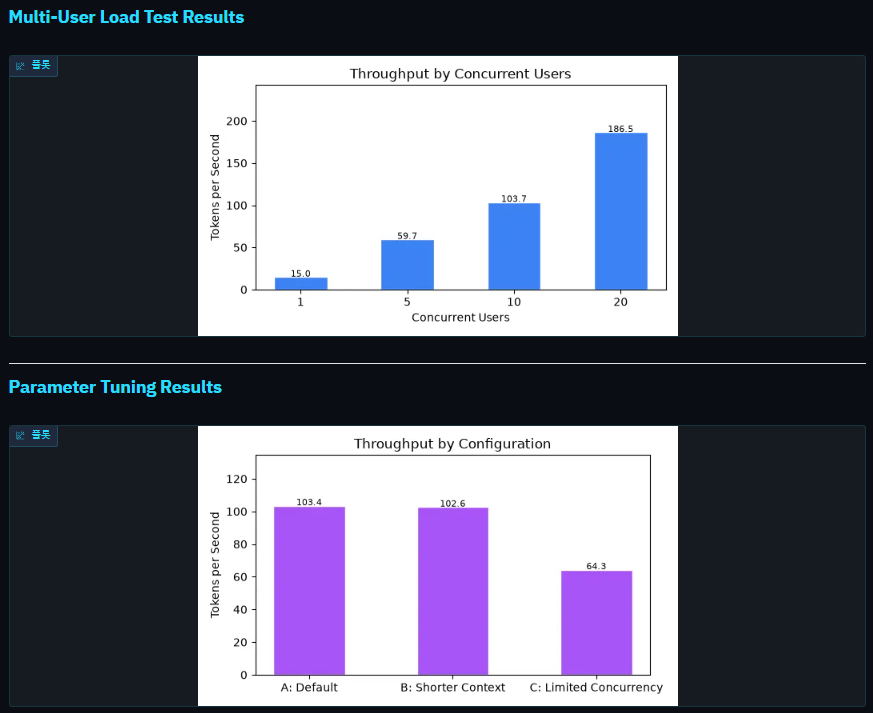

WHAT YOU WILL LEARN
LLM 추론 모니터링 대시보드 구축 방법 및 전체 최적화를 시각화하는 방법
Question 14 of 15
Knowledge Check: Trade-offs
- 이 실험에서, 여러분은 vLLM을 사용하여 SmolLM-135M을 실행했습니다. 이 과정에서 llama.cpp, TensorRT-LLM, 그리고 Hugging Face TGI와 같은 다른 추론 엔진도 언급되었습니다.
Key Points:
- vLLM은 고처리량 다사용 서비스에 뛰어난 성능을 제공합니다.
- 다른 엔진들은 각각 다른 용도로 최적화되어 있습니다.
- 모든 사용 사례에 적합한 최적의 엔진은 없습니다.
Question 15 of 15
Key Takeaways
- 추론 엔진의 중요성: 동일 모델, 시스템에 따라 속도 차이
- KV 캐시는 병목 현상: 기존 시스템은 메모리의 60~80%를 낭비합니다.
- PagedAttention: OS의 가상 메모리 페이징 방식에서 영감을 받아 문제를 해결
- vLLM의 확장성 - 동시 사용자 수에 따라 처리량 향상
- 운영환경 모니터링 필요 - 항상 tokens/sec 및 지연 시간 확인
- 상황에 따라 적절한 엔진 선택: vLLM (처리량), llama.cpp (CPU), TensorRT (NVIDIA)
'LLM' 카테고리의 다른 글
| (LLMSO 2주차) K8S 환경에서 로컬 LLM 서빙 (0) | 2026.08.13 |
|---|---|
| (LLMSO 1주차) 트랜스포너 아키텍처 실습 (0) | 2026.08.04 |