Cilium을 이용하면 Observability 측면에서의 강점과, Prmetheus/Grafana의 연동성에 대해 알아보겠습니다.
참고 링크
- 공식 매뉴얼
- Youtube] eCHO Episode 영상
- eCHO Episode 170: Cilium Metrics Review
- eCHO Episode 68: Cilium & Grafana
실습환경
- 윈도우 11 OS 에서 Vmware Workstation v17을 이용한 Linux 가상머신 3대
- Rocky Linux 9.6 (커널버전 : 5.14.0-570.26.1.el9_6.x86_64)

1. 쿠버네티스 클러스터 구성
아래 명령을 이용하여 쿠버네티스 클러스터를 kube-proxy 없이, Native Routing 모드로 구성하였습니다.
| [root@k8s-cp ~]# helm repo add cilium https://helm.cilium.io/ [root@k8s-cp ~]# helm install cilium cilium/cilium --version 1.17.6 \ --namespace kube-system \ --set k8sServiceHost=172.31.1.10 --set k8sServicePort=6443 \ --set ipam.mode="cluster-pool" \ --set ipam.operator.clusterPoolIPv4PodCIDRList={"172.20.0.0/16"} \ --set ipv4NativeRoutingCIDR=172.20.0.0/16 \ --set routingMode=native \ --set autoDirectNodeRoutes=true \ --set endpointRoutes.enabled=true \ --set kubeProxyReplacement=true \ --set bpf.masquerade=true \ --set installNoConntrackIptablesRules=true \ --set endpointHealthChecking.enabled=false \ --set healthChecking=false \ --set hubble.enabled=false \ --set operator.replicas=1 \ --set debug.enabled=true # kube-system 네임스페이스 리소스 조회 [root@k8s-cp ~]# k -n kube-system get all NAME READY STATUS RESTARTS AGE pod/cilium-envoy-flnws 1/1 Running 0 2m38s pod/cilium-envoy-h4tl5 1/1 Running 0 2m38s pod/cilium-envoy-x9p7c 1/1 Running 0 2m38s pod/cilium-gvc4m 1/1 Running 0 2m38s pod/cilium-l5ffn 1/1 Running 0 2m38s pod/cilium-llljw 1/1 Running 0 2m38s pod/cilium-operator-79f7b78b85-r5jcj 1/1 Running 0 2m38s pod/coredns-674b8bbfcf-f46nc 1/1 Running 0 6d12h pod/coredns-674b8bbfcf-wjxkw 1/1 Running 0 6d12h pod/etcd-k8s-cp 1/1 Running 2 (5m9s ago) 6d12h pod/kube-apiserver-k8s-cp 1/1 Running 2 (5m9s ago) 6d12h pod/kube-controller-manager-k8s-cp 1/1 Running 2 (5m9s ago) 6d12h pod/kube-scheduler-k8s-cp 1/1 Running 2 (5m9s ago) 6d12h NAME TYPE CLUSTER-IP EXTERNAL-IP PORT(S) AGE service/cilium-envoy ClusterIP None <none> 9964/TCP 2m38s service/kube-dns ClusterIP 10.96.0.10 <none> 53/UDP,53/TCP,9153/TCP 6d12h NAME DESIRED CURRENT READY UP-TO-DATE AVAILABLE NODE SELECTOR AGE daemonset.apps/cilium 3 3 3 3 3 kubernetes.io/os=linux 2m38s daemonset.apps/cilium-envoy 3 3 3 3 3 kubernetes.io/os=linux 2m38s NAME READY UP-TO-DATE AVAILABLE AGE deployment.apps/cilium-operator 1/1 1 1 2m38s deployment.apps/coredns 2/2 2 2 6d12h NAME DESIRED CURRENT READY AGE replicaset.apps/cilium-operator-79f7b78b85 1 1 1 2m38s replicaset.apps/coredns-674b8bbfcf 2 2 2 6d12h # NIC 에 연결된 eBPF 프로그램 목록 확인 [root@k8s-cp ~]# bpftool net list xdp: tc: ens160(2) tcx/ingress cil_from_netdev prog_id 590 link_id 15 ens160(2) tcx/egress cil_to_netdev prog_id 593 link_id 16 cilium_net(3) tcx/ingress cil_to_host prog_id 579 link_id 14 cilium_host(4) tcx/ingress cil_to_host prog_id 569 link_id 12 cilium_host(4) tcx/egress cil_from_host prog_id 572 link_id 13 lxc6606e8bfb038(6) tcx/ingress cil_from_container prog_id 614 link_id 17 lxc6606e8bfb038(6) tcx/egress cil_to_container prog_id 619 link_id 18 lxc8f72d4651d79(8) tcx/ingress cil_from_container prog_id 622 link_id 19 lxc8f72d4651d79(8) tcx/egress cil_to_container prog_id 611 link_id 20 flow_dissector: netfilter: # cilium 상태 확인 [root@k8s-cp ~]# cilium status /¯¯\ /¯¯\__/¯¯\ Cilium: OK \__/¯¯\__/ Operator: OK /¯¯\__/¯¯\ Envoy DaemonSet: OK \__/¯¯\__/ Hubble Relay: disabled \__/ ClusterMesh: disabled DaemonSet cilium Desired: 3, Ready: 3/3, Available: 3/3 DaemonSet cilium-envoy Desired: 3, Ready: 3/3, Available: 3/3 Deployment cilium-operator Desired: 1, Ready: 1/1, Available: 1/1 Containers: cilium Running: 3 cilium-envoy Running: 3 cilium-operator Running: 1 clustermesh-apiserver hubble-relay Cluster Pods: 2/2 managed by Cilium Helm chart version: 1.17.6 Image versions cilium quay.io/cilium/cilium:v1.17.6@sha256:544de3d4fed7acba72758413812780a4972d47c39035f2a06d6145d8644a3353: 3 cilium-envoy quay.io/cilium/cilium-envoy:v1.33.4-1752151664-7c2edb0b44cf95f326d628b837fcdd845102ba68@sha256:318eff387835ca2717baab42a84f35a83a5f9e7d519253df87269f80b9ff0171: 3 cilium-operator quay.io/cilium/operator-generic:v1.17.6@sha256:91ac3bf7be7bed30e90218f219d4f3062a63377689ee7246062fa0cc3839d096: 1 # cilium 이 제공하는 podCIDR 확인 [root@k8s-cp ~]# kubectl get ciliumnode -o json | grep podCIDRs -A2 "podCIDRs": [ "172.20.0.0/24" ], -- "podCIDRs": [ "172.20.1.0/24" ], -- "podCIDRs": [ "172.20.2.0/24" |
Cilium Agent는 Prometheus 메트릭을 노출하며, 아래 명령으로 확인 가능합니다. 나중에 Grafana 를 이용하여 시각화 해보겠습니다.
| [root@k8s-cp ~]# kubectl exec -n kube-system -c cilium-agent -it ds/cilium -- cilium-dbg metrics list Metric Labels Value cilium_act_processing_time_seconds 0s / 0s / 0s cilium_agent_api_process_time_seconds method=GET path=/v1/config return_code=200 2.5ms / 4.5ms / 4.95ms cilium_agent_api_process_time_seconds method=GET path=/v1/endpoint return_code=200 2.5ms / 4.5ms / 4.95ms cilium_agent_api_process_time_seconds method=GET path=/v1/healthz return_code=200 2.5ms / 4.5ms / 4.95ms cilium_agent_api_process_time_seconds method=POST path=/v1/ipam return_code=201 2.5ms / 4.5ms / 4.95ms cilium_agent_api_process_time_seconds method=PUT path=/v1/endpoint return_code=201 3.75s / 4.75s / 4.975s cilium_agent_bootstrap_seconds outcome=success scope=bpfBase 2.5ms / 4.5ms / 4.95ms cilium_agent_bootstrap_seconds outcome=success scope=cleanup 2.5ms / 4.5ms / 4.95ms cilium_agent_bootstrap_seconds outcome=success scope=daemonInit 37.5ms / 47.5ms / 49.75ms cilium_agent_bootstrap_seconds outcome=success scope=earlyInit 175ms / 235ms / 248.5ms cilium_agent_bootstrap_seconds outcome=success scope=enableConntrack 2.5ms / 4.5ms / 4.95ms cilium_agent_bootstrap_seconds outcome=success scope=fqdn 2.5ms / 4.5ms / 4.95ms cilium_agent_bootstrap_seconds outcome=success scope=healthCheck 2.5ms / 4.5ms / 4.95ms cilium_agent_bootstrap_seconds outcome=success scope=ipam 2.5ms / 4.5ms / 4.95ms cilium_agent_bootstrap_seconds outcome=success scope=k8sInit 175ms / 235ms / 248.5ms cilium_agent_bootstrap_seconds outcome=success scope=mapsInit 750ms / 950ms / 995ms cilium_agent_bootstrap_seconds outcome=success scope=overall 1.75s / 2.35s / 2.485s cilium_agent_bootstrap_seconds outcome=success scope=restore 2.5ms / 4.5ms / 4.95ms cilium_api_limiter_adjustment_factor api_call=endpoint-create 0.506619 cilium_api_limiter_adjustment_factor api_call=endpoint-list 100.000000 cilium_api_limiter_processed_requests_total api_call=endpoint-create outcome=success return_code=200 2.000000 ...(생략)... |
2. Network Observability with Hubble
Hubble 소개
공식문서 - https://docs.cilium.io/en/stable/overview/intro/#intro
Hubble은 Cilium과 eBPF 위에 구축된 완전 분산형 네트워크 및 보안 관측 플랫폼으로, 서비스 간 통신 및 네트워크 인프라의 동작을 완전히 투명한 방식으로 깊이 있게 관찰할 수 있도록 설계되었습니다. eBPF를 기반으로 하기 때문에 Hubble은 프로그래머블하고 동적으로 구성 가능한 가시성을 제공하며, 성능 오버헤드를 최소화하면서도 사용자에게 필요한 상세한 정보를 제공합니다.
- Hubble API는 Cilium 에이전트가 실행되는 개별 노드의 범위 내에서 작동합니다. 이는 로컬 Cilium 에이전트가 관찰한 트래픽에 대한 네트워크 인사이트를 제한합니다. Hubble CLI는 로컬 UDS(Unix Domain Socket)을 통해 제공되는 Hubble API를 쿼리하는 데 사용할 수 있습니다. Hubble CLI 바이너리는 기본적으로 cilium-agent POD 에 설치됩니다.
- Hubble Relay를 배포하면 클러스터 메시 시나리오에서 전체 클러스터 또는 여러 클러스터에 대한 네트워크 가시성이 제공됩니다. 이 모드에서는 Hubble CLI를 Hubble Relay 서비스로 안내하거나 Hubble UI를 통해 Hubble 데이터에 액세스할 수 있습니다. Hubble UI는 웹 인터페이스로, L3/L4 및 심지어 L7 계층에서 서비스 종속성 그래프를 자동으로 검색할 수 있게 하여 사용자 친화적인 시각화 및 서비스 맵으로서의 데이터 흐름 필터링을 가능하게 합니다.
(참고) hubble 작명 어원

Cilium의 Observability 컴포넌트인 Hubble은 이름의 어원을 허블 우주 망원경(Hubble Space Telescope)에서 가져왔습니다.허블 우주 망원경은 우주의 광대한 영역을 "관측"하고 "탐색"하여 인류의 우주에 대한 이해를 혁신적으로 변화시킨 상징적인 존재입니다.마찬가지로, Cilium의 Hubble은 클러스터 내부의 네트워크 통신을 깊이 있게 관측하고, 서비스 간의 상호작용을 파악하며, 네트워크 정책 결정을 시각화하는 역할을 합니다. 마치 허블 우주 망원경이 우주를 관측하듯이, Cilium의 Hubble은 클라우드 네이티브 환경의 "네트워크 우주"를 들여다보고 이해를 돕는다는 의미를 담고 있습니다.즉, "관측(Observability)"이라는 핵심 기능에 초점을 맞춰, 우주를 관측하는 데 혁혁한 공을 세운 허블 우주 망원경에서 영감을 받아 이름이 지어졌다고 볼 수 있습니다.
Hubble 구성
현재 Hubble 관련 구성은 되어 있지 않습니다.
| [root@k8s-cp ~]# cilium status /¯¯\ /¯¯\__/¯¯\ Cilium: OK \__/¯¯\__/ Operator: OK /¯¯\__/¯¯\ Envoy DaemonSet: OK \__/¯¯\__/ Hubble Relay: disabled \__/ ClusterMesh: disabled DaemonSet cilium Desired: 3, Ready: 3/3, Available: 3/3 DaemonSet cilium-envoy Desired: 3, Ready: 3/3, Available: 3/3 Deployment cilium-operator Desired: 1, Ready: 1/1, Available: 1/1 Containers: cilium Running: 3 cilium-envoy Running: 3 cilium-operator Running: 1 clustermesh-apiserver hubble-relay Cluster Pods: 2/2 managed by Cilium Helm chart version: 1.17.6 Image versions cilium quay.io/cilium/cilium:v1.17.6@sha256:544de3d4fed7acba72758413812780a4972d47c39035f2a06d6145d8644a3353: 3 cilium-envoy quay.io/cilium/cilium-envoy:v1.33.4-1752151664-7c2edb0b44cf95f326d628b837fcdd845102ba68@sha256:318eff387835ca2717baab42a84f35a83a5f9e7d519253df87269f80b9ff0 cilium-operator quay.io/cilium/operator-generic:v1.17.6@sha256:91ac3bf7be7bed30e90218f219d4f3062a63377689ee7246062fa0cc3839d096: 1 [root@k8s-cp ~]# cilium config view | grep -i hubble enable-hubble false [root@k8s-cp ~]# kubectl get cm -n kube-system cilium-config -o json | jq | grep hubble "enable-hubble": "false", [root@k8s-cp ~]# kubectl get secret -n kube-system | grep -iE 'cilium-ca|hubble' [root@k8s-cp ~]# ss -tnlp | grep -iE 'cilium|hubble' | tee before.txt LISTEN 0 4096 0.0.0.0:9964 0.0.0.0:* users:(("cilium-envoy",pid=3097,fd=35)) LISTEN 0 4096 0.0.0.0:9964 0.0.0.0:* users:(("cilium-envoy",pid=3097,fd=34)) LISTEN 0 4096 0.0.0.0:9964 0.0.0.0:* users:(("cilium-envoy",pid=3097,fd=33)) LISTEN 0 4096 0.0.0.0:9964 0.0.0.0:* users:(("cilium-envoy",pid=3097,fd=32)) LISTEN 0 4096 127.0.0.1:9890 0.0.0.0:* users:(("cilium-agent",pid=2497,fd=6)) LISTEN 0 4096 127.0.0.1:9878 0.0.0.0:* users:(("cilium-envoy",pid=3097,fd=39)) LISTEN 0 4096 127.0.0.1:9878 0.0.0.0:* users:(("cilium-envoy",pid=3097,fd=38)) LISTEN 0 4096 127.0.0.1:9878 0.0.0.0:* users:(("cilium-envoy",pid=3097,fd=37)) LISTEN 0 4096 127.0.0.1:9878 0.0.0.0:* users:(("cilium-envoy",pid=3097,fd=36)) LISTEN 0 4096 127.0.0.1:9879 0.0.0.0:* users:(("cilium-agent",pid=2497,fd=9)) LISTEN 0 4096 127.0.0.1:34851 0.0.0.0:* users:(("cilium-agent",pid=2497,fd=44)) |
Helm을 이용하여 Hubble 을 활성화 합니다.
| [root@k8s-cp ~]# helm upgrade cilium cilium/cilium --namespace kube-system --reuse-values \ --set hubble.enabled=true \ --set hubble.relay.enabled=true \ --set hubble.ui.enabled=true \ --set hubble.ui.service.type=NodePort \ --set hubble.ui.service.nodePort=31234 \ --set hubble.export.static.enabled=true \ --set hubble.export.static.filePath=/var/run/cilium/hubble/events.log \ --set prometheus.enabled=true \ --set operator.prometheus.enabled=true \ --set hubble.metrics.enableOpenMetrics=true \ --set hubble.metrics.enabled="{dns,drop,tcp,flow,port-distribution,icmp,httpV2:exemplars=true;labelsContext=source_ip\,source_namespace\,source_workload\,destination_ip\,destination_namespace\,destination_workload\,traffic_direction}" # hubble 활성화 후 K8S 리소스 확인 [root@k8s-cp ~]# k -n kube-system get all NAME READY STATUS RESTARTS AGE pod/cilium-6tfnn 1/1 Running 0 69s pod/cilium-envoy-flnws 1/1 Running 0 137m pod/cilium-envoy-h4tl5 1/1 Running 0 137m pod/cilium-envoy-x9p7c 1/1 Running 0 137m pod/cilium-jlwpg 1/1 Running 0 69s pod/cilium-operator-79f7b78b85-r5jcj 1/1 Running 0 137m pod/cilium-ws25w 1/1 Running 0 56s pod/coredns-674b8bbfcf-f46nc 1/1 Running 0 6d14h pod/coredns-674b8bbfcf-wjxkw 1/1 Running 0 6d14h pod/etcd-k8s-cp 1/1 Running 2 (140m ago) 6d14h pod/hubble-relay-5dcd46f5c-k9fdx 1/1 Running 0 71s pod/hubble-ui-76d4965bb6-9tn4v 2/2 Running 0 71s pod/kube-apiserver-k8s-cp 1/1 Running 2 (140m ago) 6d14h pod/kube-controller-manager-k8s-cp 1/1 Running 2 (140m ago) 6d14h pod/kube-scheduler-k8s-cp 1/1 Running 2 (140m ago) 6d14h NAME TYPE CLUSTER-IP EXTERNAL-IP PORT(S) AGE service/cilium-envoy ClusterIP None <none> 9964/TCP 137m service/hubble-metrics ClusterIP None <none> 9965/TCP 71s service/hubble-peer ClusterIP 10.105.244.29 <none> 443/TCP 71s service/hubble-relay ClusterIP 10.106.212.72 <none> 80/TCP 71s service/hubble-ui NodePort 10.104.74.47 <none> 80:31234/TCP 71s service/kube-dns ClusterIP 10.96.0.10 <none> 53/UDP,53/TCP,9153/TCP 6d14h NAME DESIRED CURRENT READY UP-TO-DATE AVAILABLE NODE SELECTOR AGE daemonset.apps/cilium 3 3 3 3 3 kubernetes.io/os=linux 137m daemonset.apps/cilium-envoy 3 3 3 3 3 kubernetes.io/os=linux 137m NAME READY UP-TO-DATE AVAILABLE AGE deployment.apps/cilium-operator 1/1 1 1 137m deployment.apps/coredns 2/2 2 2 6d14h deployment.apps/hubble-relay 1/1 1 1 71s deployment.apps/hubble-ui 1/1 1 1 71s NAME DESIRED CURRENT READY AGE replicaset.apps/cilium-operator-79f7b78b85 1 1 1 137m replicaset.apps/coredns-674b8bbfcf 2 2 2 6d14h replicaset.apps/hubble-relay-5dcd46f5c 1 1 1 71s replicaset.apps/hubble-ui-76d4965bb6 1 1 1 71s # 설치 확인 [root@k8s-cp ~]# cilium status /¯¯\ /¯¯\__/¯¯\ Cilium: OK \__/¯¯\__/ Operator: OK /¯¯\__/¯¯\ Envoy DaemonSet: OK \__/¯¯\__/ Hubble Relay: OK \__/ ClusterMesh: disabled DaemonSet cilium Desired: 3, Ready: 3/3, Available: 3/3 DaemonSet cilium-envoy Desired: 3, Ready: 3/3, Available: 3/3 Deployment cilium-operator Desired: 1, Ready: 1/1, Available: 1/1 Deployment hubble-relay Desired: 1, Ready: 1/1, Available: 1/1 Deployment hubble-ui Desired: 1, Ready: 1/1, Available: 1/1 Containers: cilium Running: 3 cilium-envoy Running: 3 cilium-operator Running: 1 clustermesh-apiserver hubble-relay Running: 1 hubble-ui Running: 1 Cluster Pods: 4/4 managed by Cilium Helm chart version: 1.17.6 Image versions cilium quay.io/cilium/cilium:v1.17.6@sha256:544de3d4fed7acba72758413812780a4972d47c39035f2a06d6145d8644a3353: 3 cilium-envoy quay.io/cilium/cilium-envoy:v1.33.4-1752151664-7c2edb0b44cf95f326d628b837fcdd845102ba68@sha256:318eff387835ca2717baab42a84f35a83a5f9e7d519253df87269f80b9ff0171: 3 cilium-operator quay.io/cilium/operator-generic:v1.17.6@sha256:91ac3bf7be7bed30e90218f219d4f3062a63377689ee7246062fa0cc3839d096: 1 hubble-relay quay.io/cilium/hubble-relay:v1.17.6@sha256:7d17ec10b3d37341c18ca56165b2f29a715cb8ee81311fd07088d8bf68c01e60: 1 hubble-ui quay.io/cilium/hubble-ui-backend:v0.13.2@sha256:a034b7e98e6ea796ed26df8f4e71f83fc16465a19d166eff67a03b822c0bfa15: 1 hubble-ui quay.io/cilium/hubble-ui:v0.13.2@sha256:9e37c1296b802830834cc87342a9182ccbb71ffebb711971e849221bd9d59392: 1 # 변경된 config 정보 확인 [root@k8s-cp ~]# cilium config view | grep -i hubble enable-hubble true enable-hubble-open-metrics true hubble-disable-tls false hubble-export-allowlist hubble-export-denylist hubble-export-fieldmask hubble-export-file-max-backups 5 hubble-export-file-max-size-mb 10 hubble-export-file-path /var/run/cilium/hubble/events.log hubble-listen-address :4244 hubble-metrics dns drop tcp flow port-distribution icmp httpV2:exemplars=true;labelsContext=source_ip,source_namespace,source_workload,destination_ip,destination_namespace,destination_workload,traffic_direction hubble-metrics-server :9965 hubble-metrics-server-enable-tls false hubble-socket-path /var/run/cilium/hubble.sock hubble-tls-cert-file /var/lib/cilium/tls/hubble/server.crt hubble-tls-client-ca-files /var/lib/cilium/tls/hubble/client-ca.crt hubble-tls-key-file /var/lib/cilium/tls/hubble/server.key [root@k8s-cp ~]# kubectl get cm -n kube-system cilium-config -o json | grep -i hubble "enable-hubble": "true", "enable-hubble-open-metrics": "true", "hubble-disable-tls": "false", "hubble-export-allowlist": "", "hubble-export-denylist": "", "hubble-export-fieldmask": "", "hubble-export-file-max-backups": "5", "hubble-export-file-max-size-mb": "10", "hubble-export-file-path": "/var/run/cilium/hubble/events.log", "hubble-listen-address": ":4244", "hubble-metrics": "dns drop tcp flow port-distribution icmp httpV2:exemplars=true;labelsContext=source_ip,source_namespace,source_workload,destination_ip,destination_namespace,destination_workload,traffic_direction", "hubble-metrics-server": ":9965", "hubble-metrics-server-enable-tls": "false", "hubble-socket-path": "/var/run/cilium/hubble.sock", "hubble-tls-cert-file": "/var/lib/cilium/tls/hubble/server.crt", "hubble-tls-client-ca-files": "/var/lib/cilium/tls/hubble/client-ca.crt", "hubble-tls-key-file": "/var/lib/cilium/tls/hubble/server.key", # hubble 활성화 후 생성된 Secret 확인 [root@k8s-cp ~]# kubectl get secret -n kube-system | grep -iE 'cilium-ca|hubble' cilium-ca Opaque 2 12m hubble-relay-client-certs kubernetes.io/tls 3 12m hubble-server-certs kubernetes.io/tls 3 12m # 새롭게 열리는 포트 확인 [root@k8s-cp ~]# ss -tnlp | grep -iE 'cilium|hubble' | tee after.txt LISTEN 0 4096 0.0.0.0:9964 0.0.0.0:* users:(("cilium-envoy",pid=3097,fd=35)) LISTEN 0 4096 0.0.0.0:9964 0.0.0.0:* users:(("cilium-envoy",pid=3097,fd=34)) LISTEN 0 4096 0.0.0.0:9964 0.0.0.0:* users:(("cilium-envoy",pid=3097,fd=33)) LISTEN 0 4096 0.0.0.0:9964 0.0.0.0:* users:(("cilium-envoy",pid=3097,fd=32)) LISTEN 0 4096 127.0.0.1:9890 0.0.0.0:* users:(("cilium-agent",pid=33770,fd=6)) LISTEN 0 4096 127.0.0.1:9878 0.0.0.0:* users:(("cilium-envoy",pid=3097,fd=39)) LISTEN 0 4096 127.0.0.1:9878 0.0.0.0:* users:(("cilium-envoy",pid=3097,fd=38)) LISTEN 0 4096 127.0.0.1:9878 0.0.0.0:* users:(("cilium-envoy",pid=3097,fd=37)) LISTEN 0 4096 127.0.0.1:9878 0.0.0.0:* users:(("cilium-envoy",pid=3097,fd=36)) LISTEN 0 4096 127.0.0.1:9879 0.0.0.0:* users:(("cilium-agent",pid=33770,fd=63)) LISTEN 0 4096 127.0.0.1:34851 0.0.0.0:* users:(("cilium-agent",pid=33770,fd=57)) LISTEN 0 4096 *:9965 *:* users:(("cilium-agent",pid=33770,fd=36)) LISTEN 0 4096 *:9962 *:* users:(("cilium-agent",pid=33770,fd=7)) LISTEN 0 4096 *:4244 *:* users:(("cilium-agent",pid=33770,fd=45)) [root@k8s-cp ~]# vimdiff before.txt after.txt  # hubble-relay 는 hubble-peer 의 서비스(ClusterIP :443)을 통해 모든 노드의 :4244에 요청 가져올 수 있음 [root@k8s-cp ~]# k -n kube-system describe cm hubble-relay-config Name: hubble-relay-config Namespace: kube-system Labels: app.kubernetes.io/managed-by=Helm Annotations: meta.helm.sh/release-name: cilium meta.helm.sh/release-namespace: kube-system Data ==== config.yaml: ---- cluster-name: default peer-service: "hubble-peer.kube-systehttp://m.svc.cluster.local.:443" listen-address: :4245 gops: true gops-port: "9893" retry-timeout: sort-buffer-len-max: sort-buffer-drain-timeout: tls-hubble-client-cert-file: /var/lib/hubble-relay/tls/client.crt tls-hubble-client-key-file: /var/lib/hubble-relay/tls/client.key tls-hubble-server-ca-files: /var/lib/hubble-relay/tls/hubble-server-ca.crt disable-server-tls: true BinaryData ==== Events: <none> # hubble-peer 서비스 확인 [root@k8s-cp ~]# kubectl get svc,ep -n kube-system hubble-peer NAME TYPE CLUSTER-IP EXTERNAL-IP PORT(S) AGE service/hubble-peer ClusterIP 10.105.244.29 <none> 443/TCP 38m NAME ENDPOINTS AGE endpoints/hubble-peer 172.31.1.10:4244,172.31.1.11:4244,172.31.1.12:4244 38m --> cilium-agent는 DaemonSet으로 생성되면 host 네트워크네임스페이스를 사용하고 4244 포트를 통해 hubble 제공하는 정보를 조회할 수 있습니다. 결국은 hubble-relay 서비스가 모든 노드의 hubble-peer 를 통해 정보를 수집 가능합니다. |
hubble UI POD 에는 2개의 container(front, backend) 가 있으며 front 는 실제 nginx 웹서버가 실행중입니다.
| [root@k8s-cp ~]# k -n kube-system get po hubble-ui-76d4965bb6-9tn4v NAME READY STATUS RESTARTS AGE hubble-ui-76d4965bb6-9tn4v 2/2 Running 0 53m [root@k8s-cp ~]# k -n kube-system describe po hubble-ui-76d4965bb6-9tn4v ...(생략)... Containers: frontend: Container ID: containerd://7747481986de0c8fe816f75773fc7c8169ba293d5bd3e9e7a13013a345f79e84 Image: quay.io/cilium/hubble-ui:v0.13.2@sha256:9e37c1296b802830834cc87342a9182ccbb71ffebb711971e849221bd9d59392 ...(생략)... Mounts: /etc/nginx/conf.d/default.conf from hubble-ui-nginx-conf (rw,path="nginx.conf") ...(생략)... backend: Container ID: containerd://bc50f24bfea5bb916563d4c8d8904bdf3da4c3b3ff07b483c2e9910d9dcd839e Image: quay.io/cilium/hubble-ui-backend:v0.13.2@sha256:a034b7e98e6ea796ed26df8f4e71f83fc16465a19d166eff67a03b822c0bfa15 ...(생략)... Volumes: hubble-ui-nginx-conf: Type: ConfigMap (a volume populated by a ConfigMap) Name: hubble-ui-nginx Optional: false # hubble-ui NGINX 설정 파일 확인 [root@k8s-cp ~]# k -n kube-system describe cm hubble-ui-nginx Name: hubble-ui-nginx Namespace: kube-system Labels: app.kubernetes.io/managed-by=Helm Annotations: meta.helm.sh/release-name: cilium meta.helm.sh/release-namespace: kube-system Data ==== nginx.conf: ---- server { listen 8081; listen [::]:8081; server_name localhost; root /app; index index.html; client_max_body_size 1G; location / { proxy_set_header Host $host; proxy_set_header X-Real-IP $remote_addr; location /api { proxy_http_version 1.1; proxy_pass_request_headers on; proxy_pass http://127.0.0.1:8090; } location / { # double `/index.html` is required here try_files $uri $uri/ /index.html /index.html; } # Liveness probe location /healthz { access_log off; add_header Content-Type text/plain; return 200 'ok'; } } } BinaryData ==== Events: <none> # 편의성을 위한 Node 포트를 확인하고 웹 접속 [root@k8s-cp ~]# k -n kube-system get svc hubble-ui NAME TYPE CLUSTER-IP EXTERNAL-IP PORT(S) AGE hubble-ui NodePort 10.104.74.47 <none> 80:31234/TCP 62m 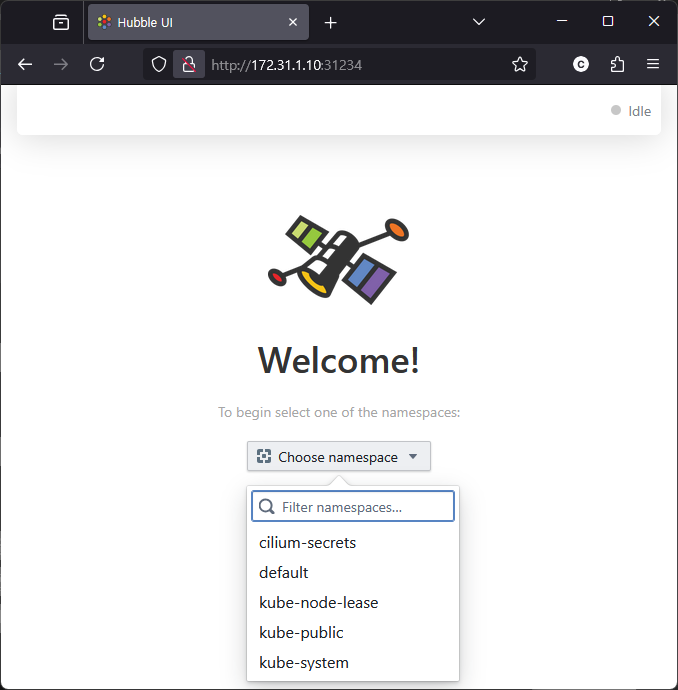 |
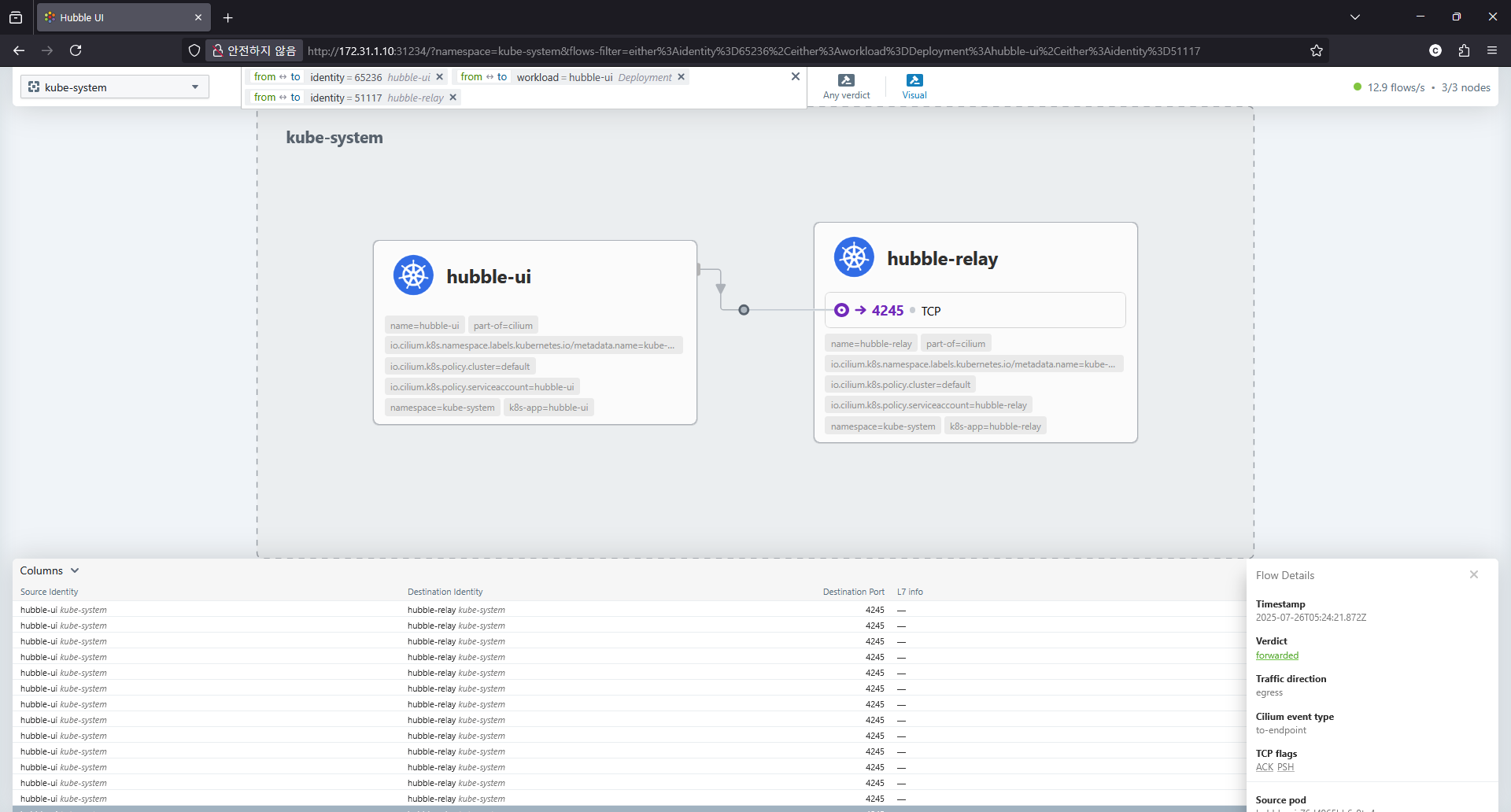
kube-system 네입스페이스를 선택하면 아래와 같이
- 실제 Flow 데이터를 hubble-relay 를 통해서 수집하고
- 기본적으로 L3/L4 데이트 흐름만 보이고, L7 데이터 흐름은 아직 확인 할 수 없습니다. (추후 설정 예정)
Hubble Clinet 도구 설치
hubble 도 자체 client 도구가 존재하고 아래 명령으로 설치합니다.
| # Linux 실습 환경에 설치 시 HUBBLE_VERSION=$(curl -s https://raw.githubusercontent.com/cilium/hubble/master/stable.txt) HUBBLE_ARCH=amd64 if [ "$(uname -m)" = "aarch64" ]; then HUBBLE_ARCH=arm64; fi curl -L --fail --remote-name-all https://github.com/cilium/hubble/releases/download/$HUBBLE_VERSION/hubble-linux-${HUBBLE_ARCH}.tar.gz{,.sha256sum} sudo tar xzvfC hubble-linux-${HUBBLE_ARCH}.tar.gz /usr/local/bin |
설치 확인해보면 정상 동작이 안됩니다. 4245 포트에 대해 127.0.0.1 에 접속해야 합니다.
| [root@k8s-cp ~]# hubble status failed getting status: rpc error: code = Unavailable desc = connection error: desc = "transport: Error while dialing: dial tcp 127.0.0.1:4245: connect: connection refused" |
Validate Hubble API Access
- In order to access the Hubble API, create a port forward to the Hubble service from your local machine.
- This will allow you to connect the Hubble client to the local port `4245` and access the Hubble Relay service in your Kubernetes cluster.
- For more information on this method, see [Use Port Forwarding to Access Application in a Cluster](https://kubernetes.io/docs/tasks/access-application-cluster/port-forward-access-application-cluster/).
쉽게 구성하기 위해서 cilium 의 port-porwading 기능을 이용하겠습니다.
| [root@k8s-cp ~]# cilium hubble port-forward& [1] 56932 ℹ️ Hubble Relay is available at 127.0.0.1:4245 [root@k8s-cp ~]# ss -tnlp | grep 4245 LISTEN 0 4096 127.0.0.1:4245 0.0.0.0:* users:(("cilium",pid=56932,fd=7)) LISTEN 0 4096 [::1]:4245 [::]:* users:(("cilium",pid=56932,fd=8)) [root@k8s-cp ~]# hubble status Healthcheck (via localhost:4245): Ok Current/Max Flows: 12,285/12,285 (100.00%) Flows/s: 14.17 Connected Nodes: 3/3 # hubble (api) server 기본 접속 주소 확인 [root@k8s-cp ~]# hubble config view basic-auth-password: "" basic-auth-username: "" config: /root/.config/hubble/config.yaml debug: false kube-context: "" kube-namespace: kube-system kubeconfig: "" port-forward: false port-forward-port: "4245" request-timeout: 12s server: localhost:4245 timeout: 5s tls: false tls-allow-insecure: false tls-ca-cert-files: [] tls-client-cert-file: "" tls-client-key-file: "" tls-server-name: "" (option) 외부에서 접속하려면 : 자신의 PC에 kubeconfig 설정 후 아래 --server 옵션을 통해 hubble api server 사용 [root@k8s-cp ~]# hubble help status | grep 'server string' --server string Address of a Hubble server. Ignored when --input-file or --port-forward is provided. (default "localhost:4245") |
hubble client 사용해 보기
| # kube-system 네임스페이스의 POD IP 확인 [root@k8s-cp ~]# k -n kube-system get ciliumendpoints.cilium.io NAME SECURITY IDENTITY ENDPOINT STATE IPV4 IPV6 coredns-674b8bbfcf-f46nc 42830 ready 172.20.0.180 coredns-674b8bbfcf-wjxkw 42830 ready 172.20.0.47 hubble-relay-5dcd46f5c-k9fdx 51117 ready 172.20.2.230 hubble-ui-76d4965bb6-9tn4v 65236 ready 172.20.1.213 |
"hubble observe" 도움말 확인
- Observe flows and events of a Hubble server
| [root@k8s-cp ~]# hubble observe -h Observe flows and events of a Hubble server Usage: hubble observe [flags] hubble observe [command] Available Commands: agent-events Observe Cilium agent events debug-events Observe Cilium debug events flows Observe flows of a Hubble server Selectors Flags: --all Get all flows stored in Hubble's buffer. Note: this option may cause Hubble to return a lot of data. It is recommended to only use it along filters to limit the amount of data returned. --first uint Get first N flows stored in Hubble's buffer. When querying against Hubble Relay, this gets N flows per instance of Hubble connected to that Relay. -f, --follow Follow flows output --last uint Get last N flows stored in Hubble's buffer (default 20). When querying against Hubble Relay, this gets N flows per instance of Hubble connected to that Relay. --since string Filter flows since a specific date. The format is relative (e.g. 3s, 4m, 1h43,, ...) or one of: StampMilli: Jan _2 15:04:05.000 YearMonthDay: 2006-01-02 YearMonthDayHour: 2006-01-02T15-07:00 YearMonthDayHourMinute: 2006-01-02T15:04-07:00 RFC3339: 2006-01-02T15:04:05-07:00 RFC3339Milli: 2006-01-02T15:04:05.999-07:00 RFC3339Micro: 2006-01-02T15:04:05.999999-07:00 RFC3339Nano: 2006-01-02T15:04:05.999999999-07:00 RFC1123Z: Mon, 02 Jan 2006 15:04:05 -0700 --until string Filter flows until a specific date. The format is relative (e.g. 3s, 4m, 1h43,, ...) or one of: StampMilli: Jan _2 15:04:05.000 YearMonthDay: 2006-01-02 YearMonthDayHour: 2006-01-02T15-07:00 YearMonthDayHourMinute: 2006-01-02T15:04-07:00 RFC3339: 2006-01-02T15:04:05-07:00 RFC3339Milli: 2006-01-02T15:04:05.999-07:00 RFC3339Micro: 2006-01-02T15:04:05.999999-07:00 RFC3339Nano: 2006-01-02T15:04:05.999999999-07:00 RFC1123Z: Mon, 02 Jan 2006 15:04:05 -0700 Filters Flags: -A, --all-namespaces filter[=true] Show all flows in any Kubernetes namespace. --cel-expression filter Filter flows using the given CEL expression --cluster filter Show all flows which match the cluster names (e.g. "test-cluster", "prod-*") --drop-reason-desc filter Show only flows which match this drop reason describe (e.g. "POLICY_DENIED", "UNSUPPORTED_L3_PROTOCOL") --fqdn filter Show all flows related to the given fully qualified domain name (e.g. "*.cilium.io"). --from-all-namespaces filter[=true] Show flows originating in any Kubernetes namespace. --from-cluster filter Show all flows originating from endpoints known to be in the given cluster name --from-fqdn filter Show all flows originating at the given fully qualified domain name (e.g. "*.cilium.io"). --from-identity filter Show all flows originating at an endpoint with the given security identity --from-ip filter Show all flows originating at the given IP address. Each of the source IPs can be specified as an exact match (e.g. '1.1.1.1') or as a CIDR range (e.g.'1.1.1.0/24'). --from-label filter Show only flows originating in an endpoint with the given labels (e.g. "key1=value1", "reserved:world") --from-namespace filter Show all flows originating in the given Kubernetes namespace. --from-pod filter Show all flows originating in the given pod name prefix([namespace/]<pod-name>). If namespace is not provided, 'default' is used --from-port filter Show only flows with the given source port (e.g. 8080) --from-service filter Shows flows where the source IP address matches the ClusterIP address of the given service name prefix([namespace/]<svc-name>). If namespace is not provided, 'default' is used --from-workload filter Show all flows originating at an endpoint with the given workload --http-header filter Show only flows which match this HTTP header key:value pairs (e.g. "foo:bar") --http-method filter Show only flows which match this HTTP method (e.g. "get", "post") --http-path filter Show only flows which match this HTTP path regular expressions (e.g. "/page/\\d+") --http-status filter Show only flows which match this HTTP status code prefix (e.g. "404", "5+") --http-url filter Show only flows which match this HTTP URL regular expressions (e.g. "http://.*cilium\.io/page/\\d+") --identity filter Show all flows related to an endpoint with the given security identity --interface filter Show all flows observed at the given interface name (e.g. eth0) --ip filter Show all flows originating or terminating at the given IP address. Each of the IPs can be specified as an exact match (e.g. '1.1.1.1') or as a CIDR range (e.g.'1.1.1.0/24'). --ip-version filter Show only IPv4, IPv6 flows or non IP flows (e.g. ARP packets) (ie: "none", "v4", "v6") -4, --ipv4 filter[=v4] Show only IPv4 flows -6, --ipv6 filter[=v6] Show only IPv6 flows -l, --label filter Show only flows related to an endpoint with the given labels (e.g. "key1=value1", "reserved:world") -n, --namespace filter Show all flows related to the given Kubernetes namespace. --node-label filter Show only flows observed on nodes matching the given label filter (e.g. "key1=value1", "io.cilium/egress-gateway") --node-name filter Show all flows which match the given node names (e.g. "k8s*", "test-cluster/*.company.com") --not filter[=true] Reverses the next filter to be blacklist i.e. --not --from-ip 2.2.2.2 --pod filter Show all flows related to the given pod name prefix ([namespace/]<pod-name>). If namespace is not provided, 'default' is used. --port filter Show only flows with given port in either source or destination (e.g. 8080) --protocol filter Show only flows which match the given L4/L7 flow protocol (e.g. "udp", "http") --service filter Shows flows where either the source or destination IP address matches the ClusterIP address of the given service name prefix ([namespace/]<svc-name>). If namespace is not provided, 'default' is used. --snat-ip filter Show all flows SNATed with the given IP address. Each of the SNAT IPs can be specified as an exact match (e.g. '1.1.1.1') or as a CIDR range (e.g.'1.1.1.0/24'). --tcp-flags filter Show only flows which match the given TCP flags (e.g. "syn", "ack", "fin") --to-all-namespaces filter[=true] Show flows terminating in any Kubernetes namespace. --to-cluster filter Show all flows destined to endpoints known to be in the given cluster name --to-fqdn filter Show all flows terminating at the given fully qualified domain name (e.g. "*.cilium.io"). --to-identity filter Show all flows terminating at an endpoint with the given security identity --to-ip filter Show all flows terminating at the given IP address. Each of the destination IPs can be specified as an exact match (e.g. '1.1.1.1') or as a CIDR range (e.g.'1.1.1.0/24'). --to-label filter Show only flows terminating in an endpoint with given labels (e.g. "key1=value1", "reserved:world") --to-namespace filter Show all flows terminating in the given Kubernetes namespace. --to-pod filter Show all flows terminating in the given pod name prefix([namespace/]<pod-name>). If namespace is not provided, 'default' is used --to-port filter Show only flows with the given destination port (e.g. 8080) --to-service filter Shows flows where the destination IP address matches the ClusterIP address of the given service name prefix ([namespace/]<svc-name>). If namespace is not provided, 'default' is used --to-workload filter Show all flows terminating at an endpoint with the given workload --trace-id filter Show only flows which match this trace ID --traffic-direction filter Show all flows in the given traffic direction (either ingress or egress) -t, --type filter Filter by event types TYPE[:SUBTYPE]. Available types and subtypes: TYPE SUBTYPE capture n/a drop n/a l7 n/a policy-verdict n/a trace from-endpoint from-host from-network from-overlay from-proxy from-stack from-crypto to-endpoint to-host to-network to-overlay to-proxy to-stack to-crypto trace-sock n/a --uuid filter Show the only flow matching this unique flow identifier, if any --verdict filter Show only flows with this verdict [FORWARDED, DROPPED, AUDIT, REDIRECTED, ERROR, TRACED, TRANSLATED] --workload filter Show all flows related to an endpoint with the given workload Raw-Filters Flags: --allowlist stringArray Specify allowlist as JSON encoded FlowFilters --denylist stringArray Specify denylist as JSON encoded FlowFilters Formatting Flags: -o, --output string Specify the output format, one of: compact: Compact output dict: Each flow is shown as KEY:VALUE pair jsonpb: JSON encoded GetFlowResponse according to proto3's JSON mapping json: Alias for jsonpb table: Tab-aligned columns (default "compact") --print-node-name Print node name in output --time-format string Specify the time format for printing. This option does not apply to the json and jsonpb output type. One of: StampMilli: Jan _2 15:04:05.000 YearMonthDay: 2006-01-02 YearMonthDayHour: 2006-01-02T15Z07:00 YearMonthDayHourMinute: 2006-01-02T15:04Z07:00 RFC3339: 2006-01-02T15:04:05Z07:00 RFC3339Milli: 2006-01-02T15:04:05.999Z07:00 RFC3339Micro: 2006-01-02T15:04:05.999999Z07:00 RFC3339Nano: 2006-01-02T15:04:05.999999999Z07:00 RFC1123Z: Mon, 02 Jan 2006 15:04:05 -0700 (default "StampMilli") Flow Format Flags: --color string Colorize the output when the output format is one of 'compact' or 'dict'. The value is one of 'auto' (default), 'always' or 'never' (default "auto") --ip-translation Translate IP addresses to logical names such as pod name, FQDN, ... (default true) --numeric Display all information in numeric form Server Flags: --basic-auth-password string Specify a password for basic auth --basic-auth-username string Specify a username for basic auth --kube-context string Kubernetes configuration context. This option is only considered when --port-forward is set. --kube-namespace string Namespace Cilium is running in. This option is only considered when --port-forward is set. (default "kube-system") --kubeconfig string Path to the kubeconfig file. This option is only considered when --port-forward is set. -P, --port-forward Automatically forward the relay port to the local machine. Analoguous to running: 'cilium hubble port-forward'. --port-forward-port uint16 Local port to forward to. 0 will select a random port. This option is only considered when --port-forward is set. (default 4245) --request-timeout duration Unary Request timeout. Only applies to non-streaming RPCs (ServerStatus, ListNodes, ListNamespaces). (default 12s) --server string Address of a Hubble server. Ignored when --input-file or --port-forward is provided. (default "localhost:4245") --timeout duration Hubble server dialing timeout (default 5s) --tls Specify that TLS must be used when establishing a connection to a Hubble server. By default, TLS is only enabled if the server address starts with 'tls://'. --tls-allow-insecure Allows the client to skip verifying the server's certificate chain and host name. This option is NOT recommended as, in this mode, TLS is susceptible to machine-in-the-middle attacks. See also the 'tls-server-name' option which allows setting the server name. --tls-ca-cert-files strings Paths to custom Certificate Authority (CA) certificate files.The files must contain PEM encoded data. --tls-client-cert-file string Path to the public key file for the client certificate to connect to a Hubble server (implies TLS). The file must contain PEM encoded data. --tls-client-key-file string Path to the private key file for the client certificate to connect a Hubble server (implies TLS). The file must contain PEM encoded data. --tls-server-name string Specify a server name to verify the hostname on the returned certificate (eg: 'instance.hubble-relay.cilium.io'). Other Flags: --experimental-field-mask strings Experimental: Comma-separated list of fields for mask. Fields not in the mask will be removed from server response. --experimental-use-default-field-masks Experimental: request only visible fields when the output format is compact, tab, or dict. --input-file string Query flows from this file instead of the server. Use '-' to read from stdin. --print-raw-filters Print allowlist/denylist filters and exit without sending the request to Hubble server -s, --silent-errors Silently ignores errors and warnings Global Flags: --config string Optional config file (default "/root/.config/hubble/config.yaml") -D, --debug Enable debug messages Get help: -h, --help Help for any command or subcommand Use "hubble observe [command] --help" for more information about a command. |
hubble observe --follow 명령을 이용하여 flow 흐름 관찰
| [root@k8s-cp ~]# hubble observe --follow Jul 26 05:47:57.342: 127.0.0.1:8080 (world) <> kube-system/coredns-674b8bbfcf-wjxkw (ID:42830) pre-xlate-rev TRACED (TCP) Jul 26 05:47:57.342: 127.0.0.1:36322 (world) <> kube-system/coredns-674b8bbfcf-wjxkw (ID:42830) pre-xlate-rev TRACED (TCP) Jul 26 05:47:57.342: 127.0.0.1:8080 (world) <> kube-system/coredns-674b8bbfcf-f46nc (ID:42830) pre-xlate-rev TRACED (TCP) Jul 26 05:47:57.342: 127.0.0.1:36338 (world) <> kube-system/coredns-674b8bbfcf-f46nc (ID:42830) pre-xlate-rev TRACED (TCP) Jul 26 05:47:58.210: kube-system/hubble-relay-5dcd46f5c-k9fdx:34366 (ID:51117) <- 172.31.1.11:4244 (remote-node) to-endpoint FORWARDED (TCP Flags: ACK, PSH) Jul 26 05:47:58.342: 127.0.0.1:36342 (world) <> kube-system/coredns-674b8bbfcf-wjxkw (ID:42830) pre-xlate-rev TRACED (TCP) Jul 26 05:47:58.342: 127.0.0.1:8080 (world) <> kube-system/coredns-674b8bbfcf-wjxkw (ID:42830) pre-xlate-rev TRACED (TCP) Jul 26 05:47:58.342: 127.0.0.1:36358 (world) <> kube-system/coredns-674b8bbfcf-f46nc (ID:42830) pre-xlate-rev TRACED (TCP) Jul 26 05:47:58.342: 127.0.0.1:8080 (world) <> kube-system/coredns-674b8bbfcf-f46nc (ID:42830) pre-xlate-rev TRACED (TCP) Jul 26 05:47:58.689: 172.31.1.12:50536 (host) -> 172.31.1.10:6443 (kube-apiserver) to-network FORWARDED (TCP Flags: ACK) Jul 26 05:47:59.186: 172.31.1.12:45594 (host) -> 172.31.1.10:6443 (kube-apiserver) to-network FORWARDED (TCP Flags: ACK) Jul 26 05:47:59.211: 172.31.1.10:40180 (kube-apiserver) -> kube-system/hubble-ui-76d4965bb6-9tn4v:8081 (ID:65236) to-endpoint FORWARDED (TCP Flags: ACK, PSH) Jul 26 05:47:59.212: 127.0.0.1:59328 (world) <> kube-system/hubble-ui-76d4965bb6-9tn4v (ID:65236) pre-xlate-rev TRACED (TCP) Jul 26 05:47:59.219: 172.31.1.10:40180 (kube-apiserver) <- kube-system/hubble-ui-76d4965bb6-9tn4v:8081 (ID:65236) to-network FORWARDED (TCP Flags: ACK, PSH) Jul 26 05:47:59.343: 127.0.0.1:36376 (world) <> kube-system/coredns-674b8bbfcf-f46nc (ID:42830) pre-xlate-rev TRACED (TCP) Jul 26 05:47:59.343: 127.0.0.1:8080 (world) <> kube-system/coredns-674b8bbfcf-wjxkw (ID:42830) pre-xlate-rev TRACED (TCP) Jul 26 05:47:59.343: 127.0.0.1:36360 (world) <> kube-system/coredns-674b8bbfcf-wjxkw (ID:42830) pre-xlate-rev TRACED (TCP) Jul 26 05:47:59.343: 127.0.0.1:8080 (world) <> kube-system/coredns-674b8bbfcf-f46nc (ID:42830) pre-xlate-rev TRACED (TCP) Jul 26 05:47:59.531: 172.31.1.11:34106 (host) -> 172.31.1.10:6443 (kube-apiserver) to-network FORWARDED (TCP Flags: ACK) Jul 26 05:47:59.916: 172.31.1.11:58682 (host) -> 172.31.1.10:6443 (kube-apiserver) to-network FORWARDED (TCP Flags: ACK) Jul 26 05:48:00.030: 172.31.1.12:51606 (host) -> kube-system/hubble-relay-5dcd46f5c-k9fdx:4222 (ID:51117) to-endpoint FORWARDED (TCP Flags: SYN) Jul 26 05:48:00.030: 172.31.1.12:51606 (host) <- kube-system/hubble-relay-5dcd46f5c-k9fdx:4222 (ID:51117) to-stack FORWARDED (TCP Flags: SYN, ACK) Jul 26 05:48:00.030: 172.31.1.12:51606 (host) -> kube-system/hubble-relay-5dcd46f5c-k9fdx:4222 (ID:51117) to-endpoint FORWARDED (TCP Flags: ACK) Jul 26 05:48:00.031: 172.31.1.12:51606 (host) -> kube-system/hubble-relay-5dcd46f5c-k9fdx:4222 (ID:51117) to-endpoint FORWARDED (TCP Flags: ACK, PSH) Jul 26 05:48:00.031: 172.31.1.12:51606 (host) <> kube-system/hubble-relay-5dcd46f5c-k9fdx (ID:51117) pre-xlate-rev TRACED (TCP) Jul 26 05:48:00.031: 172.31.1.12:51606 (host) <- kube-system/hubble-relay-5dcd46f5c-k9fdx:4222 (ID:51117) to-stack FORWARDED (TCP Flags: ACK, PSH) Jul 26 05:48:00.032: 172.31.1.12:51606 (host) -> kube-system/hubble-relay-5dcd46f5c-k9fdx:4222 (ID:51117) to-endpoint FORWARDED (TCP Flags: ACK, RST) Jul 26 05:48:00.033: 172.31.1.11:42652 (host) -> kube-system/hubble-ui-76d4965bb6-9tn4v:8081 (ID:65236) to-endpoint FORWARDED (TCP Flags: SYN) Jul 26 05:48:00.033: 172.31.1.11:42652 (host) <- kube-system/hubble-ui-76d4965bb6-9tn4v:8081 (ID:65236) to-stack FORWARDED (TCP Flags: SYN, ACK) Jul 26 05:48:00.033: 172.31.1.11:42652 (host) -> kube-system/hubble-ui-76d4965bb6-9tn4v:8081 (ID:65236) to-endpoint FORWARDED (TCP Flags: ACK) Jul 26 05:48:00.033: 172.31.1.11:42652 (host) <> kube-system/hubble-ui-76d4965bb6-9tn4v (ID:65236) pre-xlate-rev TRACED (TCP) Jul 26 05:48:00.033: 172.31.1.11:42652 (host) -> kube-system/hubble-ui-76d4965bb6-9tn4v:8081 (ID:65236) to-endpoint FORWARDED (TCP Flags: ACK, PSH) Jul 26 05:48:00.034: 172.31.1.11:42652 (host) <- kube-system/hubble-ui-76d4965bb6-9tn4v:8081 (ID:65236) to-stack FORWARDED (TCP Flags: ACK, PSH) Jul 26 05:48:00.034: 172.31.1.11:42652 (host) <- kube-system/hubble-ui-76d4965bb6-9tn4v:8081 (ID:65236) to-stack FORWARDED (TCP Flags: ACK, FIN) Jul 26 05:48:00.034: 172.31.1.11:42652 (host) -> kube-system/hubble-ui-76d4965bb6-9tn4v:8081 (ID:65236) to-endpoint FORWARDED (TCP Flags: ACK, FIN) Jul 26 05:48:00.262: 172.31.1.11:42668 (host) -> kube-system/hubble-ui-76d4965bb6-9tn4v:8081 (ID:65236) to-endpoint FORWARDED (TCP Flags: SYN) Jul 26 05:48:00.262: 172.31.1.11:42668 (host) <- kube-system/hubble-ui-76d4965bb6-9tn4v:8081 (ID:65236) to-stack FORWARDED (TCP Flags: SYN, ACK) Jul 26 05:48:00.262: 172.31.1.11:42668 (host) -> kube-system/hubble-ui-76d4965bb6-9tn4v:8081 (ID:65236) to-endpoint FORWARDED (TCP Flags: ACK) Jul 26 05:48:00.262: 172.31.1.11:42668 (host) <> kube-system/hubble-ui-76d4965bb6-9tn4v (ID:65236) pre-xlate-rev TRACED (TCP) Jul 26 05:48:00.262: 172.31.1.11:42668 (host) -> kube-system/hubble-ui-76d4965bb6-9tn4v:8081 (ID:65236) to-endpoint FORWARDED (TCP Flags: ACK, PSH) Jul 26 05:48:00.263: 172.31.1.11:42668 (host) <- kube-system/hubble-ui-76d4965bb6-9tn4v:8081 (ID:65236) to-stack FORWARDED (TCP Flags: ACK, PSH) Jul 26 05:48:00.263: 172.31.1.11:42668 (host) <- kube-system/hubble-ui-76d4965bb6-9tn4v:8081 (ID:65236) to-stack FORWARDED (TCP Flags: ACK, FIN) Jul 26 05:48:00.342: 127.0.0.1:8080 (world) <> kube-system/coredns-674b8bbfcf-wjxkw (ID:42830) pre-xlate-rev TRACED (TCP) Jul 26 05:48:00.342: 127.0.0.1:36390 (world) <> kube-system/coredns-674b8bbfcf-wjxkw (ID:42830) pre-xlate-rev TRACED (TCP) Jul 26 05:48:00.342: 127.0.0.1:36394 (world) <> kube-system/coredns-674b8bbfcf-f46nc (ID:42830) pre-xlate-rev TRACED (TCP) Jul 26 05:48:00.342: 127.0.0.1:8080 (world) <> kube-system/coredns-674b8bbfcf-f46nc (ID:42830) pre-xlate-rev TRACED (TCP) Jul 26 05:48:00.458: 172.31.1.12:37576 (host) -> 172.31.1.10:6443 (kube-apiserver) to-network FORWARDED (TCP Flags: ACK, PSH) Jul 26 05:48:01.039: 172.31.1.12:51614 (host) -> kube-system/hubble-relay-5dcd46f5c-k9fdx:4222 (ID:51117) to-endpoint FORWARDED (TCP Flags: SYN) Jul 26 05:48:01.040: 172.31.1.12:51614 (host) <- kube-system/hubble-relay-5dcd46f5c-k9fdx:4222 (ID:51117) to-stack FORWARDED (TCP Flags: SYN, ACK) Jul 26 05:48:01.040: 172.31.1.12:51614 (host) -> kube-system/hubble-relay-5dcd46f5c-k9fdx:4222 (ID:51117) to-endpoint FORWARDED (TCP Flags: ACK) Jul 26 05:48:01.040: 172.31.1.12:51614 (host) <> kube-system/hubble-relay-5dcd46f5c-k9fdx (ID:51117) pre-xlate-rev TRACED (TCP) Jul 26 05:48:01.040: 172.31.1.12:51614 (host) -> kube-system/hubble-relay-5dcd46f5c-k9fdx:4222 (ID:51117) to-endpoint FORWARDED (TCP Flags: ACK, PSH) Jul 26 05:48:01.040: 172.31.1.12:51614 (host) <- kube-system/hubble-relay-5dcd46f5c-k9fdx:4222 (ID:51117) to-stack FORWARDED (TCP Flags: ACK, PSH) Jul 26 05:48:01.042: 172.31.1.12:51614 (host) -> kube-system/hubble-relay-5dcd46f5c-k9fdx:4222 (ID:51117) to-endpoint FORWARDED (TCP Flags: ACK, FIN) Jul 26 05:48:01.042: 172.31.1.12:51614 (host) <- kube-system/hubble-relay-5dcd46f5c-k9fdx:4222 (ID:51117) to-stack FORWARDED (TCP Flags: ACK, FIN) Jul 26 05:48:01.042: 172.31.1.12:51614 (host) -> kube-system/hubble-relay-5dcd46f5c-k9fdx:4222 (ID:51117) to-endpoint FORWARDED (TCP Flags: ACK) Jul 26 05:48:01.342: 127.0.0.1:36402 (world) <> kube-system/coredns-674b8bbfcf-wjxkw (ID:42830) pre-xlate-rev TRACED (TCP) Jul 26 05:48:01.342: 127.0.0.1:8080 (world) <> kube-system/coredns-674b8bbfcf-f46nc (ID:42830) pre-xlate-rev TRACED (TCP) Jul 26 05:48:01.342: 127.0.0.1:8080 (world) <> kube-system/coredns-674b8bbfcf-wjxkw (ID:42830) pre-xlate-rev TRACED (TCP) Jul 26 05:48:01.342: 127.0.0.1:36418 (world) <> kube-system/coredns-674b8bbfcf-f46nc (ID:42830) pre-xlate-rev TRACED (TCP) |
실습편의를 위한 단축키 설정
| # cilium 파드 이름 export CILIUMPOD0=$(kubectl get -l k8s-app=cilium pods -n kube-system --field-selector spec.nodeName=k8s-cp -o jsonpath='{.items[0].metadata.name}') export CILIUMPOD1=$(kubectl get -l k8s-app=cilium pods -n kube-system --field-selector spec.nodeName=k8s-w1 -o jsonpath='{.items[0].metadata.name}') export CILIUMPOD2=$(kubectl get -l k8s-app=cilium pods -n kube-system --field-selector spec.nodeName=k8s-w2 -o jsonpath='{.items[0].metadata.name}') echo $CILIUMPOD0 $CILIUMPOD1 $CILIUMPOD2 # 단축키(alias) 지정 alias c0="kubectl exec -it $CILIUMPOD0 -n kube-system -c cilium-agent -- cilium" alias c1="kubectl exec -it $CILIUMPOD1 -n kube-system -c cilium-agent -- cilium" alias c2="kubectl exec -it $CILIUMPOD2 -n kube-system -c cilium-agent -- cilium" alias c0bpf="kubectl exec -it $CILIUMPOD0 -n kube-system -c cilium-agent -- bpftool" alias c1bpf="kubectl exec -it $CILIUMPOD1 -n kube-system -c cilium-agent -- bpftool" alias c2bpf="kubectl exec -it $CILIUMPOD2 -n kube-system -c cilium-agent -- bpftool" |
Hubble 공식 문서의 샘플 어플리케이션 배포
- Getting Started with the Star Wars Demo & Hubble/UI
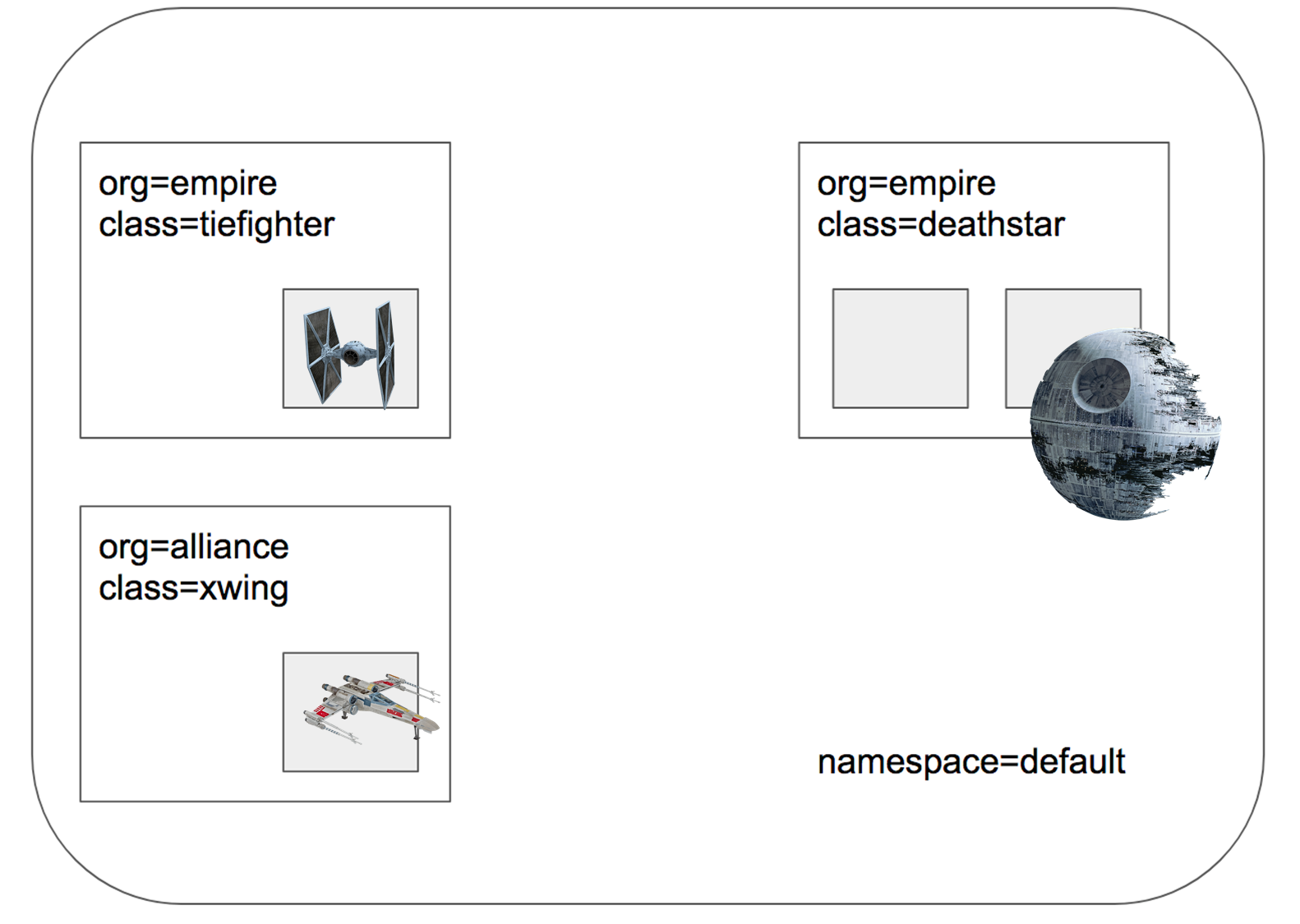
- 스타워즈에서 영감을 받은 예제에서는 데스스타, 타이파이터, 엑스윙의 세 가지 마이크로서비스 애플리케이션이 있습니다.
- 데스스타는 포트 80에서 HTTP 웹서비스를 실행하며, 이 서비스는 두 개의 포드 복제본에 걸쳐 데스스타에 대한 요청을 로드 밸런싱하는 Kubernetes 서비스로 노출됩니다.
- 데스스타 서비스는 제국의 우주선에 착륙 서비스를 제공하여 착륙 포트를 요청할 수 있도록 합니다.
타이파이터 포드는 일반적인 제국 선박의 착륙 요청 클라이언트 서비스를 나타내며, 엑스윙은 동맹 선박의 유사한 서비스를 나타냅니다. - 데스스타 착륙 서비스에 대한 접근 제어를 위한 다양한 보안 정책을 테스트할 수 있도록 존재합니다.
| [root@k8s-cp ~]# kubectl apply -f https://raw.githubusercontent.com/cilium/cilium/1.17.6/examples/minikube/http-sw-app.yaml service/deathstar created deployment.apps/deathstar created pod/tiefighter created pod/xwing created # 파드 라벨 labels 확인 [root@k8s-cp ~]# kubectl get pod --show-labels NAME READY STATUS RESTARTS AGE LABELS deathstar-8c4c77fb7-gpvpb 1/1 Running 0 46s app.kubernetes.io/name=deathstar,class=deathstar,org=empire,pod-template-hash=8c4c77fb7 deathstar-8c4c77fb7-wd62w 1/1 Running 0 46s app.kubernetes.io/name=deathstar,class=deathstar,org=empire,pod-template-hash=8c4c77fb7 tiefighter 1/1 Running 0 46s app.kubernetes.io/name=tiefighter,class=tiefighter,org=empire xwing 1/1 Running 0 46s app.kubernetes.io/name=xwing,class=xwing,org=alliance [root@k8s-cp ~]# kubectl get deploy,svc,ep deathstar Warning: v1 Endpoints is deprecated in v1.33+; use discovery.k8s.io/v1 EndpointSlice NAME READY UP-TO-DATE AVAILABLE AGE deployment.apps/deathstar 2/2 2 2 75s NAME TYPE CLUSTER-IP EXTERNAL-IP PORT(S) AGE service/deathstar ClusterIP 10.104.26.236 <none> 80/TCP 75s NAME ENDPOINTS AGE endpoints/deathstar 172.20.1.165:80,172.20.2.169:80 75s [root@k8s-cp ~]# kubectl get ciliumendpoints.cilium.io -A NAMESPACE NAME SECURITY IDENTITY ENDPOINT STATE IPV4 IPV6 default deathstar-8c4c77fb7-gpvpb 377 ready 172.20.1.165 default deathstar-8c4c77fb7-wd62w 377 ready 172.20.2.169 default tiefighter 33825 ready 172.20.2.173 default xwing 2593 ready 172.20.1.1 kube-system coredns-674b8bbfcf-f46nc 42830 ready 172.20.0.180 kube-system coredns-674b8bbfcf-wjxkw 42830 ready 172.20.0.47 kube-system hubble-relay-5dcd46f5c-k9fdx 51117 ready 172.20.2.230 kube-system hubble-ui-76d4965bb6-9tn4v 65236 ready 172.20.1.213 [root@k8s-cp ~]# kubectl get ciliumidentities.cilium.io NAME NAMESPACE AGE 2593 default 2m13s 33825 default 2m13s 377 default 2m13s 42830 kube-system 4h23m 51117 kube-system 128m 65236 kube-system 128m # 현재 ingress/egress 에 정책(Policy) 없음! , Labels 정보 확인 # 해당 노드의 endpint 목록 확인 [root@k8s-cp ~]# c0 endpoint list ENDPOINT POLICY (ingress) POLICY (egress) IDENTITY LABELS (source:key[=value]) IPv6 IPv4 STATUS ENFORCEMENT ENFORCEMENT 953 Disabled Disabled 42830 k8s:io.ciliuhttp://m.k8s.namespace.labels.kubernetes.io/metadata.name=kube-system 172.20.0.47 ready k8s:io.ciliuhttp://m.k8s.policy.cluster=default k8s:io.ciliuhttp://m.k8s.policy.serviceaccount=coredns k8s:io.kubernetes.pod.namespace=kube-system k8s:k8s-app=kube-dns 1757 Disabled Disabled 42830 k8s:io.ciliuhttp://m.k8s.namespace.labels.kubernetes.io/metadata.name=kube-system 172.20.0.180 ready k8s:io.ciliuhttp://m.k8s.policy.cluster=default k8s:io.ciliuhttp://m.k8s.policy.serviceaccount=coredns k8s:io.kubernetes.pod.namespace=kube-system k8s:k8s-app=kube-dns 2694 Disabled Disabled 1 k8s:node-role.kubernetes.io/control-plane ready k8s:node.kubernetes.io/exclude-from-external-load-balancers reserved:host [root@k8s-cp ~]# c1 endpoint list ENDPOINT POLICY (ingress) POLICY (egress) IDENTITY LABELS (source:key[=value]) IPv6 IPv4 STATUS ENFORCEMENT ENFORCEMENT 156 Disabled Disabled 1 reserved:host ready 372 Disabled Disabled 377 k8s:app.kubernetes.io/name=deathstar 172.20.1.165 ready k8s:class=deathstar k8s:io.ciliuhttp://m.k8s.namespace.labels.kubernetes.io/metadata.name=default k8s:io.ciliuhttp://m.k8s.policy.cluster=default k8s:io.ciliuhttp://m.k8s.policy.serviceaccount=default k8s:io.kubernetes.pod.namespace=default k8s:org=empire 1795 Disabled Disabled 65236 k8s:app.kubernetes.io/name=hubble-ui 172.20.1.213 ready k8s:app.kubernetes.io/part-of=cilium k8s:io.ciliuhttp://m.k8s.namespace.labels.kubernetes.io/metadata.name=kube-system k8s:io.ciliuhttp://m.k8s.policy.cluster=default k8s:io.ciliuhttp://m.k8s.policy.serviceaccount=hubble-ui k8s:io.kubernetes.pod.namespace=kube-system k8s:k8s-app=hubble-ui 3153 Disabled Disabled 2593 k8s:app.kubernetes.io/name=xwing 172.20.1.1 ready k8s:class=xwing k8s:io.ciliuhttp://m.k8s.namespace.labels.kubernetes.io/metadata.name=default k8s:io.ciliuhttp://m.k8s.policy.cluster=default k8s:io.ciliuhttp://m.k8s.policy.serviceaccount=default k8s:io.kubernetes.pod.namespace=default k8s:org=alliance [root@k8s-cp ~]# c2 endpoint list ENDPOINT POLICY (ingress) POLICY (egress) IDENTITY LABELS (source:key[=value]) IPv6 IPv4 STATUS ENFORCEMENT ENFORCEMENT 462 Disabled Disabled 1 reserved:host ready 2116 Disabled Disabled 377 k8s:app.kubernetes.io/name=deathstar 172.20.2.169 ready k8s:class=deathstar k8s:io.ciliuhttp://m.k8s.namespace.labels.kubernetes.io/metadata.name=default k8s:io.ciliuhttp://m.k8s.policy.cluster=default k8s:io.ciliuhttp://m.k8s.policy.serviceaccount=default k8s:io.kubernetes.pod.namespace=default k8s:org=empire 2937 Disabled Disabled 33825 k8s:app.kubernetes.io/name=tiefighter 172.20.2.173 ready k8s:class=tiefighter k8s:io.ciliuhttp://m.k8s.namespace.labels.kubernetes.io/metadata.name=default k8s:io.ciliuhttp://m.k8s.policy.cluster=default k8s:io.ciliuhttp://m.k8s.policy.serviceaccount=default k8s:io.kubernetes.pod.namespace=default k8s:org=empire 3441 Disabled Disabled 51117 k8s:app.kubernetes.io/name=hubble-relay 172.20.2.230 ready k8s:app.kubernetes.io/part-of=cilium k8s:io.ciliuhttp://m.k8s.namespace.labels.kubernetes.io/metadata.name=kube-system k8s:io.ciliuhttp://m.k8s.policy.cluster=default k8s:io.ciliuhttp://m.k8s.policy.serviceaccount=hubble-relay k8s:io.kubernetes.pod.namespace=kube-system k8s:k8s-app=hubble-relay # 현재 EndPoint 에 대한 Ingress, Egress 정책은 없는 상태 # IDENTITY는 보안 설정과 관련이 있으며 deathstar POD 의 경우 2개의 workder node에 1개씩 존재하지만 동일한 IDENTITY 값을 가짐 |
Check Current Access
- 데스스타 서비스의 관점에서 보면, org= empire 라벨이 부착된 선박만 연결하여 착륙을 요청할 수 있습니다.
- 우리는 규칙을 시행하지 않기 때문에 Xwing과 타이파이터 모두 착륙을 요청할 수 있습니다. 이를 테스트하려면 아래 명령을 사용하세요.
| # 호출 시도 1 : xwing --> deathstart [root@k8s-cp ~]# kubectl exec xwing -- curl -s -XPOST deathstar.default.svc.cluster.local/v1/request-landing Ship landed # hubble ui 에서 확인해보면 모든 트래픽이 정상 호출됨을 확인할 수 있습니다. 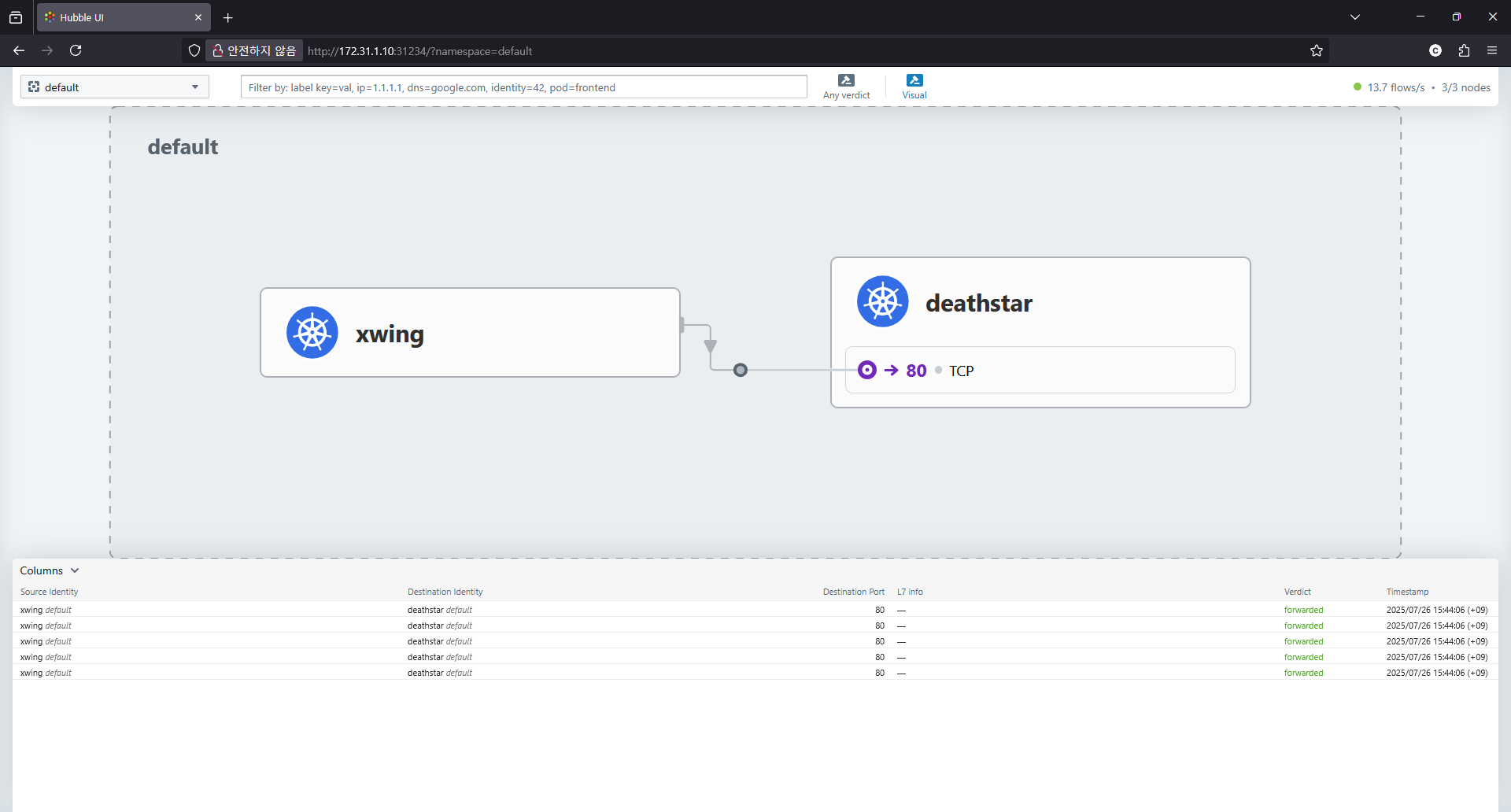 # 호출 시도 2 : tiefighter--> deathstart [root@k8s-cp ~]# kubectl exec tiefighter-- curl -s -XPOST deathstar.default.svc.cluster.local/v1/request-landing Ship landed # hubble ui 에서 확인해보면 모든 트래픽이 정상 호출됨을 확인할 수 있습니다. 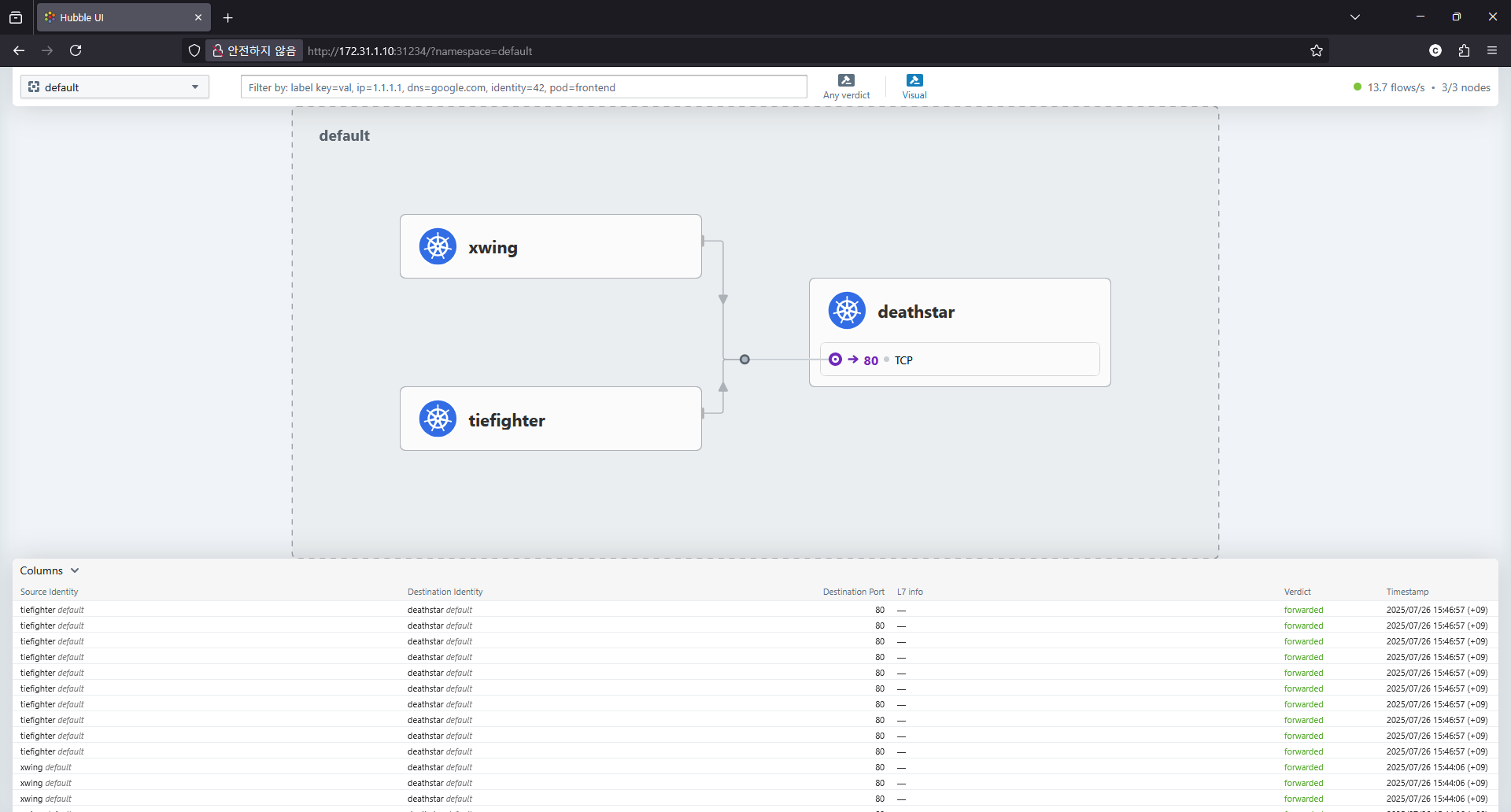 # hubble observe 를 편하게 하기 위한 변수 설정 [root@k8s-cp ~]# c1 endpoint list | grep -iE 'xwing|tiefighter|deathstar' [root@k8s-cp ~]# c2 endpoint list | grep -iE 'xwing|tiefighter|deathstar' 372 Disabled Disabled 377 k8s:app.kubernetes.io/name=deathstar 172.20.1.165 ready k8s:class=deathstar 3153 Disabled Disabled 2593 k8s:app.kubernetes.io/name=xwing 172.20.1.1 ready k8s:class=xwing 2116 Disabled Disabled 377 k8s:app.kubernetes.io/name=deathstar 172.20.2.169 ready k8s:class=deathstar 2937 Disabled Disabled 33825 k8s:app.kubernetes.io/name=tiefighter 172.20.2.173 ready k8s:class=tiefighter [root@k8s-cp ~]# XWINGID=2593 [root@k8s-cp ~]# TIEFIGHTERID=33825 [root@k8s-cp ~]# DEATHSTARID=377 # xwing POD로 부터 출발한 트래픽만 조회 [root@k8s-cp ~]# hubble observe -f --from-identity $XWINGID # udp 프로토콜만 조회 : hubble observe -f --protocol udp --from-identity $XWINGID # tcp 프로토콜만 조회 : hubble observe -f --protocol tcp --from-identity $XWINGID |
Apply an L3/L4 Policy
- cilium NetworkPolicy 를 이용한 정책 적용
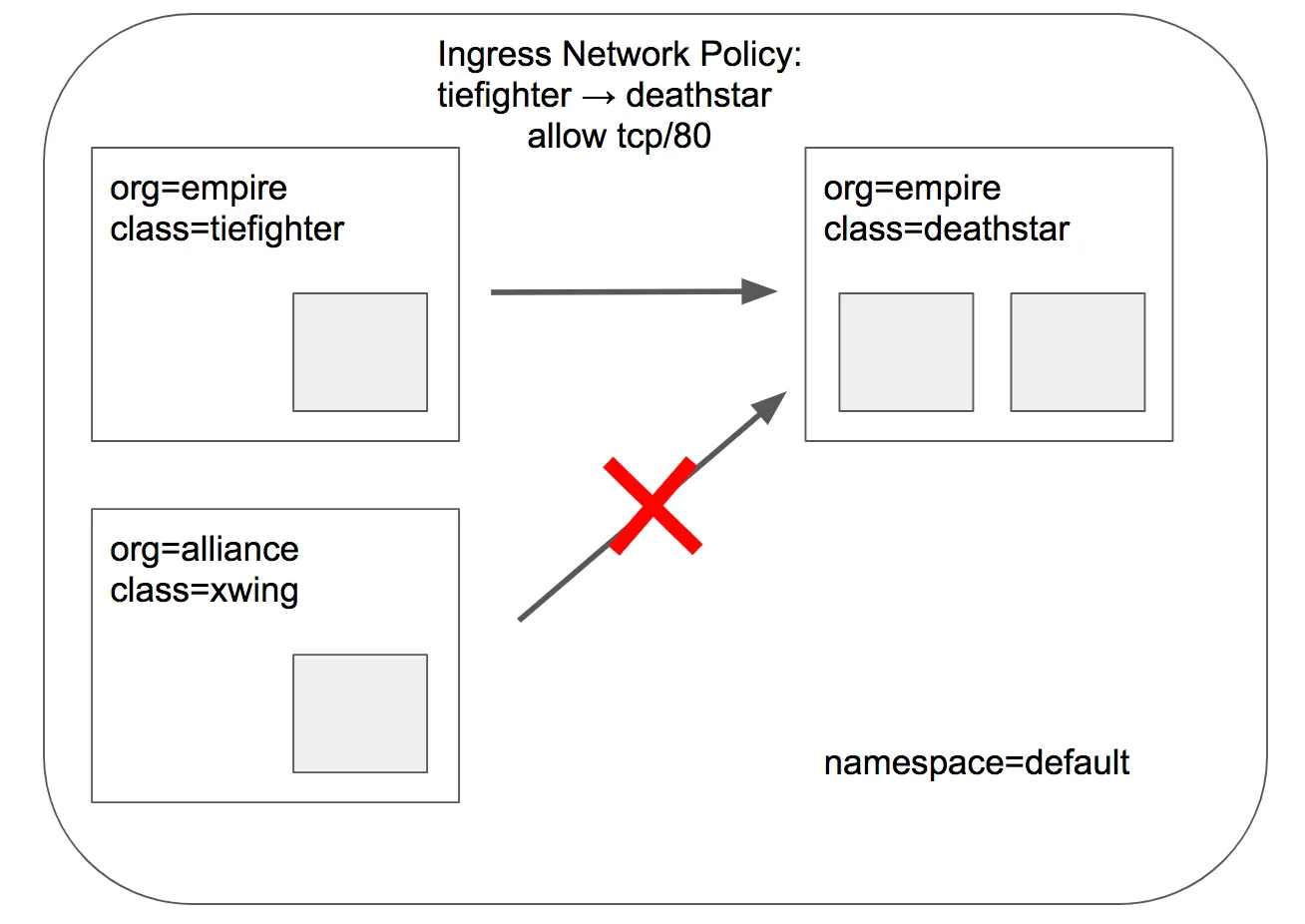
- Cilium을 사용할 때 보안 정책을 정의할 때 엔드포인트 IP 주소는 중요하지 않습니다. 대신 포드에 할당된 레이블을 사용하여 보안 정책을 정의할 수 있습니다. 정책은 클러스터 내에서 실행 중이거나 실행 중인 위치에 관계없이 레이블을 기반으로 올바른 포드에 적용됩니다.
- 데스스타 착륙 요청을 라벨이 있는 선박(org=empire)으로만 제한하는 기본 정책부터 시작하겠습니다. 이렇게 하면 org=empire 라벨이 없는 선박은 데스스타 서비스와 연결조차 할 수 없습니다. 이 정책은 IP 프로토콜(네트워크 계층 3)과 TCP 프로토콜(네트워크 계층 4)에만 적용되는 간단한 정책이므로 흔히 L3/L4 네트워크 보안 정책이라고 합니다.
- 참고: 실리움은 상태별 연결 추적을 수행합니다. 이는 정책이 프론트엔드가 백엔드에 도달할 수 있도록 허용하면, 동일한 TCP/UDP 연결 내에서 백엔드 응답의 일부인 모든 필수 응답 패킷이 자동으로 프론트엔드에 도달하도록 허용한다는 것을 의미합니다. → 리턴 패킷 자동 허용!
CiliumNetworkPolicy
| [root@k8s-cp ~]# k explain CiliumNetworkPolicy GROUP: cilium.io KIND: CiliumNetworkPolicy VERSION: v2 DESCRIPTION: CiliumNetworkPolicy is a Kubernetes third-party resource with an extended version of NetworkPolicy. |
- CiliumNetworkPolicys는 "endpointSelector"를 사용하여 팟 레이블에서 정책이 적용되는 소스와 목적지를 식별합니다.
- 아래 정책은 TCP 포트 80에서 레이블(org=empire)이 있는 모든 팟에서 레이블(org=empire, class=deathstar)이 있는 데스스타 팟으로 전송되는 트래픽을 화이트리스트로 작성합니다. (그외는 default 로 deny 정책 적용됨)
| # https://raw.githubusercontent.com/cilium/cilium/1.17.6/examples/minikube/sw_l3_l4_policy.yaml apiVersion: "cilium.io/v2"
kind: CiliumNetworkPolicy
metadata:
name: "rule1"
spec:
description: "L3-L4 policy to restrict deathstar access to empire ships only"
endpointSelector:
matchLabels:
org: empire
class: deathstar
ingress:
- fromEndpoints:
- matchLabels:
org: empire
toPorts:
- ports:
- port: "80"
protocol: TCP
# 위의 NetworkPolicy 적용 [root@k8s-cp ~]# kubectl apply -f https://raw.githubusercontent.com/cilium/cilium/1.17.6/examples/minikube/sw_l3_l4_policy.yaml ciliumnetworkpolicy.cilium.io/rule1 created [root@k8s-cp ~]# k get cnp NAME AGE VALID rule1 3s True [root@k8s-cp ~]# k describe cnp rule1 Name: rule1 Namespace: default Labels: <none> Annotations: <none> API Version: cilium.io/v2 Kind: CiliumNetworkPolicy Metadata: Creation Timestamp: 2025-07-26T07:12:35Z Generation: 1 Resource Version: 42511 UID: b43fd6bf-998e-4457-89d0-5e7b0a7a9c45 Spec: Description: L3-L4 policy to restrict deathstar access to empire ships only Endpoint Selector: Match Labels: Class: deathstar Org: empire Ingress: From Endpoints: Match Labels: Org: empire To Ports: Ports: Port: 80 Protocol: TCP Status: Conditions: Last Transition Time: 2025-07-26T07:12:35Z Message: Policy validation succeeded Status: True Type: Valid Events: <none> # 이제 xwing에 deathstar 로 가는 트래픽은 Drop 됨 [root@k8s-cp ~]# kubectl exec xwing -- curl -s -XPOST deathstar.default.svc.cluster.local/v1/request-landing --connect-timeout 2 command terminated with exit code 28 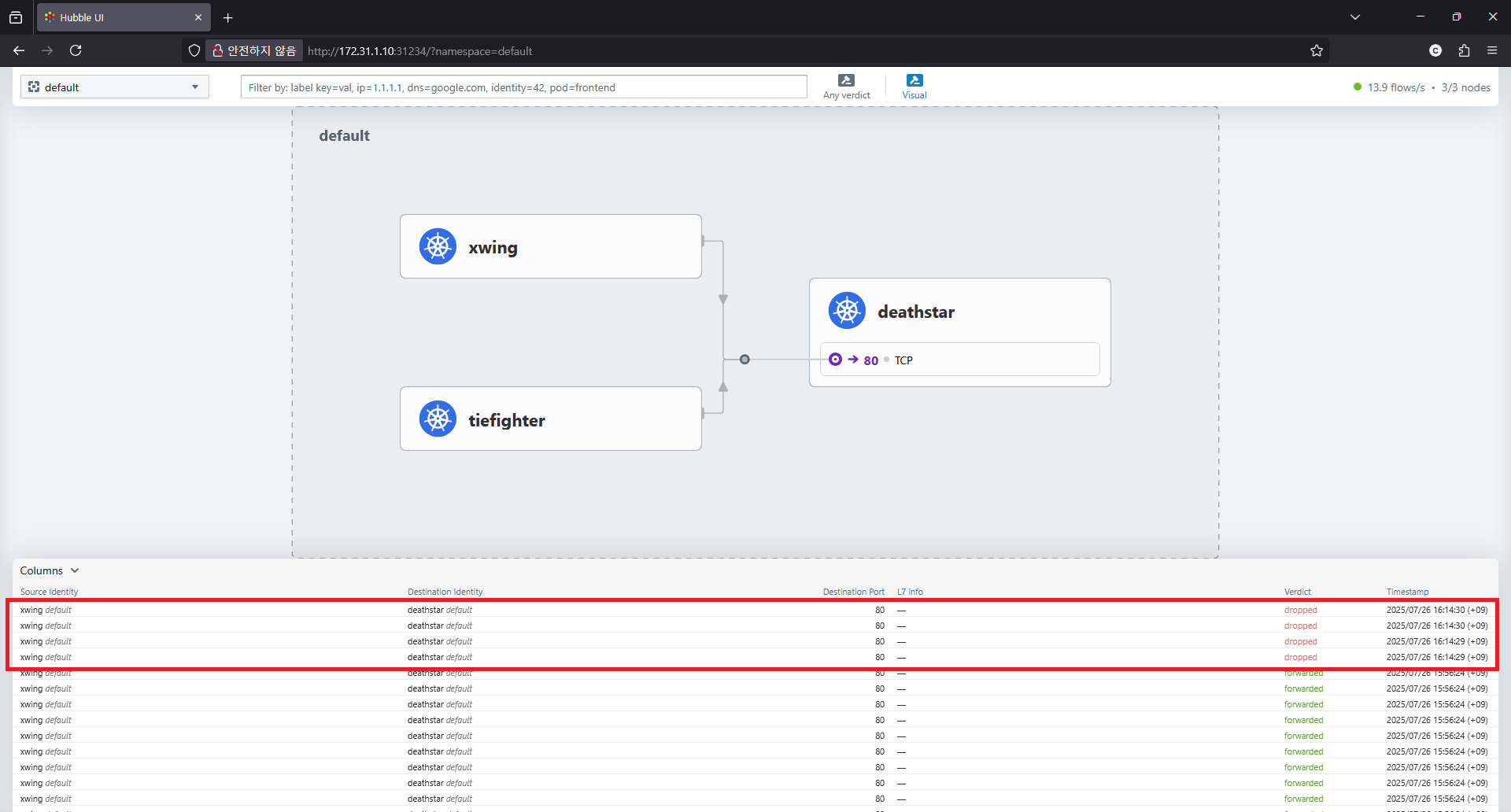 # tiefighter -> deathstar 트래픽 : 정상 호출 [root@k8s-cp ~]# kubectl exec tiefighter -- curl -s -XPOST deathstar.default.svc.cluster.local/v1/request-landing Ship landed # deathstar 에 ingress 에 policy 활성화 확인 [root@k8s-cp ~]# c0 endpoint list ENDPOINT POLICY (ingress) POLICY (egress) IDENTITY LABELS (source:key[=value]) IPv6 IPv4 STATUS ENFORCEMENT ENFORCEMENT 953 Disabled Disabled 42830 k8s:io.ciliuhttp://m.k8s.namespace.labels.kubernetes.io/metadata.name=kube-system 172.20.0.47 ready k8s:io.ciliuhttp://m.k8s.policy.cluster=default k8s:io.ciliuhttp://m.k8s.policy.serviceaccount=coredns k8s:io.kubernetes.pod.namespace=kube-system k8s:k8s-app=kube-dns 1757 Disabled Disabled 42830 k8s:io.ciliuhttp://m.k8s.namespace.labels.kubernetes.io/metadata.name=kube-system 172.20.0.180 ready k8s:io.ciliuhttp://m.k8s.policy.cluster=default k8s:io.ciliuhttp://m.k8s.policy.serviceaccount=coredns k8s:io.kubernetes.pod.namespace=kube-system k8s:k8s-app=kube-dns 2694 Disabled Disabled 1 k8s:node-role.kubernetes.io/control-plane ready k8s:node.kubernetes.io/exclude-from-external-load-balancers reserved:host [root@k8s-cp ~]# c1 endpoint list ENDPOINT POLICY (ingress) POLICY (egress) IDENTITY LABELS (source:key[=value]) IPv6 IPv4 STATUS ENFORCEMENT ENFORCEMENT 156 Disabled Disabled 1 reserved:host ready 372 Enabled Disabled 377 k8s:app.kubernetes.io/name=deathstar 172.20.1.165 ready k8s:class=deathstar k8s:io.ciliuhttp://m.k8s.namespace.labels.kubernetes.io/metadata.name=default k8s:io.ciliuhttp://m.k8s.policy.cluster=default k8s:io.ciliuhttp://m.k8s.policy.serviceaccount=default k8s:io.kubernetes.pod.namespace=default k8s:org=empire 1795 Disabled Disabled 65236 k8s:app.kubernetes.io/name=hubble-ui 172.20.1.213 ready k8s:app.kubernetes.io/part-of=cilium k8s:io.ciliuhttp://m.k8s.namespace.labels.kubernetes.io/metadata.name=kube-system k8s:io.ciliuhttp://m.k8s.policy.cluster=default k8s:io.ciliuhttp://m.k8s.policy.serviceaccount=hubble-ui k8s:io.kubernetes.pod.namespace=kube-system k8s:k8s-app=hubble-ui 3153 Disabled Disabled 2593 k8s:app.kubernetes.io/name=xwing 172.20.1.1 ready k8s:class=xwing k8s:io.ciliuhttp://m.k8s.namespace.labels.kubernetes.io/metadata.name=default k8s:io.ciliuhttp://m.k8s.policy.cluster=default k8s:io.ciliuhttp://m.k8s.policy.serviceaccount=default k8s:io.kubernetes.pod.namespace=default k8s:org=alliance [root@k8s-cp ~]# c2 endpoint list ENDPOINT POLICY (ingress) POLICY (egress) IDENTITY LABELS (source:key[=value]) IPv6 IPv4 STATUS ENFORCEMENT ENFORCEMENT 462 Disabled Disabled 1 reserved:host ready 2116 Enabled Disabled 377 k8s:app.kubernetes.io/name=deathstar 172.20.2.169 ready k8s:class=deathstar k8s:io.ciliuhttp://m.k8s.namespace.labels.kubernetes.io/metadata.name=default k8s:io.ciliuhttp://m.k8s.policy.cluster=default k8s:io.ciliuhttp://m.k8s.policy.serviceaccount=default k8s:io.kubernetes.pod.namespace=default k8s:org=empire 2937 Disabled Disabled 33825 k8s:app.kubernetes.io/name=tiefighter 172.20.2.173 ready k8s:class=tiefighter k8s:io.ciliuhttp://m.k8s.namespace.labels.kubernetes.io/metadata.name=default k8s:io.ciliuhttp://m.k8s.policy.cluster=default k8s:io.ciliuhttp://m.k8s.policy.serviceaccount=default k8s:io.kubernetes.pod.namespace=default k8s:org=empire 3441 Disabled Disabled 51117 k8s:app.kubernetes.io/name=hubble-relay 172.20.2.230 ready k8s:app.kubernetes.io/part-of=cilium k8s:io.ciliuhttp://m.k8s.namespace.labels.kubernetes.io/metadata.name=kube-system k8s:io.ciliuhttp://m.k8s.policy.cluster=default k8s:io.ciliuhttp://m.k8s.policy.serviceaccount=hubble-relay k8s:io.kubernetes.pod.namespace=kube-system k8s:k8s-app=hubble-relay |
Apply and Test HTTP-aware L7 Policy
- L7 동작 처리는 cilium-envoy 데몬셋이 담당
- 성능상의 하락은 존재하나 Obsevability 측면에서 강점이 있음

테스트 시나리오

- 위의 간단한 시나리오에서는 tiefighter / xwing에게 데스스타 API에 대한 전체 액세스 권한을 부여하거나 아예 액세스 권한을 부여하지 않는 것으로 충분했습니다. 그러나 마이크로서비스 간에 가장 강력한 보안(즉, 최소 권한 격리를 강제하는 것)을 제공하기 위해서는 데스스타 API를 호출하는 각 서비스가 합법적인 운영에 필요한 HTTP 요청 세트만 수행하도록 제한해야 합니다.
- 예를 들어, 데스스타 서비스가 임의의 제국 선박이 호출해서는 안 되는 일부 유지보수 API를 노출한다고 가정해 보겠습니다.
| [root@k8s-cp ~]# kubectl exec tiefighter -- curl -s -XPUT deathstar.default.svc.cluster.local/v1/exhaust-port Panic: deathstar exploded goroutine 1 [running]: main.HandleGarbage(0x2080c3f50, 0x2, 0x4, 0x425c0, 0x5, 0xa) /code/src/github.com/empire/deathstar/ temp/main.go:9 +0x64 main.main() /code/src/github.com/empire/deathstar/ temp/main.go:5 +0x85 |
Cilium은 HTTP 계층(즉, L7) 정책을 적용하여 타이파이터가 도달할 수 있는 URL을 제한할 수 있습니다. 다음은 타이파이터를 POST /v1/요청-랜딩 API 호출만 수행하도록 제한하고 다른 모든 호출(PUT /v1/배기포트 포함)은 허용하지 않는 정책 파일의 예입니다.
|
# 기존 rule1 정책을 업데이트 해서 사용
apiVersion: "cilium.io/v2"
kind: CiliumNetworkPolicy
metadata:
name: "rule1"
spec:
description: "L7 policy to restrict access to specific HTTP call"
endpointSelector:
matchLabels:
org: empire
class: deathstar
ingress:
- fromEndpoints:
- matchLabels:
org: empire
toPorts:
- ports:
- port: "80"
protocol: TCP
rules:
http:
- method: "POST"
path: "/v1/request-landing"
|
| # Update the existing rule to apply L7-aware policy to protect deathstar using: [root@k8s-cp ~]# kubectl apply -f https://raw.githubusercontent.com/cilium/cilium/1.17.6/examples/minikube/sw_l3_l4_l7_policy.yaml ciliumnetworkpolicy.cilium.io/rule1 configured [root@k8s-cp ~]# k describe cnp rule1 Name: rule1 Namespace: default Labels: <none> Annotations: <none> API Version: cilium.io/v2 Kind: CiliumNetworkPolicy Metadata: Creation Timestamp: 2025-07-26T07:12:35Z Generation: 2 Resource Version: 45353 UID: b43fd6bf-998e-4457-89d0-5e7b0a7a9c45 Spec: Description: L7 policy to restrict access to specific HTTP call Endpoint Selector: Match Labels: Class: deathstar Org: empire Ingress: From Endpoints: Match Labels: Org: empire To Ports: Ports: Port: 80 Protocol: TCP Rules: Http: Method: POST Path: /v1/request-landing Status: Conditions: Last Transition Time: 2025-07-26T07:12:35Z Message: Policy validation succeeded Status: True Type: Valid Events: <none> # We can now re-run the same test as above, but we will see a different outcome [root@k8s-cp ~]# kubectl exec tiefighter -- curl -s -XPOST deathstar.default.svc.cluster.local/v1/request-landing Ship landed  # We can now re-run the same test as above, but we will see a different outcome [root@k8s-cp ~]# kubectl exec tiefighter -- curl -s -XPUT deathstar.default.svc.cluster.local/v1/exhaust-port Access denied  |
다음 실습을 위해 리소스 삭제
| [root@k8s-cp ~]# kubectl delete -f https://raw.githubusercontent.com/cilium/cilium/1.17.6/examples/minikube/http-sw-app.yaml service "deathstar" deleted deployment.apps "deathstar" deleted pod "tiefighter" deleted pod "xwing" deleted [root@k8s-cp ~]# kubectl delete cnp rule1 ciliumnetworkpolicy.cilium.io "rule1" deleted |
3. Prometheus + Grafana 를 이용한 Cilium Observability 환경 구성
샘플 어플리케이션 배포
| # 샘플 애플리케이션 배포 cat << EOF | kubectl apply -f - apiVersion: apps/v1 kind: Deployment metadata: name: webpod spec: replicas: 2 selector: matchLabels: app: webpod template: metadata: labels: app: webpod spec: affinity: podAntiAffinity: requiredDuringSchedulingIgnoredDuringExecution: - labelSelector: matchExpressions: - key: app operator: In values: - sample-app topologyKey: "kubernetes.io/hostname" containers: - name: webpod image: traefik/whoami ports: - containerPort: 80 --- apiVersion: v1 kind: Service metadata: name: webpod labels: app: webpod spec: selector: app: webpod ports: - protocol: TCP port: 80 targetPort: 80 type: ClusterIP EOF # k8s-cp 노드에 curl-pod 파드 배포 cat <<EOF | kubectl apply -f - apiVersion: v1 kind: Pod metadata: name: curl-pod labels: app: curl spec: nodeName: k8s-cp containers: - name: curl image: nicolaka/netshoot command: ["tail"] args: ["-f", "/dev/null"] terminationGracePeriodSeconds: 0 EOF |
통신 확인
| # 배포 확인 kubectl get deploy,svc,ep webpod -owide kubectl get endpointslices -l app=webpod kubectl get ciliumendpoints kubectl exec -it -n kube-system ds/cilium -c cilium-agent -- cilium-dbg endpoint list # 통신 확인 kubectl exec -it curl-pod -- curl webpod | grep Hostname kubectl exec -it curl-pod -- sh -c 'while true; do curl -s webpod | grep Hostname; sleep 1; done' Hostname: webpod-697b545f57-57mgp Hostname: webpod-697b545f57-h9krv Hostname: webpod-697b545f57-57mgp Hostname: webpod-697b545f57-h9krv Hostname: webpod-697b545f57-57mgp ...(생략)... |
Prometheus + Grafana 설치
- 아래 링크에서 Cilium 이 제공하는 Prometheus + Grafana 환경이 구성된 yaml 을 제공합니다.
- https://raw.githubusercontent.com/cilium/cilium/1.17.6/examples/kubernetes/addons/prometheus/monitoring-example.yaml
- Grafana: A visualization dashboard with Cilium Dashboard pre-loaded.
- Prometheus: a time series database and monitoring system.
- This example deployment of Prometheus and Grafana will automatically scrape the Cilium and Hubble metrics.
| # Prometheus + Grafana 배포 [root@k8s-cp ~]# kubectl apply -f https://raw.githubusercontent.com/cilium/cilium/1.17.6/examples/kubernetes/addons/prometheus/monitoring-example.yaml namespace/cilium-monitoring created serviceaccount/prometheus-k8s created configmap/grafana-config created configmap/grafana-cilium-dashboard created configmap/grafana-cilium-operator-dashboard created configmap/grafana-hubble-dashboard created configmap/grafana-hubble-l7-http-metrics-by-workload created configmap/prometheus created clusterrole.rbac.authorization.k8s.io/prometheus created clusterrolebinding.rbac.authorization.k8s.io/prometheus created service/grafana created service/prometheus created deployment.apps/grafana created deployment.apps/prometheus created # 확인 [root@k8s-cp ~]# kubectl -n cilium-monitoring get all NAME READY STATUS RESTARTS AGE pod/grafana-5c69859d9-mg9zj 1/1 Running 0 54s pod/prometheus-6fc896bc5d-g2d5z 1/1 Running 0 54s NAME TYPE CLUSTER-IP EXTERNAL-IP PORT(S) AGE service/grafana ClusterIP 10.96.4.45 <none> 3000/TCP 54s service/prometheus ClusterIP 10.105.222.252 <none> 9090/TCP 54s NAME READY UP-TO-DATE AVAILABLE AGE deployment.apps/grafana 1/1 1 1 54s deployment.apps/prometheus 1/1 1 1 54s NAME DESIRED CURRENT READY AGE replicaset.apps/grafana-5c69859d9 1 1 1 54s replicaset.apps/prometheus-6fc896bc5d 1 1 1 54s # 아래 대시보드가 Grafana 에 임포트 되어 있음 [root@k8s-cp ~]# kubectl get cm -n cilium-monitoring NAME DATA AGE grafana-cilium-dashboard 1 2m51s grafana-cilium-operator-dashboard 1 2m51s grafana-config 3 2m52s grafana-hubble-dashboard 1 2m51s grafana-hubble-l7-http-metrics-by-workload 1 2m51s kube-root-ca.crt 1 2m52s prometheus 1 2m51s |
Deploy Cilium and Hubble with metrics enabled
- Cilium, Hubble, and Cilium Operator는 기본적으로 메트릭을 노출하지 않습니다.
- 이러한 서비스에 대한 메트릭을 활성화하면 이러한 구성 요소가 실행 중인 클러스터의 모든 노드에 각각 9962, 9965, 9963 포트가 열립니다.
- cilium-agent metric : 9962
- cilium-operator metric :9963
- Hubble metric : 9965
- Cilium, Hubble, and Cilium Operator의 메트릭은 모두 다음 헬름 값으로 서로 독립적으로 활성화할 수 있습니다
- prometheus.enabled=true: Enables metrics for cilium-agent.
- operator.prometheus.enabled=true: Enables metrics for cilium-operator.
- hubble.metrics.enabled: Enables the provided list of Hubble metrics.
- For Hubble metrics to work, Hubble itself needs to be enabled with hubble.enabled=true.
- See [Hubble exported metrics](https://docs.cilium.io/en/stable/observability/metrics/#hubble-exported-metrics)for the list of available Hubble metrics.
→ Refer to [Monitoring & Metrics](https://docs.cilium.io/en/stable/observability/metrics/#metrics)for more details about the individual metrics.
현재 설정으로 메트릭 노출설정 되어 있음.
hostPC에서 쉬운 접속을 위해 NodePort 30001, 30002 로 설정합니다.
| # NodePort 설정 kubectl patch svc -n cilium-monitoring prometheus -p '{"spec": {"type": "NodePort", "ports": [{"port": 9090, "targetPort": 9090, "nodePort": 30001}]}}' kubectl patch svc -n cilium-monitoring grafana -p '{"spec": {"type": "NodePort", "ports": [{"port": 3000, "targetPort": 3000, "nodePort": 30002}]}}' |
prometheus 에 접속하야 관련 Target 이 잘 등록되었는지 확인
http://172.31.1.10:30001/targets
- cilium-agent metric : 9962
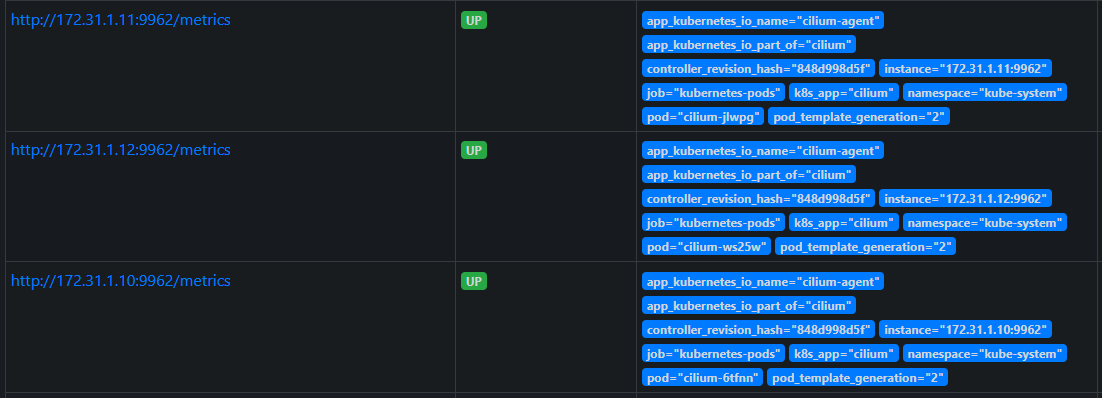
- cilium-operator metric :9963

- Hubble metric : 9965
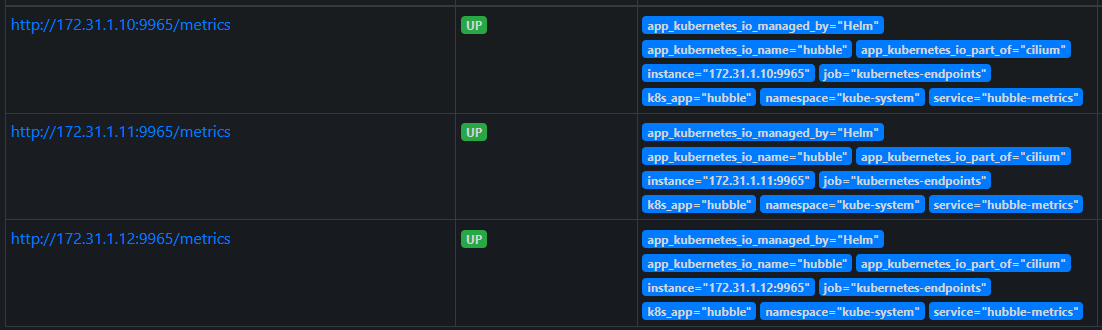
| # cilium-agent metric 메트릭 확인 curl http://172.31.1.11:9962/metrics # cilium-operator metric 메트릭 확인 curl http://172.31.1.12:9963/metrics # Hubble metric 확인 curl http://172.31.1.10:9965/metrics |
각 메트릭을 csv 로 변환하는 스크립트 :
vi ~/MetricToCsv.sh
|
URL=$1 # Metric URL - http://172.31.1.10:9090/metrics
curl -s -k $1 | grep \# > ~/tempMetric.txt
echo "TYPE,NAME,HELP"
while read line;
do
if [ "$(echo $line | grep '# HELP' | wc -l)" == "1" ]; then
HELP=$(echo $line | sed 's/# HELP //g')
fi
if [ "$(echo $line | grep '# TYPE' | wc -l)" == "1" ]; then
TYPE=$(echo $line | awk '{ print $4 }')
NAME=$(echo $line | awk '{ print $3 }')
HELP=$(echo $HELP | sed "s/$NAME //g")
echo $TYPE,$NAME,\"$HELP\"
fi
done < ~/tempMetric.txt
rm -fr ~/tempMetric.txt
|
위의 스크립트를 이용하여 3개의 csv 파일을 생성하고 윈도우 OS 로 가져온 후 엑셀 작업
| sh ~/MetricToCsv.sh http://172.31.1.11:9962/metrics > ~/cilium-agent.csv sh ~/MetricToCsv.sh http://172.31.1.12:9963/metrics > ~/cilium-operator.csv sh ~/MetricToCsv.sh http://172.31.1.10:9965/metrics > ~/hubble.csv |
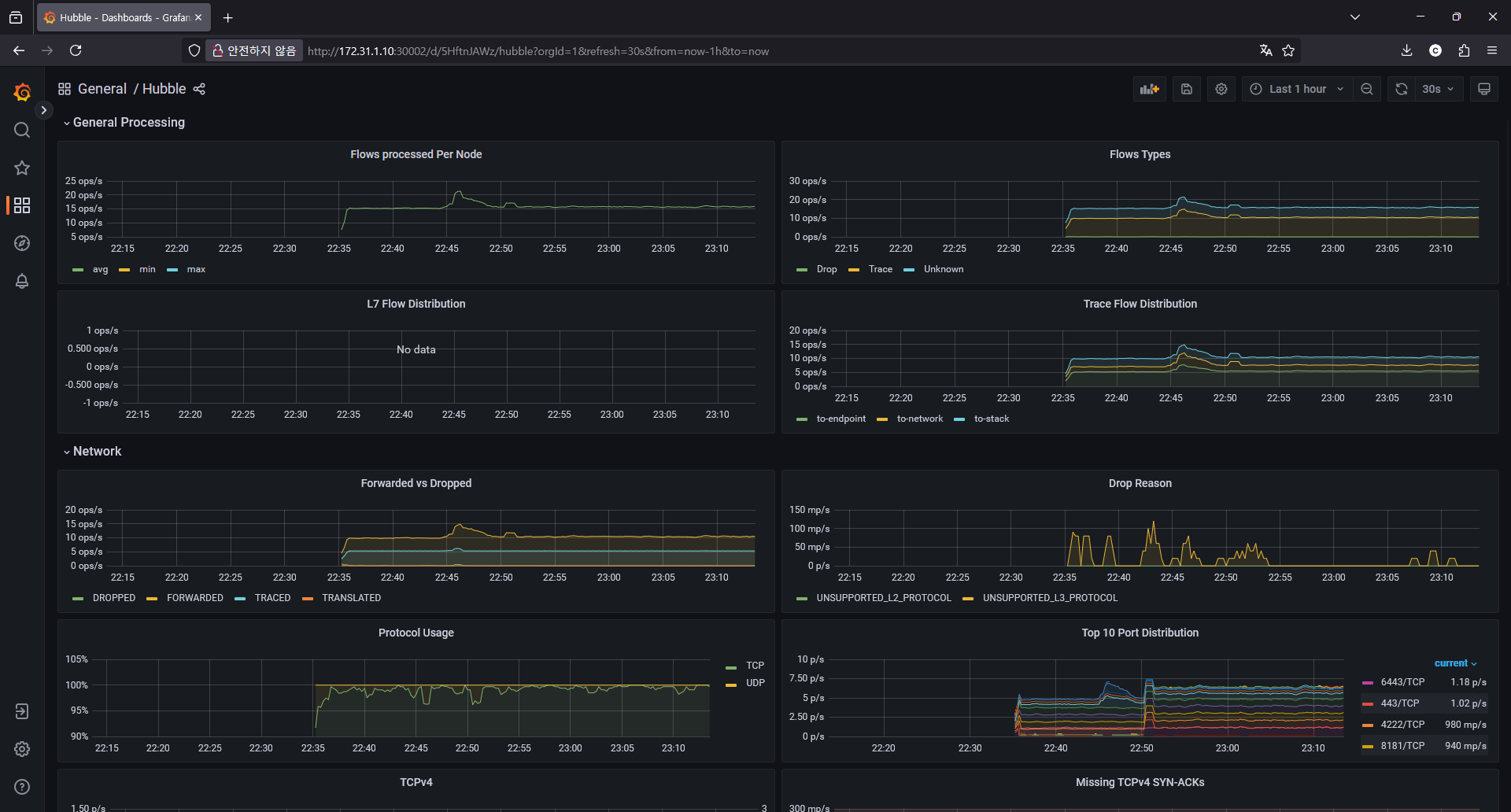
Grafana 에 접속하면 아래와 같은 대시보드가 임포트 되어 있습니다.

'Kubernetes' 카테고리의 다른 글
| Cilium Study [1기] (4주차) - Networking - 노드에 파드들간 통신 2 & K8S 외부 노출 (0) | 2025.08.07 |
|---|---|
| Cilium Study [1기] (3주차) - Networking - 노드에 파드들간 통신 상세 1 (0) | 2025.07.28 |
| Cilium Study [1기] (1주차) - eBPF (2) | 2025.07.19 |
| AEWS [3기] 12주차 - Amazon VPC Lattice for Amazon EKS (0) | 2025.04.26 |
| AEWS [3기] 10주차 - K8S 시크릿 관리 (0) | 2025.04.10 |