실습환경 구성
- 윈도우 11 OS 에서 Vmware Workstation v17을 이용한 Linux 가상머신 4대
- Rocky Linux 9.6 (커널버전 : 5.14.0-570.26.1.el9_6.x86_64)

- K8S 클러스터를 구성하는 노드가 2개의 서로 다른 네트워크에 존재함
- 172.31.0.0/20 네트워크
- VMnet8 - NAT 네트워크
- 윈도우 HOST 머신에서 접근 가능하고, 인터넷이 되는 네트워크
- 172.30.0.0/20 네트워크
- VMnet1 - Host Only 네트워크
- 윈도우 HOST 머신에서 접근 가능하고, 인터넷이 안되는 네트워크
- k8s-w0 노드는 인터넷이 가능하도록 router로 디폴트 게이트웨이 (NAT Gateway) 설정
- 172.31.0.0/20 네트워크
- router 가상머신
- k8s-w0 머신이 외부 인터넷을 할 수 있도록 NAT Gateway 역할
- " 172.31.0.0/20 네트워크" 와 " 172.30.0.0/20 네트워크" 간의 라우터 역할
- K8S 클러스터 노드 : k8s-cp, k8s-w1, k8s-w0
- 실습 동작에 필요한 static routing 설정됨
실습 노드 설정
router
##### ROUTER 역할 추가
# IP 포워딩 활성화
echo "net.ipv4.ip_forward=1" >> /etc/sysctl.conf
sysctl -p

##### NAT Gateway 기능 추가
# 인터넷이 안되는 k8s-w0 에서 인터넷을 하기 위해 필요
# iptables를 이용한 NAT 설정
iptables -t nat -A POSTROUTING -o ens160 -j MASQUERADE

# 포워드 체인 허용: 내부 네트워크에서 외부로 나가는 트래픽과 외부에서 내부로 들어오는 관련 트래픽을 허용합니다.
iptables -A FORWARD -i ens192 -o ens160 -j ACCEPT
iptables -A FORWARD -m conntrack --ctstate RELATED,ESTABLISHED -j ACCEPT

# iptables 규칙 저장: 재부팅 후에도 규칙이 유지되도록 저장해야 합니다.
dnf install -y iptables-services
iptables-save > /etc/sysconfig/iptables
systemctl enable --now iptables

##### Setting Dummy Interface
# (주의) OS 재시작하면 아래 정보는 사라짐
modprobe dummy
ip link add loop1 type dummy
ip link set loop1 up
ip addr add 10.10.1.200/24 dev loop1

ip link add loop2 type dummy
ip link set loop2 up
ip addr add 10.10.2.200/24 dev loop2

ip -br a
lo               UNKNOWN        127.0.0.1/8 ::1/128
ens160           UP             172.31.1.200/20
ens192           UP             172.30.1.200/20
loop1            UNKNOWN        10.10.1.200/24 fe80::b85f:f9ff:fe19:cf55/64
loop2            UNKNOWN        10.10.2.200/24 fe80::5b:33ff:fe9b:f465/64

##### Install Apache 웹서버
dnf install -y httpd
echo -e "<h1>Web Server : $(hostname)</h1>" > /var/www/html/index.html
systemctl enable --now httpd

#### 라우팅 테이블 확인
route -n
Kernel IP routing table
Destination     Gateway         Genmask         Flags Metric Ref    Use Iface
0.0.0.0         172.31.0.2      0.0.0.0         UG    100    0        0 ens160
10.10.1.0       0.0.0.0         255.255.255.0   U     0      0        0 loop1
10.10.2.0       0.0.0.0         255.255.255.0   U     0      0        0 loop2
172.30.0.0      0.0.0.0         255.255.240.0   U     101    0        0 ens192
172.31.0.0      0.0.0.0         255.255.240.0   U     100    0        0 ens160
k8s-cp, k8s-w1
# 정적 라우팅 추가
# (주의) OS 재시작하면 아래 정보는 사라짐
ip route add 172.30.0.0/20 via 172.31.1.200 dev ens160
ip route add 172.20.0.0/16 via 172.31.1.200 dev ens160
ip route add 10.10.0.0/16 via 172.31.1.200 dev ens160

route -n
Kernel IP routing table
Destination     Gateway         Genmask         Flags Metric Ref    Use Iface
0.0.0.0         172.31.0.2      0.0.0.0         UG    100    0        0 ens160
10.10.0.0       172.31.1.200    255.255.0.0     UG    0      0        0 ens160
172.20.0.0      172.31.1.200    255.255.0.0     UG    0      0        0 ens160
172.30.0.0      172.31.1.200    255.255.240.0   UG    0      0        0 ens160
172.31.0.0      0.0.0.0         255.255.240.0   U     100    0        0 ens160
k8s-w0
# 정적 라우팅 추가
# (주의) OS 재시작하면 아래 정보는 사라짐
ip route add 172.20.0.0/16 via 172.30.1.200 dev ens160
ip route add 10.10.0.0/16 via 172.30.1.200 dev ens160

route -n
Kernel IP routing table
Destination     Gateway         Genmask         Flags Metric Ref    Use Iface
0.0.0.0         172.30.1.200    0.0.0.0         UG    100    0        0 ens160
10.10.0.0       172.30.1.200    255.255.0.0     UG    0      0        0 ens160
172.20.0.0      172.30.1.200    255.255.0.0     UG    0      0        0 ens160
172.30.0.0      0.0.0.0         255.255.240.0   U     100    0        0 ens160
K8S 클러스터 구성
1단계 - 사전 준비
- 클러스터의 모든 node 에서 수행 : k8s-cp, k8s-w1, k8s-w0
K8S_MV='1.33' # Major Version
K8S_FV='1.33.3' # Full version
CONTAINERD_FV='1.7.27'
NERDCTL_FV='2.1.3'

# hosts 파일 편집
echo "172.30.1.10  k8s-w0" >> /etc/hosts
echo "172.31.1.10  k8s-cp" >> /etc/hosts
echo "172.31.1.11  k8s-w1" >> /etc/hosts
echo "172.31.1.200 router" >> /etc/hosts

# 방화벽 종료 및 해제
systemctl stop firewalld
systemctl disable firewalld

# selinux 해제
setenforce 0
grubby --update-kernel ALL --args selinux=0

# Swap off
swapoff --all
sed -i '/swap/s/^/#/' /etc/fstab

# 필수 패키지 설치
dnf install -y socat

# packets traversing the bridge are processed by iptables for filtering
sysctl -w net.ipv4.ip_forward=1
echo "net.ipv4.ip_forward = 1" >> /etc/sysctl.d/k8s.conf

# enable br_netfilter for iptables
modprobe br_netfilter
modprobe overlay
modprobe iptable_nat
echo "br_netfilter" >> /etc/modules-load.d/k8s.conf
echo "overlay" >> /etc/modules-load.d/k8s.conf
echo "iptable_nat" >> /etc/modules-load.d/k8s.conf

##### containerd 설치
dnf config-manager --add-repo https://download.docker.com/linux/centos/docker-ce.repo
# dnf list containerd.io --showduplicates
dnf install -y containerd.io-$CONTAINERD_FV
# containerd configure to default and cgroup managed by systemd
containerd config default > /etc/containerd/config.toml
sed -i 's/SystemdCgroup = false/SystemdCgroup = true/g' /etc/containerd/config.toml
sed -i --follow-symlinks 's/registry.k8s.io\/pause:3.8/registry.k8s.io\/pause:3.10/g' /etc/containerd/config.toml

### k8s 관련 패키지 설치
cat <<EOF | sudo tee /etc/yum.repos.d/kubernetes.repo
[kubernetes]
name=Kubernetes
baseurl=https://pkgs.k8s.io/core:/stable:/v$K8S_MV/rpm/
enabled=1
gpgcheck=1
gpgkey=https://pkgs.k8s.io/core:/stable:/v$K8S_MV/rpm/repodata/repomd.xml.key
exclude=kubelet kubeadm kubectl cri-tools kubernetes-cni
EOF

dnf install -y kubelet-$K8S_FV kubeadm-$K8S_FV kubectl-$K8S_FV --disableexcludes=kubernetes

# ready to install for k8s
systemctl restart containerd && systemctl enable containerd
systemctl enable --now kubelet

# kubectl 명령어 자동완성 기능 사용하기
dnf install -y bash-completion
kubectl completion bash >/etc/bash_completion.d/kubectl
echo "alias k=kubectl" >> ~/.bashrc
echo "complete -F __start_kubectl k" >> ~/.bashrc
source ~/.bash_profile

# nerdctl 설치
wget https://github.com/containerd/nerdctl/releases/download/v$NERDCTL_FV/nerdctl-$NERDCTL_FV-linux-amd64.tar.gz
tar xfz nerdctl-$NERDCTL_FV-linux-amd64.tar.gz -C /usr/local/bin
rm -fr nerdctl-$NERDCTL_FV-linux-amd64.tar.gz
echo "source <(nerdctl completion bash)" >> ~/.bash_profile
source ~/.bash_profile

# kubecolor 설치
KUBECOLOR_FV='0.0.25'
wget https://github.com/hidetatz/kubecolor/releases/download/v$KUBECOLOR_FV/kubecolor_$KUBECOLOR_FV\_Linux_x86_64.tar.gz
tar xfz kubecolor_$KUBECOLOR_FV\_Linux_x86_64.tar.gz -C /usr/bin/
rm -fr xfz kubecolor_$KUBECOLOR_FV\_Linux_x86_64.tar.gz
echo "alias kc='kubecolor'" >> ~/.bashrc

# helm 설치
HELM_FV='3.17.4'

curl -O https://get.helm.sh/helm-v$HELM_FV-linux-amd64.tar.gz
tar xfz helm-v$HELM_FV-linux-amd64.tar.gz
mv linux-amd64/helm /usr/local/bin
rm -fr helm-v$HELM_FV-linux-amd64.tar.gz linux-amd64
helm completion bash > /etc/bash_completion.d/helm

# cilium cli & hubble cli 설치
CILIUM_CLI_VERSION=$(curl -s https://raw.githubusercontent.com/cilium/cilium-cli/main/stable.txt)
CLI_ARCH=amd64
if [ "$(uname -m)" = "aarch64" ]; then CLI_ARCH=arm64; fi
curl -L --fail --remote-name-all https://github.com/cilium/cilium-cli/releases/download/${CILIUM_CLI_VERSION}/cilium-linux-${CLI_ARCH}.tar.gz >/dev/null 2>&1
tar xzvfC cilium-linux-${CLI_ARCH}.tar.gz /usr/local/bin
rm -fr cilium-linux-${CLI_ARCH}.tar.gz

HUBBLE_VERSION=$(curl -s https://raw.githubusercontent.com/cilium/hubble/master/stable.txt)
HUBBLE_ARCH=amd64
if [ "$(uname -m)" = "aarch64" ]; then HUBBLE_ARCH=arm64; fi
curl -L --fail --remote-name-all https://github.com/cilium/hubble/releases/download/$HUBBLE_VERSION/hubble-linux-${HUBBLE_ARCH}.tar.gz >/dev/null 2>&1
tar xzvfC hubble-linux-${HUBBLE_ARCH}.tar.gz /usr/local/bin
rm -fr hubble-linux-${HUBBLE_ARCH}.tar.gz- k8s-cp 에서 k8s-w1, k8s-w0, router 로 SSH key 방식의 인증 구성
# k8s-w1, k8s-w0 SSH key 방식의 인증 구성
ssh-keygen -t rsa -f ~/.ssh/id_rsa -N ""
ssh-copy-id k8s-w1
ssh-copy-id k8s-w0
ssh-copy-id router
2단계 - 클러스터 구성
- kubeadm init : k8s-cp
K8S_FV='1.33.3'

kubeadm init \
--kubernetes-version=v$K8S_FV \
--pod-network-cidr=10.244.0.0/16 \
--service-cidr 10.96.0.0/16 \
--apiserver-advertise-address=172.31.1.10 \
--apiserver-cert-extra-sans jadeedu.com \
--cri-socket=unix:///run/containerd/containerd.sock

#  Setting kube config file
mkdir -p $HOME/.kube
cp -i /etc/kubernetes/admin.conf $HOME/.kube/config
chown $(id -u):$(id -g) $HOME/.kube/config- kubeadm join : k8s-w1, k8s-w0
# k8s-cp 에서 join command 생성
kubeadm token create --print-join-command
kubeadm join 172.31.1.10:6443 --token iv3bdo.o4cjvcacio8k0gec --discovery-token-ca-cert-hash sha256:080eb62adfa0013d48400562edd68835b8545d1b665a0a03a2bc46dee07bc425

# k8s-w1, k8s-w0 에서 위의 join command 수행
kubeadm join 172.31.1.10:6443 --token iv3bdo.o4cjvcacio8k0gec --discovery-token-ca-cert-hash sha256:080eb62adfa0013d48400562edd68835b8545d1b665a0a03a2bc46dee07bc425
cilium CNI 구성
# Cilium 설치 with Helm
helm repo add cilium https://helm.cilium.io/

CILIUM_FV='1.18.0'

helm install cilium cilium/cilium --version $CILIUM_FV \
--namespace kube-system \
--set k8sServiceHost=172.31.1.10 --set k8sServicePort=6443 \
--set ipam.mode="cluster-pool" \
--set ipam.operator.clusterPoolIPv4PodCIDRList={"172.20.0.0/16"} \
--set ipv4NativeRoutingCIDR=172.20.0.0/16 \
--set routingMode=native --set autoDirectNodeRoutes=true \
--set kubeProxyReplacement=true --set bpf.masquerade=true --set installNoConntrackIptablesRules=true \
--set endpointHealthChecking.enabled=false --set healthChecking=false \
--set hubble.enabled=true --set hubble.relay.enabled=true --set hubble.ui.enabled=true \
--set hubble.ui.service.type=NodePort --set hubble.ui.service.nodePort=30003 \
--set prometheus.enabled=true --set operator.prometheus.enabled=true --set hubble.metrics.enableOpenMetrics=true \
--set hubble.metrics.enabled="{dns,drop,tcp,flow,port-distribution,icmp,httpV2:exemplars=true;labelsContext=source_ip\,source_namespace\,source_workload\,destination_ip\,destination_namespace\,destination_workload\,traffic_direction}" \
--set operator.replicas=1 --set debug.enabled=true| # 클러스터 구성후 pod-cidr, service-cidr 값 확인 kubectl cluster-info dump | grep -m 2 -E "cluster-cidr|service-cluster-ip-range" "--service-cluster-ip-range=10.96.0.0/16", "--cluster-cidr=10.244.0.0/16", |
네트워크 정보 확인 : autoDirectNodeRoutes=true 동작 이해
| # router 네트워크 인터페이스 정보 확인 ssh router ip -br -c -4 addr lo UNKNOWN 127.0.0.1/8 ens160 UP 172.31.1.200/20 ens192 UP 172.30.1.200/20 loop1 UNKNOWN 10.10.1.200/24 loop2 UNKNOWN 10.10.2.200/24 # k8s node 네트워크 인터페이스 정보 확인 ip -c -4 addr show dev ens160 2: ens160: <BROADCAST,MULTICAST,UP,LOWER_UP> mtu 1500 qdisc mq state UP group default qlen 1000 altname enp3s0 inet 172.31.1.10/20 brd 172.31.15.255 scope global noprefixroute ens160 valid_lft forever preferred_lft forever ssh k8s-w1 ip -c -4 addr show dev ens160 2: ens160: <BROADCAST,MULTICAST,UP,LOWER_UP> mtu 1500 qdisc mq state UP group default qlen 1000 altname enp3s0 inet 172.31.1.11/20 brd 172.31.15.255 scope global noprefixroute ens160 valid_lft forever preferred_lft forever ssh k8s-w0 ip -c -4 addr show dev ens160 2: ens160: <BROADCAST,MULTICAST,UP,LOWER_UP> mtu 1500 qdisc mq state UP group default qlen 1000 altname enp3s0 inet 172.30.1.10/20 brd 172.30.15.255 scope global noprefixroute ens160 valid_lft forever preferred_lft forever # 라우팅 정보 확인 ssh router ip -c route default via 172.31.0.2 dev ens160 proto static metric 100 10.10.1.0/24 dev loop1 proto kernel scope link src 10.10.1.200 10.10.2.0/24 dev loop2 proto kernel scope link src 10.10.2.200 172.30.0.0/20 dev ens192 proto kernel scope link src 172.30.1.200 metric 101 172.31.0.0/20 dev ens160 proto kernel scope link src 172.31.1.200 metric 100 # --set routingMode=native --set autoDirectNodeRoutes=true 동작 이해 # autoDirectNodeRoutes=true # - 같은 네트워크 대역에 있는 node 들만 podCIDR IP 가 Static Routing 을 Cilium 이 자동 추가 # - 다른 네트워크 대역에 있는 node 의 podCIDR IP 라우팅은 네트워크팀에서 라우팅 추가 작업을 해야 함 ip -c route default via 172.31.0.2 dev ens160 proto static metric 100 10.10.0.0/16 via 172.31.1.200 dev ens160 172.20.0.0/24 via 172.31.1.11 dev ens160 proto kernel 172.20.0.0/16 via 172.31.1.200 dev ens160 172.20.1.0/24 via 172.20.1.110 dev cilium_host proto kernel src 172.20.1.110 172.20.1.110 dev cilium_host proto kernel scope link 172.30.0.0/20 via 172.31.1.200 dev ens160 172.31.0.0/20 dev ens160 proto kernel scope link src 172.31.1.10 metric 100 ssh k8s-w1 ip -c route default via 172.31.0.2 dev ens160 proto static metric 100 10.10.0.0/16 via 172.31.1.200 dev ens160 172.20.0.0/24 via 172.20.0.27 dev cilium_host proto kernel src 172.20.0.27 172.20.0.0/16 via 172.31.1.200 dev ens160 172.20.0.27 dev cilium_host proto kernel scope link 172.20.1.0/24 via 172.31.1.10 dev ens160 proto kernel 172.30.0.0/20 via 172.31.1.200 dev ens160 172.31.0.0/20 dev ens160 proto kernel scope link src 172.31.1.11 metric 100 ssh k8s-w0 ip -c route default via 172.30.1.200 dev ens160 proto static metric 100 10.10.0.0/16 via 172.30.1.200 dev ens160 172.20.0.0/16 via 172.30.1.200 dev ens160 172.20.2.0/24 via 172.20.2.181 dev cilium_host proto kernel src 172.20.2.181 172.20.2.181 dev cilium_host proto kernel scope link 172.30.0.0/20 dev ens160 proto kernel scope link src 172.30.1.10 metric 100 # 통신 확인 ping -c 1 10.10.1.200 # router loop1 PING 10.10.1.200 (10.10.1.200) 56(84) bytes of data. 64 bytes from 10.10.1.200: icmp_seq=1 ttl=64 time=0.359 ms --- 10.10.1.200 ping statistics --- 1 packets transmitted, 1 received, 0% packet loss, time 0ms rtt min/avg/max/mdev = 0.359/0.359/0.359/0.000 ms ping -c 1 172.30.1.10 # k8s-w0 ens160 PING 172.30.1.10 (172.30.1.10) 56(84) bytes of data. 64 bytes from 172.30.1.10: icmp_seq=1 ttl=63 time=0.715 ms --- 172.30.1.10 ping statistics --- 1 packets transmitted, 1 received, 0% packet loss, time 0ms rtt min/avg/max/mdev = 0.715/0.715/0.715/0.000 ms # 목적지까지 경우하는 라우팅 정보 제공 ## Path MTU (pmtu): 출발지에서 목적지까지 모든 네트워크 경로 상에서 통과할 수 있는 최대 패킷 크기(Byte), IP fragmentation 없이 전송 가능한 가장 큰 패킷 크기를 의미. ## pmtu 1500: 전체 경로의 최소 MTU는 1500 , hops 2: 총 2단계 라우터/노드를 거쳐서 도달 , back 2: 응답도 동일한 hop 수로 돌아옴 tracepath -n 172.30.1.10 1?: [LOCALHOST] pmtu 1500 1: 172.31.1.200 0.405ms 1: 172.31.1.200 0.276ms 2: 172.30.1.10 0.567ms reached Resume: pmtu 1500 hops 2 back 2 |
(참고) Cilium 업그레이드 가이드
- https://docs.cilium.io/en/stable/operations/upgrade/
- https://gitlab.com/ycheol76/cilium-study/-/blob/main/3nd-week/000.%20v1.18.0%20%EC%97%85%EA%B7%B8%EB%A0%88%EC%9D%B4%EB%93%9C%20%EA%B0%80%EC%9D%B4%EB%93%9C.md
Native Routing mode
다른 네트워크에 있는 POD 간의 통신 장애를 시연하고 문제를 해결하는 과정으로 실습을 진행합니다.
| # k8s-cp 노드에도 POD 가 스케줄링 될수 있도록 taint kubectl taint nodes k8s-cp node-role.kubernetes.io/control-plane- # k8s-cp 노드에 curl-pod 파드 배포 cat <<EOF | kubectl apply -f - apiVersion: v1 kind: Pod metadata: name: curl-pod labels: app: curl spec: nodeName: k8s-cp containers: - name: curl image: nicolaka/netshoot command: ["tail"] args: ["-f", "/dev/null"] terminationGracePeriodSeconds: 0 EOF # 샘플 애플리케이션 배포 cat << EOF | kubectl apply -f - apiVersion: apps/v1 kind: Deployment metadata: name: webpod spec: replicas: 3 selector: matchLabels: app: webpod template: metadata: labels: app: webpod spec: affinity: podAntiAffinity: requiredDuringSchedulingIgnoredDuringExecution: - labelSelector: matchExpressions: - key: app operator: In values: - sample-app topologyKey: "kubernetes.io/hostname" containers: - name: webpod image: traefik/whoami ports: - containerPort: 80 --- apiVersion: v1 kind: Service metadata: name: webpod labels: app: webpod spec: selector: app: webpod ports: - protocol: TCP port: 80 targetPort: 80 type: ClusterIP EOF |
- 배포 후 네트워크 정보 확인
| # 배포 확인 kubectl get deploy,svc,ep webpod -owide Warning: v1 Endpoints is deprecated in v1.33+; use discovery.k8s.io/v1 EndpointSlice NAME READY UP-TO-DATE AVAILABLE AGE CONTAINERS IMAGES SELECTOR deployment.apps/webpod 3/3 3 3 3h29m webpod traefik/whoami app=webpod NAME TYPE CLUSTER-IP EXTERNAL-IP PORT(S) AGE SELECTOR service/webpod ClusterIP 10.96.80.99 <none> 80/TCP 3h29m app=webpod NAME ENDPOINTS AGE endpoints/webpod 172.20.0.35:80,172.20.1.207:80,172.20.2.207:80 3h29m kubectl get endpointslices -l app=webpod NAME ADDRESSTYPE PORTS ENDPOINTS AGE webpod-d4vbt IPv4 80 172.20.0.35,172.20.2.207,172.20.1.207 3h30m # IP 확인 kubectl get ciliumendpoints NAME SECURITY IDENTITY ENDPOINT STATE IPV4 IPV6 curl-pod 13922 ready 172.20.1.122 webpod-697b545f57-8xqpf 10718 ready 172.20.0.35 webpod-697b545f57-bs4cb 10718 ready 172.20.1.207 webpod-697b545f57-rzcwj 10718 ready 172.20.2.207 kubectl exec -n kube-system ds/cilium -- cilium-dbg ip list IP IDENTITY SOURCE 0.0.0.0/0 reserved:world 172.20.0.0/24 reserved:world 172.20.2.0/24 reserved:world 172.20.0.27/32 reserved:remote-node 172.20.0.35/32 k8s:app=webpod custom-resource k8s:io.ciliuhttp://m.k8s.namespace.labels.kubernetes.io/metadata.name=default k8s:io.ciliuhttp://m.k8s.policy.cluster=default k8s:io.ciliuhttp://m.k8s.policy.serviceaccount=default k8s:io.kubernetes.pod.namespace=default 172.20.0.64/32 k8s:app.kubernetes.io/name=hubble-ui custom-resource k8s:app.kubernetes.io/part-of=cilium k8s:io.ciliuhttp://m.k8s.namespace.labels.kubernetes.io/metadata.name=kube-system k8s:io.ciliuhttp://m.k8s.policy.cluster=default k8s:io.ciliuhttp://m.k8s.policy.serviceaccount=hubble-ui k8s:io.kubernetes.pod.namespace=kube-system k8s:k8s-app=hubble-ui 172.20.0.70/32 k8s:io.ciliuhttp://m.k8s.namespace.labels.kubernetes.io/metadata.name=kube-system custom-resource k8s:io.ciliuhttp://m.k8s.policy.cluster=default k8s:io.ciliuhttp://m.k8s.policy.serviceaccount=coredns k8s:io.kubernetes.pod.namespace=kube-system k8s:k8s-app=kube-dns 172.20.0.163/32 k8s:io.ciliuhttp://m.k8s.namespace.labels.kubernetes.io/metadata.name=kube-system custom-resource k8s:io.ciliuhttp://m.k8s.policy.cluster=default k8s:io.ciliuhttp://m.k8s.policy.serviceaccount=coredns k8s:io.kubernetes.pod.namespace=kube-system k8s:k8s-app=kube-dns 172.20.0.254/32 k8s:app.kubernetes.io/name=hubble-relay custom-resource k8s:app.kubernetes.io/part-of=cilium k8s:io.ciliuhttp://m.k8s.namespace.labels.kubernetes.io/metadata.name=kube-system k8s:io.ciliuhttp://m.k8s.policy.cluster=default k8s:io.ciliuhttp://m.k8s.policy.serviceaccount=hubble-relay k8s:io.kubernetes.pod.namespace=kube-system k8s:k8s-app=hubble-relay 172.20.1.110/32 reserved:host reserved:kube-apiserver 172.20.1.122/32 k8s:app=curl custom-resource k8s:io.ciliuhttp://m.k8s.namespace.labels.kubernetes.io/metadata.name=default k8s:io.ciliuhttp://m.k8s.policy.cluster=default k8s:io.ciliuhttp://m.k8s.policy.serviceaccount=default k8s:io.kubernetes.pod.namespace=default 172.20.1.207/32 k8s:app=webpod custom-resource k8s:io.ciliuhttp://m.k8s.namespace.labels.kubernetes.io/metadata.name=default k8s:io.ciliuhttp://m.k8s.policy.cluster=default k8s:io.ciliuhttp://m.k8s.policy.serviceaccount=default k8s:io.kubernetes.pod.namespace=default 172.20.2.181/32 reserved:remote-node 172.20.2.207/32 k8s:app=webpod custom-resource k8s:io.ciliuhttp://m.k8s.namespace.labels.kubernetes.io/metadata.name=default k8s:io.ciliuhttp://m.k8s.policy.cluster=default k8s:io.ciliuhttp://m.k8s.policy.serviceaccount=default k8s:io.kubernetes.pod.namespace=default 172.30.1.10/32 reserved:remote-node 172.31.1.10/32 reserved:host reserved:kube-apiserver 172.31.1.11/32 reserved:remote-node kubectl exec -n kube-system ds/cilium -- cilium-dbg endpoint list ENDPOINT POLICY (ingress) POLICY (egress) IDENTITY LABELS (source:key[=value]) IPv6 IPv4 STATUS ENFORCEMENT ENFORCEMENT 15 Disabled Disabled 10718 k8s:app=webpod 172.20.1.207 ready k8s:io.ciliuhttp://m.k8s.namespace.labels.kubernetes.io/metadata.name=default k8s:io.ciliuhttp://m.k8s.policy.cluster=default k8s:io.ciliuhttp://m.k8s.policy.serviceaccount=default k8s:io.kubernetes.pod.namespace=default 359 Disabled Disabled 1 k8s:node-role.kubernetes.io/control-plane ready k8s:node.kubernetes.io/exclude-from-external-load-balancers reserved:host 2188 Disabled Disabled 13922 k8s:app=curl 172.20.1.122 ready k8s:io.ciliuhttp://m.k8s.namespace.labels.kubernetes.io/metadata.name=default k8s:io.ciliuhttp://m.k8s.policy.cluster=default k8s:io.ciliuhttp://m.k8s.policy.serviceaccount=default k8s:io.kubernetes.pod.namespace=default kubectl exec -n kube-system ds/cilium -- cilium-dbg service list ID Frontend Service Type Backend 1 10.96.115.163:80/TCP ClusterIP 1 => 172.20.0.254:4245/TCP (active) 2 0.0.0.0:30003/TCP NodePort 1 => 172.20.0.64:8081/TCP (active) 4 10.96.105.56:80/TCP ClusterIP 1 => 172.20.0.64:8081/TCP (active) 5 10.96.0.10:53/TCP ClusterIP 1 => 172.20.0.70:53/TCP (active) 2 => 172.20.0.163:53/TCP (active) 6 10.96.0.10:53/UDP ClusterIP 1 => 172.20.0.70:53/UDP (active) 2 => 172.20.0.163:53/UDP (active) 7 10.96.0.10:9153/TCP ClusterIP 1 => 172.20.0.70:9153/TCP (active) 2 => 172.20.0.163:9153/TCP (active) 8 10.96.0.1:443/TCP ClusterIP 1 => 172.31.1.10:6443/TCP (active) 9 10.96.142.246:443/TCP ClusterIP 1 => 172.31.1.10:4244/TCP (active) 10 10.96.80.99:80/TCP ClusterIP 1 => 172.20.0.35:80/TCP (active) 2 => 172.20.1.207:80/TCP (active) 3 => 172.20.2.207:80/TCP (active) kubectl exec -n kube-system ds/cilium -- cilium-dbg bpf lb list | grep 10.96.80.99 10.96.80.99:80/TCP (0) 0.0.0.0:0 (10) (0) [ClusterIP, non-routable] 10.96.80.99:80/TCP (1) 172.20.0.35:80/TCP (10) (1) 10.96.80.99:80/TCP (3) 172.20.2.207:80/TCP (10) (3) 10.96.80.99:80/TCP (2) 172.20.1.207:80/TCP (10) (2) kubectl exec -n kube-system ds/cilium -- cilium-dbg bpf nat list UDP OUT 172.31.1.10:43655 -> 168.126.63.1:53 XLATE_SRC 172.31.1.10:43655 Created=477sec ago NeedsCT=1 UDP IN 221.151.118.78:123 -> 172.31.1.10:43181 XLATE_DST 172.31.1.10:43181 Created=1683sec ago NeedsCT=1 TCP OUT 172.31.1.10:53840 -> 104.16.99.215:443 XLATE_SRC 172.31.1.10:53840 Created=473sec ago NeedsCT=1 TCP IN 98.85.153.80:443 -> 172.31.1.10:56114 XLATE_DST 172.31.1.10:56114 Created=473sec ago NeedsCT=1 TCP IN 98.85.153.80:443 -> 172.31.1.10:56100 XLATE_DST 172.31.1.10:56100 Created=475sec ago NeedsCT=1 UDP OUT 172.31.1.10:57521 -> 194.0.5.123:123 XLATE_SRC 172.31.1.10:57521 Created=2688sec ago NeedsCT=1 UDP OUT 172.31.1.10:36054 -> 168.126.63.1:53 XLATE_SRC 172.31.1.10:36054 Created=476sec ago NeedsCT=1 UDP OUT 172.31.1.10:38701 -> 168.126.63.1:53 XLATE_SRC 172.31.1.10:38701 Created=473sec ago NeedsCT=1 UDP IN 168.126.63.1:53 -> 172.31.1.10:39589 XLATE_DST 172.31.1.10:39589 Created=472sec ago NeedsCT=1 UDP IN 168.126.63.1:53 -> 172.31.1.10:54497 XLATE_DST 172.31.1.10:54497 Created=478sec ago NeedsCT=1 UDP IN 168.126.63.1:53 -> 172.31.1.10:57715 XLATE_DST 172.31.1.10:57715 Created=476sec ago NeedsCT=1 UDP IN 168.126.63.1:53 -> 172.31.1.10:33909 XLATE_DST 172.31.1.10:33909 Created=475sec ago NeedsCT=1 UDP IN 121.174.142.82:123 -> 172.31.1.10:59963 XLATE_DST 172.31.1.10:59963 Created=529sec ago NeedsCT=1 UDP IN 121.174.142.82:123 -> 172.31.1.10:41078 XLATE_DST 172.31.1.10:41078 Created=2593sec ago NeedsCT=1 UDP IN 168.126.63.1:53 -> 172.31.1.10:57704 XLATE_DST 172.31.1.10:57704 Created=478sec ago NeedsCT=1 UDP OUT 172.31.1.10:54431 -> 203.32.26.46:123 XLATE_SRC 172.31.1.10:54431 Created=1051sec ago NeedsCT=1 UDP IN 168.126.63.1:53 -> 172.31.1.10:33262 XLATE_DST 172.31.1.10:33262 Created=473sec ago NeedsCT=1 UDP OUT 172.31.1.10:40931 -> 194.0.5.123:123 XLATE_SRC 172.31.1.10:40931 Created=1655sec ago NeedsCT=1 UDP IN 168.126.63.1:53 -> 172.31.1.10:47634 XLATE_DST 172.31.1.10:47634 Created=473sec ago NeedsCT=1 UDP OUT 172.31.1.10:55066 -> 221.151.118.78:123 XLATE_SRC 172.31.1.10:55066 Created=654sec ago NeedsCT=1 UDP OUT 172.31.1.10:59963 -> 121.174.142.82:123 XLATE_SRC 172.31.1.10:59963 Created=529sec ago NeedsCT=1 UDP OUT 172.31.1.10:39589 -> 168.126.63.1:53 XLATE_SRC 172.31.1.10:39589 Created=472sec ago NeedsCT=1 UDP OUT 172.31.1.10:48583 -> 168.126.63.1:53 XLATE_SRC 172.31.1.10:48583 Created=473sec ago NeedsCT=1 TCP OUT 172.31.1.10:56100 -> 98.85.153.80:443 XLATE_SRC 172.31.1.10:56100 Created=475sec ago NeedsCT=1 UDP IN 203.32.26.46:123 -> 172.31.1.10:47740 XLATE_DST 172.31.1.10:47740 Created=2082sec ago NeedsCT=1 UDP IN 168.126.63.1:53 -> 172.31.1.10:36054 XLATE_DST 172.31.1.10:36054 Created=476sec ago NeedsCT=1 UDP OUT 172.31.1.10:47740 -> 203.32.26.46:123 XLATE_SRC 172.31.1.10:47740 Created=2082sec ago NeedsCT=1 UDP IN 168.126.63.1:53 -> 172.31.1.10:38701 XLATE_DST 172.31.1.10:38701 Created=473sec ago NeedsCT=1 TCP IN 44.208.254.194:443 -> 172.31.1.10:42714 XLATE_DST 172.31.1.10:42714 Created=473sec ago NeedsCT=1 UDP OUT 172.31.1.10:39591 -> 168.126.63.1:53 XLATE_SRC 172.31.1.10:39591 Created=473sec ago NeedsCT=1 TCP IN 3.94.224.37:443 -> 172.31.1.10:58968 XLATE_DST 172.31.1.10:58968 Created=475sec ago NeedsCT=1 UDP OUT 172.31.1.10:33909 -> 168.126.63.1:53 XLATE_SRC 172.31.1.10:33909 Created=475sec ago NeedsCT=1 UDP OUT 172.31.1.10:47634 -> 168.126.63.1:53 XLATE_SRC 172.31.1.10:47634 Created=473sec ago NeedsCT=1 TCP OUT 172.31.1.10:56084 -> 98.85.153.80:443 XLATE_SRC 172.31.1.10:56084 Created=478sec ago NeedsCT=1 TCP IN 104.16.99.215:443 -> 172.31.1.10:53840 XLATE_DST 172.31.1.10:53840 Created=473sec ago NeedsCT=1 TCP IN 98.85.153.80:443 -> 172.31.1.10:56084 XLATE_DST 172.31.1.10:56084 Created=478sec ago NeedsCT=1 TCP OUT 172.31.1.10:56114 -> 98.85.153.80:443 XLATE_SRC 172.31.1.10:56114 Created=473sec ago NeedsCT=1 TCP IN 44.208.254.194:443 -> 172.31.1.10:42704 XLATE_DST 172.31.1.10:42704 Created=476sec ago NeedsCT=1 UDP IN 168.126.63.1:53 -> 172.31.1.10:51291 XLATE_DST 172.31.1.10:51291 Created=472sec ago NeedsCT=1 TCP OUT 172.31.1.10:58968 -> 3.94.224.37:443 XLATE_SRC 172.31.1.10:58968 Created=475sec ago NeedsCT=1 UDP OUT 172.31.1.10:60920 -> 121.174.142.82:123 XLATE_SRC 172.31.1.10:60920 Created=1568sec ago NeedsCT=1 UDP OUT 172.31.1.10:57715 -> 168.126.63.1:53 XLATE_SRC 172.31.1.10:57715 Created=476sec ago NeedsCT=1 UDP OUT 172.31.1.10:45928 -> 168.126.63.1:53 XLATE_SRC 172.31.1.10:45928 Created=475sec ago NeedsCT=1 UDP OUT 172.31.1.10:52429 -> 168.126.63.1:53 XLATE_SRC 172.31.1.10:52429 Created=475sec ago NeedsCT=1 UDP IN 168.126.63.1:53 -> 172.31.1.10:43655 XLATE_DST 172.31.1.10:43655 Created=477sec ago NeedsCT=1 UDP IN 203.32.26.46:123 -> 172.31.1.10:54431 XLATE_DST 172.31.1.10:54431 Created=1051sec ago NeedsCT=1 UDP IN 194.0.5.123:123 -> 172.31.1.10:45755 XLATE_DST 172.31.1.10:45755 Created=623sec ago NeedsCT=1 UDP IN 168.126.63.1:53 -> 172.31.1.10:47370 XLATE_DST 172.31.1.10:47370 Created=477sec ago NeedsCT=1 UDP OUT 172.31.1.10:51291 -> 168.126.63.1:53 XLATE_SRC 172.31.1.10:51291 Created=472sec ago NeedsCT=1 UDP IN 168.126.63.1:53 -> 172.31.1.10:39591 XLATE_DST 172.31.1.10:39591 Created=473sec ago NeedsCT=1 UDP IN 168.126.63.1:53 -> 172.31.1.10:33475 XLATE_DST 172.31.1.10:33475 Created=473sec ago NeedsCT=1 TCP OUT 172.31.1.10:42714 -> 44.208.254.194:443 XLATE_SRC 172.31.1.10:42714 Created=473sec ago NeedsCT=1 UDP IN 121.174.142.82:123 -> 172.31.1.10:60920 XLATE_DST 172.31.1.10:60920 Created=1568sec ago NeedsCT=1 UDP IN 168.126.63.1:53 -> 172.31.1.10:34263 XLATE_DST 172.31.1.10:34263 Created=475sec ago NeedsCT=1 UDP OUT 172.31.1.10:45755 -> 194.0.5.123:123 XLATE_SRC 172.31.1.10:45755 Created=623sec ago NeedsCT=1 UDP OUT 172.31.1.10:47370 -> 168.126.63.1:53 XLATE_SRC 172.31.1.10:47370 Created=477sec ago NeedsCT=1 UDP OUT 172.31.1.10:44118 -> 221.151.118.78:123 XLATE_SRC 172.31.1.10:44118 Created=2717sec ago NeedsCT=1 UDP IN 203.32.26.46:123 -> 172.31.1.10:51579 XLATE_DST 172.31.1.10:51579 Created=3107sec ago NeedsCT=1 TCP IN 54.144.250.218:443 -> 172.31.1.10:40472 XLATE_DST 172.31.1.10:40472 Created=477sec ago NeedsCT=1 UDP OUT 172.31.1.10:33262 -> 168.126.63.1:53 XLATE_SRC 172.31.1.10:33262 Created=473sec ago NeedsCT=1 UDP OUT 172.31.1.10:43181 -> 221.151.118.78:123 XLATE_SRC 172.31.1.10:43181 Created=1683sec ago NeedsCT=1 UDP OUT 172.31.1.10:51579 -> 203.32.26.46:123 XLATE_SRC 172.31.1.10:51579 Created=3107sec ago NeedsCT=1 UDP OUT 172.31.1.10:34263 -> 168.126.63.1:53 XLATE_SRC 172.31.1.10:34263 Created=475sec ago NeedsCT=1 TCP IN 104.16.100.215:443 -> 172.31.1.10:47310 XLATE_DST 172.31.1.10:47310 Created=472sec ago NeedsCT=1 UDP OUT 172.31.1.10:48621 -> 203.32.26.46:123 XLATE_SRC 172.31.1.10:48621 Created=9sec ago NeedsCT=1 TCP OUT 172.31.1.10:40472 -> 54.144.250.218:443 XLATE_SRC 172.31.1.10:40472 Created=477sec ago NeedsCT=1 TCP OUT 172.31.1.10:47310 -> 104.16.100.215:443 XLATE_SRC 172.31.1.10:47310 Created=472sec ago NeedsCT=1 UDP IN 168.126.63.1:53 -> 172.31.1.10:45928 XLATE_DST 172.31.1.10:45928 Created=475sec ago NeedsCT=1 UDP IN 168.126.63.1:53 -> 172.31.1.10:52429 XLATE_DST 172.31.1.10:52429 Created=475sec ago NeedsCT=1 UDP IN 221.151.118.78:123 -> 172.31.1.10:55066 XLATE_DST 172.31.1.10:55066 Created=654sec ago NeedsCT=1 UDP OUT 172.31.1.10:41078 -> 121.174.142.82:123 XLATE_SRC 172.31.1.10:41078 Created=2593sec ago NeedsCT=1 UDP IN 194.0.5.123:123 -> 172.31.1.10:40931 XLATE_DST 172.31.1.10:40931 Created=1655sec ago NeedsCT=1 UDP OUT 172.31.1.10:54497 -> 168.126.63.1:53 XLATE_SRC 172.31.1.10:54497 Created=478sec ago NeedsCT=1 TCP OUT 172.31.1.10:42704 -> 44.208.254.194:443 XLATE_SRC 172.31.1.10:42704 Created=476sec ago NeedsCT=1 UDP IN 168.126.63.1:53 -> 172.31.1.10:48583 XLATE_DST 172.31.1.10:48583 Created=473sec ago NeedsCT=1 UDP IN 194.0.5.123:123 -> 172.31.1.10:57521 XLATE_DST 172.31.1.10:57521 Created=2688sec ago NeedsCT=1 UDP IN 221.151.118.78:123 -> 172.31.1.10:44118 XLATE_DST 172.31.1.10:44118 Created=2717sec ago NeedsCT=1 UDP IN 203.32.26.46:123 -> 172.31.1.10:48621 XLATE_DST 172.31.1.10:48621 Created=9sec ago NeedsCT=1 UDP OUT 172.31.1.10:57704 -> 168.126.63.1:53 XLATE_SRC 172.31.1.10:57704 Created=478sec ago NeedsCT=1 UDP OUT 172.31.1.10:33475 -> 168.126.63.1:53 XLATE_SRC 172.31.1.10:33475 Created=473sec ago NeedsCT=1 # 현재 사용하고 있는 map 만 필터링 kubectl exec -n kube-system ds/cilium -- cilium-dbg map list | grep -v '0 0' Name Num entries Num errors Cache enabled cilium_lb4_backends_v3 13 0 true cilium_ipcache_v2 17 0 true cilium_runtime_config 256 0 true cilium_lxc 4 0 true cilium_lb4_reverse_nat 10 0 true cilium_policy_v2_02188 3 0 true cilium_policy_v2_00015 3 0 true cilium_lb4_services_v2 25 0 true cilium_policy_v2_00359 2 0 true kubectl exec -n kube-system ds/cilium -- cilium-dbg map get cilium_lb4_services_v2 | grep 10.96.80.99 10.96.80.99:80/TCP (0) 0 3[0] (10) [0x0 0x0] 10.96.80.99:80/TCP (2) 22 0[0] (10) [0x0 0x0] 10.96.80.99:80/TCP (1) 19 0[0] (10) [0x0 0x0] 10.96.80.99:80/TCP (3) 21 0[0] (10) [0x0 0x0] kubectl exec -n kube-system ds/cilium -- cilium-dbg map get cilium_lb4_backends_v3 Key Value State Error 13 TCP://172.20.0.163 14 UDP://172.20.0.70 16 TCP://172.20.0.70 17 TCP://172.20.0.163 9 TCP://172.31.1.10 15 UDP://172.20.0.163 22 TCP://172.20.1.207 21 TCP://172.20.2.207 12 TCP://172.20.0.70 19 TCP://172.20.0.35 18 TCP://172.20.0.254 11 TCP://172.20.0.64 10 TCP://172.31.1.10 kubectl exec -n kube-system ds/cilium -- cilium-dbg map get cilium_lb4_reverse_nat Key Value State Error 4 10.96.105.56:80 6 10.96.0.10:53 7 10.96.0.10:9153 9 10.96.142.246:443 5 10.96.0.10:53 1 10.96.115.163:80 2 0.0.0.0:30003 10 10.96.80.99:80 8 10.96.0.1:443 3 172.31.1.10:30003 kubectl exec -n kube-system ds/cilium -- cilium-dbg map get cilium_ipcache_v2 Key Value State Error 172.20.0.27/32 identity=6 encryptkey=0 tunnelendpoint=172.31.1.11 flags=hastunnel sync 172.20.2.207/32 identity=10718 encryptkey=0 tunnelendpoint=172.30.1.10 flags=hastunnel sync 172.20.2.0/24 identity=2 encryptkey=0 tunnelendpoint=172.30.1.10 flags=hastunnel sync 172.20.0.0/24 identity=2 encryptkey=0 tunnelendpoint=172.31.1.11 flags=hastunnel sync 172.20.1.122/32 identity=13922 encryptkey=0 tunnelendpoint=0.0.0.0 flags=<none> sync 172.30.1.10/32 identity=6 encryptkey=0 tunnelendpoint=0.0.0.0 flags=<none> sync 172.20.0.35/32 identity=10718 encryptkey=0 tunnelendpoint=172.31.1.11 flags=hastunnel sync 172.20.0.64/32 identity=44382 encryptkey=0 tunnelendpoint=172.31.1.11 flags=hastunnel sync 172.31.1.11/32 identity=6 encryptkey=0 tunnelendpoint=0.0.0.0 flags=<none> sync 0.0.0.0/0 identity=2 encryptkey=0 tunnelendpoint=0.0.0.0 flags=<none> sync 172.20.0.163/32 identity=8208 encryptkey=0 tunnelendpoint=172.31.1.11 flags=hastunnel sync 172.20.1.207/32 identity=10718 encryptkey=0 tunnelendpoint=0.0.0.0 flags=<none> sync 172.20.0.70/32 identity=8208 encryptkey=0 tunnelendpoint=172.31.1.11 flags=hastunnel sync 172.20.0.254/32 identity=25238 encryptkey=0 tunnelendpoint=172.31.1.11 flags=hastunnel sync 172.31.1.10/32 identity=1 encryptkey=0 tunnelendpoint=0.0.0.0 flags=<none> sync 172.20.2.181/32 identity=6 encryptkey=0 tunnelendpoint=172.30.1.10 flags=hastunnel sync 172.20.1.110/32 identity=1 encryptkey=0 tunnelendpoint=0.0.0.0 flags=<none> sync |
통신 확인
| # 통신 확인 : 문제 확인 kubectl exec -it curl-pod -- curl webpod | grep "IP: 172" IP: 172.20.1.207 # 통신이 안되는 POD 가 존재함 --> k8s-w0 에 있는 POD로는 호출이 실패하고 있음 # --> curl 에 connection timeout 을 1초로 적용하여 놓아서 통신이 안되는 POD를 확인할 수 있음 kubectl exec -it curl-pod -- sh -c 'while true; do curl -s --connect-timeout 1 webpod | grep "IP: 172" ; echo "---" ; sleep 1; done' IP: 172.20.1.207 --- --- --- IP: 172.20.0.35 --- --- --- --- IP: 172.20.0.35 # k8s-w0 노드에 배포된 webpod 파드 IP 지정 export WEBPOD=$(kubectl get pod -l app=webpod --field-selector spec.nodeName=k8s-w0 -o jsonpath='{.items[0].status.podIP}') echo $WEBPOD 172.20.2.207 # 신규 터미널을 열고 [router] 에서 tcpdump 수행 ssh router tcpdump -i any icmp -nn # k8s-w0 에 있는 webpod 로 ping을 해보고 원인 파악 kubectl exec -it curl-pod -- ping -c 2 -w 1 -W 1 $WEBPOD PING 172.20.2.207 (172.20.2.207) 56(84) bytes of data. --- 172.20.2.207 ping statistics --- 1 packets transmitted, 0 received, 100% packet loss, time 0ms command terminated with exit code 1 # 신규 터미널 [router] : 라우팅이 어떻게 되는지 확인 15:39:08.235284 ens160 In IP 172.20.1.122 > 172.20.2.207: ICMP echo request, id 2063, seq 1, length 64 15:39:08.235330 ens160 Out IP 172.31.1.200 > 172.20.2.207: ICMP echo request, id 2063, seq 1, length 64 --> ens160 장치를 통해 인입되는 패킷을 디폴트 gateway로 응답하기 때문에 인터넷으로 나가버림 --> router의 라우팅 테이블에는 Cilium이 관리하는 POD IP 대역에 대한 라우팅 정보가 없음 # 신규 터미널 [router] ssh router ip -c route default via 172.31.0.2 dev ens160 proto static metric 100 10.10.1.0/24 dev loop1 proto kernel scope link src 10.10.1.200 10.10.2.0/24 dev loop2 proto kernel scope link src 10.10.2.200 172.30.0.0/20 dev ens192 proto kernel scope link src 172.30.1.200 metric 101 172.31.0.0/20 dev ens160 proto kernel scope link src 172.31.1.200 metric 100 # 신규 터미널 [router] : 이번에는 80 포트에 tcpdump 수행해복 k8s-w0 에 있는 webpod로 통신이 되지 않는 원인 파악 tcpdump -i any tcp port 80 -nn 15:50:13.104507 ens160 In IP 172.20.1.122.35272 > 172.20.2.207.80: Flags [S], seq 3618438293, win 64240, options [mss 1460,sackOK,TS val 1649296151 ecr 0,nop,wscale 7], length 0 15:50:13.104534 ens160 Out IP 172.31.1.200.35272 > 172.20.2.207.80: Flags [S], seq 3618438293, win 64240, options [mss 1460,sackOK,TS val 1649296151 ecr 0,nop,wscale 7], length 0 --> ens160 장치를 통해 인입되는 패킷을 디폴트 gateway로 응답하기 때문에 인터넷으로 나가버림 --> router의 라우팅 테이블에는 Cilium이 관리하는 POD IP 대역에 대한 라우팅 정보가 없음 # router 장비의 라우팅 정보를 ip route get 명령으로 확인해보면 POD CIDR에 대한 라우팅 정보가 없기 때문에 defautl gateway로 전송하는 것을 확인 할 수 있음 ssh router ip route get 172.20.2.207 172.20.2.207 via 172.31.0.2 dev ens160 src 172.31.1.200 uid 0 # hubble 확인 # hubble ui 웹 접속 주소 확인 : default 네임스페이스 확인 NODEIP=$(ip -4 addr show eth1 | grep -oP '(?<=inet\s)\d+(\.\d+){3}') echo -e "http://$NODEIP:30003" # hubble relay 포트 포워딩 실행하고 상태 확인해보면 k8s-w0가 Unavailable 한것을 볼 수 있음 cilium hubble port-forward& hubble status Healthcheck (via localhost:4245): Ok Current/Max Flows: 8,190/8,190 (100.00%) Flows/s: 30.77 Connected Nodes: 2/3 Unavailable Nodes: 1 - k8s-w0 # flow log 모니터링해보면 SYN 만 보내고 응답이 없는 라인을 볼 수 있음 hubble observe -f --protocol tcp --pod curl-pod Aug 7 07:00:17.093 [hubble-relay-5b48c999f9-5swqk]: 1 nodes are unavailable: k8s-w0 Aug 7 07:00:17.385: default/curl-pod (ID:13922) <> 10.96.80.99:80 (world) pre-xlate-fwd TRACED (TCP) Aug 7 07:00:17.385: default/curl-pod (ID:13922) <> default/webpod-697b545f57-bs4cb:80 (ID:10718) post-xlate-fwd TRANSLATED (TCP) Aug 7 07:00:17.385: default/curl-pod:48090 (ID:13922) -> default/webpod-697b545f57-bs4cb:80 (ID:10718) to-endpoint FORWARDED (TCP Flags: SYN) Aug 7 07:00:17.385: default/curl-pod:48090 (ID:13922) <- default/webpod-697b545f57-bs4cb:80 (ID:10718) to-endpoint FORWARDED (TCP Flags: SYN, ACK) Aug 7 07:00:17.385: default/curl-pod:48090 (ID:13922) -> default/webpod-697b545f57-bs4cb:80 (ID:10718) to-endpoint FORWARDED (TCP Flags: ACK) Aug 7 07:00:17.385: default/curl-pod:48090 (ID:13922) -> default/webpod-697b545f57-bs4cb:80 (ID:10718) to-endpoint FORWARDED (TCP Flags: ACK, PSH) Aug 7 07:00:17.385: default/curl-pod:48090 (ID:13922) <> default/webpod-697b545f57-bs4cb (ID:10718) pre-xlate-rev TRACED (TCP) Aug 7 07:00:17.387: default/curl-pod:48090 (ID:13922) <- default/webpod-697b545f57-bs4cb:80 (ID:10718) to-endpoint FORWARDED (TCP Flags: ACK, PSH) Aug 7 07:00:17.388: default/curl-pod:48090 (ID:13922) -> default/webpod-697b545f57-bs4cb:80 (ID:10718) to-endpoint FORWARDED (TCP Flags: ACK, FIN) Aug 7 07:00:17.388: default/curl-pod:48090 (ID:13922) <- default/webpod-697b545f57-bs4cb:80 (ID:10718) to-endpoint FORWARDED (TCP Flags: ACK, FIN) Aug 7 07:00:17.388: default/curl-pod:48090 (ID:13922) -> default/webpod-697b545f57-bs4cb:80 (ID:10718) to-endpoint FORWARDED (TCP Flags: ACK) Aug 7 07:00:18.421: default/curl-pod (ID:13922) <> 10.96.80.99:80 (world) pre-xlate-fwd TRACED (TCP) Aug 7 07:00:18.421: default/curl-pod (ID:13922) <> default/webpod-697b545f57-bs4cb:80 (ID:10718) post-xlate-fwd TRANSLATED (TCP) Aug 7 07:00:18.421: default/curl-pod:48094 (ID:13922) -> default/webpod-697b545f57-bs4cb:80 (ID:10718) to-endpoint FORWARDED (TCP Flags: SYN) Aug 7 07:00:18.422: default/curl-pod:48094 (ID:13922) <- default/webpod-697b545f57-bs4cb:80 (ID:10718) to-endpoint FORWARDED (TCP Flags: SYN, ACK) Aug 7 07:00:18.422: default/curl-pod:48094 (ID:13922) -> default/webpod-697b545f57-bs4cb:80 (ID:10718) to-endpoint FORWARDED (TCP Flags: ACK) Aug 7 07:00:18.422: default/curl-pod:48094 (ID:13922) -> default/webpod-697b545f57-bs4cb:80 (ID:10718) to-endpoint FORWARDED (TCP Flags: ACK, PSH) Aug 7 07:00:18.425: default/curl-pod:48094 (ID:13922) <> default/webpod-697b545f57-bs4cb (ID:10718) pre-xlate-rev TRACED (TCP) Aug 7 07:00:18.429: default/curl-pod:48094 (ID:13922) <- default/webpod-697b545f57-bs4cb:80 (ID:10718) to-endpoint FORWARDED (TCP Flags: ACK, PSH) Aug 7 07:00:18.429: default/curl-pod:48094 (ID:13922) -> default/webpod-697b545f57-bs4cb:80 (ID:10718) to-endpoint FORWARDED (TCP Flags: ACK, FIN) Aug 7 07:00:18.429: default/curl-pod:48094 (ID:13922) <- default/webpod-697b545f57-bs4cb:80 (ID:10718) to-endpoint FORWARDED (TCP Flags: ACK, FIN) Aug 7 07:00:18.429: default/curl-pod:48094 (ID:13922) -> default/webpod-697b545f57-bs4cb:80 (ID:10718) to-endpoint FORWARDED (TCP Flags: ACK) Aug 7 07:00:19.449: default/curl-pod (ID:13922) <> 10.96.80.99:80 (world) pre-xlate-fwd TRACED (TCP) Aug 7 07:00:19.449: default/curl-pod (ID:13922) <> default/webpod-697b545f57-bs4cb:80 (ID:10718) post-xlate-fwd TRANSLATED (TCP) Aug 7 07:00:19.449: default/curl-pod:48110 (ID:13922) -> default/webpod-697b545f57-bs4cb:80 (ID:10718) to-endpoint FORWARDED (TCP Flags: SYN) |
위의 문제를 해결하기 위해서는 router 장비에 직접 라우팅으 잡아주면 해결이 가능합니다.
- 현재는 노드가 총 3대이지만, 노드가 100대 이상되고, PodCIDR가 변경될때는 어떻게 해야 될까요?
그래서 CILIUM 에서는 아래와 같은 방법을 이용하니다.
- 방안1 (라우팅 설정 - 수동 or 자동 BGP)
- 방안2 (Overlay Network)
Overlay Network (Encapsulation) mode
Encapsulation VXLAN 설정
| # [커널 구성 옵션] Requirements for Tunneling and Routing grep -E 'CONFIG_VXLAN=y|CONFIG_VXLAN=m|CONFIG_GENEVE=y|CONFIG_GENEVE=m|CONFIG_FIB_RULES=y' /boot/config-$(uname -r) CONFIG_FIB_RULES=y # 커널에 내장됨 CONFIG_VXLAN=m # 모듈로 컴파일됨 → 커널에 로드해서 사용 CONFIG_GENEVE=m # 모듈로 컴파일됨 → 커널에 로드해서 사용 # 커널 로드 lsmod | grep -E 'vxlan|geneve' modprobe vxlan # modprobe geneve lsmod | grep -E 'vxlan|geneve' vxlan 159744 0 ip6_udp_tunnel 16384 1 vxlan udp_tunnel 36864 1 vxlan # k8s-w1, k8s-w0 노드에서도 vxlan 모듈로드 후 확인 for i in w1 w0 ; do echo ">> node : k8s-$i <<"; ssh k8s-$i modprobe vxlan ; echo; done for i in w1 w0 ; do echo ">> node : k8s-$i <<"; ssh k8s-$i lsmod | grep -E 'vxlan|geneve' ; echo; done >> node : k8s-w1 << vxlan 159744 0 ip6_udp_tunnel 16384 1 vxlan udp_tunnel 36864 1 vxlan >> node : k8s-w0 << vxlan 159744 0 ip6_udp_tunnel 16384 1 vxlan udp_tunnel 36864 1 vxlan # k8s-w1 노드에 배포된 webpod 파드 IP 지정 export WEBPOD1=$(kubectl get pod -l app=webpod --field-selector spec.nodeName=k8s-w1 -o jsonpath='{.items[0].status.podIP}') echo $WEBPOD1 172.20.0.35 # Helm을 이용하여 Cilium의 Routing Mode를 바꾸면 통신이 단절 될 수 있으므로 확인용으로 ping 수행 # 반복 ping 실행해두기 kubectl exec -it curl-pod -- ping $WEBPOD1 # Helm을 이용하여 Cilium의 Routing Mode를 tunnel 로 업그레이드 helm upgrade cilium cilium/cilium --namespace kube-system --version 1.18.0 --reuse-values \ --set routingMode=tunnel --set tunnelProtocol=vxlan \ --set autoDirectNodeRoutes=false --set installNoConntrackIptablesRules=false # cilium-agent 데몬셋 재시작 kubectl rollout restart -n kube-system ds/cilium # 설정 확인 cilium features status | grep datapath_network Yes cilium_feature_datapath_network mode=overlay-vxlan 1 1 1 kubectl exec -it -n kube-system ds/cilium -- cilium status | grep ^Routing Routing: Network: Tunnel [vxlan] Host: BPF cilium config view | grep tunnel routing-mode tunnel tunnel-protocol vxlan tunnel-source-port-range 0-0 # cilium_vxlan 이라는 새로운 인터페이스가 생성됨 --> 하는 역할은 Overlay 네트워크 작업 : Outer IP에 감싸는 작업 수행 ip -c addr show dev cilium_vxlan 9: cilium_vxlan: <BROADCAST,MULTICAST,UP,LOWER_UP> mtu 1500 qdisc noqueue state UNKNOWN group default link/ether 52:57:1b:4e:d3:5b brd ff:ff:ff:ff:ff:ff inet6 fe80::5057:1bff:fe4e:d35b/64 scope link valid_lft forever preferred_lft forever for i in w1 w0 ; do echo ">> node : k8s-$i <<"; ssh k8s-$i ip -c addr show dev cilium_vxlan ; echo; done >> node : k8s-w1 << 15: cilium_vxlan: <BROADCAST,MULTICAST,UP,LOWER_UP> mtu 1500 qdisc noqueue state UNKNOWN group default link/ether ae:dd:06:46:13:d6 brd ff:ff:ff:ff:ff:ff inet6 fe80::acdd:6ff:fe46:13d6/64 scope link valid_lft forever preferred_lft forever >> node : k8s-w0 << 9: cilium_vxlan: <BROADCAST,MULTICAST,UP,LOWER_UP> mtu 1500 qdisc noqueue state UNKNOWN group default link/ether e6:78:ee:2d:6c:a9 brd ff:ff:ff:ff:ff:ff inet6 fe80::e478:eeff:fe2d:6ca9/64 scope link valid_lft forever preferred_lft forever # 라우팅 정보 확인 : k8s node 간 다른 네트워크 대역에 있더라도, 파드의 네트워크 대역 정보가 라우팅에 올라옴 ip -c route | grep cilium_host 172.20.0.0/24 via 172.20.1.110 dev cilium_host proto kernel src 172.20.1.110 mtu 1450 172.20.1.0/24 via 172.20.1.110 dev cilium_host proto kernel src 172.20.1.110 172.20.1.110 dev cilium_host proto kernel scope link 172.20.2.0/24 via 172.20.1.110 dev cilium_host proto kernel src 172.20.1.110 mtu 1450 ip route get 172.20.1.10 172.20.1.10 dev cilium_host src 172.20.1.110 uid 0 cache ip route get 172.20.2.10 172.20.2.10 dev cilium_host src 172.20.1.110 uid 0 cache mtu 1450 for i in w1 w0 ; do echo ">> node : k8s-$i <<"; ssh k8s-$i ip -c route | grep cilium_host ; echo; done >> node : k8s-w1 << 172.20.0.0/24 via 172.20.0.27 dev cilium_host proto kernel src 172.20.0.27 172.20.0.27 dev cilium_host proto kernel scope link 172.20.1.0/24 via 172.20.0.27 dev cilium_host proto kernel src 172.20.0.27 mtu 1450 172.20.2.0/24 via 172.20.0.27 dev cilium_host proto kernel src 172.20.0.27 mtu 1450 >> node : k8s-w0 << 172.20.0.0/24 via 172.20.2.181 dev cilium_host proto kernel src 172.20.2.181 mtu 1450 172.20.1.0/24 via 172.20.2.181 dev cilium_host proto kernel src 172.20.2.181 mtu 1450 172.20.2.0/24 via 172.20.2.181 dev cilium_host proto kernel src 172.20.2.181 172.20.2.181 dev cilium_host proto kernel scope link # cilium 파드 이름 지정 export CILIUMPOD0=$(kubectl get -l k8s-app=cilium pods -n kube-system --field-selector spec.nodeName=k8s-cp -o jsonpath='{.items[0].metadata.name}') export CILIUMPOD1=$(kubectl get -l k8s-app=cilium pods -n kube-system --field-selector spec.nodeName=k8s-w1 -o jsonpath='{.items[0].metadata.name}') export CILIUMPOD2=$(kubectl get -l k8s-app=cilium pods -n kube-system --field-selector spec.nodeName=k8s-w0 -o jsonpath='{.items[0].metadata.name}') echo $CILIUMPOD0 $CILIUMPOD1 $CILIUMPOD2 cilium-wkkz2 cilium-fxjd4 cilium-tm7rl # router 역할 IP 확인 kubectl exec -it $CILIUMPOD0 -n kube-system -c cilium-agent -- cilium status --all-addresses | grep router 172.20.1.110 (router) kubectl exec -it $CILIUMPOD1 -n kube-system -c cilium-agent -- cilium status --all-addresses | grep router 172.20.0.27 (router) kubectl exec -it $CILIUMPOD2 -n kube-system -c cilium-agent -- cilium status --all-addresses | grep router 172.20.2.181 (router) # kubectl exec -n kube-system ds/cilium -- cilium-dbg bpf ipcache list IP PREFIX/ADDRESS IDENTITY 172.30.1.10/32 identity=1 encryptkey=0 tunnelendpoint=0.0.0.0 flags=<none> 172.31.1.10/32 identity=7 encryptkey=0 tunnelendpoint=0.0.0.0 flags=<none> 0.0.0.0/0 identity=2 encryptkey=0 tunnelendpoint=0.0.0.0 flags=<none> 172.20.0.64/32 identity=44382 encryptkey=0 tunnelendpoint=172.31.1.11 flags=hastunnel 172.20.0.70/32 identity=8208 encryptkey=0 tunnelendpoint=172.31.1.11 flags=hastunnel 172.20.0.254/32 identity=25238 encryptkey=0 tunnelendpoint=172.31.1.11 flags=hastunnel 172.20.0.0/24 identity=2 encryptkey=0 tunnelendpoint=172.31.1.11 flags=hastunnel 172.20.1.110/32 identity=6 encryptkey=0 tunnelendpoint=172.31.1.10 flags=hastunnel 172.20.1.207/32 identity=10718 encryptkey=0 tunnelendpoint=172.31.1.10 flags=hastunnel 172.20.2.207/32 identity=10718 encryptkey=0 tunnelendpoint=0.0.0.0 flags=<none> 172.20.0.163/32 identity=8208 encryptkey=0 tunnelendpoint=172.31.1.11 flags=hastunnel 172.20.0.27/32 identity=6 encryptkey=0 tunnelendpoint=172.31.1.11 flags=hastunnel 172.20.0.35/32 identity=10718 encryptkey=0 tunnelendpoint=172.31.1.11 flags=hastunnel 172.20.1.122/32 identity=13922 encryptkey=0 tunnelendpoint=172.31.1.10 flags=hastunnel 172.31.1.11/32 identity=6 encryptkey=0 tunnelendpoint=0.0.0.0 flags=<none> 172.20.1.0/24 identity=2 encryptkey=0 tunnelendpoint=172.31.1.10 flags=hastunnel 172.20.2.181/32 identity=1 encryptkey=0 tunnelendpoint=0.0.0.0 flags=<none> kubectl exec -n kube-system $CILIUMPOD0 -- cilium-dbg bpf ipcache list IP PREFIX/ADDRESS IDENTITY 172.20.1.207/32 identity=10718 encryptkey=0 tunnelendpoint=0.0.0.0 flags=<none> 172.20.2.181/32 identity=6 encryptkey=0 tunnelendpoint=172.30.1.10 flags=hastunnel 172.20.2.207/32 identity=10718 encryptkey=0 tunnelendpoint=172.30.1.10 flags=hastunnel 172.20.2.0/24 identity=2 encryptkey=0 tunnelendpoint=172.30.1.10 flags=hastunnel 172.20.0.70/32 identity=8208 encryptkey=0 tunnelendpoint=172.31.1.11 flags=hastunnel 172.20.0.163/32 identity=8208 encryptkey=0 tunnelendpoint=172.31.1.11 flags=hastunnel 172.20.0.254/32 identity=25238 encryptkey=0 tunnelendpoint=172.31.1.11 flags=hastunnel 172.20.0.0/24 identity=2 encryptkey=0 tunnelendpoint=172.31.1.11 flags=hastunnel 172.20.1.110/32 identity=1 encryptkey=0 tunnelendpoint=0.0.0.0 flags=<none> 172.31.1.10/32 identity=1 encryptkey=0 tunnelendpoint=0.0.0.0 flags=<none> 172.20.0.27/32 identity=6 encryptkey=0 tunnelendpoint=172.31.1.11 flags=hastunnel 172.30.1.10/32 identity=6 encryptkey=0 tunnelendpoint=0.0.0.0 flags=<none> 172.20.0.35/32 identity=10718 encryptkey=0 tunnelendpoint=172.31.1.11 flags=hastunnel 172.20.0.64/32 identity=44382 encryptkey=0 tunnelendpoint=172.31.1.11 flags=hastunnel 172.20.1.122/32 identity=13922 encryptkey=0 tunnelendpoint=0.0.0.0 flags=<none> 172.31.1.11/32 identity=6 encryptkey=0 tunnelendpoint=0.0.0.0 flags=<none> 0.0.0.0/0 identity=2 encryptkey=0 tunnelendpoint=0.0.0.0 flags=<none> kubectl exec -n kube-system $CILIUMPOD1 -- cilium-dbg bpf ipcache list IP PREFIX/ADDRESS IDENTITY 172.20.1.207/32 identity=10718 encryptkey=0 tunnelendpoint=172.31.1.10 flags=hastunnel 172.20.2.181/32 identity=6 encryptkey=0 tunnelendpoint=172.30.1.10 flags=hastunnel 172.31.1.11/32 identity=1 encryptkey=0 tunnelendpoint=0.0.0.0 flags=<none> 0.0.0.0/0 identity=2 encryptkey=0 tunnelendpoint=0.0.0.0 flags=<none> 172.20.0.35/32 identity=10718 encryptkey=0 tunnelendpoint=0.0.0.0 flags=<none> 172.20.0.163/32 identity=8208 encryptkey=0 tunnelendpoint=0.0.0.0 flags=<none> 172.20.1.122/32 identity=13922 encryptkey=0 tunnelendpoint=172.31.1.10 flags=hastunnel 172.20.2.207/32 identity=10718 encryptkey=0 tunnelendpoint=172.30.1.10 flags=hastunnel 172.20.0.27/32 identity=1 encryptkey=0 tunnelendpoint=0.0.0.0 flags=<none> 172.20.1.110/32 identity=6 encryptkey=0 tunnelendpoint=172.31.1.10 flags=hastunnel 172.20.1.0/24 identity=2 encryptkey=0 tunnelendpoint=172.31.1.10 flags=hastunnel 172.20.2.0/24 identity=2 encryptkey=0 tunnelendpoint=172.30.1.10 flags=hastunnel 172.30.1.10/32 identity=6 encryptkey=0 tunnelendpoint=0.0.0.0 flags=<none> 172.31.1.10/32 identity=7 encryptkey=0 tunnelendpoint=0.0.0.0 flags=<none> 172.20.0.64/32 identity=44382 encryptkey=0 tunnelendpoint=0.0.0.0 flags=<none> 172.20.0.70/32 identity=8208 encryptkey=0 tunnelendpoint=0.0.0.0 flags=<none> 172.20.0.254/32 identity=25238 encryptkey=0 tunnelendpoint=0.0.0.0 flags=<none> kubectl exec -n kube-system $CILIUMPOD2 -- cilium-dbg bpf ipcache list IP PREFIX/ADDRESS IDENTITY 172.20.0.27/32 identity=6 encryptkey=0 tunnelendpoint=172.31.1.11 flags=hastunnel 172.20.0.35/32 identity=10718 encryptkey=0 tunnelendpoint=172.31.1.11 flags=hastunnel 172.20.0.163/32 identity=8208 encryptkey=0 tunnelendpoint=172.31.1.11 flags=hastunnel 172.20.1.122/32 identity=13922 encryptkey=0 tunnelendpoint=172.31.1.10 flags=hastunnel 172.20.1.207/32 identity=10718 encryptkey=0 tunnelendpoint=172.31.1.10 flags=hastunnel 172.30.1.10/32 identity=1 encryptkey=0 tunnelendpoint=0.0.0.0 flags=<none> 172.31.1.11/32 identity=6 encryptkey=0 tunnelendpoint=0.0.0.0 flags=<none> 172.20.0.70/32 identity=8208 encryptkey=0 tunnelendpoint=172.31.1.11 flags=hastunnel 172.20.0.254/32 identity=25238 encryptkey=0 tunnelendpoint=172.31.1.11 flags=hastunnel 172.20.0.0/24 identity=2 encryptkey=0 tunnelendpoint=172.31.1.11 flags=hastunnel 172.31.1.10/32 identity=7 encryptkey=0 tunnelendpoint=0.0.0.0 flags=<none> 0.0.0.0/0 identity=2 encryptkey=0 tunnelendpoint=0.0.0.0 flags=<none> 172.20.0.64/32 identity=44382 encryptkey=0 tunnelendpoint=172.31.1.11 flags=hastunnel 172.20.1.110/32 identity=6 encryptkey=0 tunnelendpoint=172.31.1.10 flags=hastunnel 172.20.1.0/24 identity=2 encryptkey=0 tunnelendpoint=172.31.1.10 flags=hastunnel 172.20.2.181/32 identity=1 encryptkey=0 tunnelendpoint=0.0.0.0 flags=<none> 172.20.2.207/32 identity=10718 encryptkey=0 tunnelendpoint=0.0.0.0 flags=<none> # kubectl exec -n kube-system ds/cilium -- cilium-dbg bpf socknat list Socket Cookie Backend -> Frontend kubectl exec -n kube-system $CILIUMPOD0 -- cilium-dbg bpf socknat list Socket Cookie Backend -> Frontend kubectl exec -n kube-system $CILIUMPOD1 -- cilium-dbg bpf socknat list Socket Cookie Backend -> Frontend 120805 172.20.0.254:-27376 -> 10.96.115.163:20480 (revnat=512) 144887 172.31.1.10:11033 -> 10.96.0.1:-17663 (revnat=2304) 148674 172.31.1.10:11033 -> 10.96.0.1:-17663 (revnat=2304) 148678 172.31.1.10:11033 -> 10.96.0.1:-17663 (revnat=2304) 144895 172.31.1.11:-27632 -> 10.96.142.246:-17663 (revnat=256) 12295 172.20.0.226:13568 -> 10.96.0.10:13568 (revnat=1792) 12294 172.20.0.149:13568 -> 10.96.0.10:13568 (revnat=1792) kubectl exec -n kube-system $CILIUMPOD2 -- cilium-dbg bpf socknat list Socket Cookie Backend -> Frontend |
파드 간 통신 확인
| # 통신 확인 --> 모든 통신이 정상 수행됨 kubectl exec -it curl-pod -- curl webpod | grep "IP: 172" kubectl exec -it curl-pod -- sh -c 'while true; do curl -s --connect-timeout 1 webpod | grep "IP: 172"; echo "---" ; sleep 1; done' IP: 172.20.2.207 --- IP: 172.20.2.207 --- IP: 172.20.1.207 --- IP: 172.20.0.35 --- IP: 172.20.0.35 --- IP: 172.20.0.35 --- # k8s-w0 노드에 배포된 webpod 파드 IP 지정 export WEBPOD=$(kubectl get pod -l app=webpod --field-selector spec.nodeName=k8s-w0 -o jsonpath='{.items[0].status.podIP}') echo $WEBPOD 172.20.2.207 # 신규 터미널 [router] --> vxlan 은 udp 8472 번을 사용 tcpdump -i any udp port 8472 -nn # kubectl exec -it curl-pod -- ping -c 2 -w 1 -W 1 $WEBPOD # 신규 터미널 [router] : 라우팅 정보 확인 17:01:45.101138 ens160 In IP 172.31.1.10.40803 > 172.30.1.10.8472: OTV, flags [I] (0x08), overlay 0, instance 13922 IP 172.20.1.122 > 172.20.2.207: ICMP echo request, id 9741, seq 1, length 64 17:01:45.101177 ens192 Out IP 172.31.1.10.40803 > 172.30.1.10.8472: OTV, flags [I] (0x08), overlay 0, instance 13922 IP 172.20.1.122 > 172.20.2.207: ICMP echo request, id 9741, seq 1, length 64 17:01:45.101683 ens192 In IP 172.30.1.10.39394 > 172.31.1.10.8472: OTV, flags [I] (0x08), overlay 0, instance 10718 IP 172.20.2.207 > 172.20.1.122: ICMP echo reply, id 9741, seq 1, length 64 17:01:45.101704 ens160 Out IP 172.31.1.200.39394 > 172.31.1.10.8472: OTV, flags [I] (0x08), overlay 0, instance 10718 IP 172.20.2.207 > 172.20.1.122: ICMP echo reply, id 9741, seq 1, length 64 # 반복 접속 kubectl exec -it curl-pod -- sh -c 'while true; do curl -s --connect-timeout 1 webpod | grep "IP: 172"; echo "---" ; sleep 1; done' # 신규 터미널 [router] --> vxlan 은 udp 8472 번을 사용하여 패킷 캡처 후 오픈 tcpdump -i any udp port 8472 -w /tmp/vxlan.pcap termshark -r /tmp/vxlan.pcap -d udp.port==8472,vxlan --> overlay 네트워크를 사용하므로 router 장비에서는 L3 정보만으로 라우팅함 --> 통신은 가능해졌지만 패킷마다 추가적인 header가 필요하고, EnCapsulation, DeCapsulation에 대한 추가적인 오버헤드 발생 --> 정리 : 노드 간 같은 네트워크 대역에 있어도, 모든 파드 들간 통신은 Overlay Network을 사용 (50바이트 헤더 추가, 처리를 위한 컴퓨팅 리소스) 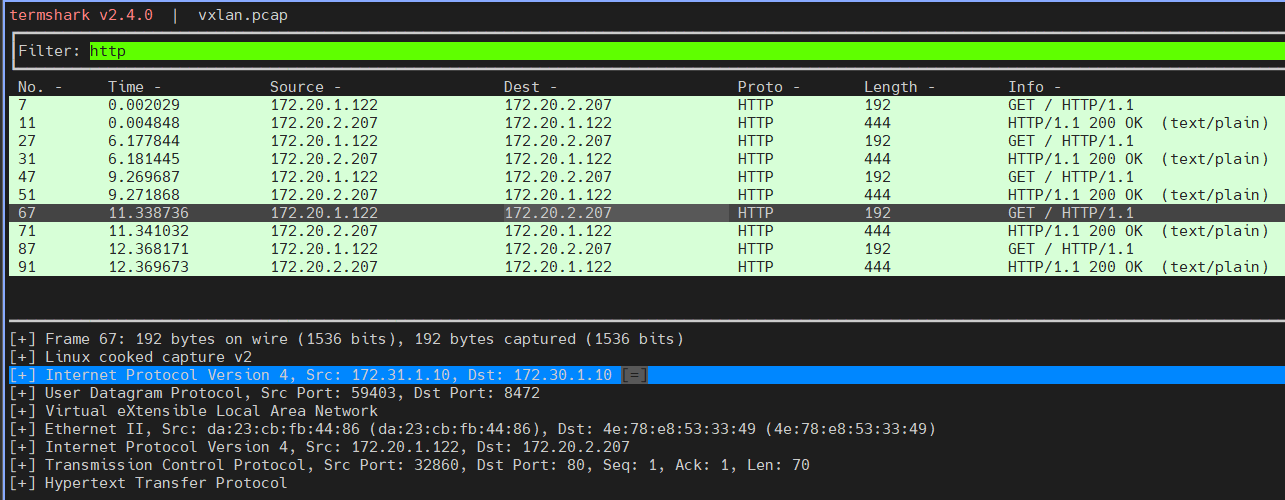 # 신규 터미널 [k8s-ctr] hubble flow log 모니터링 : overlay 통신 모드 확인! hubble observe -f --protocol tcp --pod curl-pod Aug 7 08:17:46.759: default/curl-pod:49100 (ID:13922) -> default/webpod-697b545f57-8xqpf:80 (ID:10718) to-endpoint FORWARDED (TCP Flags: ACK) Aug 7 08:17:46.760: default/curl-pod:49100 (ID:13922) -> default/webpod-697b545f57-8xqpf:80 (ID:10718) to-overlay FORWARDED (TCP Flags: ACK) Aug 7 08:17:47.781: default/curl-pod (ID:13922) <> 10.96.80.99:80 (world) pre-xlate-fwd TRACED (TCP) Aug 7 08:17:47.781: default/curl-pod (ID:13922) <> default/webpod-697b545f57-bs4cb:80 (ID:10718) post-xlate-fwd TRANSLATED (TCP) Aug 7 08:17:47.781: default/curl-pod:43868 (ID:13922) -> default/webpod-697b545f57-bs4cb:80 (ID:10718) to-endpoint FORWARDED (TCP Flags: SYN) Aug 7 08:17:47.782: default/curl-pod:43868 (ID:13922) <- default/webpod-697b545f57-bs4cb:80 (ID:10718) to-endpoint FORWARDED (TCP Flags: SYN, ACK) Aug 7 08:17:47.782: default/curl-pod:43868 (ID:13922) -> default/webpod-697b545f57-bs4cb:80 (ID:10718) to-endpoint FORWARDED (TCP Flags: ACK) Aug 7 08:17:47.782: default/curl-pod:43868 (ID:13922) -> default/webpod-697b545f57-bs4cb:80 (ID:10718) to-endpoint FORWARDED (TCP Flags: ACK, PSH) Aug 7 08:17:47.782: default/curl-pod:43868 (ID:13922) <> default/webpod-697b545f57-bs4cb (ID:10718) pre-xlate-rev TRACED (TCP) Aug 7 08:17:47.784: default/curl-pod:43868 (ID:13922) <- default/webpod-697b545f57-bs4cb:80 (ID:10718) to-endpoint FORWARDED (TCP Flags: ACK, PSH) Aug 7 08:17:47.785: default/curl-pod:43868 (ID:13922) -> default/webpod-697b545f57-bs4cb:80 (ID:10718) to-endpoint FORWARDED (TCP Flags: ACK, FIN) Aug 7 08:17:47.785: default/curl-pod:43868 (ID:13922) <- default/webpod-697b545f57-bs4cb:80 (ID:10718) to-endpoint FORWARDED (TCP Flags: ACK, FIN) |
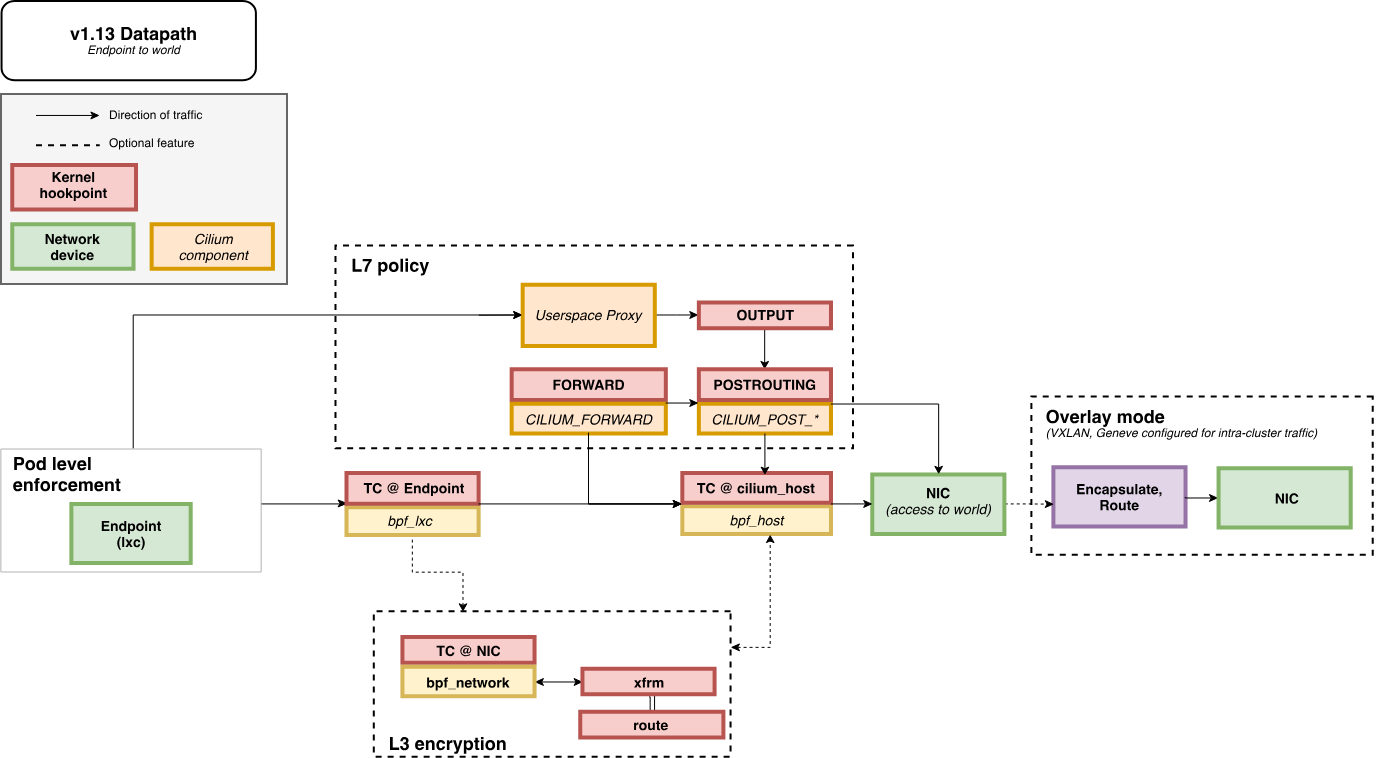
- POD 에서 빠져 나갈때
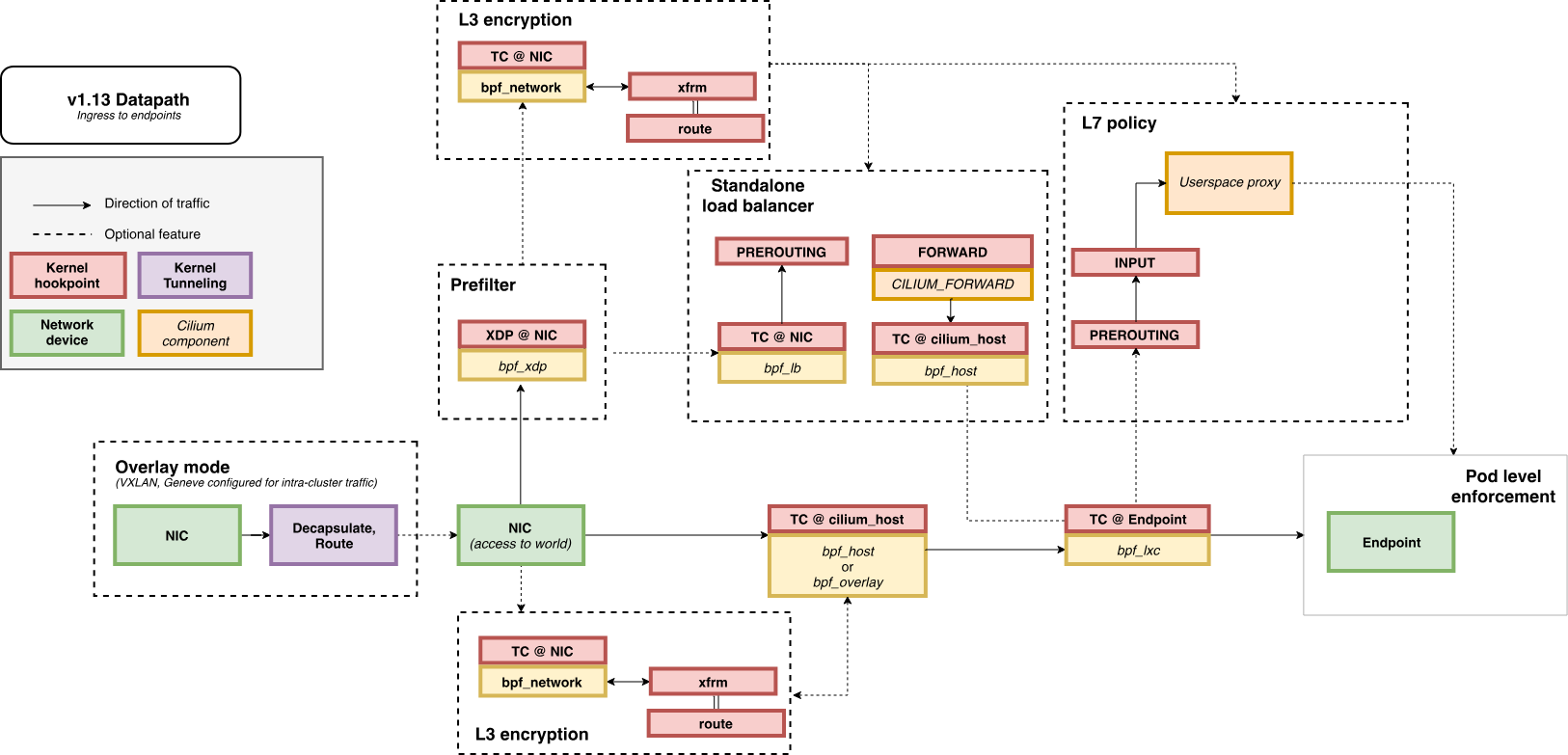
- POD 로 인입시
(참고) MTU, MSS
AWS에서의 MTU, MSS 이해 | Amazon Web Services
들어가며 레거시 이더넷 네트워크는 IEEE 802.3 표준에 따라 1500바이트의 MTU(Maximum Transmission Unit)를 기본값으로 사용합니다. 반면 AWS 클라우드 인프라는 9001바이트 점보 프레임(Jumbo Frames)을 지원함
aws.amazon.com
| # -M do : Don't Fragment (DF) 플래그를 설정하여 조각화 방지 # -s 1472 : 페이로드(payload) 크기, 즉 ICMP 데이터 크기 kubectl exec -it curl-pod -- ping -M do -s 1500 $WEBPOD PING 172.20.2.43 (172.20.2.43) 1500(1528) bytes of data. ping: sendmsg: Message too large |
'Kubernetes' 카테고리의 다른 글
| Cilium Study [1기] (6주차) - Cilium ServiceMesh (0) | 2025.08.19 |
|---|---|
| Cilium Study [1기] (5주차) - BGP Control Plane (4) | 2025.08.13 |
| Cilium Study [1기] (3주차) - Networking - 노드에 파드들간 통신 상세 1 (0) | 2025.07.28 |
| Cilium Study [1기] (2주차) - Observability (3) | 2025.07.26 |
| Cilium Study [1기] (1주차) - eBPF (2) | 2025.07.19 |