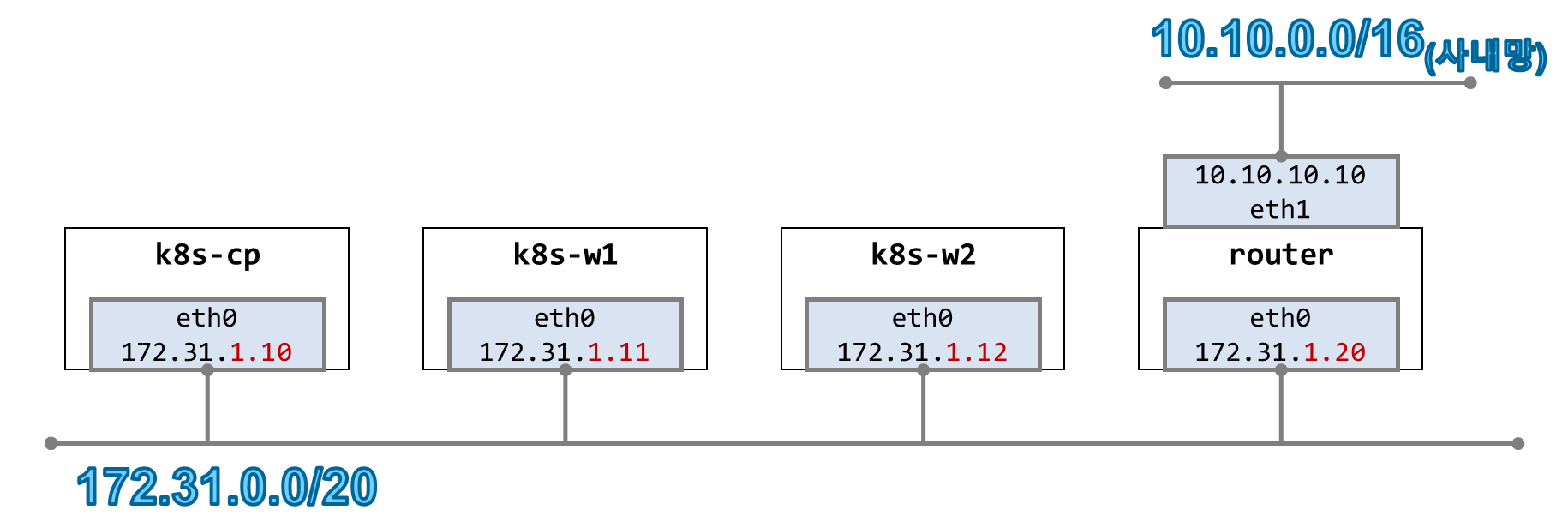
실습환경
- 윈도우 11 OS 에서 Vmware Workstation v17을 이용한 Linux 가상머신 4대
- Rocky Linux 9.6 (커널버전 : 5.14.0-570.26.1.el9_6.x86_64)
- k8s-cp 노드에도 POD가 배포될 수 있도록 taint 작업을 하였
1. 쿠버네티스 클러스터 구성
아래 명령을 이용하여 쿠버네티스 클러스터를 kube-proxy 없이, Native Routing 모드로 구성하였습니다
| helm repo add cilium https://helm.cilium.io/ # ipam 모드는 kubernetes로 하였음 helm install cilium cilium/cilium --version 1.17.6 --namespace kube-system \ --set k8sServiceHost=172.31.1.10 --set k8sServicePort=6443 \ --set ipam.mode="kubernetes" --set k8s.requireIPv4PodCIDR=true --set ipv4NativeRoutingCIDR=10.244.0.0/16 \ --set routingMode=native --set autoDirectNodeRoutes=true --set endpointRoutes.enabled=true \ --set kubeProxyReplacement=true --set bpf.masquerade=true --set installNoConntrackIptablesRules=true \ --set endpointHealthChecking.enabled=false --set healthChecking=false \ --set hubble.enabled=true --set hubble.relay.enabled=true --set hubble.ui.enabled=true \ --set hubble.ui.service.type=NodePort --set hubble.ui.service.nodePort=30003 \ --set prometheus.enabled=true --set operator.prometheus.enabled=true --set hubble.metrics.enableOpenMetrics=true \ --set hubble.metrics.enabled="{dns,drop,tcp,flow,port-distribution,icmp,httpV2:exemplars=true;labelsContext=source_ip\,source_namespace\,source_workload\,destination_ip\,destination_namespace\,destination_workload\,traffic_direction}" \ --set operator.replicas=1 --set debug.enabled=true #--set ipam.mode="cluster-pool" --set ipam.operator.clusterPoolIPv4PodCIDRList={"172.20.0.0/16"} --set ipv4NativeRoutingCIDR=172.20.0.0/16 \ # Install Cilium / Hubble CLI echo "[TASK 8] Install Cilium / Hubble CLI" CILIUM_CLI_VERSION=$(curl -s https://raw.githubusercontent.com/cilium/cilium-cli/main/stable.txt) CLI_ARCH=amd64 if [ "$(uname -m)" = "aarch64" ]; then CLI_ARCH=arm64; fi curl -L --fail --remote-name-all https://github.com/cilium/cilium-cli/releases/download/${CILIUM_CLI_VERSION}/cilium-linux-${CLI_ARCH}.tar.gz >/dev/null 2>&1 tar xzvfC cilium-linux-${CLI_ARCH}.tar.gz /usr/local/bin rm -fr cilium-linux-${CLI_ARCH}.tar.gz HUBBLE_VERSION=$(curl -s https://raw.githubusercontent.com/cilium/hubble/master/stable.txt) HUBBLE_ARCH=amd64 if [ "$(uname -m)" = "aarch64" ]; then HUBBLE_ARCH=arm64; fi curl -L --fail --remote-name-all https://github.com/cilium/hubble/releases/download/$HUBBLE_VERSION/hubble-linux-${HUBBLE_ARCH}.tar.gz >/dev/null 2>&1 tar xzvfC hubble-linux-${HUBBLE_ARCH}.tar.gz /usr/local/bin rm -fr hubble-linux-${HUBBLE_ARCH}.tar.gz # Remove node taint kubectl taint nodes k8s-cp node-role.kubernetes.io/control-plane- # Install Prometheus & Grafana" kubectl apply -f https://raw.githubusercontent.com/cilium/cilium/1.17.6/examples/kubernetes/addons/prometheus/monitoring-example.yaml >/dev/null 2>&1 kubectl patch svc -n cilium-monitoring prometheus -p '{"spec": {"type": "NodePort", "ports": [{"port": 9090, "targetPort": 9090, "nodePort": 30001}]}}' >/dev/null 2>&1 kubectl patch svc -n cilium-monitoring grafana -p '{"spec": {"type": "NodePort", "ports": [{"port": 3000, "targetPort": 3000, "nodePort": 30002}]}}' >/dev/null 2>&1 # Dynamically provisioning persistent local storage with Kubernetes kubectl apply -f https://raw.githubusercontent.com/rancher/local-path-provisioner/v0.0.31/deploy/local-path-storage.yaml >/dev/null 2>&1 kubectl patch storageclass local-path -p '{"metadata": {"annotations":{"storageclass.kubernetes.io/is-default-class":"true"}}}' >/dev/null 2>&1 |
클러스터 접속 후 기본정보 확인
| # 클러스터 정보 확인 kubectl cluster-info Kubernetes control plane is running at https://172.31.1.10:6443 CoreDNS is running at https://172.31.1.10:6443/api/v1/namespaces/kube-system/services/kube-dns:dns/proxy To further debug and diagnose cluster problems, use 'kubectl cluster-info dump'. kubectl cluster-info dump | grep -m 2 -E "cluster-cidr|service-cluster-ip-range" "--service-cluster-ip-range=10.96.0.0/12", "--cluster-cidr=192.168.0.0/16", # 파드 정보 : 상태, 파드 IP 확인 kubectl get nodes -o jsonpath='{range .items[*]}{.metadata.name}{"\t"}{.spec.podCIDR}{"\n"}{end}' k8s-cp 192.168.0.0/24 k8s-w1 192.168.1.0/24 k8s-w2 192.168.2.0/24 kubectl get ciliumnode -o json | grep podCIDRs -A2 "podCIDRs": [ "192.168.0.0/24" ], -- "podCIDRs": [ "192.168.1.0/24" ], -- "podCIDRs": [ "192.168.2.0/24" ], kubectl get pod -A -owide NAMESPACE NAME READY STATUS RESTARTS AGE IP NODE NOMINATED NODE READINESS GATES cilium-monitoring grafana-5c69859d9-xg49l 1/1 Running 0 14m 192.168.1.158 k8s-w1 <none> <none> cilium-monitoring prometheus-6fc896bc5d-bh248 1/1 Running 0 14m 192.168.1.30 k8s-w1 <none> <none> kube-system cilium-2c7dp 1/1 Running 0 23m 172.31.1.12 k8s-w2 <none> <none> kube-system cilium-envoy-k6wm5 1/1 Running 0 23m 172.31.1.11 k8s-w1 <none> <none> kube-system cilium-envoy-q8lmn 1/1 Running 0 23m 172.31.1.10 k8s-cp <none> <none> kube-system cilium-envoy-rxkdb 1/1 Running 0 23m 172.31.1.12 k8s-w2 <none> <none> kube-system cilium-operator-79f7b78b85-x6jz4 1/1 Running 0 23m 172.31.1.11 k8s-w1 <none> <none> kube-system cilium-pjzjg 1/1 Running 0 23m 172.31.1.11 k8s-w1 <none> <none> kube-system cilium-sg9nd 1/1 Running 0 23m 172.31.1.10 k8s-cp <none> <none> kube-system coredns-674b8bbfcf-f46nc 1/1 Running 0 12d 192.168.2.166 k8s-w2 <none> <none> kube-system coredns-674b8bbfcf-wjxkw 1/1 Running 0 12d 192.168.2.176 k8s-w2 <none> <none> kube-system etcd-k8s-cp 1/1 Running 2 (37m ago) 12d 172.31.1.10 k8s-cp <none> <none> kube-system hubble-relay-5dcd46f5c-j9vsm 1/1 Running 0 23m 192.168.2.109 k8s-w2 <none> <none> kube-system hubble-ui-76d4965bb6-z26nj 2/2 Running 0 23m 192.168.2.29 k8s-w2 <none> <none> kube-system kube-apiserver-k8s-cp 1/1 Running 2 (37m ago) 12d 172.31.1.10 k8s-cp <none> <none> kube-system kube-controller-manager-k8s-cp 1/1 Running 2 (37m ago) 12d 172.31.1.10 k8s-cp <none> <none> kube-system kube-scheduler-k8s-cp 1/1 Running 2 (37m ago) 12d 172.31.1.10 k8s-cp <none> <none> local-path-storage local-path-provisioner-74f9666bc9-lhsvf 1/1 Running 0 13m 192.168.1.174 k8s-w1 <none> <none> # ipam 모드 확인 cilium config view | grep ^ipam ipam kubernetes |
위 설정확인에서 ipam 모드가 kubernetes 인것은
컨트롤러 매니저에 의해서 노드별로 중첩되지 않게 발급 받은 POD CIDR 값을 CILIUM CNI에서 POD의 IP로 사용
그래서 POD의 IP를 확인해보면 192.168.0.0/16 IP 대역을 할당받습니다.
| kubectl get ciliumendpoints -A NAMESPACE NAME SECURITY IDENTITY ENDPOINT STATE IPV4 IPV6 cilium-monitoring grafana-5c69859d9-xg49l 8378 ready 192.168.1.158 cilium-monitoring prometheus-6fc896bc5d-bh248 43979 ready 192.168.1.30 kube-system coredns-674b8bbfcf-f46nc 23480 ready 192.168.2.166 kube-system coredns-674b8bbfcf-wjxkw 23480 ready 192.168.2.176 kube-system hubble-relay-5dcd46f5c-j9vsm 24442 ready 192.168.2.109 kube-system hubble-ui-76d4965bb6-z26nj 1580 ready 192.168.2.29 local-path-storage local-path-provisioner-74f9666bc9-lhsvf 9730 ready 192.168.1.174 |
유틸리티 설치
K9S 설치
모니터링을 원할히 하기 위해 k9s 툴을 설치하겠습니다.
- Kubernetes CLI To Manage Your Clusters In Style!
- https://github.com/derailed/k9s
| # amd64 CPU + Rcoky Linux wget https://github.com/derailed/k9s/releases/download/v0.50.9/k9s_linux_amd64.rpm -O /tmp/k9s_linux_amd64.rpm dnf localinstall /tmp/k9s_linux_amd64.rpm |
- The Command Line
| # List current version k9s version # To get info about K9s runtime (logs, configs, etc..) k9s info # List all available CLI options k9s help # To run K9s in a given namespace k9s -n mycoolns # Start K9s in an existing KubeConfig context k9s --context coolCtx # Start K9s in readonly mode - with all cluster modification commands disabled k9s --readonly |
- Key Bindings
| Action | Command | Comment |
| Show active keyboard mnemonics and help | ? | |
| Show all available resource alias | ctrl-a | |
| To bail out of K9s | :quit, :q, ctrl-c | |
| To go up/back to the previous view | esc | If you have crumbs on, this will go to the previous one |
| View a Kubernetes resource using singular/plural or short-name | :pod⏎ | accepts singular, plural, short-name or alias ie pod or pods |
| View a Kubernetes resource in a given namespace | :pod ns-x⏎ | |
| View filtered pods (New v0.30.0!) | :pod /fred⏎ | View all pods filtered by fred |
| View labeled pods (New v0.30.0!) | :pod app=fred,env=dev⏎ | View all pods with labels matching app=fred and env=dev |
| View pods in a given context (New v0.30.0!) | :pod @ctx1⏎ | View all pods in context ctx1. Switches out your current k9s context! |
| Filter out a resource view given a filter | /filter⏎ | Regex2 supported ie `fred |
| Inverse regex filter | /! filter⏎ | Keep everything that doesn't match. |
| Filter resource view by labels | /-l label-selector⏎ | |
| Fuzzy find a resource given a filter | /-f filter⏎ | |
| Bails out of view/command/filter mode | <esc> | |
| Key mapping to describe, view, edit, view logs,... | d,v, e, l,... | |
| To view and switch to another Kubernetes context (Pod view) | :ctx⏎ | |
| To view and switch directly to another Kubernetes context (Last used view) | :ctx context-name⏎ | |
| To view and switch to another Kubernetes namespace | :ns⏎ | |
| To switch back to the last active command (like how "cd -" works) | - | Navigation that adds breadcrumbs to the bottom are not commands |
| To go back and forward through the command history | back: [, forward: ] | Same as above |
| To view all saved resources | :screendump or sd⏎ | |
| To delete a resource (TAB and ENTER to confirm) | ctrl-d | |
| To kill a resource (no confirmation dialog, equivalent to kubectl delete --now) | ctrl-k | |
| Launch pulses view | :pulses or pu⏎ | |
| Launch XRay view | :xray RESOURCE [NAMESPACE]⏎ | RESOURCE can be one of po, svc, dp, rs, sts, ds, NAMESPACE is optional |
| Launch Popeye view | :popeye or pop⏎ | See popeye |
termshark
- CLI 에서 wireshark 수행
| # 설치 dnf install -y wireshark-cli wget https://github.com/gcla/termshark/releases/download/v2.4.0/termshark_2.4.0_linux_x64.tar.gz /tmp/termshark_2.4.0_linux_x64.tar.gz tar -xzf /tmp/termshark_2.4.0_linux_x64.tar.gz mv /tmp/termshark_2.4.0_linux_x64/termshark /usr/local/bin # Inspect a local pcap: termshark -r test.pcap # Capture ping packets on interface eth0: termshark -i eth0 icmp |
IPAM (IP Address Management)
- https://docs.cilium.io/en/stable/network/concepts/ipam/
- 네트워크 엔드포인트(컨테이너 및 기타)에서 관리하는 IP 주소 할당 및 관리를 담당합니다.
- Cilium은 다양한 사용자의 요구를 충족시키기 위해 다양한 IPAM 모드가 지원됩니다.
| Feature | Kubernetes Host Scope | Cluster Scope (default) |
Multi-Pool | CRD-backed | AWS ENI | Azure IPAM | GKE |
| Tunnel routing | ✅ | ✅ | ❌ | ❌ | ❌ | ❌ | ❌ |
| Direct routing | ✅ | ✅ | ✅ | ✅ | ✅ | ✅ | ✅ |
| CIDR Configuration | Kubernetes | Cilium | Cilium | External | External (AWS) | External (Azure) | External (GCP) |
| Multiple CIDRs per cluster | ❌ | ✅ | ✅ | N/A | N/A | N/A | N/A |
| Multiple CIDRs per node | ❌ | ❌ | ✅ | N/A | N/A | N/A | N/A |
| Dynamic CIDR/IP allocation | ❌ | ❌ | ✅ | ✅ | ✅ | ✅ | ❌ |
기존 클러스터의 IPAM 모드를 변경하지 마세요.
라이브 환경에서 IPAM 모드를 변경하면 기존 워크로드의 지속적인 연결 중단이 발생할 수 있습니다.
IPAM 모드를 변경하는 가장 안전한 방법은 새로운 IPAM 구성으로 새로운 Kubernetes 클러스터를 설치하는 것입니다.
Kubernetes Host Scope
- https://docs.cilium.io/en/stable/network/concepts/ipam/kubernetes/
- 컨트롤러 매니저에 의해서 노드별로 중첩되지 않게 발급 받은 POD CIDR 값을 CILIUM CNI에서 POD의 IP로 사용합니다.
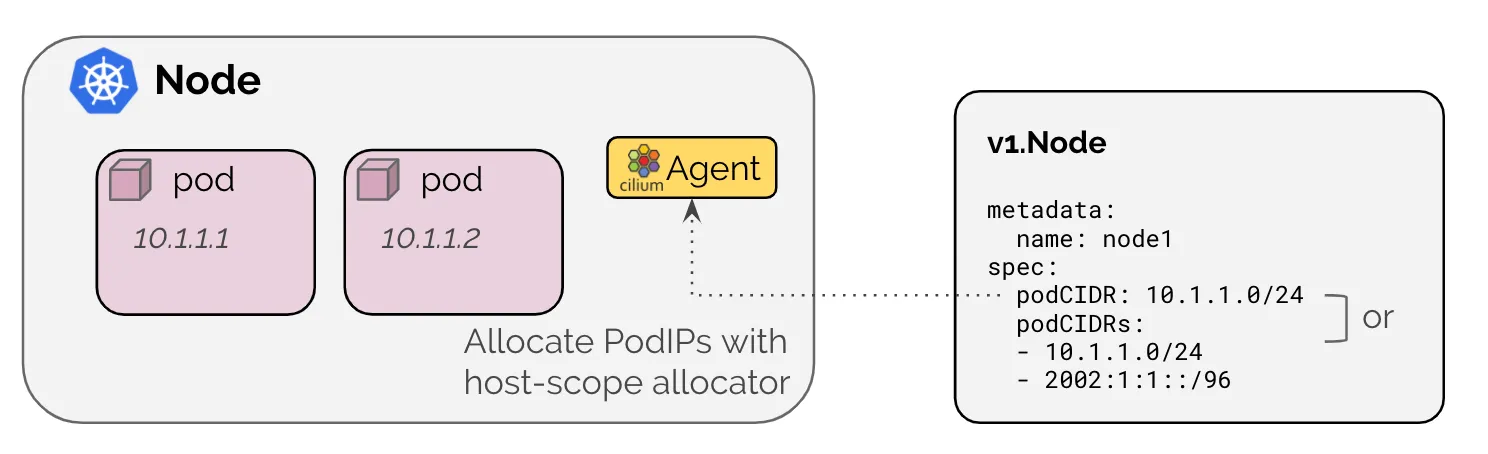
- Kubernetes 호스트 범위 IPAM 모드는 ipam: Kubernetes에서 활성화되며 클러스터의 각 개별 노드에 주소 할당을 위임합니다.
- IP는 Kubernetes에 의해 각 노드에 연결된 PodCIDR 범위에서 할당됩니다.
- 노드별로 기본 subnet mask 는 16 bit 입니다.
- 이 모드에서는 Cilium 에이전트가 Kubernetes v1.Node 객체를 통해 PodCIDR 범위가 다음 방법 중 하나를 통해 활성화된 모든 주소 패밀리에 대해 제공될 때까지 시작 시 대기합니다:
| # 클러스터 정보 확인 kubectl cluster-info dump | grep -m 2 -E "cluster-cidr|service-cluster-ip-range" "--service-cluster-ip-range=10.96.0.0/12", "--cluster-cidr=192.168.0.0/16", # ipam 모드 확인 cilium config view | grep ^ipam ipam kubernetes ipam-cilium-node-update-rate 15s # 노드별 파드에 할당되는 IPAM(PodCIDR) 정보 확인 # --allocate-node-cidrs=true 로 설정된 kube-controller-manager에서 CIDR을 자동 할당함 kubectl get nodes -o jsonpath='{range .items[*]}{.metadata.name}{"\t"}{.spec.podCIDR}{"\n"}{end}' k8s-cp 192.168.0.0/24 k8s-w1 192.168.1.0/24 k8s-w2 192.168.2.0/24 k describe pod -n kube-system kube-controller-manager-k8s-cp ... Command: kube-controller-manager --allocate-node-cidrs=true --authentication-kubeconfig=/etc/kubernetes/controller-manager.conf --authorization-kubeconfig=/etc/kubernetes/controller-manager.conf --bind-address=127.0.0.1 --client-ca-file=/etc/kubernetes/pki/ca.crt --cluster-cidr=192.168.0.0/16 --cluster-name=kubernetes --cluster-signing-cert-file=/etc/kubernetes/pki/ca.crt --cluster-signing-key-file=/etc/kubernetes/pki/ca.key --controllers=*,bootstrapsigner,tokencleaner --kubeconfig=/etc/kubernetes/controller-manager.conf --leader-elect=true --requestheader-client-ca-file=/etc/kubernetes/pki/front-proxy-ca.crt --root-ca-file=/etc/kubernetes/pki/ca.crt --service-account-private-key-file=/etc/kubernetes/pki/sa.key --service-cluster-ip-range=10.96.0.0/12 --use-service-account-credentials=true ... kubectl get ciliumnode -o json | grep podCIDRs -A2 "podCIDRs": [ "192.168.0.0/24" ], -- "podCIDRs": [ "192.168.1.0/24" ], -- "podCIDRs": [ "192.168.2.0/24" ], # 파드 정보 : 상태, 파드 IP 확인 kubectl get ciliumendpoints.cilium.io -A NAMESPACE NAME SECURITY IDENTITY ENDPOINT STATE IPV4 IPV6 cilium-monitoring grafana-5c69859d9-xg49l 8378 ready 192.168.1.158 cilium-monitoring prometheus-6fc896bc5d-bh248 43979 ready 192.168.1.30 kube-system coredns-674b8bbfcf-f46nc 23480 ready 192.168.2.166 kube-system coredns-674b8bbfcf-wjxkw 23480 ready 192.168.2.176 kube-system hubble-relay-5dcd46f5c-j9vsm 24442 ready 192.168.2.109 kube-system hubble-ui-76d4965bb6-z26nj 1580 ready 192.168.2.29 local-path-storage local-path-provisioner-74f9666bc9-lhsvf 9730 ready 192.168.1.174 |
* 샘플 어플리케이션 배포
# 샘플 애플리케이션 배포
cat << EOF | kubectl apply -f -
apiVersion: apps/v1
kind: Deployment
metadata:
  name: webpod
spec:
  replicas: 2
  selector:
    matchLabels:
      app: webpod
  template:
    metadata:
      labels:
        app: webpod
    spec:
      affinity:
        podAntiAffinity:
          requiredDuringSchedulingIgnoredDuringExecution:
          - labelSelector:
              matchExpressions:
              - key: app
                operator: In
                values:
                - sample-app
            topologyKey: "kubernetes.io/hostname"
      containers:
      - name: webpod
        image: traefik/whoami
        ports:
        - containerPort: 80
---
apiVersion: v1
kind: Service
metadata:
  name: webpod
  labels:
    app: webpod
spec:
  selector:
    app: webpod
  ports:
  - protocol: TCP
    port: 80
    targetPort: 80
  type: ClusterIP
EOF


# k8s-cp 노드에 curl-pod 파드 배포
cat <<EOF | kubectl apply -f -
apiVersion: v1
kind: Pod
metadata:
  name: curl-pod
  labels:
    app: curl
spec:
  nodeName: k8s-cp
  containers:
  - name: curl
    image: nicolaka/netshoot
    command: ["tail"]
    args: ["-f", "/dev/null"]
  terminationGracePeriodSeconds: 0
EOF
확인
| # 배포 확인 kubectl get deploy,svc,ep webpod -owide NAME READY UP-TO-DATE AVAILABLE AGE CONTAINERS IMAGES SELECTOR deployment.apps/webpod 2/2 2 2 3m33s webpod traefik/whoami app=webpod NAME TYPE CLUSTER-IP EXTERNAL-IP PORT(S) AGE SELECTOR service/webpod ClusterIP 10.98.230.97 <none> 80/TCP 3m33s app=webpod NAME ENDPOINTS AGE endpoints/webpod 192.168.1.248:80,192.168.2.74:80 3m33s kubectl get endpointslices -l app=webpod NAME ADDRESSTYPE PORTS ENDPOINTS AGE webpod-cbpfn IPv4 80 192.168.1.248,192.168.2.74 3m51s kubectl get ciliumendpoints # IP 확인 NAME SECURITY IDENTITY ENDPOINT STATE IPV4 IPV6 curl-pod 21980 ready 192.168.0.151 webpod-697b545f57-c8xhr 2803 ready 192.168.2.74 webpod-697b545f57-hmr9s 2803 ready 192.168.1.248 kubectl exec -it -n kube-system ds/cilium -c cilium-agent -- cilium-dbg endpoint list ENDPOINT POLICY (ingress) POLICY (egress) IDENTITY LABELS (source:key[=value]) IPv6 IPv4 STATUS ENFORCEMENT ENFORCEMENT 222 Disabled Disabled 23480 k8s:io.ciliuhttp://m.k8s.namespace.labels.kubernetes.io/metadata.name=kube-system 192.168.2.166 ready k8s:io.ciliuhttp://m.k8s.policy.cluster=default k8s:io.ciliuhttp://m.k8s.policy.serviceaccount=coredns k8s:io.kubernetes.pod.namespace=kube-system k8s:k8s-app=kube-dns 311 Disabled Disabled 23480 k8s:io.ciliuhttp://m.k8s.namespace.labels.kubernetes.io/metadata.name=kube-system 192.168.2.176 ready k8s:io.ciliuhttp://m.k8s.policy.cluster=default k8s:io.ciliuhttp://m.k8s.policy.serviceaccount=coredns k8s:io.kubernetes.pod.namespace=kube-system k8s:k8s-app=kube-dns 892 Disabled Disabled 24442 k8s:app.kubernetes.io/name=hubble-relay 192.168.2.109 ready k8s:app.kubernetes.io/part-of=cilium k8s:io.ciliuhttp://m.k8s.namespace.labels.kubernetes.io/metadata.name=kube-system k8s:io.ciliuhttp://m.k8s.policy.cluster=default k8s:io.ciliuhttp://m.k8s.policy.serviceaccount=hubble-relay k8s:io.kubernetes.pod.namespace=kube-system k8s:k8s-app=hubble-relay 939 Disabled Disabled 2803 k8s:app=webpod 192.168.2.74 ready k8s:io.ciliuhttp://m.k8s.namespace.labels.kubernetes.io/metadata.name=default k8s:io.ciliuhttp://m.k8s.policy.cluster=default k8s:io.ciliuhttp://m.k8s.policy.serviceaccount=default k8s:io.kubernetes.pod.namespace=default 1334 Disabled Disabled 1 reserved:host ready 2284 Disabled Disabled 1580 k8s:app.kubernetes.io/name=hubble-ui 192.168.2.29 ready k8s:app.kubernetes.io/part-of=cilium k8s:io.ciliuhttp://m.k8s.namespace.labels.kubernetes.io/metadata.name=kube-system k8s:io.ciliuhttp://m.k8s.policy.cluster=default k8s:io.ciliuhttp://m.k8s.policy.serviceaccount=hubble-ui k8s:io.kubernetes.pod.namespace=kube-system k8s:k8s-app=hubble-ui # 통신 확인 kubectl exec -it curl-pod -- curl webpod | grep Hostname Hostname: webpod-697b545f57-hmr9s kubectl exec -it curl-pod -- sh -c 'while true; do curl -s webpod | grep Hostname; sleep 1; done' Hostname: webpod-697b545f57-c8xhr Hostname: webpod-697b545f57-hmr9s Hostname: webpod-697b545f57-c8xhr Hostname: webpod-697b545f57-c8xhr Hostname: webpod-697b545f57-c8xhr Hostname: webpod-697b545f57-hmr9s Hostname: webpod-697b545f57-c8xhr |
hubble 확인
| # hubble ui 웹 접속 주소 확인 : default 네임스페이스 확인 NODEIP=$(ip -4 addr show ens160 | grep -oP '(?<=inet\s)\d+(\.\d+){3}') echo -e "http://$NODEIP:30003" http://172.31.1.10:30003 # hubble relay 포트 포워딩 실행 cilium hubble port-forward& hubble status Healthcheck (via localhost:4245): Ok Current/Max Flows: 11,141/12,285 (90.69%) Flows/s: 15.75 Connected Nodes: 3/3 # flow log 모니터링 hubble observe -f --protocol tcp --to-pod curl-pod hubble observe -f --protocol tcp --from-pod curl-pod hubble observe -f --protocol tcp --pod curl-pod # 통신 확인 kubectl exec -it curl-pod -- curl webpod | grep Hostname |
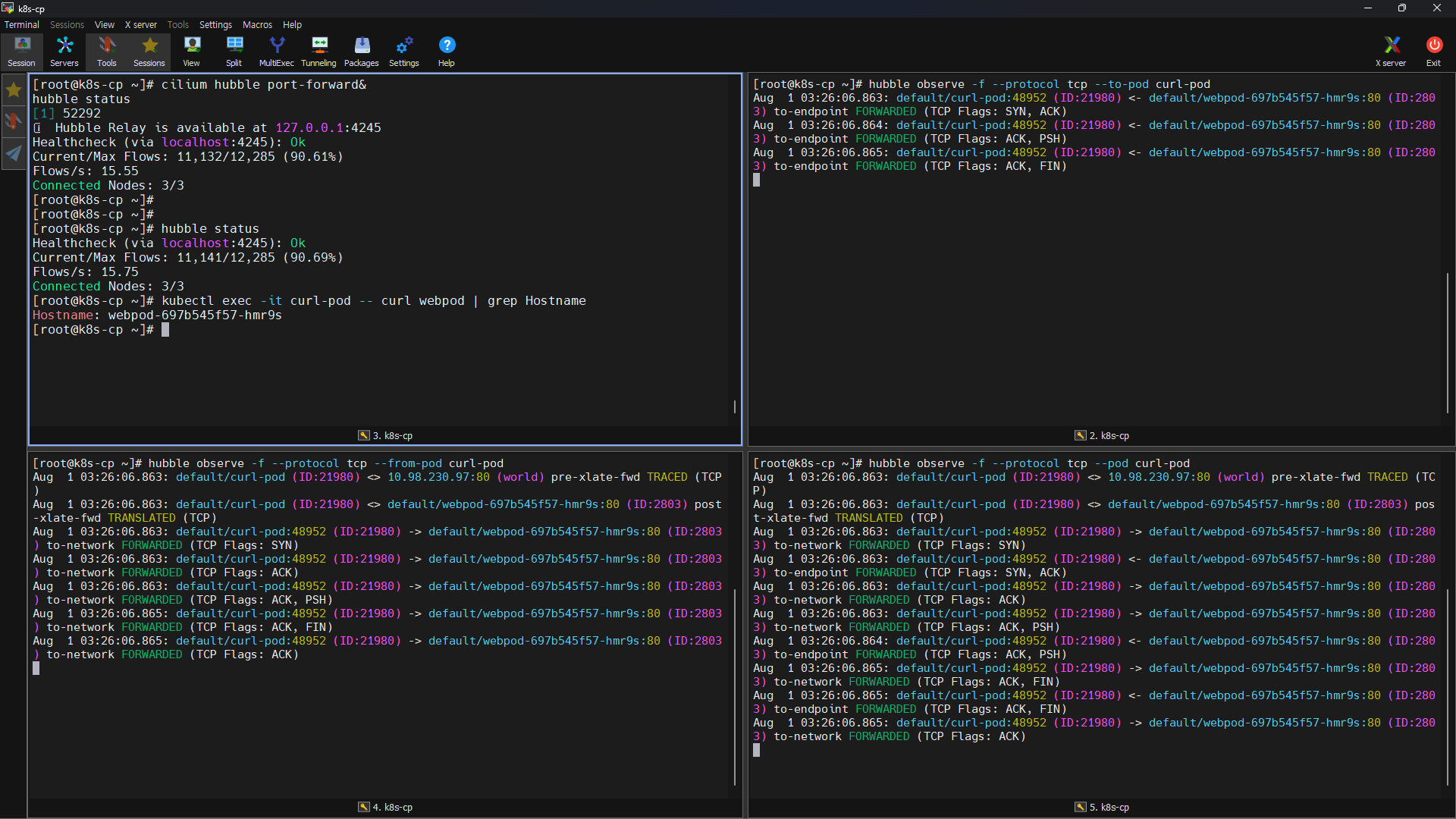
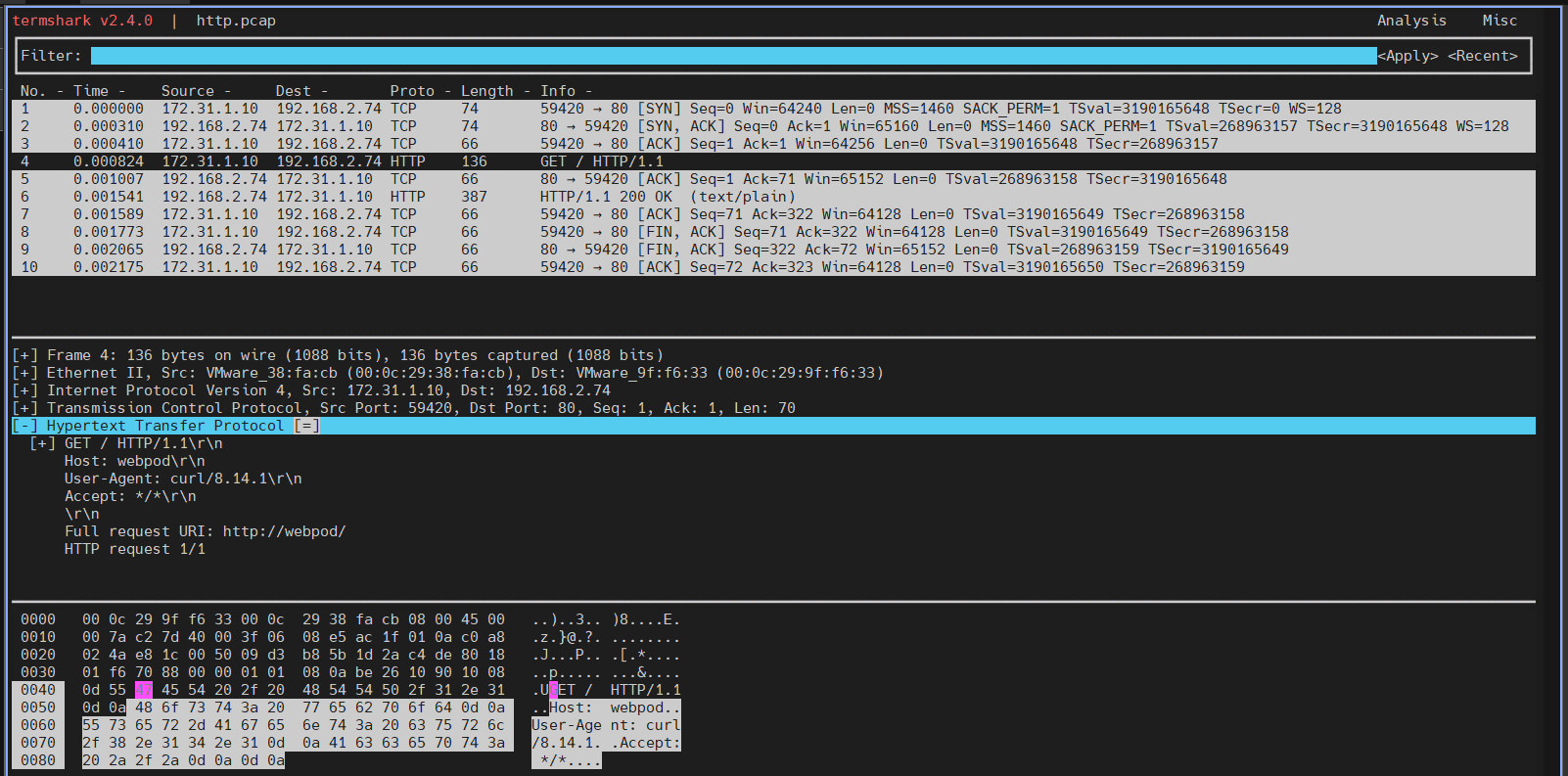
| pre-xlate-fwd , TRACED : NAT (IP 변환) 전 , 추적 중인 flow post-xlate-fwd , TRANSLATED : NAT 후의 흐름 , NAT 변환이 일어났음 # tcpdump 확인 tcpdump -i ens160 tcp port 80 -w /tmp/http.pcap termshark -r /tmp/http.pcap |
[Cilium] Cluster Scope & 마이그레이션 실습
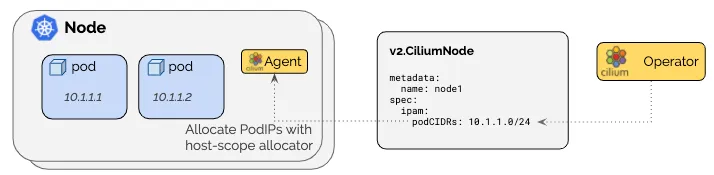
- 클러스터 범위 IPAM 모드는 각 노드에 노드별 PodCIDR을 할당하고 각 노드에 호스트 범위 할당기를 사용하여 IP를 할당합니다.
- 따라서 이 모드는 Kubernetes 호스트 범위 모드와 유사합니다.
- 차이점은 Kubernetes가 Kubernetes v1.Node 리소스를 통해 노드별 PodCIDR을 할당하는 대신, Cilium Operator가 v2.CiliumNode 리소스(CRD)를 통해 노드별 PodCIDR을 관리한다는 점입니다.
- 이 모드의 장점은 Kubernetes가 노드별 PodCIDR을 나눠주도록 구성되는 것에 의존하지 않는다는 점입니다.
- 최소 마스크 길이는 /30이며 권장 최소 마스크 길이는 /29 이상입니다. 2개 주소는 예약됨(네트워크, 브로드캐스트 주소)
- 10.0.0.0/8 is the default pod CIDR. clusterPoolIPv4PodCIDRList
| # 반복 요청 해두기 kubectl exec -it curl-pod -- sh -c 'while true; do curl -s webpod | grep Hostname; sleep 1; done' # Helm 차트 버전 확인 helm list -A NAME NAMESPACE REVISION UPDATED STATUS CHART APP VERSION cilium kube-system 1 2025-08-01 10:36:27.324481224 +0900 KST deployed cilium-1.17.6 1.17.6 # IPAM 모드를 Cluster Scopre 로 설정 변경 helm upgrade cilium cilium/cilium --namespace kube-system --version 1.17.6 --reuse-values \ --set ipam.mode="cluster-pool" \ --set ipam.operator.clusterPoolIPv4PodCIDRList={"172.20.0.0/16"} \ --set ipv4NativeRoutingCIDR=172.20.0.0/16 Release "cilium" has been upgraded. Happy Helming! NAME: cilium LAST DEPLOYED: Fri Aug 1 13:05:28 2025 NAMESPACE: kube-system STATUS: deployed REVISION: 2 TEST SUITE: None NOTES: You have successfully installed Cilium with Hubble Relay and Hubble UI. Your release version is 1.17.6. For any further help, visit https://docs.cilium.io/en/v1.17/gettinghelp # IPAM 모드를 바꾸면 cilium-operator 와 cilium-agent 재시작 해야함 kubectl -n kube-system rollout restart deploy/cilium-operator kubectl -n kube-system rollout restart ds/cilium # 변경 확인 kubectl get nodes -o jsonpath='{range .items[*]}{.metadata.name}{"\t"}{.spec.podCIDR}{"\n"}{end}' k8s-cp 192.168.0.0/24 k8s-w1 192.168.1.0/24 k8s-w2 192.168.2.0/24 cilium config view | grep ^ipam ipam cluster-pool ipam-cilium-node-update-rate 15s # ciliumnode 는 아직 안 바뀌었음 kubectl get ciliumnode -o json | grep podCIDRs -A2 "podCIDRs": [ "192.168.0.0/24" ], -- "podCIDRs": [ "192.168.1.0/24" ], -- "podCIDRs": [ "192.168.2.0/24" kubectl get ciliumendpoints.cilium.io -A NAMESPACE NAME SECURITY IDENTITY ENDPOINT STATE IPV4 IPV6 cilium-monitoring grafana-5c69859d9-xg49l 8378 ready 192.168.1.74 cilium-monitoring prometheus-6fc896bc5d-bh248 43979 ready 192.168.1.132 default curl-pod 21980 ready 192.168.0.253 default webpod-697b545f57-c8xhr 2803 ready 192.168.2.98 default webpod-697b545f57-hmr9s 2803 ready 192.168.1.50 kube-system coredns-674b8bbfcf-f46nc 23480 ready 192.168.2.207 kube-system coredns-674b8bbfcf-wjxkw 23480 ready 192.168.2.206 kube-system hubble-relay-5dcd46f5c-j9vsm 24442 ready 192.168.2.99 kube-system hubble-ui-76d4965bb6-z26nj 1580 ready 192.168.2.205 local-path-storage local-path-provisioner-74f9666bc9-lhsvf 9730 ready 192.168.1.251 # k8s-w1, k8s-w2 ciliumnode 리소스를 삭제하고 cilium-agent 재시작 kubectl delete ciliumnode k8s-w1 kubectl -n kube-system rollout restart ds/cilium # k8s-w1, k8s-w2 는 podCIDR 가 바뀌었음 kubectl get ciliumnode -o json | grep podCIDRs -A2 "podCIDRs": [ "192.168.0.0/24" ], -- "podCIDRs": [ "172.20.2.0/24" ], -- "podCIDRs": [ "172.20.1.0/24" ], kubectl get ciliumendpoints.cilium.io -A NAMESPACE NAME SECURITY IDENTITY ENDPOINT STATE IPV4 IPV6 default curl-pod 21980 ready 192.168.0.253 kube-system coredns-674b8bbfcf-gb4zw 23480 ready 192.168.0.174 kube-system coredns-674b8bbfcf-klpd9 23480 ready 172.20.2.5 # k8s-cp 도 ciliumnode 리소스를 삭제하고 cilium-agent 재시작 kubectl delete ciliumnode k8s-cp kubectl -n kube-system rollout restart ds/cilium kubectl get ciliumnode -o json | grep podCIDRs -A2 "podCIDRs": [ "172.20.3.0/24" ], -- "podCIDRs": [ "172.20.2.0/24" ], -- "podCIDRs": [ "172.20.1.0/24" ], kubectl get ciliumendpoints.cilium.io -A NAMESPACE NAME SECURITY IDENTITY ENDPOINT STATE IPV4 IPV6 kube-system coredns-674b8bbfcf-6smpx 23480 ready 172.20.3.59 kube-system coredns-674b8bbfcf-klpd9 23480 ready 172.20.2.5 # 노드의 poccidr static routing 자동 변경 적용 확인 ip -c route default via 172.31.0.2 dev ens160 proto static metric 100 172.20.1.0/24 via 172.31.1.12 dev ens160 proto kernel 172.20.2.0/24 via 172.31.1.11 dev ens160 proto kernel 172.20.3.59 dev lxcb1e4a05c280a proto kernel scope link 172.31.0.0/20 dev ens160 proto kernel scope link src 172.31.1.10 metric 100 ssh k8s-w1 ip -c route default via 172.31.0.2 dev ens160 proto static metric 100 172.20.1.0/24 via 172.31.1.12 dev ens160 proto kernel 172.20.2.5 dev lxce2f067daf3de proto kernel scope link 172.20.3.0/24 via 172.31.1.10 dev ens160 proto kernel 172.31.0.0/20 dev ens160 proto kernel scope link src 172.31.1.11 metric 100 ssh k8s-w2 ip -c route default via 172.31.0.2 dev ens160 proto static metric 100 172.20.2.0/24 via 172.31.1.11 dev ens160 proto kernel 172.20.3.0/24 via 172.31.1.10 dev ens160 proto kernel 172.31.0.0/20 dev ens160 proto kernel scope link src 172.31.1.12 metric 100 # 기존 POD 에 할당된 IP는 변경되지 않고 있어, 직접 rollout restart kubectl get pod -A -owide | grep 192.168 cilium-monitoring grafana-5c69859d9-xg49l 0/1 Running 1 (112m ago) 4h4m 192.168.1.74 k8s-w1 <none> <none> cilium-monitoring prometheus-6fc896bc5d-bh248 1/1 Running 1 (112m ago) 4h4m 192.168.1.132 k8s-w1 <none> <none> default curl-pod 1/1 Running 1 (112m ago) 154m 192.168.0.253 k8s-cp <none> <none> default webpod-697b545f57-c8xhr 1/1 Running 1 (112m ago) 154m 192.168.2.98 k8s-w2 <none> <none> default webpod-697b545f57-hmr9s 1/1 Running 1 (112m ago) 154m 192.168.1.50 k8s-w1 <none> <none> kube-system hubble-relay-5dcd46f5c-j9vsm 0/1 CrashLoopBackOff 7 (3m28s ago) 4h13m 192.168.2.99 k8s-w2 <none> <none> kube-system hubble-ui-76d4965bb6-z26nj 1/2 Running 10 (9s ago) 4h13m 192.168.2.205 k8s-w2 <none> <none> local-path-storage local-path-provisioner-74f9666bc9-lhsvf 1/1 Running 1 (112m ago) 4h3m 192.168.1.251 k8s-w1 <none> <none> kubectl -n kube-system rollout restart deploy/hubble-relay deploy/hubble-ui kubectl -n cilium-monitoring rollout restart deploy/prometheus deploy/grafana kubectl rollout restart deploy/webpod # curl-pod는 삭제할 수 밖에 없음 kubectl delete pod curl-pod # cilium hubble port-forward& # k8s-cp 노드에 curl-pod 파드 배포 cat <<EOF | kubectl apply -f - apiVersion: v1 kind: Pod metadata: name: curl-pod labels: app: curl spec: nodeName: k8s-cp containers: - name: curl image: nicolaka/netshoot command: ["tail"] args: ["-f", "/dev/null"] terminationGracePeriodSeconds: 0 EOF # 이제 모든 파드의 IP 변경되었습니다. kubectl get ciliumendpoints.cilium.io -A NAMESPACE NAME SECURITY IDENTITY ENDPOINT STATE IPV4 IPV6 cilium-monitoring grafana-5f9d9b46f8-tw864 8378 ready 172.20.3.60 cilium-monitoring prometheus-7544bcbd57-9frcl 43979 ready 172.20.2.166 default curl-pod 21980 ready 172.20.3.202 default webpod-6b856ccb68-mb5fs 2803 ready 172.20.1.34 default webpod-6b856ccb68-mwnfj 2803 ready 172.20.2.22 kube-system coredns-674b8bbfcf-6smpx 23480 ready 172.20.3.59 kube-system coredns-674b8bbfcf-klpd9 23480 ready 172.20.2.5 kube-system hubble-relay-79c788fcd6-ngbwr 24442 ready 172.20.2.175 kube-system hubble-ui-66945dfbdf-l2w55 1580 ready 172.20.1.172 # 반복 요청 kubectl exec -it curl-pod -- sh -c 'while true; do curl -s webpod | grep Hostname; sleep 1; done' Hostname: webpod-6b856ccb68-mb5fs Hostname: webpod-6b856ccb68-mb5fs Hostname: webpod-6b856ccb68-mwnfj Hostname: webpod-6b856ccb68-mwnfj |
Routing
Cilium CNI 를 적용한 K8S 에서 POD 간의 Roting은 2가지를 사용합니다.
- 방식1 : Encapsulation : VXLAN, GENEVE
- 방식2 : Native-Routing : PodCIDR 라우팅 방안
방식1 : Encapsulation : VXLAN, GENEVE
- https://docs.cilium.io/en/stable/network/concepts/routing/
- Cilium 기본 네트워킹 인프라에서 요구 사항이 가장 적은 모드이기 때문에 Encapsulation 모드에서 자동으로 실행됩니다.
- 이 모드에서는 모든 클러스터 노드가 UDP 기반 캡슐화 프로토콜 VXLAN 또는 Geneve를 사용하여 터널의 메시를 형성합니다.
- Cilium 노드 간의 모든 트래픽이 캡슐화됩니다.
- 캡슐화는 일반 노드 간 연결에 의존합니다. 이는 Cilium 노드가 이미 서로 연결될 수 있다면 모든 라우팅 요구 사항이 이미 충족된다는 것을 의미합니다.
- 기본 네트워크는 IPv4를 지원해야 합니다. 기본 네트워크와 방화벽은 캡슐화된 패킷을 허용해야 합니다:
- VXLAN (default) : UDP 8472
- Geneve : UDP 6081
- 장점
- 단순성 Simplicity
- 클러스터 노드를 연결하는 네트워크는 PodCIDR을 인식할 필요가 없습니다.
- 클러스터 노드는 여러 라우팅 또는 링크 계층 도메인을 생성할 수 있습니다.
- 클러스터 노드가 IP/UDP를 사용하여 서로 연결할 수 있는 한 기본 네트워크의 토폴로지는 중요하지 않습니다.
- 정체성 맥락 Identity context
- 캡슐화 프로토콜은 네트워크 패킷과 함께 메타데이터를 전송할 수 있게 해줍니다.
- Cilium은 소스 보안 ID와 같은 메타데이터를 전송하는 이 기능을 활용합니다.
- The identity transfer is an optimization designed to avoid one identity lookup on the remote node.
- 단순성 Simplicity
- 단점
- MTU Overhead
- 캡슐화 헤더를 추가하면 페이로드에 사용할 수 있는 유효 MTU가 네이티브 라우팅(VXLAN의 경우 네트워크 패킷당 50바이트)보다 낮아집니다.
- 이로 인해 특정 네트워크 연결에 대한 최대 처리량이 낮아집니다.
- 이는 점보 프레임(1500바이트당 오버헤드 50바이트 대 9000바이트당 오버헤드 50바이트)을 활성화함으로써 크게 완화될 수 있습니다.
-
- 설정
- tunnel-protocol: Set the encapsulation protocol to vxlan or geneve, defaults to vxlan.
- tunnel-port: Set the port for the encapsulation protocol. Defaults to 8472 for vxlan and 6081 for geneve.
- 설정
방식2 : Native-Routing : PodCIDR 라우팅 방안
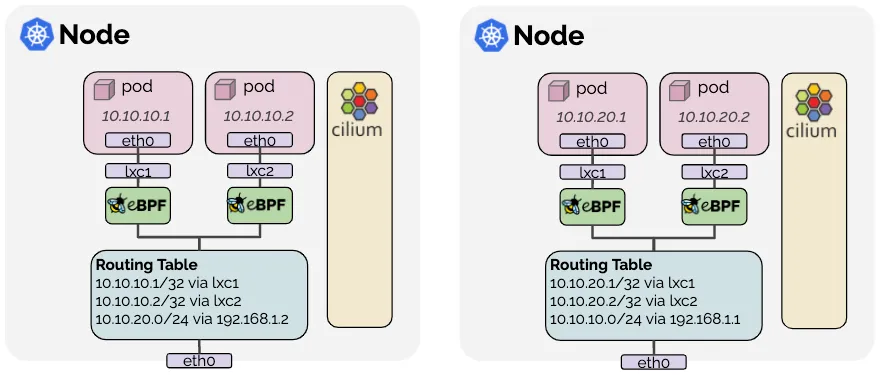
- https://docs.cilium.io/en/stable/network/concepts/routing/#native-routing
- 네이티브 라우팅 데이터 경로는 라우팅 모드에서 네이티브로 활성화되며 네이티브 패킷 전달 모드를 활성화합니다.
- 네이티브 패킷 전달 모드는 캡슐화를 수행하는 대신 Cilium이 실행되는 네트워크의 라우팅 기능을 활용합니다.
- 네이티브 라우팅 모드에서는 Cilium이 다른 로컬 엔드포인트로 주소 지정되지 않은 모든 패킷을 Linux 커널의 라우팅 하위 시스템에 위임합니다.
- 이는 패킷이 로컬 프로세스가 패킷을 방출한 것처럼 라우팅된다는 것을 의미합니다.
- 따라서 클러스터 노드를 연결하는 네트워크는 PodCIDR을 라우팅할 수 있어야 합니다.
- PodCIDR 라우팅 방안 1
- 각 개별 노드는 다른 모든 노드의 모든 포드 IP를 인식하고 이를 표현하기 위해 Linux 커널 라우팅 테이블에 삽입됩니다.
- 모든 노드가 단일 L2 네트워크를 공유하는 경우 auto-direct-node-routes: true하여 이 문제를 해결할 수 있습니다.
- 그렇지 않으면 BGP 데몬과 같은 추가 시스템 구성 요소를 실행하여 경로를 배포해야 합니다.
- PodCIDR 라우팅 방안 2
- 노드 자체는 모든 포드 IP를 라우팅하는 방법을 모르지만 다른 모든 포드에 도달하는 방법을 아는 라우터가 네트워크에 존재합니다.
- 이 시나리오에서는 Linux 노드가 이러한 라우터를 가리키는 기본 경로를 포함하도록 구성됩니다.
- 이 모델은 클라우드 제공자 네트워크 통합에 사용됩니다. 자세한 내용은 [Google Cloud](https://docs.cilium.io/en/stable/network/concepts/routing/#google-cloud), [AWS ENI](https://docs.cilium.io/en/stable/network/concepts/routing/#aws-eni) 및 Azure IPAM을 참조하세요.
- 설정
- routing-mode: native: Enable native routing mode.
- ipv4-native-routing-cidr: x.x.x.x/y: Set the CIDR in which native routing can be performed.
- auto-direct-node-routes: true : 동일 L2 네트워크 공유 시, 걱 노드의 PodCIDR에 대한 Linux 커널 라우팅 테이블에 삽입.
노드 간 파드 통신 상세 확인해 보겠습닏.
| # Cilium Agent 단축키 지정 # cilium 파드 이름 export CILIUMPOD0=$(kubectl get -l k8s-app=cilium pods -n kube-system --field-selector spec.nodeName=k8s-cp -o jsonpath='{.items[0].metadata.name}') export CILIUMPOD1=$(kubectl get -l k8s-app=cilium pods -n kube-system --field-selector spec.nodeName=k8s-w1 -o jsonpath='{.items[0].metadata.name}') export CILIUMPOD2=$(kubectl get -l k8s-app=cilium pods -n kube-system --field-selector spec.nodeName=k8s-w2 -o jsonpath='{.items[0].metadata.name}') echo $CILIUMPOD0 $CILIUMPOD1 $CILIUMPOD2 cilium-tlnsf cilium-hd55q cilium-vm8zz # 단축키(alias) 지정 alias c0="kubectl exec -it $CILIUMPOD0 -n kube-system -c cilium-agent -- cilium" alias c1="kubectl exec -it $CILIUMPOD1 -n kube-system -c cilium-agent -- cilium" alias c2="kubectl exec -it $CILIUMPOD2 -n kube-system -c cilium-agent -- cilium" |
| # default 네임스페이스이 POD IP를 확인하고 각 노드의 라우팅 테이블을 확인 k get po -o wide NAME READY STATUS RESTARTS AGE IP NODE NOMINATED NODE READINESS GATES curl-pod 1/1 Running 0 23m 172.20.3.202 k8s-cp <none> <none> webpod-6b856ccb68-mb5fs 1/1 Running 0 50m 172.20.1.34 k8s-w2 <none> <none> webpod-6b856ccb68-mwnfj 1/1 Running 0 50m 172.20.2.22 k8s-w1 <none> <none> ip -c route default via 172.31.0.2 dev ens160 proto static metric 100 172.20.1.0/24 via 172.31.1.12 dev ens160 proto kernel 172.20.2.0/24 via 172.31.1.11 dev ens160 proto kernel 172.20.3.59 dev lxcb1e4a05c280a proto kernel scope link 172.20.3.60 dev lxc67f3cb05b352 proto kernel scope link 172.20.3.202 dev lxc2bad931ac137 proto kernel scope link 172.31.0.0/20 dev ens160 proto kernel scope link src 172.31.1.10 metric 100 ssh k8s-w1 ip -c route default via 172.31.0.2 dev ens160 proto static metric 100 172.20.1.0/24 via 172.31.1.12 dev ens160 proto kernel 172.20.2.5 dev lxce2f067daf3de proto kernel scope link 172.20.2.22 dev lxc2183f425215e proto kernel scope link 172.20.2.166 dev lxc37ae4cf67cdb proto kernel scope link 172.20.2.175 dev lxc029aeca71fc3 proto kernel scope link 172.20.3.0/24 via 172.31.1.10 dev ens160 proto kernel 172.31.0.0/20 dev ens160 proto kernel scope link src 172.31.1.11 metric 100 ssh k8s-w2 ip -c route default via 172.31.0.2 dev ens160 proto static metric 100 172.20.1.34 dev lxcf8fe12646912 proto kernel scope link 172.20.1.172 dev lxc091c6f5df278 proto kernel scope link 172.20.2.0/24 via 172.31.1.11 dev ens160 proto kernel 172.20.3.0/24 via 172.31.1.10 dev ens160 proto kernel 172.31.0.0/20 dev ens160 proto kernel scope link src 172.31.1.12 metric 100 |
Masquerading
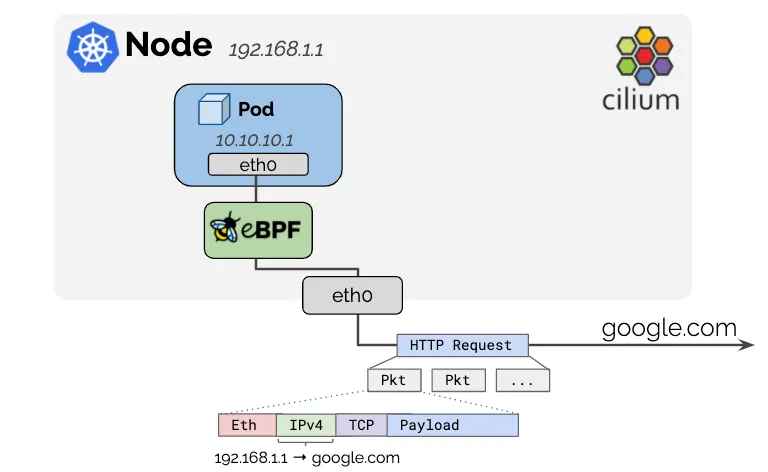
- https://docs.cilium.io/en/stable/network/concepts/masquerading/
- 포드에 사용되는 IPv4 주소는 일반적으로 RFC1918 개인 주소 블록에서 할당되므로 공개적으로 라우팅할 수 없습니다.
- Cilium은 노드의 IP 주소가 이미 네트워크에서 라우팅 가능하기 때문에 클러스터를 떠나는 모든 트래픽의 소스 IP 주소를 자동으로 masquerade 합니다.
- 만약 masquerade 기능을 OFF 하려면, enable-ipv4-masquerade: false , enable-ipv6-masquerade: false
- 기본 동작은 로컬 노드의 IP 할당 CIDR 내에서 모든 목적지를 제외하는 것입니다.
- 더 넓은 네트워크에서 포드 IP를 라우팅할 수 있는 경우, 해당 네트워크는 ipv4-native-routing-cidr: 10.0.0/8 (또는 IPv6 주소의 경우 ipv6-native-routing-cidr: fd00:/100) 옵션을 사용하여 지정할 수 있습니다. 이 경우 해당 CIDR 내의 모든 목적지는 masquerade 되지 않습니다.
- 구현 방식 : eBPF-based vs iptables-based
- eBPF-based : bpf.masquerade=true
- By default, BPF masquerading also enables the BPF Host-Routing mode. See [eBPF Host-Routing](https://docs.cilium.io/en/stable/operations/performance/tuning/#ebpf-host-routing)for benefits and limitations of this mode.
- Masquerading은 eBPF Masquerading 프로그램을 실행하는 장치에서만 수행할 수 있습니다.
- 이는 출력 장치가 프로그램을 실행하는 경우 포드에서 외부 주소로 전송된 패킷이 Masquerading(출력 장치 IPv4 주소로)된다는 것을 의미합니다.
| kubectl exec -it -n kube-system ds/cilium -c cilium-agent -- cilium status | grep Masquerading Masquerading: BPF [ens160] 172.20.0.0/16 [IPv4: Enabled, IPv6: Disabled] |
-
- 지정되지 않은 경우, 프로그램은 BPF NodePort 장치 감지 메커니즘에 의해 선택된 장치에 자동으로 연결됩니다.
- 이를 수동으로 변경하려면 devices helm 옵션을 사용하세요.
- The eBPF-based masquerading can masquerade packets of the following L4 protocols: TCP, UDP, ICMP
- 기본적으로 ipv4-native-routing-cidr 범위를 벗어난 IP 주소로 향하는 포드의 모든 패킷은 Masquerading되지만, 다른 (클러스터) 노드(Node IP)로 향하는 패킷은 제외됩니다. eBPF 마스커딩이 활성화되면 포드에서 클러스터 노드의 External IP로의 트래픽도 마스커딩되지 않습니다.
| # cilium config view | grep ipv4-native-routing-cidr ipv4-native-routing-cidr 172.20.0.0/16 # 노드 IP로 통신 시 확인 tcpdump -i ens160 icmp -nn kubectl exec -it curl-pod -- ping 172.31.1.11 ... |
-
- 좀 더 정교한 설정은 (Cilium 의 eBPF 구현) ip-masq-agent 를 통해서 가능합니다. 아래 실습에서 자세히 다루보자 - [Docs](https://github.com/kubernetes-sigs/ip-masq-agent)
- iptables-based
- 이것은 모든 커널 버전에서 작동할 레거시 구현입니다. This is the legacy implementation that will work on all kernel versions.
- The default behavior will masquerade all traffic leaving on a non-Cilium network device. This typically leads to the correct behavior.
- In order to limit the network interface on which masquerading should be performed, the option egress-masquerade-interfaces: eth0 can be used.
- For the advanced case where the routing layer would select different source addresses depending on the destination CIDR, the option enable-masquerade-to-route-source: "true" can be used in order to masquerade to the source addresses rather than to the primary interface address.
Masquerading 실습 확인
- 현재 상태 확인
| # 현재 설정 확인 kubectl exec -it -n kube-system ds/cilium -c cilium-agent -- cilium status | grep Masquerading Masquerading: BPF [ens160] 172.20.0.0/16 [IPv4: Enabled, IPv6: Disabled] cilium config view | grep ipv4-native-routing-cidr ipv4-native-routing-cidr 172.20.0.0/16 # 통신 확인 kubectl exec -it curl-pod -- curl -s webpod | grep Hostname Hostname: webpod-6b856ccb68-mb5fs |
- router eth0 172.31.1.20 통신 확인
| # router eth0 172.31.1.20 로 ping >> IP 확인 # k8s-cp 에서 tcpdump 수행 tcpdump -i ens160 icmp -nn # 또다른 터미널에서 curl-pod 안에서 클러스터에 조인되지 않은 172.31.1.20 ping 4회 수행 kubectl exec -it curl-pod -- ping -c 4 172.31.1.20 PING 172.31.1.20 (172.31.1.20) 56(84) bytes of data. 64 bytes from 172.31.1.20: icmp_seq=1 ttl=63 time=0.634 ms 64 bytes from 172.31.1.20: icmp_seq=2 ttl=63 time=0.326 ms # tcpdump를 확인해보면 curl-pod 의 IP가 k8s-cp IP로 마스커레이딩 된것을 볼수 있습니다. 16:28:31.055425 IP 172.31.1.10 > 172.31.1.20: ICMP echo request, id 32977, seq 1, length 64 16:28:31.055780 IP 172.31.1.20 > 172.31.1.10: ICMP echo reply, id 32977, seq 1, length 64 16:28:32.081201 IP 172.31.1.10 > 172.31.1.20: ICMP echo request, id 32977, seq 2, length 64 16:28:32.081542 IP 172.31.1.20 > 172.31.1.10: ICMP echo reply, id 32977, seq 2, length 64 16:28:33.104913 IP 172.31.1.10 > 172.31.1.20: ICMP echo request, id 32977, seq 3, length 64 16:28:33.105440 IP 172.31.1.20 > 172.31.1.10: ICMP echo reply, id 32977, seq 3, length 64 16:28:34.130377 IP 172.31.1.10 > 172.31.1.20: ICMP echo request, id 32977, seq 4, length 64 16:28:34.130785 IP 172.31.1.20 > 172.31.1.10: ICMP echo reply, id 32977, seq 4, length 64 |
- router loop1/2 통신 확인
| # route 서버 설정 sysctl net.ipv4.ip_forward=1 modprobe dummy ip link add loop1 type dummy ip link set loop1 up ip addr add 10.10.1.200/24 dev loop1 ip link add loop2 type dummy ip link set loop2 up ip addr add 10.10.2.200/24 dev loop2 ip -br a lo UNKNOWN 127.0.0.1/8 ::1/128 ens160 UP 172.31.1.20/20 ens192 UP 10.10.10.10/16 loop1 UNKNOWN 10.10.1.200/24 fe80::4005:cff:fe97:ab1f/64 loop2 UNKNOWN 10.10.2.200/24 fe80::20a3:54ff:fecc:d358/64 # 아파치 웹서버 실행 dnf install httpd -y systemctl enable --now httpd echo -e "<h1>Web Server : $(hostname)</h1>" > /var/www/html/index.html curl localhost <h1>Web Server : router</h1> |
| # router ip -br -c -4 addr lo UNKNOWN 127.0.0.1/8 ens160 UP 172.31.1.20/20 ens192 UP 10.10.10.10/16 loop1 UNKNOWN 10.10.1.200/24 loop2 UNKNOWN 10.10.2.200/24 # k8s-cp # router 로 가는 static 라우팅 추가 ip route add 10.10.0.0/16 via 172.31.1.20 dev ens160 ip -c route default via 172.31.0.2 dev ens160 proto static metric 100 10.10.0.0/16 via 172.31.1.20 dev ens160 172.20.1.0/24 via 172.31.1.12 dev ens160 proto kernel 172.20.2.0/24 via 172.31.1.11 dev ens160 proto kernel 172.20.3.59 dev lxcb1e4a05c280a proto kernel scope link 172.20.3.60 dev lxc67f3cb05b352 proto kernel scope link 172.20.3.202 dev lxc2bad931ac137 proto kernel scope link 172.31.0.0/20 dev ens160 proto kernel scope link src 172.31.1.10 metric 100 # 결국 마스커레이딩을 통해 router의 아파치웹서버로 통신이 됨 |
'Kubernetes' 카테고리의 다른 글
| Cilium Study [1기] (5주차) - BGP Control Plane (4) | 2025.08.13 |
|---|---|
| Cilium Study [1기] (4주차) - Networking - 노드에 파드들간 통신 2 & K8S 외부 노출 (0) | 2025.08.07 |
| Cilium Study [1기] (2주차) - Observability (3) | 2025.07.26 |
| Cilium Study [1기] (1주차) - eBPF (2) | 2025.07.19 |
| AEWS [3기] 12주차 - Amazon VPC Lattice for Amazon EKS (0) | 2025.04.26 |