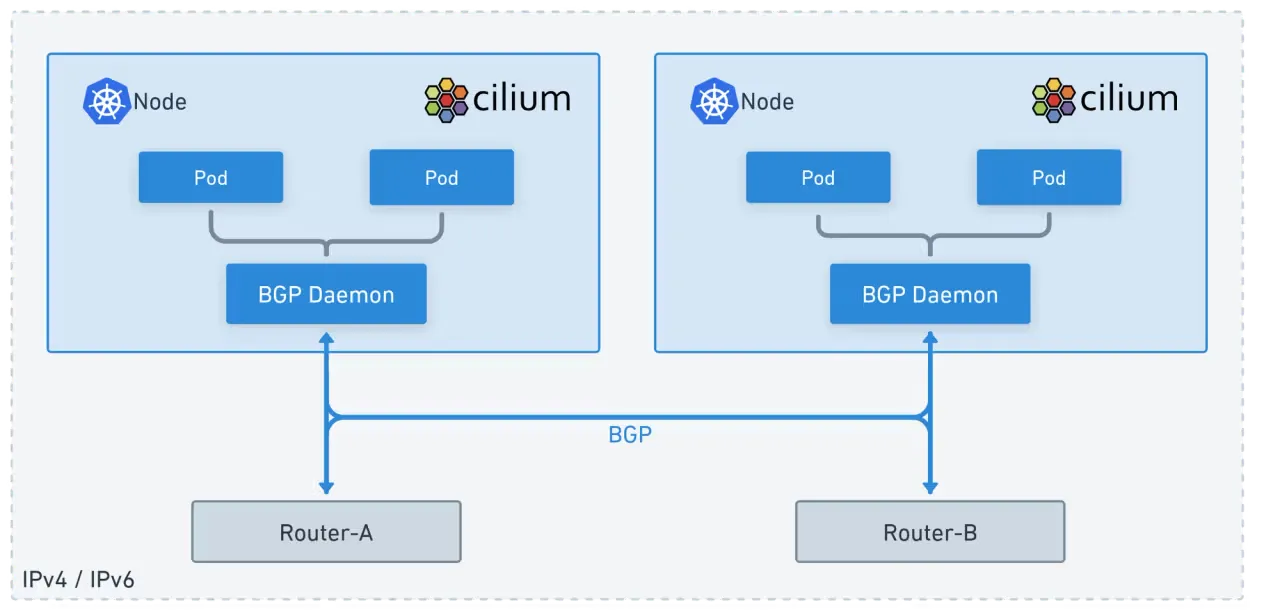
Cilium에서 BGP Control Plane을 구성하면 외부 라우터와 BGP 연동을 할 수 있습니다.
이를 활용하여 서로다른 네트워크에 존재하는 쿠버네티스 노드안의 POD, Service 리소스가 통신되는 실습을 통해 확인해 보겠습니다.
실습환경 구성
- 윈도우 11 OS 에서 Vmware Workstation v17을 이용한 Linux 가상머신 4대
- Rocky Linux 9.6 (커널버전 : 5.14.0-570.26.1.el9_6.x86_64)
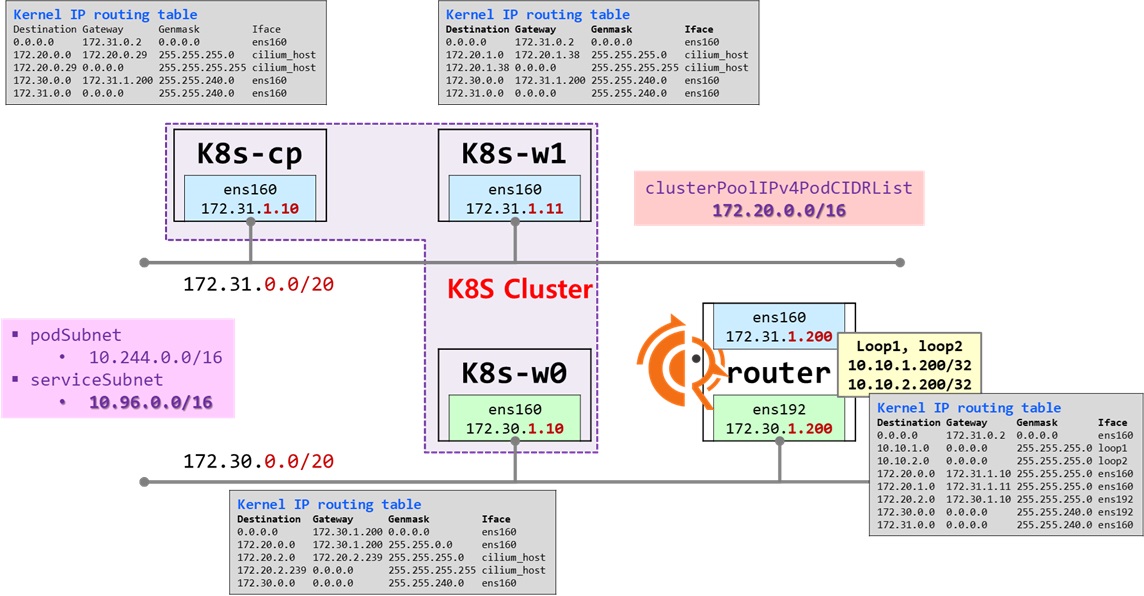
- K8S 클러스터를 구성하는 노드가 2개의 서로 다른 네트워크에 존재함
- 172.31.0.0/20 네트워크
- VMnet8 - NAT 네트워크
- 윈도우 HOST 머신에서 접근 가능하고, 인터넷이 되는 네트워크
- 172.30.0.0/20 네트워크
- VMnet1 - Host Only 네트워크
- 윈도우 HOST 머신에서 접근 가능하고, 인터넷이 안되는 네트워크
- k8s-w0 노드는 인터넷이 가능하도록 router로 디폴트 게이트웨이 (NAT Gateway) 설정
- 172.31.0.0/20 네트워크
- router 가상머신
- k8s-w0 머신이 외부 인터넷을 할 수 있도록 NAT Gateway 역할
- " 172.31.0.0/20 네트워크" 와 " 172.30.0.0/20 네트워크" 간의 라우터 역할
- BGP 동작을 위한 frr 을 설치하여 라우터 네트워크 장비 역할
- K8S 클러스터 노드 : k8s-cp, k8s-w1, k8s-w0
- 실습 동작에 필요한 static routing 설정됨
실습 노드 설정
router
##### ROUTER 역할 추가
# IP 포워딩 활성화
echo "net.ipv4.ip_forward=1" >> /etc/sysctl.conf
sysctl -p

##### NAT Gateway 기능 추가
# 인터넷이 안되는 k8s-w0 에서 인터넷을 하기 위해 필요
# iptables를 이용한 NAT 설정
iptables -t nat -A POSTROUTING -o ens160 -j MASQUERADE

# 포워드 체인 허용: 내부 네트워크에서 외부로 나가는 트래픽과 외부에서 내부로 들어오는 관련 트래픽을 허용합니다.
iptables -A FORWARD -i ens192 -o ens160 -j ACCEPT
iptables -A FORWARD -m conntrack --ctstate RELATED,ESTABLISHED -j ACCEPT

# iptables 규칙 저장: 재부팅 후에도 규칙이 유지되도록 저장해야 합니다.
dnf install -y iptables-services
iptables-save > /etc/sysconfig/iptables
systemctl enable --now iptables

##### Setting Dummy Interface
# (주의) OS 재시작하면 아래 정보는 사라짐
modprobe dummy
ip link add loop1 type dummy
ip link set loop1 up
ip addr add 10.10.1.200/24 dev loop1

ip link add loop2 type dummy
ip link set loop2 up
ip addr add 10.10.2.200/24 dev loop2

ip -br a
lo               UNKNOWN        127.0.0.1/8 ::1/128
ens160           UP             172.31.1.200/20
ens192           UP             172.30.1.200/20
loop1            UNKNOWN        10.10.1.200/24 fe80::b85f:f9ff:fe19:cf55/64
loop2            UNKNOWN        10.10.2.200/24 fe80::5b:33ff:fe9b:f465/64

##### termshark 설치
dnf install -y wireshark-cli
wget https://github.com/gcla/termshark/releases/download/v2.4.0/termshark_2.4.0_linux_x64.tar.gz -O /tmp/termshark_2.4.0_linux_x64.tar.gz
tar -xzf /tmp/termshark_2.4.0_linux_x64.tar.gz -C /tmp
mv /tmp/termshark_2.4.0_linux_x64/termshark /usr/local/bin
rm -fr /tmp/termshark_2.4.0_linux_x64.tar.gz


##### Install Apache 웹서버
dnf install -y httpd
echo -e "<h1>Web Server : $(hostname)</h1>" > /var/www/html/index.html
systemctl enable --now httpd

#### 라우팅 테이블 확인
route -n
Kernel IP routing table
Destination     Gateway         Genmask         Flags Metric Ref    Use Iface
0.0.0.0         172.31.0.2      0.0.0.0         UG    100    0        0 ens160
10.10.1.0       0.0.0.0         255.255.255.0   U     0      0        0 loop1
10.10.2.0       0.0.0.0         255.255.255.0   U     0      0        0 loop2
172.30.0.0      0.0.0.0         255.255.240.0   U     101    0        0 ens192
172.31.0.0      0.0.0.0         255.255.240.0   U     100    0        0 ens160

# Configure FRR"
dnf install frr -y
sed -i "s/^bgpd=no/bgpd=yes/g" /etc/frr/daemons

NODEIP=$(ip -4 addr show ens160| grep -oP '(?<=inet\s)\d+(\.\d+){3}')
cat << EOF >> /etc/frr/frr.conf
!
router bgp 65000
  bgp router-id $NODEIP
  bgp graceful-restart
  no bgp ebgp-requires-policy
  bgp bestpath as-path multipath-relax
  maximum-paths 4
  network 10.10.1.0/24
EOF

systemctl daemon-reload
systemctl enable --now frr
k8s-cp, k8s-w1
# 동적 라우팅 추가
# (주의) OS 재시작하면 아래 정보는 사라짐
ip route add 172.30.0.0/20 via 172.31.1.200 dev ens160

route -n
Kernel IP routing table
Destination     Gateway         Genmask         Flags Metric Ref    Use Iface
0.0.0.0         172.31.0.2      0.0.0.0         UG    100    0        0 ens160
172.30.0.0      172.31.1.200    255.255.240.0   UG    0      0        0 ens160
172.31.0.0      0.0.0.0         255.255.240.0   U     100    0        0 ens160
k8s-w0
# 동적 라우팅 추가
# (주의) OS 재시작하면 아래 정보는 사라짐
ip route add 172.20.0.0/16 via 172.30.1.200 dev ens160

route -n
Kernel IP routing table
Destination     Gateway         Genmask         Flags Metric Ref    Use Iface
0.0.0.0         172.30.1.200    0.0.0.0         UG    100    0        0 ens160
172.20.0.0      172.30.1.200    255.255.0.0     UG    0      0        0 ens160
172.30.0.0      0.0.0.0         255.255.240.0   U     100    0        0 ens160
K8S 클러스터 구성
1단계 - 사전 준비
- 클러스터의 모든 node 에서 수행 : k8s-cp, k8s-w1, k8s-w0
K8S_MV='1.33' # Major Version
K8S_FV='1.33.3' # Full version
CONTAINERD_FV='1.7.27'
NERDCTL_FV='2.1.3'

# hosts 파일 편집
echo "172.30.1.10  k8s-w0" >> /etc/hosts
echo "172.31.1.10  k8s-cp" >> /etc/hosts
echo "172.31.1.11  k8s-w1" >> /etc/hosts
echo "172.31.1.200 router" >> /etc/hosts

# 방화벽 종료 및 해제
systemctl stop firewalld
systemctl disable firewalld

# selinux 해제
setenforce 0
grubby --update-kernel ALL --args selinux=0

# Swap off
swapoff --all
sed -i '/swap/s/^/#/' /etc/fstab

# 필수 패키지 설치
dnf install -y socat

# packets traversing the bridge are processed by iptables for filtering
sysctl -w net.ipv4.ip_forward=1
echo "net.ipv4.ip_forward = 1" >> /etc/sysctl.d/k8s.conf

# enable br_netfilter for iptables
modprobe br_netfilter
modprobe overlay
modprobe iptable_nat
echo "br_netfilter" >> /etc/modules-load.d/k8s.conf
echo "overlay" >> /etc/modules-load.d/k8s.conf
echo "iptable_nat" >> /etc/modules-load.d/k8s.conf

##### containerd 설치
dnf config-manager --add-repo https://download.docker.com/linux/centos/docker-ce.repo
# dnf list containerd.io --showduplicates
dnf install -y containerd.io-$CONTAINERD_FV
# containerd configure to default and cgroup managed by systemd
containerd config default > /etc/containerd/config.toml
sed -i 's/SystemdCgroup = false/SystemdCgroup = true/g' /etc/containerd/config.toml
sed -i --follow-symlinks 's/registry.k8s.io\/pause:3.8/registry.k8s.io\/pause:3.10/g' /etc/containerd/config.toml

### k8s 관련 패키지 설치
cat <<EOF | sudo tee /etc/yum.repos.d/kubernetes.repo
[kubernetes]
name=Kubernetes
baseurl=https://pkgs.k8s.io/core:/stable:/v$K8S_MV/rpm/
enabled=1
gpgcheck=1
gpgkey=https://pkgs.k8s.io/core:/stable:/v$K8S_MV/rpm/repodata/repomd.xml.key
exclude=kubelet kubeadm kubectl cri-tools kubernetes-cni
EOF

dnf install -y kubelet-$K8S_FV kubeadm-$K8S_FV kubectl-$K8S_FV --disableexcludes=kubernetes

# ready to install for k8s
systemctl restart containerd && systemctl enable containerd
systemctl enable --now kubelet

# kubectl 명령어 자동완성 기능 사용하기
dnf install -y bash-completion
kubectl completion bash >/etc/bash_completion.d/kubectl
echo "alias k=kubectl" >> ~/.bashrc
echo "complete -F __start_kubectl k" >> ~/.bashrc
source ~/.bash_profile

# nerdctl 설치
wget https://github.com/containerd/nerdctl/releases/download/v$NERDCTL_FV/nerdctl-$NERDCTL_FV-linux-amd64.tar.gz
tar xfz nerdctl-$NERDCTL_FV-linux-amd64.tar.gz -C /usr/local/bin
rm -fr nerdctl-$NERDCTL_FV-linux-amd64.tar.gz
echo "source <(nerdctl completion bash)" >> ~/.bash_profile
source ~/.bash_profile

# kubecolor 설치
KUBECOLOR_FV='0.0.25'
wget https://github.com/hidetatz/kubecolor/releases/download/v$KUBECOLOR_FV/kubecolor_$KUBECOLOR_FV\_Linux_x86_64.tar.gz
tar xfz kubecolor_$KUBECOLOR_FV\_Linux_x86_64.tar.gz -C /usr/bin/
rm -fr xfz kubecolor_$KUBECOLOR_FV\_Linux_x86_64.tar.gz
echo "alias kc='kubecolor'" >> ~/.bashrc

# helm 설치
HELM_FV='3.17.4'

curl -O https://get.helm.sh/helm-v$HELM_FV-linux-amd64.tar.gz
tar xfz helm-v$HELM_FV-linux-amd64.tar.gz
mv linux-amd64/helm /usr/local/bin
rm -fr helm-v$HELM_FV-linux-amd64.tar.gz linux-amd64
helm completion bash > /etc/bash_completion.d/helm

# cilium cli & hubble cli 설치
CILIUM_CLI_VERSION=$(curl -s https://raw.githubusercontent.com/cilium/cilium-cli/main/stable.txt)
CLI_ARCH=amd64
if [ "$(uname -m)" = "aarch64" ]; then CLI_ARCH=arm64; fi
curl -L --fail --remote-name-all https://github.com/cilium/cilium-cli/releases/download/${CILIUM_CLI_VERSION}/cilium-linux-${CLI_ARCH}.tar.gz >/dev/null 2>&1
tar xzvfC cilium-linux-${CLI_ARCH}.tar.gz /usr/local/bin
rm -fr cilium-linux-${CLI_ARCH}.tar.gz

HUBBLE_VERSION=$(curl -s https://raw.githubusercontent.com/cilium/hubble/master/stable.txt)
HUBBLE_ARCH=amd64
if [ "$(uname -m)" = "aarch64" ]; then HUBBLE_ARCH=arm64; fi
curl -L --fail --remote-name-all https://github.com/cilium/hubble/releases/download/$HUBBLE_VERSION/hubble-linux-${HUBBLE_ARCH}.tar.gz >/dev/null 2>&1
tar xzvfC hubble-linux-${HUBBLE_ARCH}.tar.gz /usr/local/bin
rm -fr hubble-linux-${HUBBLE_ARCH}.tar.gz- k8s-cp 에서 k8s-w1, k8s-w0, router 로 SSH key 방식의 인증 구성
# k8s-w1, k8s-w0 SSH key 방식의 인증 구성
ssh-keygen -t rsa -f ~/.ssh/id_rsa -N ""
ssh-copy-id k8s-w1
ssh-copy-id k8s-w0
ssh-copy-id router
2단계 - 클러스터 구성
- kubeadm init : k8s-cp
K8S_FV='1.33.3'

kubeadm init \
--kubernetes-version=v$K8S_FV \
--pod-network-cidr=10.244.0.0/16 \
--service-cidr 10.96.0.0/16 \
--apiserver-advertise-address=172.31.1.10 \
--apiserver-cert-extra-sans jadeedu.com \
--cri-socket=unix:///run/containerd/containerd.sock

#  Setting kube config file
mkdir -p $HOME/.kube
cp -i /etc/kubernetes/admin.conf $HOME/.kube/config
chown $(id -u):$(id -g) $HOME/.kube/config- kubeadm join : k8s-w1, k8s-w0
# k8s-cp 에서 join command 생성
kubeadm token create --print-join-command
kubeadm join 172.31.1.10:6443 --token iv3bdo.o4cjvcacio8k0gec --discovery-token-ca-cert-hash sha256:080eb62adfa0013d48400562edd68835b8545d1b665a0a03a2bc46dee07bc425

# k8s-w1, k8s-w0 에서 위의 join command 수행
kubeadm join 172.31.1.10:6443 --token iv3bdo.o4cjvcacio8k0gec --discovery-token-ca-cert-hash sha256:080eb62adfa0013d48400562edd68835b8545d1b665a0a03a2bc46dee07bc425
cilium CNI 구성
- autoDirectNodeRoutes=false
- 같은 네트워크 대역의 K8S 노드에 대해서 Cilium 이 라우팅을 추가하지 않음
- BGP 라우팅을 통해 POD간 네트워킹이 가능하도록 실습 진행
# Cilium 설치 with Helm
helm repo add cilium https://helm.cilium.io/

CILIUM_FV='1.18.0'

helm install cilium cilium/cilium --version $CILIUM_FV \
--namespace kube-system \
--set k8sServiceHost=172.31.1.10 --set k8sServicePort=6443 \
--set ipam.mode="cluster-pool" \
--set ipam.operator.clusterPoolIPv4PodCIDRList={"172.20.0.0/16"} \
--set ipv4NativeRoutingCIDR=172.20.0.0/16 \
--set routingMode=native \
--set autoDirectNodeRoutes=false \
--set bgpControlPlane.enabled=true \
--set kubeProxyReplacement=true \
--set bpf.masquerade=true \
--set installNoConntrackIptablesRules=true \
--set endpointHealthChecking.enabled=false --set healthChecking=false \
--set hubble.enabled=true --set hubble.relay.enabled=true --set hubble.ui.enabled=true \
--set hubble.ui.service.type=NodePort --set hubble.ui.service.nodePort=30003 \
--set prometheus.enabled=true --set operator.prometheus.enabled=true --set hubble.metrics.enableOpenMetrics=true \
--set hubble.metrics.enabled="{dns,drop,tcp,flow,port-distribution,icmp,httpV2:exemplars=true;labelsContext=source_ip\,source_namespace\,source_workload\,destination_ip\,destination_namespace\,destination_workload\,traffic_direction}" \
--set operator.replicas=1 --set debug.enabled=true| # 클러스터 구성후 pod-cidr, service-cidr 값 확인 kubectl cluster-info dump | grep -m 2 -E "cluster-cidr|service-cluster-ip-range" "--service-cluster-ip-range=10.96.0.0/16", "--cluster-cidr=10.244.0.0/16", # Cilium 의 BGP 관련 설정이 적용되었는지 확인 cilium config view | grep -i bgp bgp-router-id-allocation-ip-pool bgp-router-id-allocation-mode default bgp-secrets-namespace kube-system enable-bgp-control-plane true enable-bgp-control-plane-status-report true |
네트워크 정보 확인 : autoDirectNodeRoutes=false동작 이해
| # router 네트워크 인터페이스 정보 확인 ssh router ip -br -c -4 addr lo UNKNOWN 127.0.0.1/8 ens160 UP 172.31.1.200/20 ens192 UP 172.30.1.200/20 loop1 UNKNOWN 10.10.1.200/24 loop2 UNKNOWN 10.10.2.200/24 # k8s node 네트워크 인터페이스 정보 확인 ip -c -4 addr show dev ens160 2: ens160: <BROADCAST,MULTICAST,UP,LOWER_UP> mtu 1500 qdisc mq state UP group default qlen 1000 altname enp3s0 inet 172.31.1.10/20 brd 172.31.15.255 scope global noprefixroute ens160 valid_lft forever preferred_lft forever ssh k8s-w1 ip -c -4 addr show dev ens160 2: ens160: <BROADCAST,MULTICAST,UP,LOWER_UP> mtu 1500 qdisc mq state UP group default qlen 1000 altname enp3s0 inet 172.31.1.11/20 brd 172.31.15.255 scope global noprefixroute ens160 valid_lft forever preferred_lft forever ssh k8s-w0 ip -c -4 addr show dev ens160 2: ens160: <BROADCAST,MULTICAST,UP,LOWER_UP> mtu 1500 qdisc mq state UP group default qlen 1000 altname enp3s0 inet 172.30.1.10/20 brd 172.30.15.255 scope global noprefixroute ens160 valid_lft forever preferred_lft forever # 라우팅 정보 확인 ssh router ip -c route default via 172.31.0.2 dev ens160 proto static metric 100 10.10.1.0/24 dev loop1 proto kernel scope link src 10.10.1.200 10.10.2.0/24 dev loop2 proto kernel scope link src 10.10.2.200 172.30.0.0/20 dev ens192 proto kernel scope link src 172.30.1.200 metric 101 172.31.0.0/20 dev ens160 proto kernel scope link src 172.31.1.200 metric 100 # autoDirectNodeRoutes=true # - 같은 네트워크 대역에 있는 node 들만 podCIDR IP 가 Static Routing 을 Cilium 이 자동 추가 # - 다른 네트워크 대역에 있는 node 의 podCIDR IP 라우팅은 네트워크팀에서 라우팅 추가 작업을 해야 함 # autoDirectNodeRoutes=false # - 같은 네트워크 대역에 있는 node 들에서 상대방 podCIDR 정보가 없음 ip -c route default via 172.31.0.2 dev ens160 proto static metric 100 172.20.0.0/24 via 172.20.0.29 dev cilium_host proto kernel src 172.20.0.29 # 자신의 podCIDR 만 존재하고 상대방 노드의 정보가 없음 172.20.0.29 dev cilium_host proto kernel scope link 172.30.0.0/20 via 172.31.1.200 dev ens160 172.31.0.0/20 dev ens160 proto kernel scope link src 172.31.1.10 metric 100 ssh k8s-w1 ip -c route default via 172.31.0.2 dev ens160 proto static metric 100 172.20.1.0/24 via 172.20.1.38 dev cilium_host proto kernel src 172.20.1.38 172.20.1.38 dev cilium_host proto kernel scope link 172.30.0.0/20 via 172.31.1.200 dev ens160 172.31.0.0/20 dev ens160 proto kernel scope link src 172.31.1.11 metric 100 ssh k8s-w0 ip -c route default via 172.30.1.200 dev ens160 proto static metric 100 172.20.0.0/16 via 172.30.1.200 dev ens160 172.20.2.0/24 via 172.20.2.239 dev cilium_host proto kernel src 172.20.2.239 172.20.2.239 dev cilium_host proto kernel scope link 172.30.0.0/20 dev ens160 proto kernel scope link src 172.30.1.10 metric 100 # 통신 확인 ping -c 1 10.10.1.200 # router loop1 PING 10.10.1.200 (10.10.1.200) 56(84) bytes of data. --- 10.10.1.200 ping statistics --- 1 packets transmitted, 0 received, 100% packet loss, time 0ms ping -c 1 172.30.1.10 # k8s-w0 ens160 PING 172.30.1.10 (172.30.1.10) 56(84) bytes of data. 64 bytes from 172.30.1.10: icmp_seq=1 ttl=63 time=0.669 ms --- 172.30.1.10 ping statistics --- 1 packets transmitted, 1 received, 0% packet loss, time 0ms rtt min/avg/max/mdev = 0.669/0.669/0.669/0.000 ms # 목적지까지 경우하는 라우팅 정보 제공 ## Path MTU (pmtu): 출발지에서 목적지까지 모든 네트워크 경로 상에서 통과할 수 있는 최대 패킷 크기(Byte), IP fragmentation 없이 전송 가능한 가장 큰 패킷 크기를 의미. ## pmtu 1500: 전체 경로의 최소 MTU는 1500 , hops 2: 총 2단계 라우터/노드를 거쳐서 도달 , back 2: 응답도 동일한 hop 수로 돌아옴 tracepath -n 172.30.1.10 1?: [LOCALHOST] pmtu 1500 1: 172.31.1.200 0.417ms 1: 172.31.1.200 0.260ms 2: 172.30.1.10 0.624ms reached Resume: pmtu 1500 hops 2 back 2 |
샘플 어플리케이션을 배포하면 상대방 노드에 있는 podCIDR를 모르기 때문에 통신에 문제가 발생하는것을 알 수 있습니다.
이러한 문제를 BGP 를 이용하여 문제를 해결하는 과정으로 실습을 진행합니다.
| # k8s-cp 노드에도 POD 가 스케줄링 될수 있도록 taint kubectl taint nodes k8s-cp node-role.kubernetes.io/control-plane- # k8s-cp 노드에 curl-pod 파드 배포 cat <<EOF | kubectl apply -f - apiVersion: v1 kind: Pod metadata: name: curl-pod labels: app: curl spec: nodeName: k8s-cp containers: - name: curl image: nicolaka/netshoot command: ["tail"] args: ["-f", "/dev/null"] terminationGracePeriodSeconds: 0 EOF # 샘플 애플리케이션 배포 cat << EOF | kubectl apply -f - apiVersion: apps/v1 kind: Deployment metadata: name: webpod spec: replicas: 3 selector: matchLabels: app: webpod template: metadata: labels: app: webpod spec: affinity: podAntiAffinity: requiredDuringSchedulingIgnoredDuringExecution: - labelSelector: matchExpressions: - key: app operator: In values: - sample-app topologyKey: "kubernetes.io/hostname" containers: - name: webpod image: traefik/whoami ports: - containerPort: 80 --- apiVersion: v1 kind: Service metadata: name: webpod labels: app: webpod spec: selector: app: webpod ports: - protocol: TCP port: 80 targetPort: 80 type: ClusterIP EOF |
- 배포 후 네트워크 정보 확인
| # IP 확인 kubectl get ciliumendpoints NAME SECURITY IDENTITY ENDPOINT STATE IPV4 IPV6 curl-pod 12648 ready 172.20.0.46 webpod-697b545f57-f4z68 31877 ready 172.20.0.44 webpod-697b545f57-v82g5 31877 ready 172.20.2.18 webpod-697b545f57-xz98g 31877 ready 172.20.1.170 kubectl exec -n kube-system ds/cilium -- cilium-dbg ip list |
통신 문제 확인 : 노드 내의 파드들 끼리만 통신되는 중!
| # 통신이 안되는 POD 가 존재함 --> curl-pod가 k8s-cp 에 배포되었고 같은 노드에서 배포된 webpod 만 통신이 가능합 kubectl exec -it curl-pod -- sh -c 'while true; do curl -s --connect-timeout 1 webpod | grep "IP: 172" ; echo "---" ; sleep 1; done' --- --- --- IP: 172.20.0.44 --- IP: 172.20.0.44 --- --- IP: 172.20.0.44 --- --- IP: 172.20.0.44 --- |
위의 문제를 해결하기 위해서 BGP 를 이용하게 됩니다.
Cilium BGP Control
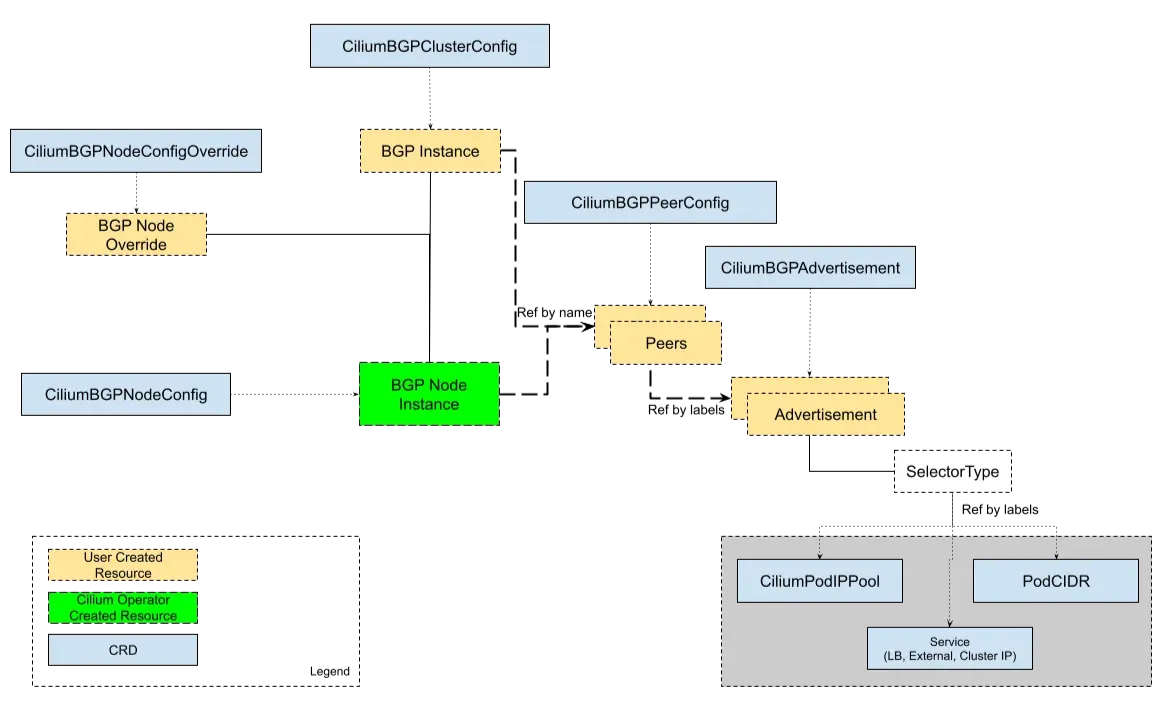
- PlaneCilium BGP Control Plane (BGPv2) : Cilium Custom Resources 를 통해 BGP 설정 관리 가능
- https://docs.cilium.io/en/stable/network/bgp-control-plane/bgp-control-plane-v2/
- CiliumBGPClusterConfig : Defines BGP instances and peer configurations that are applied to multiple nodes.
- CiliumBGPPeerConfig : A common set of BGP peering setting. It can be used across multiple peers.
- CiliumBGPAdvertisement : Defines prefixes that are injected into the BGP routing table.
- CiliumBGPNodeConfigOverride : Defines node-specific BGP configuration to provide a finer control.
- 위의 CR을 생성하면 gobgp 라는 프로그램이 CR 정보를 읽어와서 BGP 동작을 실행하는 구조임
Cilium BGP 사용시 2가지 주의할 점
- Cilium의 BGP는 기본적으로 외부 경로를 커널 라우팅 테이블에 주입하지 않음.
- 결론은 Cilium 으로 BGP 사용 시, 2개 이상의 NIC 사용할 경우에는 Node에 직접 라우팅 설정 및 관리가 필요함.
BGP 설정 후 통신 확인
router 장비에서 FRR 설정
| # 통신 문제를 확인하기 위해 curl-pod 에 webpod 통신을 계속시도 해 놓고 kubectl exec -it curl-pod -- sh -c 'while true; do curl -s --connect-timeout 1 webpod | grep "IP: 172" ; echo "---" ; sleep 1; done' # router 장비로 이동 ssh router # FRR이 수행하고 있는 라우팅 프로토콜을 확인해보면 bgp 가 실행되고 있음 [root@router ~]# ss -tnlp | grep -iE 'zebra|bgpd' LISTEN 0 4096 0.0.0.0:179 0.0.0.0:* users:(("bgpd",pid=742,fd=22)) LISTEN 0 3 127.0.0.1:2605 0.0.0.0:* users:(("bgpd",pid=742,fd=18)) LISTEN 0 3 127.0.0.1:2601 0.0.0.0:* users:(("zebra",pid=724,fd=25)) LISTEN 0 4096 [::]:179 [::]:* users:(("bgpd",pid=742,fd=23)) [root@router ~]# ps -ef |grep frr root 708 1 0 09:26 ? 00:00:00 /usr/libexec/frr/watchfrr -d -F traditional zebra bgpd staticd frr 724 1 0 09:26 ? 00:00:00 /usr/libexec/frr/zebra -d -F traditional -A 127.0.0.1 -s 90000000 frr 742 1 0 09:26 ? 00:00:00 /usr/libexec/frr/bgpd -d -F traditional -A 127.0.0.1 frr 759 1 0 09:26 ? 00:00:00 /usr/libexec/frr/staticd -d -F traditional -A 127.0.0.1 root 1793 1760 0 10:37 pts/0 00:00:00 grep --color=auto frr # FRR은 vtysh 라는 CLI 도구를 이용하여 정보를 확인하거나, 설정 모드로 진입할 수 있음 # 현재 FRR 정보 확인 [root@router ~]# vtysh -c 'show running' Building configuration... Current configuration: ! frr version 8.5.3 frr defaults traditional hostname router no ipv6 forwarding ! router bgp 65000 bgp router-id 172.31.1.200 no bgp ebgp-requires-policy bgp graceful-restart bgp bestpath as-path multipath-relax ! address-family ipv4 unicast network 10.10.1.0/24 # <-- 이 IP 대역을 광고 maximum-paths 4 exit-address-family exit ! end # BGP 설정정보 확인 [root@router ~]# cat /etc/frr/frr.conf hostname router ! router bgp 65000 bgp router-id 172.31.1.200 bgp graceful-restart no bgp ebgp-requires-policy bgp bestpath as-path multipath-relax maximum-paths 4 <-- 최대 4개의 경로로 L4 처럼 꽂아주는 역할 network 10.10.1.0/24 |
(참고) 용어 정리
- AS (Autonomous System)
- 단일 관리 기관이 제어하는 네트워크의 집합을 의미합니다.2 이는 하나의 기업, ISP(Internet Service Provider) 또는 대학 네트워크와 같이 단일 라우팅 정책을 따르는 독립된 관리 영역을 나타냅니다. 이러한 AS는 IANA(Internet Assigned Numbers Authority)가 지정한 고유한 AS 번호(ASN)로 식별됩니다.
- 이번 실습에서는 router 머신이 65000의 AS 번호를 사용합니다.
- k8s 클러스터의 노드들은 65001 의 AS 번호를 사용합니다.
| # BGP 가 연동이 되면 정보를 아래 명령으로 확인할 수 있는데 현재 아무 연동이 없음 [root@router ~]# vtysh -c 'show ip bgp summary' % No BGP neighbors found in VRF default # BGP 로 광고한 정보를 확인해보면 자기 자신을 광고하고 있음 [root@router ~]# vtysh -c 'show ip bgp' BGP table version is 1, local router ID is 172.31.1.200, vrf id 0 Default local pref 100, local AS 65000 Status codes: s suppressed, d damped, h history, * valid, > best, = multipath, i internal, r RIB-failure, S Stale, R Removed Nexthop codes: @NNN nexthop's vrf id, < announce-nh-self Origin codes: i - IGP, e - EGP, ? - incomplete RPKI validation codes: V valid, I invalid, N Not found Network Next Hop Metric LocPrf Weight Path *> 10.10.1.0/24 0.0.0.0 0 32768 i Displayed 1 routes and 1 total paths # 현재 라우팅 정보 확인 [root@router ~]# vtysh -c 'show ip route' Codes: K - kernel route, C - connected, S - static, R - RIP, O - OSPF, I - IS-IS, B - BGP, E - EIGRP, N - NHRP, T - Table, v - VNC, V - VNC-Direct, F - PBR, f - OpenFabric, > - selected route, * - FIB route, q - queued, r - rejected, b - backup t - trapped, o - offload failure K>* 0.0.0.0/0 [0/100] via 172.31.0.2, ens160, 01:31:51 C>* 10.10.1.0/24 is directly connected, loop1, 01:26:03 C>* 10.10.2.0/24 is directly connected, loop2, 01:26:02 C>* 172.30.0.0/20 is directly connected, ens192, 01:31:51 C>* 172.31.0.0/20 is directly connected, ens160, 01:31:51 # Cilium node 연동 설정 방안 1 # FRR 입장에서 k8s-cp, k8s-w1, k8s-w0 와 neighbor로 선언하고, 속성이 동일하니까 peer-group으로 묶었음. # FRR 은 65000번의 AS 번호를 사용하고 "remote-as external" 설정을 하면 FRR 입장에서 자기자신의 AS 가 아니면 neighbor로 설정 해줌 [root@router ~]# cat << EOF >> /etc/frr/frr.conf neighbor CILIUM peer-group neighbor CILIUM remote-as external neighbor 172.31.1.10 peer-group CILIUM neighbor 172.31.1.11 peer-group CILIUM neighbor 172.30.1.10 peer-group CILIUM EOF # FRR 재시작 [root@router ~]# systemctl daemon-reload && systemctl restart frr # 모니터링 걸어두기! [root@k8s-cp ~]# journalctl -u frr -f |
cilium 에 bgp 설정
| # BGP 동작할 노드를 위한 label 설정 [root@k8s-cp ~]# kubectl label nodes k8s-cp k8s-w0 k8s-w1 enable-bgp=true node/k8s-cp labeled node/k8s-w0 labeled node/k8s-w1 labeled # Config Cilium BGP [root@k8s-cp ~]# cat << EOF | kubectl apply -f - apiVersion: cilium.io/v2
kind: CiliumBGPAdvertisement
metadata:
name: bgp-advertisements
labels:
advertise: bgp
spec:
advertisements:
- advertisementType: "PodCIDR"
---
apiVersion: cilium.io/v2
kind: CiliumBGPPeerConfig
metadata:
name: cilium-peer
spec:
timers:
holdTimeSeconds: 9
keepAliveTimeSeconds: 3
ebgpMultihop: 2
gracefulRestart:
enabled: true
restartTimeSeconds: 15
families:
- afi: ipv4
safi: unicast
advertisements:
matchLabels:
advertise: "bgp"
---
apiVersion: cilium.io/v2
kind: CiliumBGPClusterConfig
metadata:
name: cilium-bgp
spec:
nodeSelector:
matchLabels:
"enable-bgp": "true"
bgpInstances:
- name: "instance-65001"
localASN: 65001
peers:
- name: "tor-switch"
peerASN: 65000
peerAddress: 172.31.1.200 # router ip address
peerConfigRef:
name: "cilium-peer"
ciliumbgpadvertisement.cilium.io/bgp-advertisements created ciliumbgppeerconfig.cilium.io/cilium-peer created ciliumbgpclusterconfig.cilium.io/cilium-bgp created # k8s-cp 노드는 BGP LISTENER로 동작하지 않고, Initiator가 되서 router에 연결 [root@k8s-cp ~]# ss -tnlp | grep 179 [root@k8s-cp ~]# ss -tnp | grep 179 ESTAB 0 0 172.31.1.10:59515 172.31.1.200:179 users:(("cilium-agent",pid=6780,fd=55)) # BGP 라우터를 통해서 상대방 peer 와 잘 연결되었음 [root@k8s-cp ~]# cilium bgp peers Node Local AS Peer AS Peer Address Session State Uptime Family Received Advertised k8s-cp 65001 65000 172.31.1.200 established 5m39s ipv4/unicast 4 2 k8s-w0 65001 65000 172.31.1.200 established 5m39s ipv4/unicast 4 2 k8s-w1 65001 65000 172.31.1.200 established 5m39s ipv4/unicast 4 2 # BGP를 통해서 podCIDR를 광고하는 네트워크 정보 확인 [root@k8s-cp ~]# cilium bgp routes available ipv4 unicast Node VRouter Prefix NextHop Age Attrs k8s-cp 65001 172.20.0.0/24 0.0.0.0 5m47s [{Origin: i} {Nexthop: 0.0.0.0}] k8s-w0 65001 172.20.2.0/24 0.0.0.0 5m47s [{Origin: i} {Nexthop: 0.0.0.0}] k8s-w1 65001 172.20.1.0/24 0.0.0.0 5m47s [{Origin: i} {Nexthop: 0.0.0.0}] # BGP 관련 CR 정보 확인 [root@k8s-cp ~]# kubectl get ciliumbgpadvertisements,ciliumbgppeerconfigs,ciliumbgpclusterconfigs NAME AGE ciliumbgpadvertisement.cilium.io/bgp-advertisements 5m56s NAME AGE ciliumbgppeerconfig.cilium.io/cilium-peer 5m56s NAME AGE ciliumbgpclusterconfig.cilium.io/cilium-bgp 5m56s # 현재 BGP 상태 확인 [root@k8s-cp ~]# kubectl get ciliumbgpnodeconfigs -o yaml | grep -A 5 peeringState peeringState: established routeCount: - advertised: 2 afi: ipv4 received: 1 safi: unicast -- peeringState: established routeCount: - advertised: 2 afi: ipv4 received: 1 safi: unicast -- peeringState: established routeCount: - advertised: 2 afi: ipv4 received: 1 safi: unicast # FRR 이 실행중인 router 장비로 이동 [root@k8s-cp ~]# ssh router # k8s 각 노드별 podCIDR 라우팅 정보가 추가됨 [root@router ~]# ip -c route | grep bgp 172.20.0.0/24 nhid 20 via 172.31.1.10 dev ens160 proto bgp metric 20 172.20.1.0/24 nhid 19 via 172.31.1.11 dev ens160 proto bgp metric 20 172.20.2.0/24 nhid 18 via 172.30.1.10 dev ens192 proto bgp metric 20 [root@router ~]# vtysh -c 'show ip bgp summary' IPv4 Unicast Summary (VRF default): BGP router identifier 172.31.1.200, local AS number 65000 vrf-id 0 BGP table version 4 RIB entries 7, using 1344 bytes of memory Peers 3, using 2174 KiB of memory Peer groups 1, using 64 bytes of memory Neighbor V AS MsgRcvd MsgSent TblVer InQ OutQ Up/Down State/PfxRcd PfxSnt Desc 172.30.1.10 4 65001 427 430 0 0 0 00:21:12 1 4 N/A 172.31.1.10 4 65001 428 430 0 0 0 00:21:12 1 4 N/A 172.31.1.11 4 65001 427 430 0 0 0 00:21:12 1 4 N/A Total number of neighbors 3 [root@router ~]# vtysh -c 'show ip bgp' BGP table version is 4, local router ID is 172.31.1.200, vrf id 0 Default local pref 100, local AS 65000 Status codes: s suppressed, d damped, h history, * valid, > best, = multipath, i internal, r RIB-failure, S Stale, R Removed Nexthop codes: @NNN nexthop's vrf id, < announce-nh-self Origin codes: i - IGP, e - EGP, ? - incomplete RPKI validation codes: V valid, I invalid, N Not found Network Next Hop Metric LocPrf Weight Path *> 10.10.1.0/24 0.0.0.0 0 32768 i *> 172.20.0.0/24 172.31.1.10 0 65001 i *> 172.20.1.0/24 172.31.1.11 0 65001 i *> 172.20.2.0/24 172.30.1.10 0 65001 i Displayed 4 routes and 4 total paths # 그런데 아직은 curl-pod 에서 k8s-w0, k8s-w1에 이는 webpod 와 통신이 안되고 있음 [root@k8s-cp ~]# kubectl exec -it curl-pod -- sh -c 'while true; do curl -s --connect-timeout 1 webpod | grep "IP: 172" ; echo "---" ; sleep 1; done' --- --- --- IP: 172.20.0.44 --- --- # k8s-cp tcpdump 해두기 tcpdump -i ens160 tcp port 179 -w /tmp/bgp.pcap # router : frr 재시작 ssh router systemctl restart frr |
# tcpdump 확인 bgp.type == 2
termshark -r /tmp/bgp.pcap
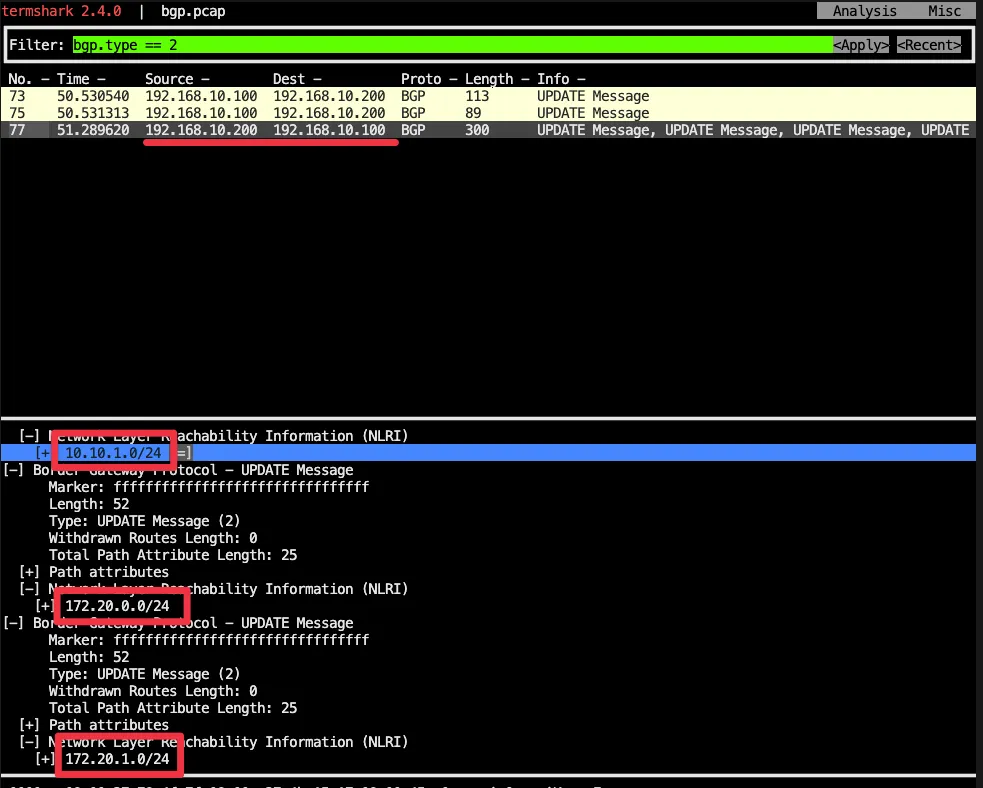
| # 분명 Router 장비를 통해 BGP UPDATE로 받음을 확인. cilium bgp routes (Defaulting to `available ipv4 unicast` routes, please see help for more options) Node VRouter Prefix NextHop Age Attrs k8s-cp 65001 172.20.0.0/24 0.0.0.0 4h40m28s [{Origin: i} {Nexthop: 0.0.0.0}] k8s-w0 65001 172.20.2.0/24 0.0.0.0 4h40m28s [{Origin: i} {Nexthop: 0.0.0.0}] k8s-w1 65001 172.20.1.0/24 0.0.0.0 4h40m28s [{Origin: i} {Nexthop: 0.0.0.0}] ip -c route default via 172.31.0.2 dev ens160 proto static metric 100 172.20.0.0/24 via 172.20.0.29 dev cilium_host proto kernel src 172.20.0.29 172.20.0.29 dev cilium_host proto kernel scope link 172.30.0.0/20 via 172.31.1.200 dev ens160 172.31.0.0/20 dev ens160 proto kernel scope link src 172.31.1.10 metric 100 |
Cilium의 BGP는 기본적으로 외부 경로를 커널 라우팅 테이블에 주입하지 않음. (by ChatGPT)
- 왜 Cilium이 받은 BGP 경로가 K8s 노드 OS 커널 라우팅 테이블에 안 들어오나?
- Cilium의 BGP는 "컨트롤 플레인"만 동작
- Cilium BGP Speaker(GoBGP 기반)는 BGP 세션을 맺고 prefix를 광고하거나 수신합니다.
- 하지만 수신한 경로를 Linux 커널(FIB) 에 바로 주입하지 않음.
- 대신 Cilium 내부에서 LoadBalancer 서비스 광고, PodCIDR 전파 같은 용도로만 사용.
- Pod/Service 네트워크 경로는 Cilium eBPF가 처리
- Cilium은 kube-proxy 대체 모드에서 eBPF datapath로 패킷을 라우팅합니다.
- 외부 경로 학습이 커널 라우팅 테이블에 없어도, eBPF map에 저장된 다음 홉 정보로 처리 가능.
- GoBGP 기본 설정도 FIB 설치 비활성화
- Cilium이 사용하는 GoBGP 라이브러리는 disable-telemetry, disable-fib 상태로 빌드됨.
- 즉, 외부 라우터에서 들어온 BGP NLRI는 커널에 반영되지 않고, Cilium 내부 정책/광고 로직에서만 사용.
- Cilium의 BGP는 "컨트롤 플레인"만 동작
문제 해결 후 통신 확인
--> 결론은 Cilium 으로 BGP 사용 시, 2개 이상의 NIC 사용할 경우에는 Node에 직접 라우팅 설정 및 관리가 필요함.
- 해당 라우팅을 상단에 네트워크 장비가 받게 되고, 해당 장비는 Cilium Node를 통해 모든 PodCIDR 정보를 알고 있기에, 목적지로 전달 가능함.
- 결론은 Cilium 으로 BGP 사용 시, 2개 이상의 NIC 사용할 경우에는 Node에 직접 라우팅 설정 및 관리가 필요함.
| # k8s 파드 사용 대역 통신 전체는 ens160을 통해서 라우팅 설정 ip route add 172.20.0.0/16 via 172.31.1.200 ssh k8s-w1 ip route add 172.20.0.0/16 via 172.31.1.200 ssh k8s-w0 ip route add 172.20.0.0/16 via 172.31.1.200 # 이제서야 curl-pod 에서 k8s-w0, k8s-w1에 있는 webpod 와 통신이 됨 [root@k8s-cp ~]# kubectl exec -it curl-pod -- sh -c 'while true; do curl -s --connect-timeout 1 webpod | grep "IP: 172" ; echo "---" ; sleep 1; done' IP: 172.20.2.18 --- IP: 172.20.1.170 --- IP: 172.20.2.18 --- IP: 172.20.2.18 --- IP: 172.20.1.170 --- IP: 172.20.0.44 --- IP: 172.20.0.44 --- # router 가 bgp로 학습한 라우팅 정보 한번 더 확인 : ssh router ip -c route | grep bgp 172.20.0.0/24 nhid 18 via 172.31.1.10 dev ens160 proto bgp metric 20 172.20.1.0/24 nhid 20 via 172.31.1.11 dev ens160 proto bgp metric 20 172.20.2.0/24 nhid 16 via 172.30.1.10 dev ens192 proto bgp metric 20 |
노드 유지보수 (k8s-w0) 예시
시나리오 :
k8s-w0 노드의 Disk가 문제 있어서, 유지보수를 1시간 정도 해야 하는 상황
- 노드 유지보수를 위한 설정
| # (참고) BGP Control Plane logs kubectl logs -n kube-system -l name=cilium-operator -f | grep "subsys=bgp-cp-operator" kubectl logs -n kube-system -l k8s-app=cilium -f | grep "subsys=bgp-control-plane" # 유지보수를 위한 설정 kubectl drain k8s-w0 --ignore-daemonsets node/k8s-w0 cordoned Warning: ignoring DaemonSet-managed Pods: kube-system/cilium-envoy-vfd4v, kube-system/cilium-kzh8t, kube-system/kube-proxy-djcs8 evicting pod default/webpod-697b545f57-v82g5 pod/webpod-697b545f57-v82g5 evicted node/k8s-w0 drained # k8s-w0 에서 bgp daemon 설정 중지 kubectl label nodes k8s-w0 enable-bgp=false --overwrite node/k8s-w0 labeled # 확인 kubectl get node NAME STATUS ROLES AGE VERSION k8s-cp Ready control-plane 7h3m v1.33.3 k8s-w0 Ready,SchedulingDisabled <none> 7h2m v1.33.3 k8s-w1 Ready <none> 7h2m v1.33.3 # k8s-w0 가 BGP 노드에서 제외됨 kubectl get ciliumbgpnodeconfigs NAME AGE k8s-cp 5h19m k8s-w1 5h19m cilium bgp routes (Defaulting to `available ipv4 unicast` routes, please see help for more options) Node VRouter Prefix NextHop Age Attrs k8s-cp 65001 172.20.0.0/24 0.0.0.0 5h20m43s [{Origin: i} {Nexthop: 0.0.0.0}] k8s-w1 65001 172.20.1.0/24 0.0.0.0 5h20m43s [{Origin: i} {Nexthop: 0.0.0.0}] cilium bgp peers Node Local AS Peer AS Peer Address Session State Uptime Family Received Advertised k8s-cp 65001 65000 172.31.1.200 established 48m8s ipv4/unicast 3 2 k8s-w1 65001 65000 172.31.1.200 established 48m8s ipv4/unicast 3 2 ssh router "sudo vtysh -c 'show ip bgp summary'" IPv4 Unicast Summary (VRF default): BGP router identifier 172.31.1.200, local AS number 65000 vrf-id 0 BGP table version 5 RIB entries 5, using 960 bytes of memory Peers 3, using 2174 KiB of memory Peer groups 1, using 64 bytes of memory Neighbor V AS MsgRcvd MsgSent TblVer InQ OutQ Up/Down State/PfxRcd PfxSnt Desc 172.30.1.10 4 65001 887 888 0 0 0 00:05:34 Active 0 N/A 172.31.1.10 4 65001 996 1000 0 0 0 00:49:37 1 3 N/A 172.31.1.11 4 65001 996 1000 0 0 0 00:49:37 1 3 N/A Total number of neighbors 3 ssh router "sudo vtysh -c 'show ip bgp'" BGP table version is 5, local router ID is 172.31.1.200, vrf id 0 Default local pref 100, local AS 65000 Status codes: s suppressed, d damped, h history, * valid, > best, = multipath, i internal, r RIB-failure, S Stale, R Removed Nexthop codes: @NNN nexthop's vrf id, < announce-nh-self Origin codes: i - IGP, e - EGP, ? - incomplete RPKI validation codes: V valid, I invalid, N Not found Network Next Hop Metric LocPrf Weight Path *> 10.10.1.0/24 0.0.0.0 0 32768 i *> 172.20.0.0/24 172.31.1.10 0 65001 i *> 172.20.1.0/24 172.31.1.11 0 65001 i Displayed 3 routes and 3 total paths ssh router "sudo vtysh -c 'show ip route bgp'" Codes: K - kernel route, C - connected, S - static, R - RIP, O - OSPF, I - IS-IS, B - BGP, E - EIGRP, N - NHRP, T - Table, v - VNC, V - VNC-Direct, F - PBR, f - OpenFabric, > - selected route, * - FIB route, q - queued, r - rejected, b - backup t - trapped, o - offload failure B>* 172.20.0.0/24 [20/0] via 172.31.1.10, ens160, weight 1, 00:49:50 B>* 172.20.1.0/24 [20/0] via 172.31.1.11, ens160, weight 1, 00:49:50 ssh router ip -c route | grep bgp 172.20.0.0/24 nhid 18 via 172.31.1.10 dev ens160 proto bgp metric 20 172.20.1.0/24 nhid 20 via 172.31.1.11 dev ens160 proto bgp metric 20 |
- 원복 설정
| # 원복 설정 kubectl label nodes k8s-w0 enable-bgp=true --overwrite node/k8s-w0 labeled kubectl uncordon k8s-w0 node/k8s-w0 uncordoned # 확인 kubectl get node NAME STATUS ROLES AGE VERSION k8s-cp Ready control-plane 7h10m v1.33.3 k8s-w0 Ready <none> 7h9m v1.33.3 k8s-w1 Ready <none> 7h9m v1.33.3 kubectl get ciliumbgpnodeconfigs NAME AGE k8s-cp 5h26m k8s-w0 54s k8s-w1 5h26m cilium bgp routes (Defaulting to `available ipv4 unicast` routes, please see help for more options) Node VRouter Prefix NextHop Age Attrs k8s-cp 65001 172.20.0.0/24 0.0.0.0 5h27m12s [{Origin: i} {Nexthop: 0.0.0.0}] k8s-w0 65001 172.20.2.0/24 0.0.0.0 1m12s [{Origin: i} {Nexthop: 0.0.0.0}] k8s-w1 65001 172.20.1.0/24 0.0.0.0 5h27m12s [{Origin: i} {Nexthop: 0.0.0.0}] cilium bgp peers Node Local AS Peer AS Peer Address Session State Uptime Family Received Advertised k8s-cp 65001 65000 172.31.1.200 established 54m36s ipv4/unicast 4 2 k8s-w0 65001 65000 172.31.1.200 established 1m28s ipv4/unicast 4 2 k8s-w1 65001 65000 172.31.1.200 established 54m36s ipv4/unicast 4 2 ssh router "vtysh -c 'show ip bgp summary'" IPv4 Unicast Summary (VRF default): BGP router identifier 172.31.1.200, local AS number 65000 vrf-id 0 BGP table version 6 RIB entries 7, using 1344 bytes of memory Peers 3, using 2174 KiB of memory Peer groups 1, using 64 bytes of memory Neighbor V AS MsgRcvd MsgSent TblVer InQ OutQ Up/Down State/PfxRcd PfxSnt Desc 172.30.1.10 4 65001 924 927 0 0 0 00:01:41 1 4 N/A 172.31.1.10 4 65001 1100 1105 0 0 0 00:54:49 1 4 N/A 172.31.1.11 4 65001 1100 1104 0 0 0 00:54:49 1 4 N/A Total number of neighbors 3 ssh router "vtysh -c 'show ip bgp'" BGP table version is 6, local router ID is 172.31.1.200, vrf id 0 Default local pref 100, local AS 65000 Status codes: s suppressed, d damped, h history, * valid, > best, = multipath, i internal, r RIB-failure, S Stale, R Removed Nexthop codes: @NNN nexthop's vrf id, < announce-nh-self Origin codes: i - IGP, e - EGP, ? - incomplete RPKI validation codes: V valid, I invalid, N Not found Network Next Hop Metric LocPrf Weight Path *> 10.10.1.0/24 0.0.0.0 0 32768 i *> 172.20.0.0/24 172.31.1.10 0 65001 i *> 172.20.1.0/24 172.31.1.11 0 65001 i *> 172.20.2.0/24 172.30.1.10 0 65001 i Displayed 4 routes and 4 total paths ssh router "vtysh -c 'show ip route bgp'" Codes: K - kernel route, C - connected, S - static, R - RIP, O - OSPF, I - IS-IS, B - BGP, E - EIGRP, N - NHRP, T - Table, v - VNC, V - VNC-Direct, F - PBR, f - OpenFabric, > - selected route, * - FIB route, q - queued, r - rejected, b - backup t - trapped, o - offload failure B>* 172.20.0.0/24 [20/0] via 172.31.1.10, ens160, weight 1, 00:55:48 B>* 172.20.1.0/24 [20/0] via 172.31.1.11, ens160, weight 1, 00:55:48 B>* 172.20.2.0/24 [20/0] via 172.30.1.10, ens192, weight 1, 00:02:39 ssh router ip -c route | grep bgp 172.20.0.0/24 nhid 18 via 172.31.1.10 dev ens160 proto bgp metric 20 172.20.1.0/24 nhid 20 via 172.31.1.11 dev ens160 proto bgp metric 20 172.20.2.0/24 nhid 22 via 172.30.1.10 dev ens192 proto bgp metric 20 # 노드별 파드 분배 실행 kubectl get pod -owide NAME READY STATUS RESTARTS AGE IP NODE NOMINATED NODE READINESS GATES curl-pod 1/1 Running 0 6h37m 172.20.0.46 k8s-cp <none> <none> webpod-697b545f57-f4z68 1/1 Running 0 6h37m 172.20.0.44 k8s-cp <none> <none> webpod-697b545f57-pm5np 1/1 Running 0 12m 172.20.1.128 k8s-w1 <none> <none> webpod-697b545f57-xz98g 1/1 Running 0 6h37m 172.20.1.170 k8s-w1 <none> <none> kubectl scale deployment webpod --replicas 0 kubectl scale deployment webpod --replicas 3 kubectl get pod -owide NAME READY STATUS RESTARTS AGE IP NODE NOMINATED NODE READINESS GATES curl-pod 1/1 Running 0 6h38m 172.20.0.46 k8s-cp <none> <none> webpod-697b545f57-5vmpg 1/1 Running 0 18s 172.20.0.223 k8s-cp <none> <none> webpod-697b545f57-5wjm5 1/1 Running 0 18s 172.20.1.194 k8s-w1 <none> <none> webpod-697b545f57-ngk2t 1/1 Running 0 18s 172.20.2.50 k8s-w0 <none> <none> |
(참고) Descheduler for Kubernetes
- Pod의 상태를 확인하여 조건에 성립하는 Pod를 Eviction하여 원하는 상태로 만듬
- https://github.com/kubernetes-sigs/descheduler
- https://ybchoi.com/19
Disabling CRD Status Report
- 노드가 많은 대규모 클러스터의 경우, api 서버에 부하 유발할 수 있으니, bgp status reporting off 권장
- https://docs.cilium.io/en/stable/network/bgp-control-plane/bgp-control-plane-operation/#disabling-crd-status-report
| # 확인 kubectl get ciliumbgpnodeconfigs -o yaml # 설정 helm upgrade cilium cilium/cilium --version 1.18.0 --namespace kube-system --reuse-values \ --set bgpControlPlane.statusReport.enabled=false kubectl -n kube-system rollout restart ds/cilium daemonset.apps/cilium restarted # 확인 : CiliumBGPNodeConfig Status 정보가 없다! kubectl get ciliumbgpnodeconfigs -o yaml ... "status": {} |
Service(LoadBalancer - ExternalIP) IPs 를 BGP로 광고
- https://docs.cilium.io/en/stable/network/bgp-control-plane/bgp-control-plane-v2/#service-virtual-ips
| # LB IPAM Announcement over BGP 설정 예정으로, 노드의 네트워크 대역이 아니여도 가능! cat << EOF | kubectl apply -f - apiVersion: "cilium.io/v2" kind: CiliumLoadBalancerIPPool metadata: name: "cilium-pool" spec: allowFirstLastIPs: "No" blocks: - cidr: "172.16.1.0/24" EOF kubectl get ippool NAME DISABLED CONFLICTING IPS AVAILABLE AGE cilium-pool false False 254 8s # kubectl patch svc webpod -p '{"spec": {"type": "LoadBalancer"}}' service/webpod patched kubectl get svc webpod NAME TYPE CLUSTER-IP EXTERNAL-IP PORT(S) AGE webpod LoadBalancer 10.96.184.7 172.16.1.1 80:31895/TCP 6h52m kubectl get ippool NAME DISABLED CONFLICTING IPS AVAILABLE AGE cilium-pool false False 253 93s kubectl describe svc webpod | grep 'Traffic Policy' External Traffic Policy: Cluster Internal Traffic Policy: Cluster kubectl -n kube-system exec ds/cilium -c cilium-agent -- cilium-dbg service list ID Frontend Service Type Backend 1 10.96.0.1:443/TCP ClusterIP 1 => 172.31.1.10:6443/TCP (active) 2 10.96.31.210:443/TCP ClusterIP 1 => 172.31.1.10:4244/TCP (active) 3 10.96.4.128:80/TCP ClusterIP 1 => 172.20.1.250:4245/TCP (active) 4 0.0.0.0:30003/TCP NodePort 1 => 172.20.1.231:8081/TCP (active) 6 10.96.50.122:80/TCP ClusterIP 1 => 172.20.1.231:8081/TCP (active) 7 10.96.0.10:53/TCP ClusterIP 1 => 172.20.0.45:53/TCP (active) 2 => 172.20.0.143:53/TCP (active) 8 10.96.0.10:53/UDP ClusterIP 1 => 172.20.0.45:53/UDP (active) 2 => 172.20.0.143:53/UDP (active) 9 10.96.0.10:9153/TCP ClusterIP 1 => 172.20.0.45:9153/TCP (active) 2 => 172.20.0.143:9153/TCP (active) 10 10.96.184.7:80/TCP ClusterIP 1 => 172.20.0.223:80/TCP (active) 2 => 172.20.1.194:80/TCP (active) 3 => 172.20.2.50:80/TCP (active) 11 0.0.0.0:31895/TCP NodePort 1 => 172.20.0.223:80/TCP (active) 2 => 172.20.1.194:80/TCP (active) 3 => 172.20.2.50:80/TCP (active) 13 172.16.1.1:80/TCP LoadBalancer 1 => 172.20.0.223:80/TCP (active) 2 => 172.20.1.194:80/TCP (active) 3 => 172.20.2.50:80/TCP (active) # LBIP로 curl 요청 확인 kubectl get svc webpod -o jsonpath='{.status.loadBalancer.ingress[0].ip}' LBIP=$(kubectl get svc webpod -o jsonpath='{.status.loadBalancer.ingress[0].ip}') curl -s $LBIP Hostname: webpod-697b545f57-5vmpg IP: 127.0.0.1 IP: ::1 IP: 172.20.0.223 IP: fe80::2c18:12ff:fe66:e333 RemoteAddr: 172.20.0.29:36908 GET / HTTP/1.1 Host: 172.16.1.1 User-Agent: curl/7.76.1 Accept: */* # 모니터링 watch ssh router ip -c route default via ^[35m172.31.0.2 ^[0mdev ^[36mens160 ^[0mproto static metric 100 ^[35m10.10.1.0/24 ^[0mdev ^[36mloop1 ^[0mproto kernel scope link src ^[35m10.10.1.200 ^[0m ^[35m10.10.2.0/24 ^[0mdev ^[36mloop2 ^[0mproto kernel scope link src ^[35m10.10.2.200 ^[0m ^[35m172.20.0.0/24 ^[0mnhid 18 via ^[35m172.31.1.10 ^[0mdev ^[36mens160 ^[0mproto bgp metric 20 ^[35m172.20.1.0/24 ^[0mnhid 20 via ^[35m172.31.1.11 ^[0mdev ^[36mens160 ^[0mproto bgp metric 20 ^[35m172.20.2.0/24 ^[0mnhid 22 via ^[35m172.30.1.10 ^[0mdev ^[36mens192 ^[0mproto bgp metric 20 ^[35m172.30.0.0/20 ^[0mdev ^[36mens192 ^[0mproto kernel scope link src ^[35m172.30.1.200 ^[0mmetric 101 ^[35m172.31.0.0/20 ^[0mdev ^[36mens160 ^[0mproto kernel scope link src ^[35m172.31.1.200 ^[0mmetric 100 # LB EX-IP를 BGP로 광고 설정 cat << EOF | kubectl apply -f - apiVersion: cilium.io/v2
kind: CiliumBGPAdvertisement
metadata:
name: bgp-advertisements-lb-exip-webpod
labels:
advertise: bgp
spec:
advertisements:
- advertisementType: "Service"
service:
addresses:
- LoadBalancerIP
selector:
matchExpressions:
- { key: app, operator: In, values: [ webpod ] }
kubectl get CiliumBGPAdvertisement NAME AGE bgp-advertisements 5h47m bgp-advertisements-lb-exip-webpod 13s # 확인 kubectl exec -it -n kube-system ds/cilium -- cilium-dbg bgp route-policies VRouter Policy Name Type Match Peers Match Families Match Prefixes (Min..Max Len) RIB Action Path Actions 65001 allow-local import accept 65001 tor-switch-ipv4-PodCIDR export 172.31.1.200/32 172.20.0.0/24 (24..24) accept 65001 tor-switch-ipv4-Service-webpod-default-LoadBalancerIP export 172.31.1.200/32 172.16.1.1/32 (32..32) accept cilium bgp routes available ipv4 unicast Node VRouter Prefix NextHop Age Attrs k8s-cp 65001 172.16.1.1/32 0.0.0.0 1m3s [{Origin: i} {Nexthop: 0.0.0.0}] 65001 172.20.0.0/24 0.0.0.0 9m19s [{Origin: i} {Nexthop: 0.0.0.0}] k8s-w0 65001 172.16.1.1/32 0.0.0.0 1m4s [{Origin: i} {Nexthop: 0.0.0.0}] 65001 172.20.2.0/24 0.0.0.0 9m20s [{Origin: i} {Nexthop: 0.0.0.0}] k8s-w1 65001 172.16.1.1/32 0.0.0.0 1m3s [{Origin: i} {Nexthop: 0.0.0.0}] 65001 172.20.1.0/24 0.0.0.0 9m8s [{Origin: i} {Nexthop: 0.0.0.0}] # 현재 BGP가 동작하는 모든 노드로 전달 가능! ssh router ip -c route default via ^[35m172.31.0.2 ^[0mdev ^[36mens160 ^[0mproto static metric 100 ^[35m10.10.1.0/24 ^[0mdev ^[36mloop1 ^[0mproto kernel scope link src ^[35m10.10.1.200 ^[0m ^[35m10.10.2.0/24 ^[0mdev ^[36mloop2 ^[0mproto kernel scope link src ^[35m10.10.2.200 ^[0m ^[35m172.16.1.1 ^[0mnhid 27 proto bgp metric 20 nexthop via ^[35m172.31.1.10 ^[0mdev ens160 weight 1 nexthop via ^[35m172.31.1.11 ^[0mdev ens160 weight 1 nexthop via ^[35m172.30.1.10 ^[0mdev ens192 weight 1 ^[35m172.20.0.0/24 ^[0mnhid 18 via ^[35m172.31.1.10 ^[0mdev ^[36mens160 ^[0mproto bgp metric 20 ^[35m172.20.1.0/24 ^[0mnhid 20 via ^[35m172.31.1.11 ^[0mdev ^[36mens160 ^[0mproto bgp metric 20 ^[35m172.20.2.0/24 ^[0mnhid 22 via ^[35m172.30.1.10 ^[0mdev ^[36mens192 ^[0mproto bgp metric 20 ^[35m172.30.0.0/20 ^[0mdev ^[36mens192 ^[0mproto kernel scope link src ^[35m172.30.1.200 ^[0mmetric 101 ^[35m172.31.0.0/20 ^[0mdev ^[36mens160 ^[0mproto kernel scope link src ^[35m172.31.1.200 ^[0mmetric 100 ssh router "sudo vtysh -c 'show ip route bgp'" Codes: K - kernel route, C - connected, S - static, R - RIP, O - OSPF, I - IS-IS, B - BGP, E - EIGRP, N - NHRP, T - Table, v - VNC, V - VNC-Direct, F - PBR, f - OpenFabric, > - selected route, * - FIB route, q - queued, r - rejected, b - backup t - trapped, o - offload failure B>* 172.16.1.1/32 [20/0] via 172.30.1.10, ens192, weight 1, 00:02:35 * via 172.31.1.10, ens160, weight 1, 00:02:35 * via 172.31.1.11, ens160, weight 1, 00:02:35 B>* 172.20.0.0/24 [20/0] via 172.31.1.10, ens160, weight 1, 01:17:16 B>* 172.20.1.0/24 [20/0] via 172.31.1.11, ens160, weight 1, 01:17:16 B>* 172.20.2.0/24 [20/0] via 172.30.1.10, ens192, weight 1, 00:24:07 ssh router "sudo vtysh -c 'show ip bgp summary'" IPv4 Unicast Summary (VRF default): BGP router identifier 172.31.1.200, local AS number 65000 vrf-id 0 BGP table version 7 RIB entries 9, using 1728 bytes of memory Peers 3, using 2174 KiB of memory Peer groups 1, using 64 bytes of memory Neighbor V AS MsgRcvd MsgSent TblVer InQ OutQ Up/Down State/PfxRcd PfxSnt Desc 172.30.1.10 4 65001 1387 1390 0 0 0 00:11:20 2 5 N/A 172.31.1.10 4 65001 1563 1567 0 0 0 00:11:21 2 5 N/A 172.31.1.11 4 65001 1563 1568 0 0 0 00:11:09 2 5 N/A Total number of neighbors 3 ssh router "sudo vtysh -c 'show ip bgp'" Network Next Hop Metric LocPrf Weight Path # * valid, > best, = multipath *> 172.16.1.1/32 192.168.10.100 0 65001 i *= 192.168.20.100 0 65001 i *= 192.168.10.101 0 65001 i ssh router "sudo vtysh -c 'show ip bgp'" BGP table version is 7, local router ID is 172.31.1.200, vrf id 0 Default local pref 100, local AS 65000 Status codes: s suppressed, d damped, h history, * valid, > best, = multipath, i internal, r RIB-failure, S Stale, R Removed Nexthop codes: @NNN nexthop's vrf id, < announce-nh-self Origin codes: i - IGP, e - EGP, ? - incomplete RPKI validation codes: V valid, I invalid, N Not found Network Next Hop Metric LocPrf Weight Path *> 10.10.1.0/24 0.0.0.0 0 32768 i *> 172.16.1.1/32 172.30.1.10 0 65001 i *= 172.31.1.11 0 65001 i *= 172.31.1.10 0 65001 i *> 172.20.0.0/24 172.31.1.10 0 65001 i *> 172.20.1.0/24 172.31.1.11 0 65001 i *> 172.20.2.0/24 172.30.1.10 0 65001 i Displayed 5 routes and 7 total paths ssh router "sudo vtysh -c 'show ip bgp 172.16.1.1/32'" BGP routing table entry for 172.16.1.1/32, version 7 Paths: (3 available, best #1, table default) Advertised to non peer-group peers: 172.30.1.10 172.31.1.10 172.31.1.11 65001 172.30.1.10 from 172.30.1.10 (172.30.1.10) Origin IGP, valid, external, multipath, best (Router ID) Last update: Fri Aug 15 17:05:11 2025 65001 172.31.1.11 from 172.31.1.11 (172.31.1.11) Origin IGP, valid, external, multipath Last update: Fri Aug 15 17:05:11 2025 65001 172.31.1.10 from 172.31.1.10 (172.31.1.10) Origin IGP, valid, external, multipath Last update: Fri Aug 15 17:05:11 2025 |
- router 에서 LB EX-IP 호출 확인
| LBIP=172.16.1.1 # 반복 접속해보면 3개의 webpod 로 부하분산 되는것이 확인됨 for i in {1..100}; do curl -s $LBIP | grep Hostname; done | sort | uniq -c | sort -nr 38 Hostname: webpod-697b545f57-ngk2t 31 Hostname: webpod-697b545f57-5wjm5 31 Hostname: webpod-697b545f57-5vmpg # k8s-cp 에서 replicas=2 로 줄여보고, 배포되지 않은 노드에서도 모든 노드가 172.16.1 IP 대역을 광고하고 있음 kubectl scale deployment webpod --replicas 2 kubectl get pod -owide NAME READY STATUS RESTARTS AGE IP NODE NOMINATED NODE READINESS GATES curl-pod 1/1 Running 0 7h15m 172.20.0.46 k8s-cp <none> <none> webpod-697b545f57-5vmpg 1/1 Running 0 37m 172.20.0.223 k8s-cp <none> <none> webpod-697b545f57-ngk2t 1/1 Running 0 37m 172.20.2.50 k8s-w0 <none> <none> cilium bgp routes (Defaulting to `available ipv4 unicast` routes, please see help for more options) Node VRouter Prefix NextHop Age Attrs k8s-cp 65001 172.16.1.1/32 0.0.0.0 19m56s [{Origin: i} {Nexthop: 0.0.0.0}] 65001 172.20.0.0/24 0.0.0.0 28m12s [{Origin: i} {Nexthop: 0.0.0.0}] k8s-w0 65001 172.16.1.1/32 0.0.0.0 19m56s [{Origin: i} {Nexthop: 0.0.0.0}] 65001 172.20.2.0/24 0.0.0.0 28m12s [{Origin: i} {Nexthop: 0.0.0.0}] k8s-w1 65001 172.16.1.1/32 0.0.0.0 19m56s [{Origin: i} {Nexthop: 0.0.0.0}] 65001 172.20.1.0/24 0.0.0.0 28m1s [{Origin: i} {Nexthop: 0.0.0.0}] # router 에서 정보 확인 : k8s-ctr 노드에 대상 파드가 배치되지 않았지만, 라우팅 경로 설정이 되어 있다. # --> 최적화 필요 ip -c route vtysh -c 'show ip bgp summary' vtysh -c 'show ip bgp' vtysh -c 'show ip bgp 172.16.1.1/32' vtysh -c 'show ip route bgp' |
(정보) ECMP (equal cost multipath) is a method to utilize multiple same-cost paths to route a packet to a destination
How to ECMP load-balancing for CISCO? (ECMP Hashing)
Recently, I have some questions about the ECMP load-balancing on CISCO switch. I have already known that the traffic will be distrubute according to each interfaces. However, I can not understand the method for this. This is good chance for me to learn. I
createnetech.tistory.com
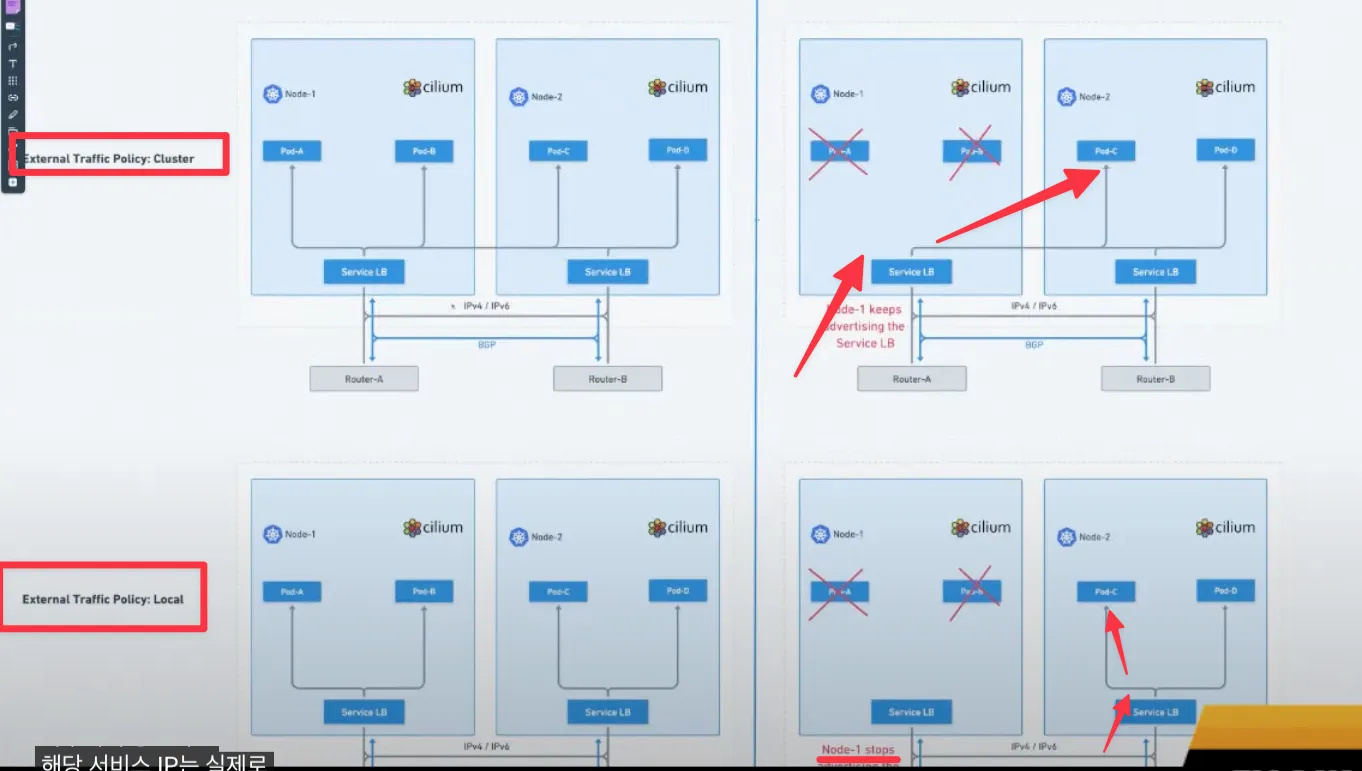
ExternalPolicy 가 "Cluster"로 설정되어 있어 불필요한 네트워크이 발생하므로 이러한 문제를 해결하기 위해 ExternalPolicy 를 "Local"로 설정
External Traffic Policy (Local) : 소스 IP 보존
- https://www.youtube.com/watch?v=Tv0R6VxyWhc
- https://docs.cilium.io/en/stable/network/bgp-control-plane/bgp-control-plane-v2/#externaltrafficpolicy-internaltrafficpolicy
- Linux ECMP Hash Policy

| # 모니터링 watch "ssh router ip -c route" default via ^[35m172.31.0.2 ^[0mdev ^[36mens160 ^[0mproto static metric 100 ^[35m10.10.1.0/24 ^[0mdev ^[36mloop1 ^[0mproto kernel scope link src ^[35m10.10.1.200 ^[0m ^[35m10.10.2.0/24 ^[0mdev ^[36mloop2 ^[0mproto kernel scope link src ^[35m10.10.2.200 ^[0m ^[35m172.16.1.1 ^[0mnhid 27 proto bgp metric 20 nexthop via ^[35m172.31.1.10 ^[0mdev ens160 weight 1 nexthop via ^[35m172.31.1.11 ^[0mdev ens160 weight 1 nexthop via ^[35m172.30.1.10 ^[0mdev ens192 weight 1 ^[35m172.20.0.0/24 ^[0mnhid 18 via ^[35m172.31.1.10 ^[0mdev ^[36mens160 ^[0mproto bgp metric 20 ^[35m172.20.1.0/24 ^[0mnhid 20 via ^[35m172.31.1.11 ^[0mdev ^[36mens160 ^[0mproto bgp metric 20 ^[35m172.20.2.0/24 ^[0mnhid 22 via ^[35m172.30.1.10 ^[0mdev ^[36mens192 ^[0mproto bgp metric 20 ^[35m172.30.0.0/20 ^[0mdev ^[36mens192 ^[0mproto kernel scope link src ^[35m172.30.1.200 ^[0mmetric 101 ^[35m172.31.0.0/20 ^[0mdev ^[36mens160 ^[0mproto kernel scope link src ^[35m172.31.1.200 ^[0mmetric 100 # k8s-cp kubectl patch service webpod -p '{"spec":{"externalTrafficPolicy":"Local"}}' service/webpod patched # router(frr) : 서비스에 대상 파드가 배치된 노드만 BGP 경로에 출력! # webpod 가 없는 node는 광고를 하지 않는다. ssh router "vtysh -c 'show ip bgp'" BGP table version is 7, local router ID is 172.31.1.200, vrf id 0 Default local pref 100, local AS 65000 Status codes: s suppressed, d damped, h history, * valid, > best, = multipath, i internal, r RIB-failure, S Stale, R Removed Nexthop codes: @NNN nexthop's vrf id, < announce-nh-self Origin codes: i - IGP, e - EGP, ? - incomplete RPKI validation codes: V valid, I invalid, N Not found Network Next Hop Metric LocPrf Weight Path *> 10.10.1.0/24 0.0.0.0 0 32768 i *> 172.16.1.1/32 172.30.1.10 0 65001 i *= 172.31.1.10 0 65001 i *> 172.20.0.0/24 172.31.1.10 0 65001 i *> 172.20.1.0/24 172.31.1.11 0 65001 i *> 172.20.2.0/24 172.30.1.10 0 65001 i Displayed 5 routes and 6 total paths ssh router "vtysh -c 'show ip bgp 172.16.1.1/32'" BGP routing table entry for 172.16.1.1/32, version 7 Paths: (2 available, best #1, table default) Advertised to non peer-group peers: 172.30.1.10 172.31.1.10 172.31.1.11 65001 172.30.1.10 from 172.30.1.10 (172.30.1.10) Origin IGP, valid, external, multipath, best (Older Path) Last update: Fri Aug 15 17:05:11 2025 65001 172.31.1.10 from 172.31.1.10 (172.31.1.10) Origin IGP, valid, external, multipath Last update: Fri Aug 15 17:05:11 2025 ssh router "vtysh -c 'show ip route bgp'" Codes: K - kernel route, C - connected, S - static, R - RIP, O - OSPF, I - IS-IS, B - BGP, E - EIGRP, N - NHRP, T - Table, v - VNC, V - VNC-Direct, F - PBR, f - OpenFabric, > - selected route, * - FIB route, q - queued, r - rejected, b - backup t - trapped, o - offload failure B>* 172.16.1.1/32 [20/0] via 172.30.1.10, ens192, weight 1, 00:02:30 * via 172.31.1.10, ens160, weight 1, 00:02:30 B>* 172.20.0.0/24 [20/0] via 172.31.1.10, ens160, weight 1, 01:49:46 B>* 172.20.1.0/24 [20/0] via 172.31.1.11, ens160, weight 1, 01:49:46 B>* 172.20.2.0/24 [20/0] via 172.30.1.10, ens192, weight 1, 00:56:37 ssh router ip -c route default via 172.31.0.2 dev ens160 proto static metric 100 10.10.1.0/24 dev loop1 proto kernel scope link src 10.10.1.200 10.10.2.0/24 dev loop2 proto kernel scope link src 10.10.2.200 172.16.1.1 nhid 31 proto bgp metric 20 nexthop via 172.31.1.10 dev ens160 weight 1 nexthop via 172.30.1.10 dev ens192 weight 1 172.20.0.0/24 nhid 18 via 172.31.1.10 dev ens160 proto bgp metric 20 172.20.1.0/24 nhid 20 via 172.31.1.11 dev ens160 proto bgp metric 20 172.20.2.0/24 nhid 22 via 172.30.1.10 dev ens192 proto bgp metric 20 172.30.0.0/20 dev ens192 proto kernel scope link src 172.30.1.200 metric 101 172.31.0.0/20 dev ens160 proto kernel scope link src 172.31.1.200 metric 100 # 신규터미널 (3개) : k8s-w1, k8s-cp, k8s-w0 tcpdump -i eth1 -A -s 0 -nn 'tcp port 80' # 현재 실습 환경 경우 반복 접속 시 한쪽 노드로 선택되고, 소스IP가 보존! LBIP=172.16.1.1 curl -s $LBIP for i in {1..100}; do curl -s $LBIP | grep Hostname; done | sort | uniq -c | sort -nr while true; do curl -s $LBIP | egrep 'Hostname|RemoteAddr' ; sleep 0.1; done ## 아래 실행 시 tcpdump 에 다른 노드 선택되는지 확인! 안될수도 있음! curl -s $LBIP --interface 10.10.1.200 curl -s $LBIP --interface 10.10.2.200 |
- Linux ECMP Hash Policy 설정
| # 리눅스 커널은 기본적으로 L3(목적지 IP 기반) 해시를 사용합니다. 보다 정교한 부하분산을 원하면 L4 해시 (IP + 포트) 기반으로 설정 # 1 : source IP, dest IP, source port, dest port 기반 hash (more granular)로 변경 sysctl -w net.ipv4.fib_multipath_hash_policy=1 echo "net.ipv4.fib_multipath_hash_policy=1" >> /etc/sysctl.conf # for i in {1..100}; do curl -s $LBIP | grep Hostname; done | sort | uniq -c | sort -nr 56 Hostname: webpod-697b545f57-5vmpg 44 Hostname: webpod-697b545f57-ngk2t # k8s-cp kubectl scale deployment webpod --replicas 3 kubectl get pod -owide NAME READY STATUS RESTARTS AGE IP NODE NOMINATED NODE READINESS GATES curl-pod 1/1 Running 0 7h38m 172.20.0.46 k8s-cp <none> <none> webpod-697b545f57-5vmpg 1/1 Running 0 60m 172.20.0.223 k8s-cp <none> <none> webpod-697b545f57-cgfkx 1/1 Running 0 5s 172.20.1.59 k8s-w1 <none> <none> webpod-697b545f57-ngk2t 1/1 Running 0 60m 172.20.2.50 k8s-w0 <none> <none> # router ssh router ip -c route default via 172.31.0.2 dev ens160 proto static metric 100 10.10.1.0/24 dev loop1 proto kernel scope link src 10.10.1.200 10.10.2.0/24 dev loop2 proto kernel scope link src 10.10.2.200 172.16.1.1 nhid 36 proto bgp metric 20 nexthop via 172.31.1.10 dev ens160 weight 1 nexthop via 172.31.1.11 dev ens160 weight 1 nexthop via 172.30.1.10 dev ens192 weight 1 172.20.0.0/24 nhid 18 via 172.31.1.10 dev ens160 proto bgp metric 20 172.20.1.0/24 nhid 20 via 172.31.1.11 dev ens160 proto bgp metric 20 172.20.2.0/24 nhid 22 via 172.30.1.10 dev ens192 proto bgp metric 20 172.30.0.0/20 dev ens192 proto kernel scope link src 172.30.1.200 metric 101 172.31.0.0/20 dev ens160 proto kernel scope link src 172.31.1.200 metric 100 for i in {1..100}; do curl -s $LBIP | grep Hostname; done | sort | uniq -c | sort -nr 34 Hostname: webpod-697b545f57-ngk2t 33 Hostname: webpod-697b545f57-cgfkx 33 Hostname: webpod-697b545f57-5vmpg |
ExternalTrafficPolicy(Local) 설정 시, Router 의 ECMP 에서 Hash Policy 경로 결정과 요청 트래픽 환경(소스 IP, 포트 등)으로 특정 동일 노드로만 라우팅 될 수 있음 → 대체로 Hash Policy 를 L4 수준 설정 권장.
'Kubernetes' 카테고리의 다른 글
| Cilium Study [1기] (7주차) - Jmeter를 이용한 K8S 부하테스트 (0) | 2025.08.29 |
|---|---|
| Cilium Study [1기] (6주차) - Cilium ServiceMesh (0) | 2025.08.19 |
| Cilium Study [1기] (4주차) - Networking - 노드에 파드들간 통신 2 & K8S 외부 노출 (0) | 2025.08.07 |
| Cilium Study [1기] (3주차) - Networking - 노드에 파드들간 통신 상세 1 (0) | 2025.07.28 |
| Cilium Study [1기] (2주차) - Observability (3) | 2025.07.26 |