Cilium 은 eBPF 기반의 효율적인 네트워킹을 이용하여 Ingress, Gateway API 지원이 가능하며, Istio 같은 Service Mesh 솔루션의 기능도 대체가 가능합니다.
이번 블로그에서는 아래 기능들을 학습해 보겠습니다.
- Cilium을 Ingress Controller로 사용하는 Ingress 리소스 지원
- Cilium을 Gateway API Controller로 사용하는 Gateway API 리소스 지원
- Serice Mesh 기능 지원
0. 실습환경 구성
- 윈도우 11 OS 에서 Vmware Workstation v17을 이용한 Linux 가상머신 2대 + 윈도우 호스트 PC
- Rocky Linux 9.6 (커널버전 : 5.14.0-570.26.1.el9_6.x86_64)
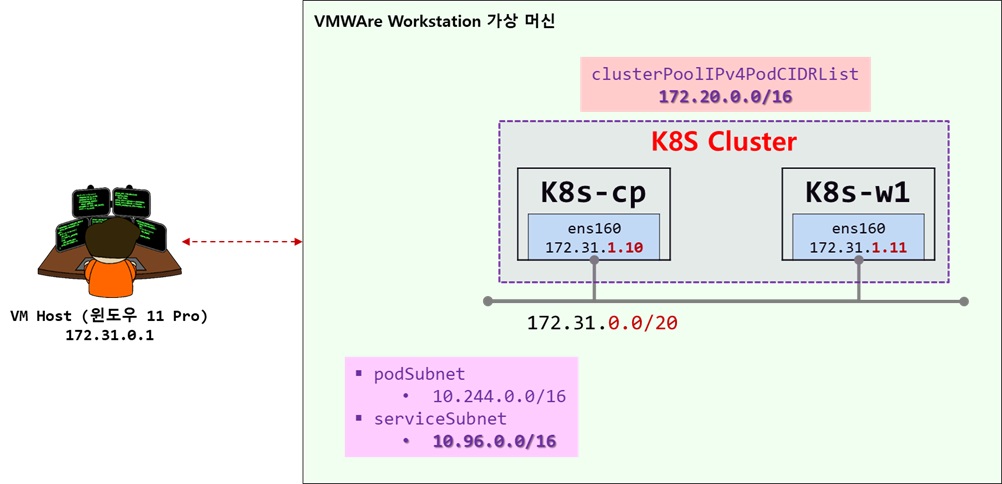
- K8S 클러스터를 구성하는 2개의 노드(k8s-cp, k8s-w1)가 같은 네트워크에 존재함
- 172.31.0.0/20 네트워크
- VMnet8 - NAT 네트워크
- 윈도우 HOST 머신에서 접근 가능하고, 인터넷이 되는 네트워크
- 172.31.0.0/20 네트워크
K8S 클러스터 구성
1단계 - 사전 준비
- 클러스터의 모든 node 에서 수행 : k8s-cp, k8s-w1
K8S_MV='1.33' # Major Version
K8S_FV='1.33.3' # Full version
CONTAINERD_FV='1.7.27'
NERDCTL_FV='2.1.3'

# hosts 파일 편집
echo "172.31.1.10  k8s-cp" >> /etc/hosts
echo "172.31.1.11  k8s-w1" >> /etc/hosts

# 방화벽 종료 및 해제
systemctl stop firewalld
systemctl disable firewalld

# selinux 해제
setenforce 0
grubby --update-kernel ALL --args selinux=0

# Swap off
swapoff --all
sed -i '/swap/s/^/#/' /etc/fstab

# 필수 패키지 설치
dnf install -y socat

# packets traversing the bridge are processed by iptables for filtering
sysctl -w net.ipv4.ip_forward=1
echo "net.ipv4.ip_forward = 1" >> /etc/sysctl.d/k8s.conf

# enable br_netfilter for iptables
modprobe br_netfilter
modprobe overlay
modprobe iptable_nat
echo "br_netfilter" >> /etc/modules-load.d/k8s.conf
echo "overlay" >> /etc/modules-load.d/k8s.conf
echo "iptable_nat" >> /etc/modules-load.d/k8s.conf

##### containerd 설치
dnf config-manager --add-repo https://download.docker.com/linux/centos/docker-ce.repo
# dnf list containerd.io --showduplicates
dnf install -y containerd.io-$CONTAINERD_FV
# containerd configure to default and cgroup managed by systemd
containerd config default > /etc/containerd/config.toml
sed -i 's/SystemdCgroup = false/SystemdCgroup = true/g' /etc/containerd/config.toml
sed -i --follow-symlinks 's/registry.k8s.io\/pause:3.8/registry.k8s.io\/pause:3.10/g' /etc/containerd/config.toml

### k8s 관련 패키지 설치
cat <<EOF | sudo tee /etc/yum.repos.d/kubernetes.repo
[kubernetes]
name=Kubernetes
baseurl=https://pkgs.k8s.io/core:/stable:/v$K8S_MV/rpm/
enabled=1
gpgcheck=1
gpgkey=https://pkgs.k8s.io/core:/stable:/v$K8S_MV/rpm/repodata/repomd.xml.key
exclude=kubelet kubeadm kubectl cri-tools kubernetes-cni
EOF

dnf install -y kubelet-$K8S_FV kubeadm-$K8S_FV kubectl-$K8S_FV --disableexcludes=kubernetes

# ready to install for k8s
systemctl restart containerd && systemctl enable containerd
systemctl enable --now kubelet

# kubectl 명령어 자동완성 기능 사용하기
dnf install -y bash-completion
kubectl completion bash >/etc/bash_completion.d/kubectl
echo "alias k=kubectl" >> ~/.bashrc
echo "complete -F __start_kubectl k" >> ~/.bashrc
source ~/.bash_profile

# nerdctl 설치
wget https://github.com/containerd/nerdctl/releases/download/v$NERDCTL_FV/nerdctl-$NERDCTL_FV-linux-amd64.tar.gz
tar xfz nerdctl-$NERDCTL_FV-linux-amd64.tar.gz -C /usr/local/bin
rm -fr nerdctl-$NERDCTL_FV-linux-amd64.tar.gz
echo "source <(nerdctl completion bash)" >> ~/.bash_profile
source ~/.bash_profile

# kubecolor 설치
KUBECOLOR_FV='0.0.25'
wget https://github.com/hidetatz/kubecolor/releases/download/v$KUBECOLOR_FV/kubecolor_$KUBECOLOR_FV\_Linux_x86_64.tar.gz
tar xfz kubecolor_$KUBECOLOR_FV\_Linux_x86_64.tar.gz -C /usr/bin/
rm -fr xfz kubecolor_$KUBECOLOR_FV\_Linux_x86_64.tar.gz
echo "alias kc='kubecolor'" >> ~/.bashrc

# helm 설치
HELM_FV='3.17.4'

curl -O https://get.helm.sh/helm-v$HELM_FV-linux-amd64.tar.gz
tar xfz helm-v$HELM_FV-linux-amd64.tar.gz
mv linux-amd64/helm /usr/local/bin
rm -fr helm-v$HELM_FV-linux-amd64.tar.gz linux-amd64
helm completion bash > /etc/bash_completion.d/helm

# cilium cli & hubble cli 설치
CILIUM_CLI_VERSION=$(curl -s https://raw.githubusercontent.com/cilium/cilium-cli/main/stable.txt)
CLI_ARCH=amd64
if [ "$(uname -m)" = "aarch64" ]; then CLI_ARCH=arm64; fi
curl -L --fail --remote-name-all https://github.com/cilium/cilium-cli/releases/download/${CILIUM_CLI_VERSION}/cilium-linux-${CLI_ARCH}.tar.gz >/dev/null 2>&1
tar xzvfC cilium-linux-${CLI_ARCH}.tar.gz /usr/local/bin
rm -fr cilium-linux-${CLI_ARCH}.tar.gz

HUBBLE_VERSION=$(curl -s https://raw.githubusercontent.com/cilium/hubble/master/stable.txt)
HUBBLE_ARCH=amd64
if [ "$(uname -m)" = "aarch64" ]; then HUBBLE_ARCH=arm64; fi
curl -L --fail --remote-name-all https://github.com/cilium/hubble/releases/download/$HUBBLE_VERSION/hubble-linux-${HUBBLE_ARCH}.tar.gz >/dev/null 2>&1
tar xzvfC hubble-linux-${HUBBLE_ARCH}.tar.gz /usr/local/bin
rm -fr hubble-linux-${HUBBLE_ARCH}.tar.gz- k8s-cp 에서 k8s-w1, k8s-w0, router 로 SSH key 방식의 인증 구성
# k8s-w1, k8s-w0 SSH key 방식의 인증 구성
ssh-keygen -t rsa -f ~/.ssh/id_rsa -N ""
ssh-copy-id k8s-w1
2단계 - 클러스터 구성
- kubeadm init : k8s-cp
K8S_FV='1.33.3'

kubeadm init \
--kubernetes-version=v$K8S_FV \
--pod-network-cidr=10.244.0.0/16 \
--service-cidr 10.96.0.0/16 \
--apiserver-advertise-address=172.31.1.10 \
--apiserver-cert-extra-sans jadeedu.com \
--cri-socket=unix:///run/containerd/containerd.sock

#  Setting kube config file
mkdir -p $HOME/.kube
cp -i /etc/kubernetes/admin.conf $HOME/.kube/config
chown $(id -u):$(id -g) $HOME/.kube/config- kubeadm join : k8s-w1
# k8s-cp 에서 join command 생성
kubeadm token create --print-join-command
kubeadm join 172.31.1.10:6443 --token iv3bdo.o4cjvcacio8k0gec --discovery-token-ca-cert-hash sha256:080eb62adfa0013d48400562edd68835b8545d1b665a0a03a2bc46dee07bc425

# k8s-w1 에서 위의 join command 수행
kubeadm join 172.31.1.10:6443 --token iv3bdo.o4cjvcacio8k0gec --discovery-token-ca-cert-hash sha256:080eb62adfa0013d48400562edd68835b8545d1b665a0a03a2bc46dee07bc425
cilium CNI 구성
- Cilium 버전 : 1.18.1
# Cilium 설치 with Helm
helm repo add cilium https://helm.cilium.io/

CILIUM_FV='1.18.1'

helm install cilium cilium/cilium --version $CILIUM_FV --namespace kube-system \
--set k8sServiceHost=172.31.1.10 --set k8sServicePort=6443 \
--set ipam.mode="cluster-pool" --set ipam.operator.clusterPoolIPv4PodCIDRList={"172.20.0.0/16"} --set ipv4NativeRoutingCIDR=172.20.0.0/16 \
--set routingMode=native --set autoDirectNodeRoutes=true --set endpointRoutes.enabled=true --set directRoutingSkipUnreachable=true \
--set kubeProxyReplacement=true --set bpf.masquerade=true --set installNoConntrackIptablesRules=true \
--set endpointHealthChecking.enabled=false --set healthChecking=false \
--set hubble.enabled=true --set hubble.relay.enabled=true --set hubble.ui.enabled=true \
--set hubble.ui.service.type=NodePort --set hubble.ui.service.nodePort=30003 \
--set prometheus.enabled=true --set operator.prometheus.enabled=true --set hubble.metrics.enableOpenMetrics=true \
--set hubble.metrics.enabled="{dns,drop,tcp,flow,port-distribution,icmp,httpV2:exemplars=true;labelsContext=source_ip\,source_namespace\,source_workload\,destination_ip\,destination_namespace\,destination_workload\,traffic_direction}" \
--set ingressController.enabled=true --set ingressController.loadbalancerMode=shared --set loadBalancer.l7.backend=envoy \
--set localRedirectPolicy=true --set l2announcements.enabled=true \
--set operator.replicas=1 --set debug.enabled=true| # 클러스터 구성후 pod-cidr, service-cidr 값 확인 kubectl cluster-info dump | grep -m 2 -E "cluster-cidr|service-cluster-ip-range" "--service-cluster-ip-range=10.96.0.0/16", "--cluster-cidr=10.244.0.0/16", # ipam 모드 확인 cilium config view | grep ^ipam ipam cluster-pool ipam-cilium-node-update-rate 15s # cilium 상태 확인 cilium status /¯¯\ /¯¯\__/¯¯\ Cilium: OK \__/¯¯\__/ Operator: OK /¯¯\__/¯¯\ Envoy DaemonSet: OK \__/¯¯\__/ Hubble Relay: OK \__/ ClusterMesh: disabled DaemonSet cilium Desired: 2, Ready: 2/2, Available: 2/2 DaemonSet cilium-envoy Desired: 2, Ready: 2/2, Available: 2/2 Deployment cilium-operator Desired: 1, Ready: 1/1, Available: 1/1 Deployment hubble-relay Desired: 1, Ready: 1/1, Available: 1/1 Deployment hubble-ui Desired: 1, Ready: 1/1, Available: 1/1 Containers: cilium Running: 2 cilium-envoy Running: 2 cilium-operator Running: 1 clustermesh-apiserver hubble-relay Running: 1 hubble-ui Running: 1 Cluster Pods: 4/4 managed by Cilium Helm chart version: 1.18.1 Image versions cilium quay.io/cilium/cilium:v1.18.1@sha256:65ab17c052d8758b2ad157ce766285e04173722df59bdee1ea6d5fda7149f0e9: 2 cilium-envoy quay.io/cilium/cilium-envoy:v1.34.4-1754895458-68cffdfa568b6b226d70a7ef81fc65dda3b890bf@sha256:247e908700012f7ef56f75908f8c965215c26a27762f296068645eb55450bda2: 2 cilium-operator quay.io/cilium/operator-generic:v1.18.1@sha256:97f4553afa443465bdfbc1cc4927c93f16ac5d78e4dd2706736e7395382201bc: 1 hubble-relay quay.io/cilium/hubble-relay:v1.18.1@sha256:7e2fd4877387c7e112689db7c2b153a4d5c77d125b8d50d472dbe81fc1b139b0: 1 hubble-ui quay.io/cilium/hubble-ui-backend:v0.13.2@sha256:a034b7e98e6ea796ed26df8f4e71f83fc16465a19d166eff67a03b822c0bfa15: 1 hubble-ui quay.io/cilium/hubble-ui:v0.13.2@sha256:9e37c1296b802830834cc87342a9182ccbb71ffebb711971e849221bd9d59392: 1 cilium config view | grep -E '^loadbalancer|l7' enable-l7-proxy true loadbalancer-l7 envoy loadbalancer-l7-algorithm round_robin loadbalancer-l7-ports |
샘플 어플리케이션 배포
| # k8s-cp 노드에도 POD 가 스케줄링 될수 있도록 taint kubectl taint nodes k8s-cp node-role.kubernetes.io/control-plane- # k8s-cp 노드에 curl-pod 파드 배포 cat <<EOF | kubectl apply -f - apiVersion: v1 kind: Pod metadata: name: curl-pod labels: app: curl spec: nodeName: k8s-cp containers: - name: curl image: nicolaka/netshoot command: ["tail"] args: ["-f", "/dev/null"] terminationGracePeriodSeconds: 0 EOF # 샘플 애플리케이션 배포 cat << EOF | kubectl apply -f - apiVersion: apps/v1 kind: Deployment metadata: name: webpod spec: replicas: 2 selector: matchLabels: app: webpod template: metadata: labels: app: webpod spec: affinity: podAntiAffinity: requiredDuringSchedulingIgnoredDuringExecution: - labelSelector: matchExpressions: - key: app operator: In values: - sample-app topologyKey: "kubernetes.io/hostname" containers: - name: webpod image: traefik/whoami ports: - containerPort: 80 --- apiVersion: v1 kind: Service metadata: name: webpod labels: app: webpod spec: selector: app: webpod ports: - protocol: TCP port: 80 targetPort: 80 type: ClusterIP EOF |
- 배포 후 네트워크 정보 확인
| # IP 확인 kubectl get ciliumendpoints NAME SECURITY IDENTITY ENDPOINT STATE IPV4 IPV6 curl-pod 17329 ready 172.20.0.30 webpod-697b545f57-4fcf7 34852 ready 172.20.0.175 webpod-697b545f57-nh8nf 34852 ready 172.20.1.55 kubectl exec -n kube-system ds/cilium -- cilium-dbg ip list IP IDENTITY SOURCE 0.0.0.0/0 reserved:world 172.20.0.0/24 reserved:world 172.20.0.21/32 reserved:remote-node 172.20.0.30/32 k8s:app=curl custom-resource k8s:io.ciliuhttp://m.k8s.namespace.labels.kubernetes.io/metadata.name=default k8s:io.ciliuhttp://m.k8s.policy.cluster=default k8s:io.ciliuhttp://m.k8s.policy.serviceaccount=default k8s:io.kubernetes.pod.namespace=default 172.20.0.166/32 reserved:ingress 172.20.0.175/32 k8s:app=webpod custom-resource k8s:io.ciliuhttp://m.k8s.namespace.labels.kubernetes.io/metadata.name=default k8s:io.ciliuhttp://m.k8s.policy.cluster=default k8s:io.ciliuhttp://m.k8s.policy.serviceaccount=default k8s:io.kubernetes.pod.namespace=default 172.20.1.10/32 reserved:host 172.20.1.23/32 k8s:io.ciliuhttp://m.k8s.namespace.labels.kubernetes.io/metadata.name=kube-system custom-resource k8s:io.ciliuhttp://m.k8s.policy.cluster=default k8s:io.ciliuhttp://m.k8s.policy.serviceaccount=coredns k8s:io.kubernetes.pod.namespace=kube-system k8s:k8s-app=kube-dns 172.20.1.55/32 k8s:app=webpod custom-resource k8s:io.ciliuhttp://m.k8s.namespace.labels.kubernetes.io/metadata.name=default k8s:io.ciliuhttp://m.k8s.policy.cluster=default k8s:io.ciliuhttp://m.k8s.policy.serviceaccount=default k8s:io.kubernetes.pod.namespace=default 172.20.1.126/32 reserved:ingress 172.20.1.127/32 k8s:app.kubernetes.io/name=hubble-ui custom-resource k8s:app.kubernetes.io/part-of=cilium k8s:io.ciliuhttp://m.k8s.namespace.labels.kubernetes.io/metadata.name=kube-system k8s:io.ciliuhttp://m.k8s.policy.cluster=default k8s:io.ciliuhttp://m.k8s.policy.serviceaccount=hubble-ui k8s:io.kubernetes.pod.namespace=kube-system k8s:k8s-app=hubble-ui 172.20.1.250/32 k8s:io.ciliuhttp://m.k8s.namespace.labels.kubernetes.io/metadata.name=kube-system custom-resource k8s:io.ciliuhttp://m.k8s.policy.cluster=default k8s:io.ciliuhttp://m.k8s.policy.serviceaccount=coredns k8s:io.kubernetes.pod.namespace=kube-system k8s:k8s-app=kube-dns 172.20.1.251/32 k8s:app.kubernetes.io/name=hubble-relay custom-resource k8s:app.kubernetes.io/part-of=cilium k8s:io.ciliuhttp://m.k8s.namespace.labels.kubernetes.io/metadata.name=kube-system k8s:io.ciliuhttp://m.k8s.policy.cluster=default k8s:io.ciliuhttp://m.k8s.policy.serviceaccount=hubble-relay k8s:io.kubernetes.pod.namespace=kube-system k8s:k8s-app=hubble-relay 172.31.1.10/32 reserved:kube-apiserver reserved:remote-node 172.31.1.11/32 reserved:host # 통신 확인 : 정상 kubectl exec -it curl-pod -- sh -c 'while true; do curl -s --connect-timeout 1 webpod | grep "IP: 172" ; echo "---" ; sleep 1; done' IP: 172.20.0.175 --- IP: 172.20.1.55 --- IP: 172.20.0.175 --- IP: 172.20.0.175 --- |
1. Cilium Service Mesh
(용어정리) MSA 와 Service Mesh
- MSA (Micro Service Architecture)
- 시스템을 여러 개의 독립된 서비스로 나눠서, 이 서비스를 조합함으로써 기능을 제공하는 아키텍쳐 디자인 패턴
이러한 MSA 어플리케이션은 아래와 같은 Death Star 아키텍처의 모습을 보입니다.
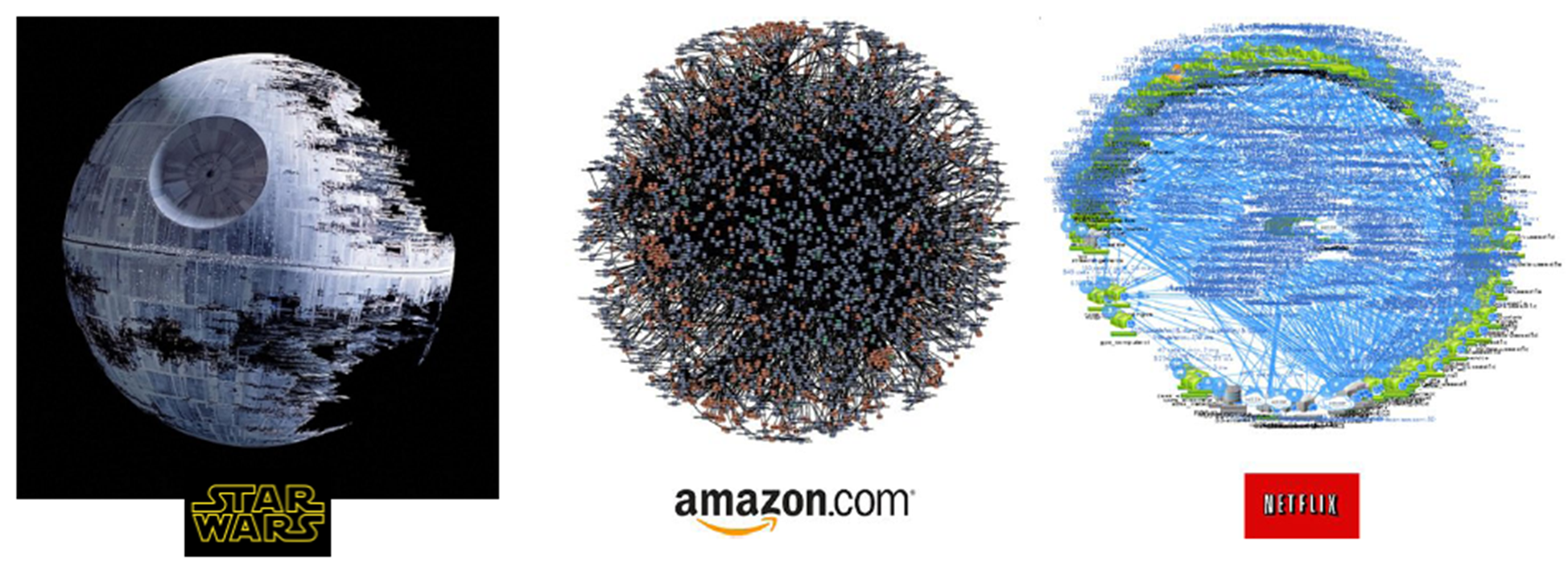
위 그림에서 조그만 점 하나가 마이크로서비스입니다. 그리고 마이크로서비스간의 호출관계가 그물망 처럼 얽혀있어서 Service Mesh 환경이라고 명명하였으며 이러한 Service Mesh 환경에는 아래와 같은 문제점을 개발팀의 코딩이 아니라 인프라 레벨에서 해결해야 하는 도전과제가 있습니다.
- 클라우드에서 마이크로서비스를 운영하는 데는 여러 도전과제가 있다.
- 몇 가지를 꼽자면 신뢰할 수 없는 네트워크, 서비스 가용성, 이해하기 어려운 트래픽 흐름, 트래픽 암호화, 애플리케이션 상태, 성능 등이 있다.
- 이런 어려움들은 각 애플리케이션 내에서 라이브러리를 사용해 패턴(서비스 디스커버리 등)들을 구현함으로써 완화된다.
- 서비스들에 대한 관찰 가능성을 확보할 목적으로 메트릭과 트레이싱을 생성하고 배포하려면 추가적인 라이브러리와 서비스가 필요한다.
- 서비스 메시는 이런 공통 관심사를 애플리케이션 대신 프로세스 외부에서 투명한 방식으로 구현하는 인프라다.
- 이스티오는 다음과 같은 요소로 구성된 서비스 메시 구현체다.
- 데이터 플레인, 애플리케이션과 함께 배포되는 서비스 프록시로 구서오디며, 정책을 구현하고 트래픽을 제어하고 메트릭과 트레이싱을 생성하는 등 애플리케이션을 보완한다.
- 컨트롤 플레인, 운영자가 데이터 플레인의 네트워크 동작을 제어할 수 있도록 API를 노출한다.
- 이스티오는 엔보이를 서비스 프록시로 사용하는데, 기능이 다양하고 동적으로 설정할 수 있기 때문이다.
Service Mesh
- Micro Service Architecture를 적용한 시스템의 내부 통신이 Mesh 네트워크의 형태를 띄는 것에 빗대어 Service Mesh로 명명되었습니다.
- Service Mesh 는 서비스 간 통신을 추상화하여 안전하고, 빠르고, 신뢰할 수 있게 만드는 전용 InfraStructure Layer입니다.
- 추상화를 통해 복잡한 내부 네트워크를 제어하고, 추적하고, 내부 네트워크 관련 로직을 추가함으로써 안정성, 신뢰성, 탄력성, 표준화, 가시성, 보안성 등을 확보합니다.
- Service Mesh 는 URL 경로, 호스트 헤더, API 버전 또는 기타 응용 프로그램 수준 규칙을 기반으로 하는 계층 7 네트워크 Layer 입니다.
- Service Mesh 의 구현체인 경량화 Proxy를 통해 다양한 Routing Rules, Circuit breaker 등 공통기능을 설정할 수 있습니다. 이는 서비스 간 통신에 연관된 기능 뿐만 아니라, 서비스의 배포 전략에도 도움을 줍니다.
Vendor별 Service Mesh 정의
- Google https://cloud.google.com/anthos/service-mesh/?hl=ko
- AWS https://aws.amazon.com/ko/app-mesh/
- AZURE https://docs.microsoft.com/ko-kr/azure/aks/servicemesh-about
- RedHat https://www.redhat.com/ko/topics/microservices/what-is-a-service-mesh
Service Mesh 솔루션의 대표적인 제품으로 istio 가 있으며, Cilium 을 이용하면 istio 가 하는 기능의 많은 부분을 대체할 수 있습니다.
Cilium Service Mesh
위 링크의 Cilium Service Mesh 의 기능을 보면 아래와 같으며, Istio 가 하고자 하는 일과 거의 동일하다는것을 알수 있습니다.
- Resilient Connectivity:
- Service to service communication must be possible across boundaries such as clouds, clusters, and premises. Communication must be resilient and fault tolerant.
- L7 Traffic Management:
- Load balancing, rate limiting, and resiliency must be L7-aware (HTTP, REST, gRPC, WebSocket, …).
- Identity-based Security:
- Relying on network identifiers to achieve security is no longer sufficient, both the sending and receiving services must be able to authenticate each other based on identities instead of a network identifier.
- Observability & Tracing:
- Observability in the form of tracing and metrics is critical to understanding, monitoring, and troubleshooting application stability, performance, and availability.
- Transparency:
- The functionality must be available to applications in a transparent manner, i.e. without requiring to change application code.
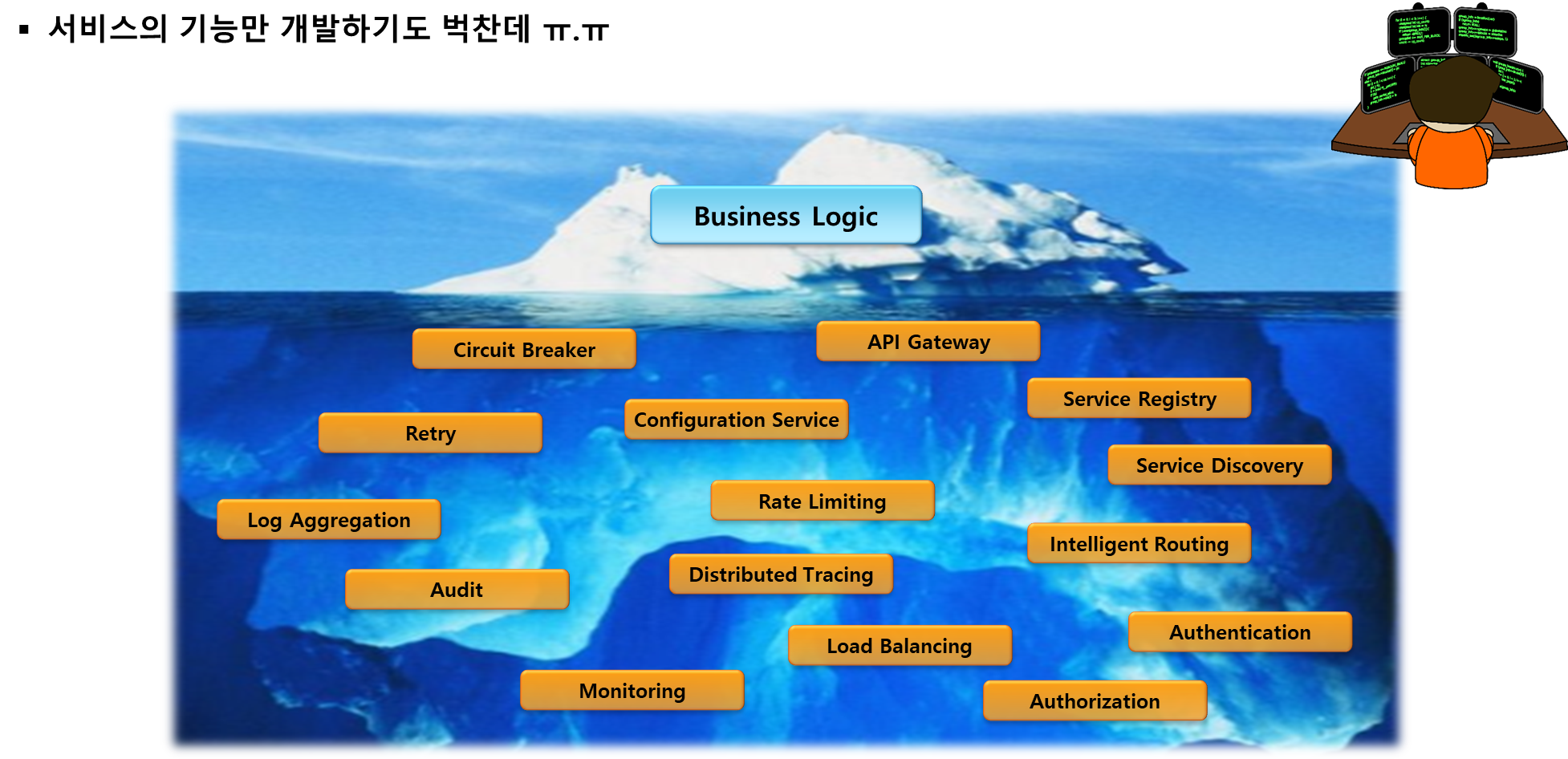
Service Mesh 솔루션의 핵심은 "Business Logic"과 별개인 비기능적인 요소를 인프라레벨의 솔루션이 해줘야 한다는 것입니다.
Why Cilium Service Mesh?
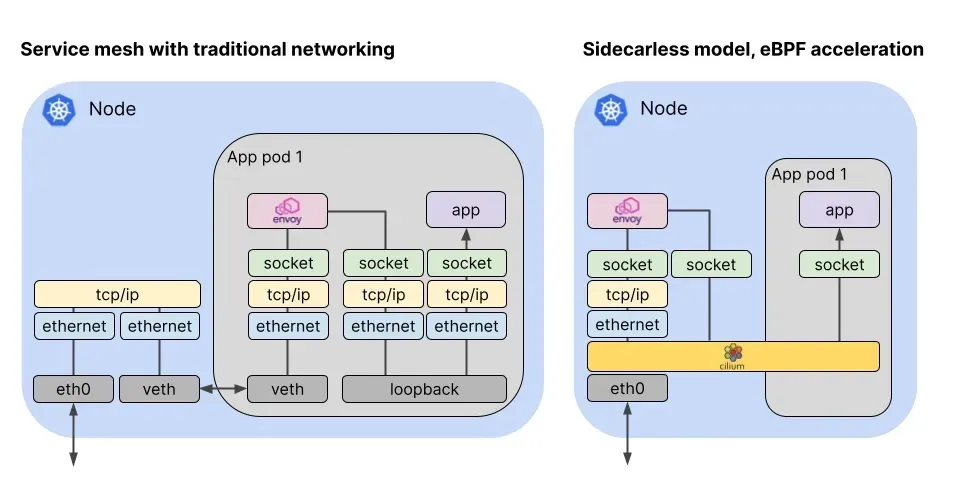
- L3/L4 수준 프로토콜 : eBPF 처리
- IP, TCP, UDP와 같은 프로토콜을 포함한 모든 네트워크 처리에 대해 Cilium은 고효율 커널 내부 데이터 경로로 eBPF를 사용.
- For all network processing including protocols such as IP, TCP, and UDP, Cilium uses eBPF as the highly efficient in-kernel datapath
- L7 수준 애플리케이션 : cilium-envoy 처리
- HTTP, Kafka, gRPC, DNS와 같은 애플리케이션 계층 프로토콜은 Envoy와 같은 프록시를 사용하여 파싱.
- Protocols at the application layer such as HTTP, Kafka, gRPC, and DNS are parsed using a proxy such as Envoy.
2. K8S Ingress Support
K8S 에서 Ingress는 라우팅 규칙일뿐이며, 이러한 라우팅 규칙을 처리하는 Controller가 설치되어야 합니다.
- 인그레스 컨트롤러 구현체
- GKE
- NGINX Ingress Controller
- F5 BIG IP Controller
- Kong
- API 게이트웨이 솔루션인데 Ingress Controller의 기능을 지원함, https://konghq.com/blog/kubernetes-ingress-controller-for-kong
- istio
- GKE
Cilium 도 Ingress Controller 역할 수행이 가능하며, 아래와 같은 조건으로 Cilium 이 구성되어야 합니다.
- 필수 조건
- Cilium must be configured with NodePort enabled, using nodePort.enabled=true or by enabling the kube-proxy replacement with kubeProxyReplacement=true. For more information, see [kube-proxy replacement](https://docs.cilium.io/en/stable/network/kubernetes/kubeproxy-free/#kubeproxy-free).
- Cilium must be configured with the L7 proxy enabled using l7Proxy=true (enabled by default).
- By default, the Ingress controller creates a Service of LoadBalancer type, so your environment will need to support this. Alternatively, you can change this to NodePort or, since Cilium 1.16+, directly expose the Cilium L7 proxy on the [host network](https://docs.cilium.io/en/stable/network/servicemesh/ingress/#gs-ingress-host-network-mode).
Cilium 에서 Ingress 는 2가지 방식을 지원합니다.
- dedicated:
- The Ingress controller will create a dedicated loadbalancer for the Ingress.
- shared:
- The Ingress controller will use a shared loadbalancer for all Ingress resources.
- How Cilium Ingress and Gateway API differ from other Ingress controllers
- Cilium의 Ingress 및 Gateway API 지원과 다른 Ingress 컨트롤러 간의 가장 큰 차이점 중 하나는 구현이 CNI와 얼마나 밀접하게 연결되어 있는지입니다. Cilium의 경우 Ingress와 Gateway API는 네트워킹 스택의 일부이므로 다른 Ingress 또는 Gateway API 컨트롤러(심지어 Cilium 클러스터에서 실행되는 다른 Ingress 또는 Gateway API 컨트롤러)와는 다른 방식으로 작동합니다.
- 다른 Ingress 또는 Gateway API 컨트롤러는 일반적으로 클러스터에 Deployment 또는 데몬셋으로 설치되며, Loadbalancer Service 또는 이와 유사한 서비스를 통해 노출됩니다. (물론 Cilium은 이를 활성화할 수 있습니다).
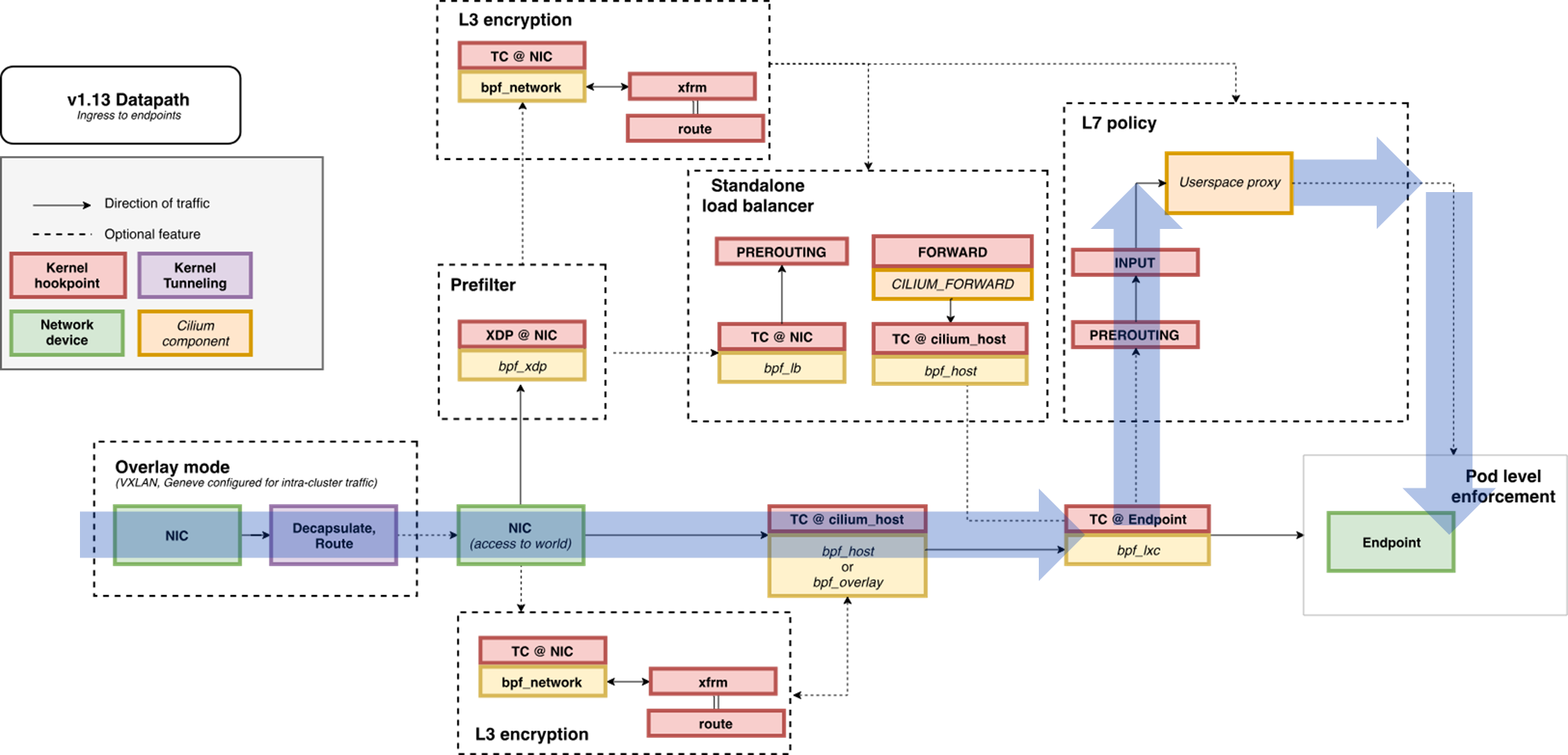
- Cilium Ingress 및 Gateway API 구성은 Loadbalancer 또는 NodePort 서비스를 통해 노출되거나, 선택적으로 Host network에서도 노출될 수 있습니다. 이 모든 경우에 트래픽이 서비스의 포트에 도착하면 eBPF 코드가 트래픽을 가로채어 투명하게 Envoy에 전달합니다(TPROXY 커널 기능을 사용하여).
- 아래는 ChatGPT 내용으로 부정확할 수 있음
- 패킷이 Kubernetes Service IP:Port에 도착하면, kube-proxy 없이 Cilium의 eBPF가 이를 가로챔.
- Cilium은 Envoy Proxy를 L7 데이터플레인으로 사용. 하지만 단순 포트포워딩(REDIRECT)이 아니라, 커널의 TPROXY(Transparent Proxy) 기능을 이용함.
- 커널 netfilter/iptables에서 지원하는 특수 기능
- ‘투명 프록시’ 역할 : 클라이언트는 원래 목적지로 연결했다고 생각하지만, 사실상 로컬 프록시(여기서는 Envoy)로 트래픽이 리디렉션됨
- 원본 destination IP/Port, source IP/Port를 유지한 채 소켓 레벨에서 Envoy가 트래픽을 가로채어 처리할 수 있음
즉, Envoy가 "내가 80/443 포트에서 직접 리스닝한 것처럼" 패킷을 받을 수 있고, 그 과정은 클라이언트 입장에서 완전히 투명합니다.
- 동작 경로
- [Client] → [K8s Node:Ingress/Gateway Service Port]
- → (eBPF Service LB) → (TPROXY) → [Envoy Proxy (Pod)]
- → (L7 라우팅/정책 처리) → (eBPF) → [Backend Pod]
- [Client] → [K8s Node:Ingress/Gateway Service Port]
- 아래는 ChatGPT 내용으로 부정확할 수 있음
- 이는 Client IP visibility 같은 문제에 영향을 미치며, 이는 다른 입력 컨트롤러에 대한 Cilium의 Ingress 또는 Gateway API과 다르게 작동합니다.
또한 Cilium의 네트워크 정책 엔진이 Ingress에서 들어오는 트래픽 경계와 트래픽에 CiliumNetworkPolicy를 적용할 수 있도록 합니다.
Cilium’s ingress config and CiliumNetworkPolicy
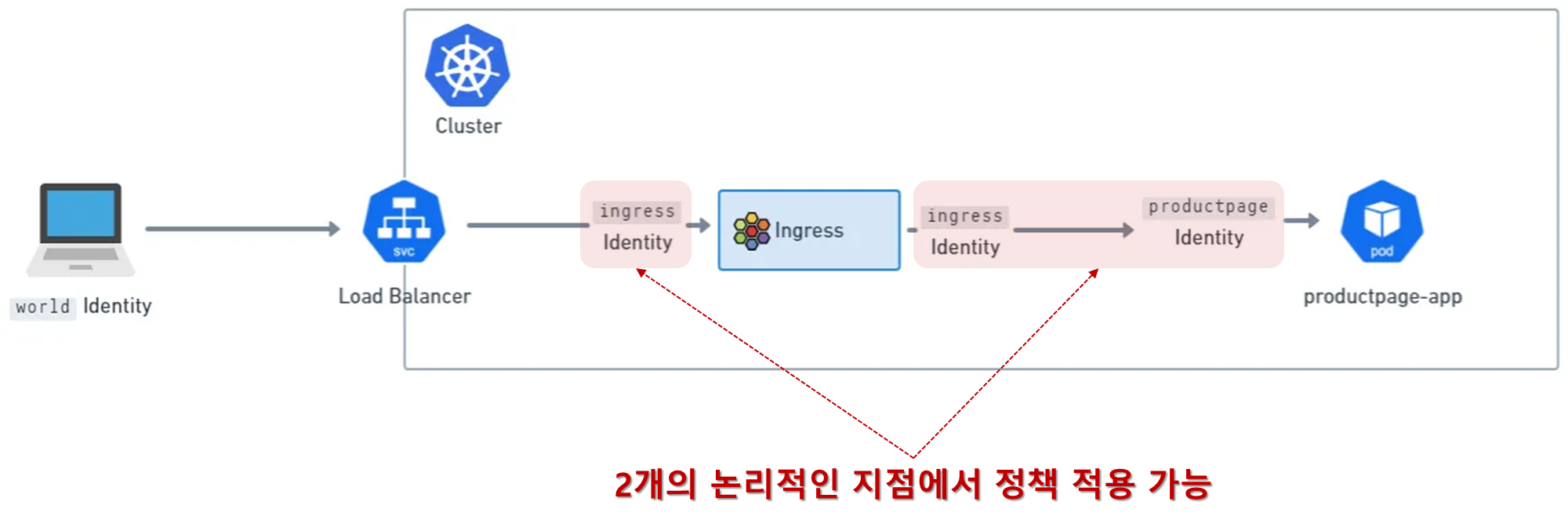
- 노드별 envoy proxy 에 Network policy 정책 적용할 수 있다.
- Ingress and Gateway API traffic bound to backend services via Cilium passes through a per-node Envoy proxy.
- The per-node Envoy proxy has special code that allows it to interact with the eBPF policy engine, and do policy lookups on traffic.
- This allows Envoy to be a Network Policy enforcement point, both for Ingress (and Gateway API) traffic, and also for east-west traffic via GAMMA or L7 Traffic Management.
- However, for ingress config, there’s also an additional step. Traffic that arrives at Envoy for Ingress or Gateway API is assigned the special ingress identity in Cilium’s Policy engine. Cilium의 정책 엔진에서 특수 입력 ID가 할당.
- 클러스터 외부에서 들어오는 트래픽은 일반적으로 클러스터에 (IP CIDR 정책이 없는 한) world identity가 할당됩니다.
- 이는 실제로 실리움 인그레스에 두 개의 논리적 정책 집행 지점이 있다는 것을 의미합니다. two logical Policy enforcement points.
- before traffic arrives at the ingress identity, and after, when it is about to exit the per-node Envoy.
- This means that, when applying Network Policy to a cluster, it’s important to ensure that both steps are allowed, and that traffic is allowed from world to ingress, and from ingress to identities in the cluster (like the productpage identity in the image above). although the same principles also apply for Gateway API. Gateway API도 동일하게 적용된다.
지원되는 인그레스 애너테이션
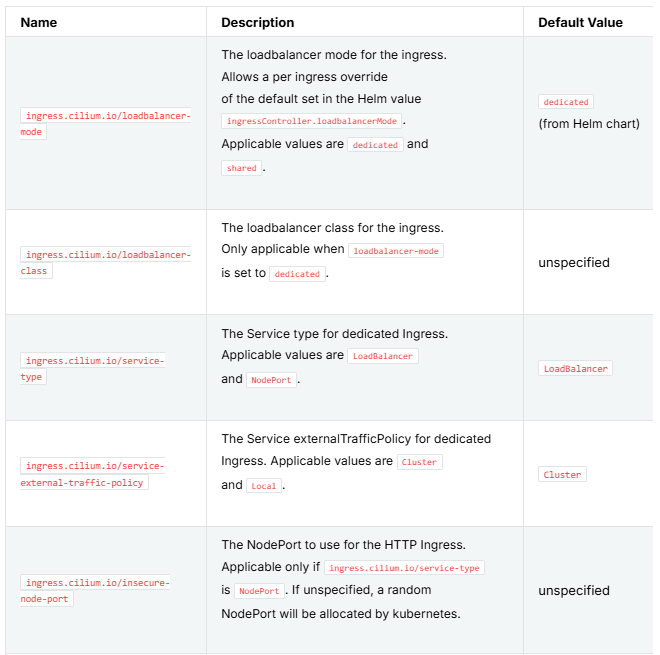
- eBPF Datapath : Ingress to → Endpoint
Cilium K8S Ingress Support 관련 정보 확인
- Cilium Ingress 와 Cilium GatewayAPI는 동시 활성화 불가능함. 다른 Ingress(nginx) 와는 가능.
| # cilium 설치 시 아래 파라미터 적용되어 있음 ## --set ingressController.enabled=true ## --set ingressController.loadbalancerMode=shared ## --set loadBalancer.l7.backend=envoy \ cilium config view | grep -E '^loadbalancer|l7' enable-l7-proxy true loadbalancer-l7 envoy loadbalancer-l7-algorithm round_robin # LB 정책을 구사할 수 있음 (default : RR) loadbalancer-l7-ports # ingress 에 예약된 내부 IP 확인 : node(cilium-envoy) 별로 존재 kubectl exec -it -n kube-system ds/cilium -- cilium ip list | grep ingress 172.20.0.166/32 reserved:ingress 172.20.1.126/32 reserved:ingress # cilium-envoy 확인 kubectl get ds -n kube-system cilium-envoy -owide NAME DESIRED CURRENT READY UP-TO-DATE AVAILABLE NODE SELECTOR AGE CONTAINERS IMAGES SELECTOR cilium-envoy 2 2 2 2 2 kubernetes.io/os=linux 130m cilium-envoy quay.io/cilium/cilium-envoy:v1.34.4-1754895458-68cffdfa568b6b226d70a7ef81fc65dda3b890bf@sha256:247e908700012f7ef56f75908f8c965215c26a27762f296068645eb55450bda2 k8s-app=cilium-envoy kubectl get pod -n kube-system -l k8s-app=cilium-envoy -owide NAME READY STATUS RESTARTS AGE IP NODE NOMINATED NODE READINESS GATES cilium-envoy-bb278 1/1 Running 1 (112m ago) 130m 172.31.1.11 k8s-w1 <none> <none> cilium-envoy-sdt2d 1/1 Running 1 (113m ago) 130m 172.31.1.10 k8s-cp <none> <none> kc describe pod -n kube-system -l k8s-app=cilium-envoy ... Containers: cilium-envoy: Container ID: containerd://04cf571a901b894869802e2e3ca183b9a4314bd29f08b373fecd8fc13bb6f8b4 Image: quay.io/cilium/cilium-envoy:v1.34.4-1754895458-68cffdfa568b6b226d70a7ef81fc65dda3b890bf@sha256:247e908700012f7ef56f75908f8c965215c26a27762f296068645eb55450bda2 Image ID: quay.io/cilium/cilium-envoy@sha256:247e908700012f7ef56f75908f8c965215c26a27762f296068645eb55450bda2 Port: 9964/TCP Host Port: 9964/TCP Command: /usr/bin/cilium-envoy-starter Args: -- -c /var/run/cilium/envoy/bootstrap-config.json --base-id 0 --log-level info State: Running ... Mounts: /sys/fs/bpf from bpf-maps (rw) /var/run/cilium/envoy/ from envoy-config (ro) /var/run/cilium/envoy/artifacts from envoy-artifacts (ro) /var/run/cilium/envoy/sockets from envoy-sockets (rw) /var/run/secrets/kubernetes.io/serviceaccount from kube-api-access-6gsbl (ro) ... Volumes: envoy-sockets: Type: HostPath (bare host directory volume) Path: /var/run/cilium/envoy/sockets HostPathType: DirectoryOrCreate envoy-artifacts: Type: HostPath (bare host directory volume) Path: /var/run/cilium/envoy/artifacts HostPathType: DirectoryOrCreate envoy-config: Type: ConfigMap (a volume populated by a ConfigMap) Name: cilium-envoy-config Optional: false bpf-maps: Type: HostPath (bare host directory volume) Path: /sys/fs/bpf HostPathType: DirectoryOrCreate # ls -al /var/run/cilium/envoy/sockets total 0 drwxr-xr-x 3 root root 120 Aug 19 15:22 . drwxr-xr-x 4 root root 80 Aug 19 15:22 .. srw-rw---- 1 root 1337 0 Aug 19 15:22 access_log.sock srwxr-xr-x 1 root root 0 Aug 19 15:22 admin.sock drwxr-xr-x 3 root root 60 Aug 19 15:22 envoy srw-rw---- 1 root 1337 0 Aug 19 15:22 xds.sock # kubectl exec -it -n kube-system ds/cilium-envoy -- ls -al /var/run/cilium/envoy total 0 drwxrwxrwx 5 root root 121 Aug 19 06:04 . drwxr-xr-x 3 root root 19 Aug 19 06:22 .. drwxr-xr-x 2 root root 35 Aug 19 06:04 ..2025_08_19_06_04_08.3101344363 lrwxrwxrwx 1 root root 32 Aug 19 06:04 ..data -> ..2025_08_19_06_04_08.3101344363 drwxr-xr-x 2 root root 40 Aug 19 06:22 artifacts lrwxrwxrwx 1 root root 28 Aug 19 06:04 bootstrap-config.json -> ..data/bootstrap-config.json drwxr-xr-x 3 root root 120 Aug 19 06:22 sockets # envoy 의 config 확인 kubectl exec -it -n kube-system ds/cilium-envoy -- cat /var/run/cilium/envoy/bootstrap-config.json > envoy.json cat envoy.json | jq {
"admin": {
"address": {
"pipe": {
"path": "/var/run/cilium/envoy/sockets/admin.sock"
}
}
},
"applicationLogConfig": {
"logFormat": {
"textFormat": "[%Y-%m-%d %T.%e][%t][%l][%n] [%g:%#] %v"
}
},
"bootstrapExtensions": [
{
"name": "envoy.bootstrap.internal_listener",
"typedConfig": {
"@type": "type.googleapis.com/envoy.extensions.bootstrap.internal_listener.v3.InternalListener"
}
}
],
"dynamicResources": {
"cdsConfig": {
"apiConfigSource": {
"apiType": "GRPC",
"grpcServices": [
{
"envoyGrpc": {
"clusterName": "xds-grpc-cilium"
}
}
],
"setNodeOnFirstMessageOnly": true,
"transportApiVersion": "V3"
},
"initialFetchTimeout": "30s",
"resourceApiVersion": "V3"
},
"ldsConfig": {
"apiConfigSource": {
"apiType": "GRPC",
"grpcServices": [
{
"envoyGrpc": {
"clusterName": "xds-grpc-cilium"
}
}
],
"setNodeOnFirstMessageOnly": true,
"transportApiVersion": "V3"
},
"initialFetchTimeout": "30s",
"resourceApiVersion": "V3"
}
},
"node": {
"cluster": "ingress-cluster",
"id": "host~127.0.0.1~no-id~localdomain"
},
"overloadManager": {
"resourceMonitors": [
{
"name": "envoy.resource_monitors.global_downstream_max_connections",
"typedConfig": {
"@type": "type.googleapis.com/envoy.extensions.resource_monitors.downstream_connections.v3.DownstreamConnectionsConfig",
"max_active_downstream_connections": "50000"
}
}
]
},
"staticResources": {
"clusters": [
{
"circuitBreakers": {
"thresholds": [
{
"maxRetries": 128
}
]
},
"cleanupInterval": "2.500s",
"connectTimeout": "2s",
"lbPolicy": "CLUSTER_PROVIDED",
"name": "ingress-cluster",
"type": "ORIGINAL_DST",
"typedExtensionProtocolOptions": {
"envoy.extensions.upstreams.http.v3.HttpProtocolOptions": {
"@type": "type.googleapis.com/envoy.extensions.upstreams.http.v3.HttpProtocolOptions",
"commonHttpProtocolOptions": {
"idleTimeout": "60s",
"maxConnectionDuration": "0s",
"maxRequestsPerConnection": 0
},
"useDownstreamProtocolConfig": {}
}
}
},
{
"circuitBreakers": {
"thresholds": [
{
"maxRetries": 128
}
]
},
"cleanupInterval": "2.500s",
"connectTimeout": "2s",
"lbPolicy": "CLUSTER_PROVIDED",
"name": "egress-cluster-tls",
"transportSocket": {
"name": "cilium.tls_wrapper",
"typedConfig": {
"@type": "type.googleapis.com/cilium.UpstreamTlsWrapperContext"
}
},
"type": "ORIGINAL_DST",
"typedExtensionProtocolOptions": {
"envoy.extensions.upstreams.http.v3.HttpProtocolOptions": {
"@type": "type.googleapis.com/envoy.extensions.upstreams.http.v3.HttpProtocolOptions",
"commonHttpProtocolOptions": {
"idleTimeout": "60s",
"maxConnectionDuration": "0s",
"maxRequestsPerConnection": 0
},
"upstreamHttpProtocolOptions": {},
"useDownstreamProtocolConfig": {}
}
}
},
{
"circuitBreakers": {
"thresholds": [
{
"maxRetries": 128
}
]
},
"cleanupInterval": "2.500s",
"connectTimeout": "2s",
"lbPolicy": "CLUSTER_PROVIDED",
"name": "egress-cluster",
"type": "ORIGINAL_DST",
"typedExtensionProtocolOptions": {
"envoy.extensions.upstreams.http.v3.HttpProtocolOptions": {
"@type": "type.googleapis.com/envoy.extensions.upstreams.http.v3.HttpProtocolOptions",
"commonHttpProtocolOptions": {
"idleTimeout": "60s",
"maxConnectionDuration": "0s",
"maxRequestsPerConnection": 0
},
"useDownstreamProtocolConfig": {}
}
}
},
{
"circuitBreakers": {
"thresholds": [
{
"maxRetries": 128
}
]
},
"cleanupInterval": "2.500s",
"connectTimeout": "2s",
"lbPolicy": "CLUSTER_PROVIDED",
"name": "ingress-cluster-tls",
"transportSocket": {
"name": "cilium.tls_wrapper",
"typedConfig": {
"@type": "type.googleapis.com/cilium.UpstreamTlsWrapperContext"
}
},
"type": "ORIGINAL_DST",
"typedExtensionProtocolOptions": {
"envoy.extensions.upstreams.http.v3.HttpProtocolOptions": {
"@type": "type.googleapis.com/envoy.extensions.upstreams.http.v3.HttpProtocolOptions",
"commonHttpProtocolOptions": {
"idleTimeout": "60s",
"maxConnectionDuration": "0s",
"maxRequestsPerConnection": 0
},
"upstreamHttpProtocolOptions": {},
"useDownstreamProtocolConfig": {}
}
}
},
{
"connectTimeout": "2s",
"loadAssignment": {
"clusterName": "xds-grpc-cilium",
"endpoints": [
{
"lbEndpoints": [
{
"endpoint": {
"address": {
"pipe": {
"path": "/var/run/cilium/envoy/sockets/xds.sock"
}
}
}
}
]
}
]
},
"name": "xds-grpc-cilium",
"type": "STATIC",
"typedExtensionProtocolOptions": {
"envoy.extensions.upstreams.http.v3.HttpProtocolOptions": {
"@type": "type.googleapis.com/envoy.extensions.upstreams.http.v3.HttpProtocolOptions",
"explicitHttpConfig": {
"http2ProtocolOptions": {}
}
}
}
},
{
"connectTimeout": "2s",
"loadAssignment": {
"clusterName": "/envoy-admin",
"endpoints": [
{
"lbEndpoints": [
{
"endpoint": {
"address": {
"pipe": {
"path": "/var/run/cilium/envoy/sockets/admin.sock"
}
}
}
}
]
}
]
},
"name": "/envoy-admin",
"type": "STATIC"
}
],
"listeners": [
{
"address": {
"socketAddress": {
"address": "0.0.0.0",
"portValue": 9964
}
},
"filterChains": [
{
"filters": [
{
"name": "envoy.filters.network.http_connection_manager",
"typedConfig": {
"@type": "type.googleapis.com/envoy.extensions.filters.network.http_connection_manager.v3.HttpConnectionManager",
"httpFilters": [
{
"name": "envoy.filters.http.router",
"typedConfig": {
"@type": "type.googleapis.com/envoy.extensions.filters.http.router.v3.Router"
}
}
],
"internalAddressConfig": {
"cidrRanges": [
{
"addressPrefix": "10.0.0.0",
"prefixLen": 8
},
{
"addressPrefix": "172.16.0.0",
"prefixLen": 12
},
{
"addressPrefix": "192.168.0.0",
"prefixLen": 16
},
{
"addressPrefix": "127.0.0.1",
"prefixLen": 32
}
]
},
"routeConfig": {
"virtualHosts": [
{
"domains": [
"*"
],
"name": "prometheus_metrics_route",
"routes": [
{
"match": {
"prefix": "/metrics"
},
"name": "prometheus_metrics_route",
"route": {
"cluster": "/envoy-admin",
"prefixRewrite": "/stats/prometheus"
}
}
]
}
]
},
"statPrefix": "envoy-prometheus-metrics-listener",
"streamIdleTimeout": "300s"
}
}
]
}
],
"name": "envoy-prometheus-metrics-listener"
},
{
"address": {
"socketAddress": {
"address": "127.0.0.1",
"portValue": 9878
}
},
"filterChains": [
{
"filters": [
{
"name": "envoy.filters.network.http_connection_manager",
"typedConfig": {
"@type": "type.googleapis.com/envoy.extensions.filters.network.http_connection_manager.v3.HttpConnectionManager",
"httpFilters": [
{
"name": "envoy.filters.http.router",
"typedConfig": {
"@type": "type.googleapis.com/envoy.extensions.filters.http.router.v3.Router"
}
}
],
"internalAddressConfig": {
"cidrRanges": [
{
"addressPrefix": "10.0.0.0",
"prefixLen": 8
},
{
"addressPrefix": "172.16.0.0",
"prefixLen": 12
},
{
"addressPrefix": "192.168.0.0",
"prefixLen": 16
},
{
"addressPrefix": "127.0.0.1",
"prefixLen": 32
}
]
},
"routeConfig": {
"virtual_hosts": [
{
"domains": [
"*"
],
"name": "health",
"routes": [
{
"match": {
"prefix": "/healthz"
},
"name": "health",
"route": {
"cluster": "/envoy-admin",
"prefixRewrite": "/ready"
}
}
]
}
]
},
"statPrefix": "envoy-health-listener",
"streamIdleTimeout": "300s"
}
}
]
}
],
"name": "envoy-health-listener"
}
]
}
}
kubectl -n kube-system get configmap cilium-envoy-config kubectl -n kube-system get configmap cilium-envoy-config -o json \ | jq -r '.data["bootstrap-config.json"]' \ | jq . ... {
"admin": {
"address": {
"pipe": {
"path": "/var/run/cilium/envoy/sockets/admin.sock"
}
}
},
"listeners": [
{
"address": {
"socketAddress": {
"address": "0.0.0.0",
"portValue": 9964
tree /sys/fs/bpf ├── cilium │ ├── devices │ │ ├── cilium_host │ │ │ └── links │ │ │ ├── cil_from_host │ │ │ └── cil_to_host │ │ ├── cilium_net │ │ │ └── links │ │ │ └── cil_to_host │ │ └── ens160 │ │ └── links │ │ ├── cil_from_netdev │ │ └── cil_to_netdev │ ├── endpoints │ │ ├── 359 │ │ │ └── links │ │ │ ├── cil_from_container │ │ │ └── cil_to_container │ │ └── 431 │ │ └── links │ │ ├── cil_from_container │ │ └── cil_to_container │ └── socketlb │ └── links │ └── cgroup │ ├── cil_sock4_connect │ ├── cil_sock4_getpeername ... # cilium-envoy 서비스는 Headless Service 임 kubectl get svc,ep -n kube-system cilium-envoy NAME TYPE CLUSTER-IP EXTERNAL-IP PORT(S) AGE service/cilium-envoy ClusterIP None <none> 9964/TCP 139m NAME ENDPOINTS AGE endpoints/cilium-envoy 172.31.1.10:9964,172.31.1.11:9964 139m # 클러스터 외부의 트래픽을 인입하기 위한 LoadBalacer -> Shared mode로 동작하고 있음 kubectl get svc,ep -n kube-system cilium-ingress NAME TYPE CLUSTER-IP EXTERNAL-IP PORT(S) AGE service/cilium-ingress LoadBalancer 10.96.163.95 <pending> 80:31761/TCP,443:32094/TCP 139m NAME ENDPOINTS AGE endpoints/cilium-ingress 192.192.192.192:9999 139m # Cilium → Envoy 간의 제어 채널(Control Plane), 외부 클라이언트가 접근하는 데이터 채널이 아님 by ChatGPT |
- LB-IPAM 설정 후 확인 : CiliumL2AnnouncementPolicy
| # 현재 L2 Announcement 활성화 상태 cilium config view | grep l2 enable-l2-announcements true enable-l2-neigh-discovery false # BGP 모드를 사용하지 않고, 노드 한곳이 Reader가 되는 L2 Announcement 사용하고 있음 # k8s 노드와 충돌나지 않는 대역 사용 cat << EOF | kubectl apply -f - apiVersion: "cilium.io/v2" kind: CiliumLoadBalancerIPPool metadata: name: "cilium-lb-ippool" spec: blocks: - start: "172.31.15.211" stop: "172.31.15.215" EOF ciliumloadbalancerippool.cilium.io/cilium-lb-ippool created kubectl get ippool NAME DISABLED CONFLICTING IPS AVAILABLE AGE cilium-lb-ippool false False 4 49s kubectl get ippools -o jsonpath='{.items[*].status.conditions[?(@.type!="cilium.io/PoolConflict")]}' | jq {
"lastTransitionTime": "2025-08-19T08:35:16Z",
"message": "5",
"observedGeneration": 1,
"reason": "noreason",
"status": "Unknown",
"type": "cilium.io/IPsTotal"
}
{
"lastTransitionTime": "2025-08-19T08:35:16Z",
"message": "4",
"observedGeneration": 1,
"reason": "noreason",
"status": "Unknown",
"type": "cilium.io/IPsAvailable"
}
{
"lastTransitionTime": "2025-08-19T08:35:16Z",
"message": "1",
"observedGeneration": 1,
"reason": "noreason",
"status": "Unknown",
"type": "cilium.io/IPsUsed"
}
# L2 Announcement 정책 설정 cat << EOF | kubectl apply -f - apiVersion: "cilium.io/v2alpha1"
kind: CiliumL2AnnouncementPolicy
metadata:
name: policy1
spec:
interfaces:
- ens160
externalIPs: true
loadBalancerIPs: true
ciliuml2announcementpolicy.cilium.io/policy1 created # 현재 리더 역할 노드 확인 kubectl -n kube-system get lease | grep "cilium-l2announce" cilium-l2announce-kube-system-cilium-ingress k8s-w1 kubectl -n kube-system get lease/cilium-l2announce-kube-system-cilium-ingress -o yaml | yq apiVersion: coordination.k8s.io/v1
kind: Lease
metadata:
creationTimestamp: "2025-08-19T08:37:30Z"
name: cilium-l2announce-kube-system-cilium-ingress
namespace: kube-system
resourceVersion: "19082"
uid: ef5e1e23-9c8a-4f53-ab3a-ebd841d889e0
spec:
acquireTime: "2025-08-19T08:37:30.304959Z"
holderIdentity: k8s-w1
leaseDurationSeconds: 15
leaseTransitions: 0
renewTime: "2025-08-19T08:40:10.856518Z"
# K8S 클러스터 내부 LB EX-IP로 호출 가능 echo $LBIP 172.31.15.211 arping $LBIP -c 2 ARPING 172.31.15.211 from 172.31.1.10 ens160 Unicast reply from 172.31.15.211 [00:0C:29:F3:C0:59] 0.772ms Unicast reply from 172.31.15.211 [00:0C:29:F3:C0:59] 1.256ms Sent 2 probes (1 broadcast(s)) Received 2 response(s) # k8s 외부 노드(윈도우)에서 LB EX-IP로 호출 가능 확인 C:\> ping -n 1 172.31.15.211 C:\> arp -a | findstr 172.31.15.211 172.31.15.211 00-0c-29-f3-c0-59 동적 |
Ingress HTTP Example : XFF 확인
- https://docs.cilium.io/en/stable/network/servicemesh/http/
- istio 의 공식예제인 bookinfo 이용

| # 기존의 curl-pod, webpod를 디폴트 네임스페이스에서 삭제 kubectl delete all --all # Deploy the Demo App : 공식 문서는 release-1.11 로 ARM CPU 에서 실패한다. 1.26 버전을 높여서 샘플 배포 할 것! kubectl apply -f https://raw.githubusercontent.com/istio/istio/release-1.26/samples/bookinfo/platform/kube/bookinfo.yaml # istio 와 다르게 사이드카 컨테이너가 없다 1/1 , NodePort와 LoadBalancer 서비스 없다. kubectl get pod,svc,ep NAME READY STATUS RESTARTS AGE pod/details-v1-766844796b-4zzvd 1/1 Running 0 3m pod/productpage-v1-54bb874995-rct8k 1/1 Running 0 3m pod/ratings-v1-5dc79b6bcd-t5ts9 1/1 Running 0 3m pod/reviews-v1-598b896c9d-5qkk8 1/1 Running 0 3m pod/reviews-v2-556d6457d-msx2g 1/1 Running 0 3m pod/reviews-v3-564544b4d6-wlx6x 1/1 Running 0 3m NAME TYPE CLUSTER-IP EXTERNAL-IP PORT(S) AGE service/details ClusterIP 10.96.68.140 <none> 9080/TCP 3m service/kubernetes ClusterIP 10.96.0.1 <none> 443/TCP 3m6s service/productpage ClusterIP 10.96.249.214 <none> 9080/TCP 3m service/ratings ClusterIP 10.96.246.152 <none> 9080/TCP 3m service/reviews ClusterIP 10.96.112.144 <none> 9080/TCP 3m NAME ENDPOINTS AGE endpoints/details 172.20.0.124:9080 3m endpoints/kubernetes 172.31.1.10:6443 3m6s endpoints/productpage 172.20.1.181:9080 3m endpoints/ratings 172.20.1.210:9080 3m endpoints/reviews 172.20.0.63:9080,172.20.0.97:9080,172.20.1.180:9080 3m # kc describe ingressclasses.networking.k8s.io Name: cilium Labels: app.kubernetes.io/managed-by=Helm Annotations: meta.helm.sh/release-name: cilium meta.helm.sh/release-namespace: kube-system Controller: cilium.io/ingress-controller Events: <none> kubectl get ingressclasses.networking.k8s.io NAME CONTROLLER PARAMETERS AGE cilium cilium.io/ingress-controller <none> 3h5m # Basic ingress for istio bookinfo demo application, which can be found in below cat << EOF | kubectl apply -f - apiVersion: networking.k8s.io/v1 kind: Ingress metadata: name: basic-ingress namespace: default spec: ingressClassName: cilium rules: - http: paths: - backend: service: name: details port: number: 9080 path: /details pathType: Prefix - backend: service: name: productpage port: number: 9080 path: / pathType: Prefix EOF # Adress 는 cilium-ingress LoadBalancer 의 EX-IP kubectl get svc -n kube-system cilium-ingress NAME TYPE CLUSTER-IP EXTERNAL-IP PORT(S) AGE cilium-ingress LoadBalancer 10.96.163.95 172.31.15.211 80:31761/TCP,443:32094/TCP 3h6m kubectl get ingress NAME CLASS HOSTS ADDRESS PORTS AGE basic-ingress cilium * 172.31.15.211 80 45s kc describe ingress Name: basic-ingress Labels: <none> Namespace: default Address: 172.31.15.211 Ingress Class: cilium Default backend: <default> Rules: Host Path Backends ---- ---- -------- * /details details:9080 (172.20.0.124:9080) / productpage:9080 (172.20.1.181:9080) Annotations: <none> Events: <none> # 호출 확인 LBIP=$(kubectl get svc -n kube-system cilium-ingress -o jsonpath='{.status.loadBalancer.ingress[0].ip}') echo $LBIP 172.31.15.211 # 호출확인 curl -so /dev/null -w "%{http_code}\n" http://$LBIP/ 200 curl -so /dev/null -w "%{http_code}\n" http://$LBIP/details/1 200 curl -so /dev/null -w "%{http_code}\n" http://$LBIP/ratings 404 # <- Ingress 에 매칭되는 조건이 없어서 404 임, 하지만 MSA 내에서 details 마이크로서비스가 호출하기 때문에 웹에서는 정상 화면 출력됨 # Access the Bookinfo application curl "http://$LBIP/productpage?u=normal" # 클러스터 외부 (VM을 실행하고 있는 윈도우 호스트)에서 접속확인 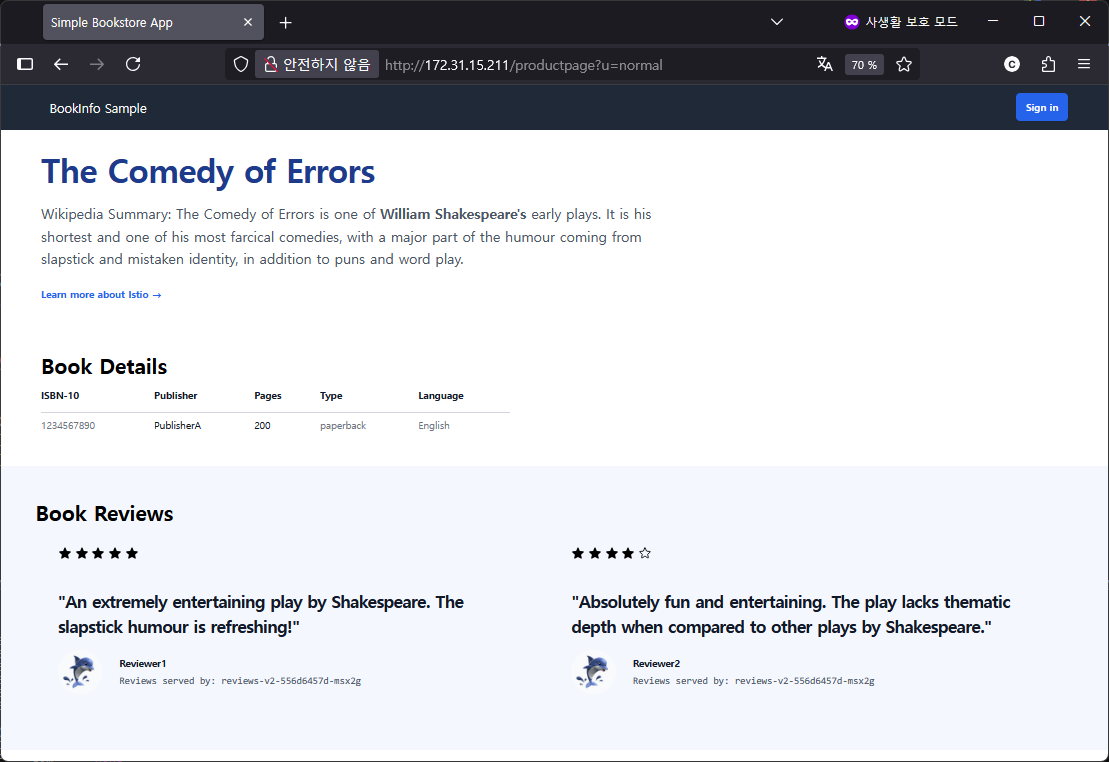 # hubble 모니터링 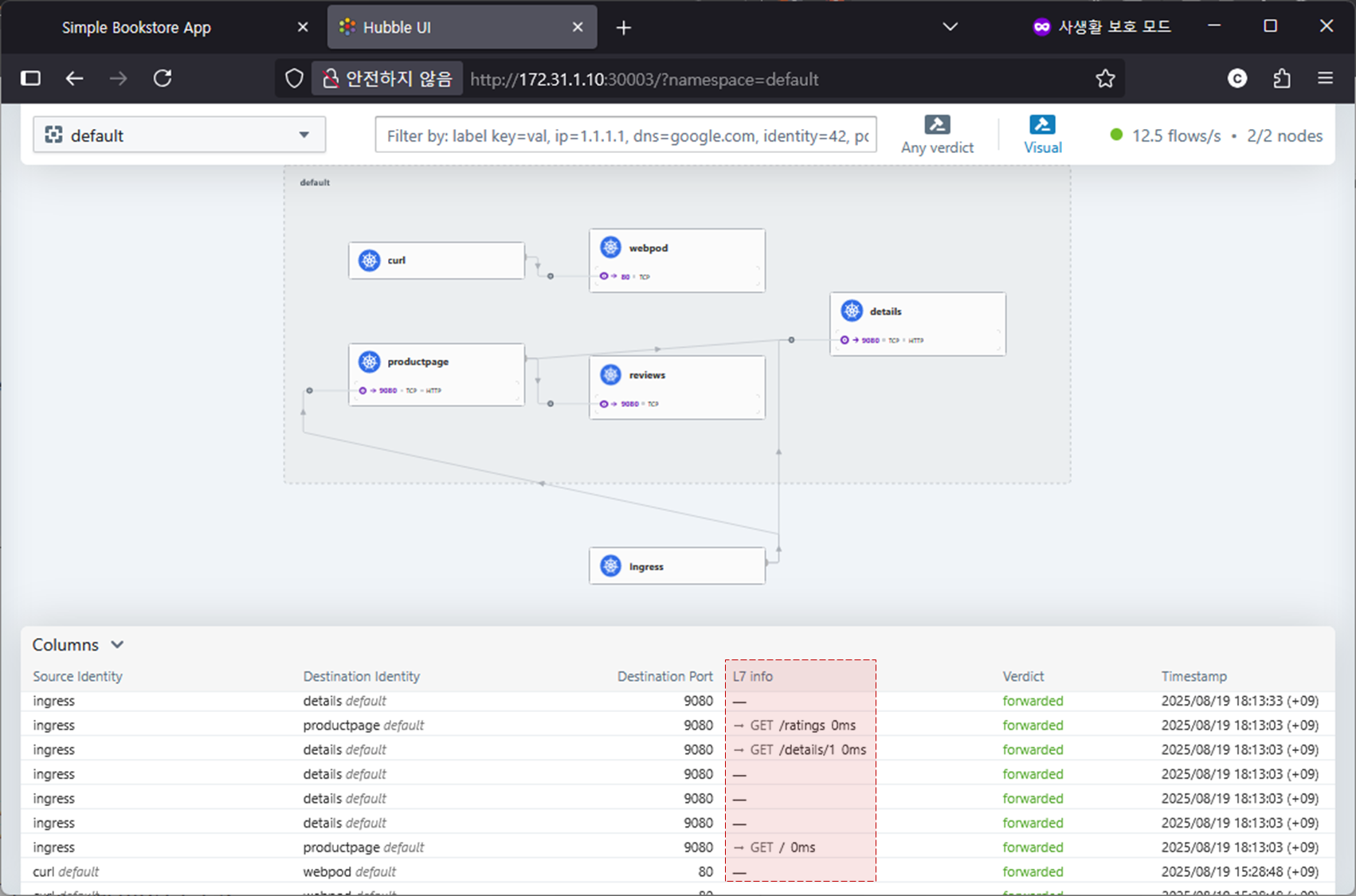 # 호출했을때 envoy 정보 확인 curl -s http://$LBIP/details/1 -v * Trying 172.31.15.211:80... * Connected to 172.31.15.211 (172.31.15.211) port 80 (#0) > GET /details/1 HTTP/1.1 > Host: 172.31.15.211 > User-Agent: curl/7.76.1 > Accept: */* > * Mark bundle as not supporting multiuse < HTTP/1.1 200 OK < content-type: application/json < server: envoy < date: Tue, 19 Aug 2025 09:28:02 GMT < content-length: 178 < x-envoy-upstream-service-time: 2 < * Connection #0 to host 172.31.15.211 left intact {"id":1,"author":"William Shakespeare","year":1595,"type":"paperback","pages":200,"publisher":"PublisherA","language":"English","ISBN-10":"1234567890","ISBN-13":"123-1234567890"} |
dedicated mode
- Ingress 관련 모드를 shared, dedicated 로 글로벌하게 설정 가능
- 글로벌 설정을 shared 모드로 한 후에, 특정 ingress 만 dedicated 모드로 설정 가능
- "ingress.cilium.io/loadbalancer-mode: dedicated" 어노테이션 이용
| # 디폴트 네임스페이스에서 curl-pod, webpod 샘플 배포 cat <<EOF | kubectl apply -f - apiVersion: v1 kind: Pod metadata: name: curl-pod labels: app: curl spec: nodeName: k8s-cp containers: - name: curl image: nicolaka/netshoot command: ["tail"] args: ["-f", "/dev/null"] terminationGracePeriodSeconds: 0 EOF cat << EOF | kubectl apply -f - apiVersion: apps/v1 kind: Deployment metadata: name: webpod spec: replicas: 2 selector: matchLabels: app: webpod template: metadata: labels: app: webpod spec: affinity: podAntiAffinity: requiredDuringSchedulingIgnoredDuringExecution: - labelSelector: matchExpressions: - key: app operator: In values: - sample-app topologyKey: "kubernetes.io/hostname" containers: - name: webpod image: traefik/whoami ports: - containerPort: 80 --- apiVersion: v1 kind: Service metadata: name: webpod labels: app: webpod spec: selector: app: webpod ports: - protocol: TCP port: 80 targetPort: 80 type: ClusterIP EOF # ingress.cilium.io/loadbalancer-mode 어노테이션을 이용하여 dedicated 모드의 ingress 리소스 생성 cat << EOF | kubectl apply -f - apiVersion: networking.k8s.io/v1 kind: Ingress metadata: name: webpod-ingress namespace: default annotations: ingress.cilium.io/loadbalancer-mode: dedicated spec: ingressClassName: cilium rules: - http: paths: - backend: service: name: webpod port: number: 80 path: / pathType: Prefix EOF # webpod 용 ingress 리소스가 dedicated 모드로 생성되었음 k get ing NAME CLASS HOSTS ADDRESS PORTS AGE basic-ingress cilium * 172.31.15.211 80 86m webpod-ingress cilium * 172.31.15.212 80 23s kc describe ingress webpod-ingress Name: webpod-ingress Labels: <none> Namespace: default Address: 172.31.15.212 Ingress Class: cilium Default backend: <default> Rules: Host Path Backends ---- ---- -------- * / webpod:80 (172.20.1.103:80,172.20.0.159:80) Annotations: ingress.cilium.io/loadbalancer-mode: dedicated Events: <none> kubectl get svc,ep cilium-ingress-webpod-ingress NAME TYPE CLUSTER-IP EXTERNAL-IP PORT(S) AGE service/cilium-ingress-webpod-ingress LoadBalancer 10.96.30.171 172.31.15.212 80:32606/TCP,443:30831/TCP 2m9s NAME ENDPOINTS AGE endpoints/cilium-ingress-webpod-ingress 192.192.192.192:9999 2m9s # LB EX-IP에 대한 L2 Announcement 의 Leader 노드 확인 kubectl get lease -n kube-system | grep ingress cilium-l2announce-default-cilium-ingress-webpod-ingress k8s-cp cilium-l2announce-kube-system-cilium-ingress k8s-w1 # 클러스터 외부 (VM을 실행하고 있는 윈도우 호스트)에서 접속확인 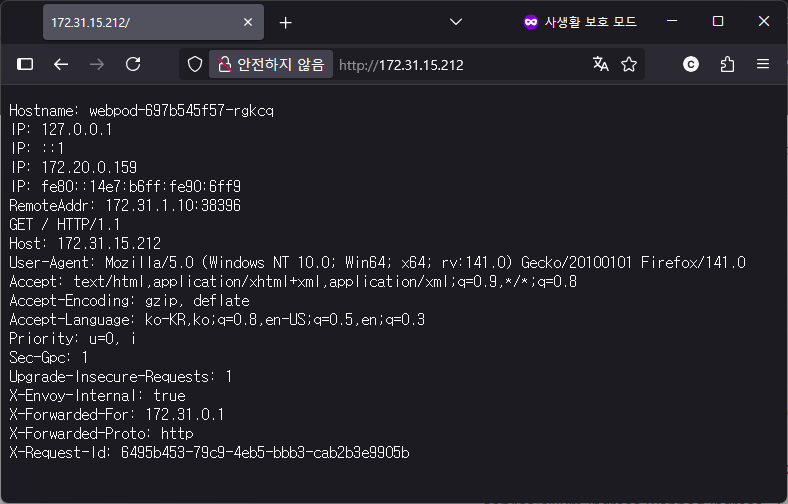 |
Ingress and Network Policy Example
| # 클러스터 전체(모든 네임스페이스)에 적용되는 정책 : # 클러스터 외부에서 접속 불가 정책 설정 # --> 참고로 아래 정책 적용 후 Hubble-ui 로 접속 불가! cat << EOF | kubectl apply -f - apiVersion: "cilium.io/v2" kind: CiliumClusterwideNetworkPolicy metadata: name: "external-lockdown" spec: description: "Block all the traffic originating from outside of the cluster" endpointSelector: {} ingress: - fromEntities: - cluster EOF ciliumclusterwidenetworkpolicy.cilium.io/external-lockdown created kubectl get ciliumclusterwidenetworkpolicy NAME VALID external-lockdown True # 클러스터 안의 POD에서는 Ingress 의 LBIP를 이용하여 접속 가능 kubectl exec curl-pod -- curl --fail -v http://"$LBIP"/details/1 % Total % Received % Xferd Average Speed Time Time Time Current Dload Upload Total Spent Left Speed 0 0 0 0 0 0 0 0 --:--:-- --:--:-- --:--:-- 0* Trying 172.31.15.211:80... * Connected to 172.31.15.211 (172.31.15.211) port 80 * using HTTP/1.x > GET /details/1 HTTP/1.1 > Host: 172.31.15.211 > User-Agent: curl/8.14.1 > Accept: */* > * Request completely sent off < HTTP/1.1 200 OK < content-type: application/json < server: envoy < date: Tue, 19 Aug 2025 10:50:56 GMT < content-length: 178 < x-envoy-upstream-service-time: 4 < { [178 bytes data] 100 178 100 178 0 0 22300 0 --:--:-- --:--:-- --:--:-- 25428 * Connection #0 to host 172.31.15.211 left intact {"id":1,"author":"William Shakespeare","year":1595,"type":"paperback","pages":200,"publisher":"PublisherA","language":"English","ISBN-10":"1234567890","ISBN-13":"123-1234567890"} # 클러스터안의 노드에서는 Ingress 의 LBIP를 이용하여 접속 불가능 curl --fail -v http://"$LBIP"/details/1 * Trying 172.31.15.211:80... * Connected to 172.31.15.211 (172.31.15.211) port 80 (#0) > GET /details/1 HTTP/1.1 > Host: 172.31.15.211 > User-Agent: curl/7.76.1 > Accept: */* > * Mark bundle as not supporting multiuse < HTTP/1.1 403 Forbidden < content-length: 15 < content-type: text/plain < date: Tue, 19 Aug 2025 10:52:41 GMT < server: envoy * The requested URL returned error: 403 * Closing connection 0 curl: (22) The requested URL returned error: 403 # 클러스터 외부(VM을 호스팅하는 윈도우 PC)에서도 Ingress 의 LBIP를 이용하여 접속 불가능 C:\> curl --fail -v http://172.31.15.211/details/1 * Trying 172.31.15.211:80... * Connected to 172.31.15.211 (172.31.15.211) port 80 * using HTTP/1.x > GET /details/1 HTTP/1.1 > Host: 172.31.15.211 > User-Agent: curl/8.13.0 > Accept: */* > < HTTP/1.1 403 Forbidden < content-length: 15 < content-type: text/plain < date: Tue, 19 Aug 2025 10:54:15 GMT < server: envoy * The requested URL returned error: 403 < * closing connection #0 curl: (22) The requested URL returned error: 403 # Allow all the traffic originating from a specific CIDR cat << EOF | kubectl apply -f - apiVersion: "cilium.io/v2" kind: CiliumClusterwideNetworkPolicy metadata: name: "allow-cidr" spec: description: "Allow all the traffic originating from a specific CIDR" endpointSelector: matchExpressions: - key: reserved:ingress operator: Exists ingress: - fromCIDRSet: # Please update the CIDR to match your environment - cidr: 172.31.0.1/32 - cidr: 127.0.0.1/32 EOF # 요청 성공 : k8s-cp , 외부 윈도우 PC 모두 가능 curl --fail -v http://"$LBIP"/details/1 C:\> curl --fail -v http://172.31.15.211/details/1 * Trying 172.31.15.211:80... * Connected to 172.31.15.211 (172.31.15.211) port 80 * using HTTP/1.x > GET /details/1 HTTP/1.1 > Host: 172.31.15.211 > User-Agent: curl/8.13.0 > Accept: */* > * Request completely sent off < HTTP/1.1 200 OK < content-type: application/json < server: envoy < date: Tue, 19 Aug 2025 10:59:44 GMT < content-length: 178 < x-envoy-upstream-service-time: 3 < {"id":1,"author":"William Shakespeare","year":1595,"type":"paperback","pages":200,"publisher":"PublisherA","language":"English","ISBN-10":"1234567890","ISBN-13":"123-1234567890"}* Connection #0 to host 172.31.15.211 left intact # Default Deny Ingress Policy : DNS쿼리와 kube-system내의 파드 제외 to deny all traffic by default cat << EOF | kubectl apply -f - apiVersion: cilium.io/v2 kind: CiliumClusterwideNetworkPolicy metadata: name: "default-deny" spec: description: "Block all the traffic (except DNS) by default" egress: - toEndpoints: - matchLabels: io.kubernetes.pod.namespace: kube-system k8s-app: kube-dns toPorts: - ports: - port: '53' protocol: UDP rules: dns: - matchPattern: '*' endpointSelector: matchExpressions: - key: io.kubernetes.pod.namespace operator: NotIn values: - kube-system EOF ciliumclusterwidenetworkpolicy.cilium.io/default-deny created kubectl get ciliumclusterwidenetworkpolicy NAME VALID allow-cidr True default-deny True external-lockdown True # 요청 실패되는것을 확인 curl --fail -v http://"$LBIP"/details/1 C:\> curl --fail -v http://172.31.15.211/details/1 * Trying 172.31.15.211:80... * Connected to 172.31.15.211 (172.31.15.211) port 80 * using HTTP/1.x > GET /details/1 HTTP/1.1 > Host: 172.31.15.211 > User-Agent: curl/8.13.0 > Accept: */* > < HTTP/1.1 403 Forbidden < content-length: 15 < content-type: text/plain < date: Tue, 19 Aug 2025 11:02:52 GMT < server: envoy * The requested URL returned error: 403 < * closing connection #0 curl: (22) The requested URL returned error: 403 # ingress 를 통해서 인입 시 허용 cat << EOF | kubectl apply -f - apiVersion: cilium.io/v2 kind: CiliumClusterwideNetworkPolicy metadata: name: allow-ingress-egress spec: description: "Allow all the egress traffic from reserved ingress identity to any endpoints in the cluster" endpointSelector: matchExpressions: - key: reserved:ingress operator: Exists egress: - toEntities: - cluster EOF kubectl get ciliumclusterwidenetworkpolicy NAME VALID allow-cidr True allow-ingress-egress True default-deny True external-lockdown True curl --fail -v http://"$LBIP"/details/1 C:\> curl --fail -v http://172.31.15.211/details/1 * Trying 172.31.15.211:80... * Connected to 172.31.15.211 (172.31.15.211) port 80 * using HTTP/1.x > GET /details/1 HTTP/1.1 > Host: 172.31.15.211 > User-Agent: curl/8.13.0 > Accept: */* > * Request completely sent off < HTTP/1.1 200 OK < content-type: application/json < server: envoy < date: Tue, 19 Aug 2025 11:04:48 GMT < content-length: 178 < x-envoy-upstream-service-time: 2 < {"id":1,"author":"William Shakespeare","year":1595,"type":"paperback","pages":200,"publisher":"PublisherA","language":"English","ISBN-10":"1234567890","ISBN-13":"123-1234567890"}* Connection #0 to host 172.31.15.211 left intact # 정책 삭제 kubectl delete CiliumClusterwideNetworkPolicy --all ciliumclusterwidenetworkpolicy.cilium.io "allow-cidr" deleted ciliumclusterwidenetworkpolicy.cilium.io "allow-ingress-egress" deleted ciliumclusterwidenetworkpolicy.cilium.io "default-deny" deleted ciliumclusterwidenetworkpolicy.cilium.io "external-lockdown" deleted |
Ingress Path Types Example
- https://docs.cilium.io/en/stable/network/servicemesh/path-types/
- This example walks through how various path types interact and allows you to test that Cilium is working as it should.
| # Apply the base definitions kubectl apply -f https://raw.githubusercontent.com/cilium/cilium/main/examples/kubernetes/servicemesh/ingress-path-types.yaml # 확인 kubectl get -f https://raw.githubusercontent.com/cilium/cilium/main/examples/kubernetes/servicemesh/ingress-path-types.yaml # Apply the Ingress kubectl apply -f https://raw.githubusercontent.com/cilium/cilium/main/examples/kubernetes/servicemesh/ingress-path-types-ingress.yaml # 확인 kc describe ingress multiple-path-types Name: multiple-path-types Labels: <none> Namespace: default Address: 172.31.15.211 Ingress Class: cilium Default backend: <default> Rules: Host Path Backends ---- ---- -------- pathtypes.example.com /exact exactpath:80 (172.20.1.85:3000) / prefixpath:80 (172.20.1.26:3000) /prefix prefixpath2:80 (172.20.1.211:3000) /impl implpath:80 (172.20.0.173:3000) /impl.+ implpath2:80 (172.20.1.63:3000) Annotations: <none> Events: <none> kc get ingress multiple-path-types -o yaml spec: ingressClassName: cilium rules: - host: pathtypes.example.com http: paths: - backend: service: name: exactpath port: number: 80 path: /exact pathType: Exact - backend: service: name: prefixpath port: number: 80 path: / pathType: Prefix - backend: service: name: prefixpath2 port: number: 80 path: /prefix pathType: Prefix - backend: service: name: implpath port: number: 80 path: /impl pathType: ImplementationSpecific - backend: service: name: implpath2 port: number: 80 path: /impl.+ pathType: ImplementationSpecific # 호출 확인 export PATHTYPE_IP=`k get ing multiple-path-types -o json | jq -r '.status.loadBalancer.ingress[0].ip'` echo $PATHTYPE_IP 172.31.15.211 curl -s -H "Host: pathtypes.example.com" http://$PATHTYPE_IP/ | jq {
"path": "/",
"host": "pathtypes.example.com",
"method": "GET",
"proto": "HTTP/1.1",
"headers": {
"Accept": [
"*/*"
],
"User-Agent": [
"curl/7.76.1"
],
"X-Envoy-Internal": [
"true"
],
"X-Forwarded-For": [
"172.31.1.10"
],
"X-Forwarded-Proto": [
"http"
],
"X-Request-Id": [
"4945a58d-ca60-49cb-b711-e65d32dad962"
]
},
"namespace": "default",
"ingress": "",
"service": "",
"pod": "prefixpath-5d6b989d4-8mqrz"
}
# 파드명 이름 확인 kubectl get pod | grep path exactpath-7488f8c6c6-sw6bn 1/1 Running 0 2m36s implpath-7d8bf85676-b2m4c 1/1 Running 0 2m36s implpath2-56c97c8556-757wm 1/1 Running 0 2m36s prefixpath-5d6b989d4-8mqrz 1/1 Running 0 2m36s prefixpath2-b7c7c9568-dgcc8 1/1 Running 0 2m36s # Should show prefixpath curl -s -H "Host: pathtypes.example.com" http://$PATHTYPE_IP/ | grep -E 'path|pod' "path": "/", "host": "pathtypes.example.com", "pod": "prefixpath-5d6b989d4-8mqrz" # Should show exactpath curl -s -H "Host: pathtypes.example.com" http://$PATHTYPE_IP/exact | grep -E 'path|pod' "path": "/exact", "host": "pathtypes.example.com", "pod": "exactpath-7488f8c6c6-sw6bn" # Should show prefixpath2 curl -s -H "Host: pathtypes.example.com" http://$PATHTYPE_IP/prefix | grep -E 'path|pod' "path": "/prefix", "host": "pathtypes.example.com", "pod": "prefixpath2-b7c7c9568-dgcc8" # Should show implpath curl -s -H "Host: pathtypes.example.com" http://$PATHTYPE_IP/impl | grep -E 'path|pod' "path": "/impl", "host": "pathtypes.example.com", "pod": "implpath-7d8bf85676-b2m4c" # Should show implpath2 curl -s -H "Host: pathtypes.example.com" http://$PATHTYPE_IP/implementation | grep -E 'path|pod' "path": "/implementation", "host": "pathtypes.example.com", "pod": "implpath2-56c97c8556-757wm" # 삭제 kubectl delete -f https://raw.githubusercontent.com/cilium/cilium/main/examples/kubernetes/servicemesh/ingress-path-types.yaml kubectl delete -f https://raw.githubusercontent.com/cilium/cilium/main/examples/kubernetes/servicemesh/ingress-path-types-ingress.yaml # ingress 실습 리소스 삭제 kubectl delete ingress basic-ingress webpod-ingress ingress.networking.k8s.io "basic-ingress" deleted ingress.networking.k8s.io "webpod-ingress" deleted |
'Kubernetes' 카테고리의 다른 글
| Cilium Study [1기] (8주차) - Cilium Security (0) | 2025.09.04 |
|---|---|
| Cilium Study [1기] (7주차) - Jmeter를 이용한 K8S 부하테스트 (0) | 2025.08.29 |
| Cilium Study [1기] (5주차) - BGP Control Plane (4) | 2025.08.13 |
| Cilium Study [1기] (4주차) - Networking - 노드에 파드들간 통신 2 & K8S 외부 노출 (0) | 2025.08.07 |
| Cilium Study [1기] (3주차) - Networking - 노드에 파드들간 통신 상세 1 (0) | 2025.07.28 |